@ioakeimsogiakas
here the DFplayer pinout

Make sure the RX of the DFPlayer is connected to the TX of your Arduino, and the TX of the DFPlayer is connected to the RX of your Arduino.
@ioakeimsogiakas
here the DFplayer pinout
Make sure the RX of the DFPlayer is connected to the TX of your Arduino, and the TX of the DFPlayer is connected to the RX of your Arduino.
yeah the dfplayer rx is connected to pin 16 (with a 1KΩ ish resistor) the tx is directly connected to pin 17 and ground vcc and the speaker wires are definitely correct since it can play songs with bridging the io pins
Unfortunately, the photos are very blurry, all the wires are the same color and it is completely unclear what is connected where.
Is the GND of DFplayer connected to GND of Mega?
Also, the speaker connection looks weird. If I see correct, the speaker wires are connected to SPK_1 and SPK_2 pins.
Isn't it should be a SPK_1 and GND?
Could you take a clear photo of Mega pins and another one of the DFPlayer?
yes, the ground is connected to the arduino. Also, the VCC is connected to the 5v pin of the arduino. I know the picture is not clear but I don't have any other wires to use...Furthermore, yes the speaker is connected to SPK_1 and SPK_2 that's what I have seen
Are you sure your DFPlayer and serial port on your Arduino board are working?
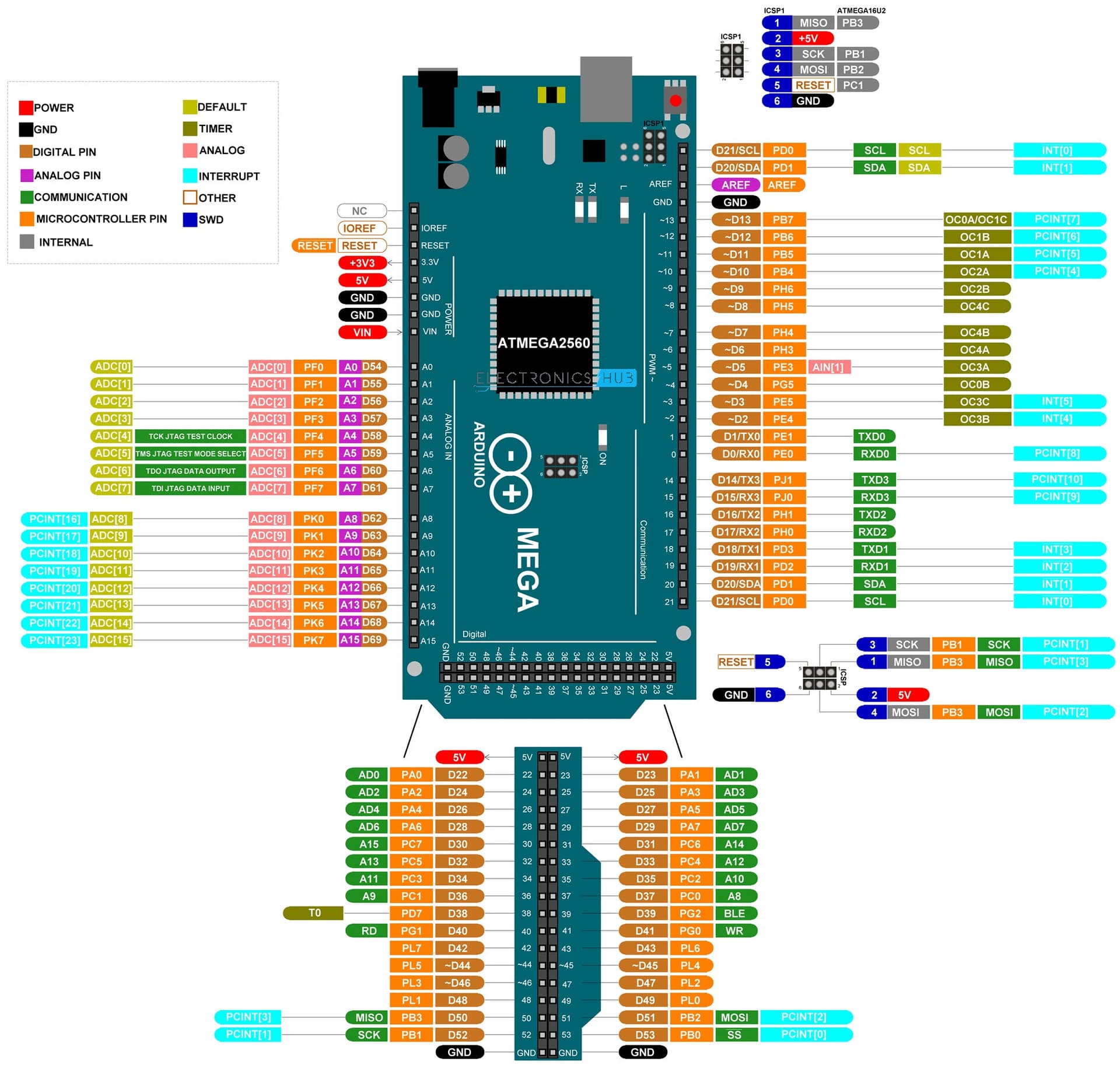
On the arduino I don't have any doubts on the df player not so much. I will change it to Serial1 and report back in the afternoon. Which where the pins for serial1?
If your clone has the same microcontroller as the Arduino Mega, here are the pinouts.
Yes, it is the same, I have the same board
You haven't had any problems with it right?
I found it fully compatible with original Mega except the size
Ok thanks you
I redit all of my connecions and moved the tx and rx wires to serial1. the problem still presist. I will change the resistor to an actually 1KΩ one and not a bunch of 10Ks in parallel and report back.
Here is the code for reference.
/***************************************************
DFPlayer - A Mini MP3 Player For Arduino
 <https://www.dfrobot.com/product-1121.html>

 ***************************************************
 This example shows the basic function of library for DFPlayer.

 Created 2016-12-07
 By [Angelo qiao](Angelo.qiao@dfrobot.com)

 GNU Lesser General Public License.
 See <http://www.gnu.org/licenses/> for details.
 All above must be included in any redistribution
 ****************************************************/

/***********Notice and Trouble shooting***************
 1.Connection and Diagram can be found here
 <https://www.dfrobot.com/wiki/index.php/DFPlayer_Mini_SKU:DFR0299#Connection_Diagram>
 2.This code is tested on Arduino Uno, Leonardo, Mega boards.
 ****************************************************/

#include "Arduino.h"
#include "DFRobotDFPlayerMini.h"
#include <SoftwareSerial.h>

DFRobotDFPlayerMini myDFPlayer;
void printDetail(uint8_t type, int value);

void setup(){
  Serial1.begin(9600);
  Serial.begin(9600);

  Serial.println();
  Serial.println(F("DFRobot DFPlayer Mini Demo"));
  Serial.println(F("Initializing DFPlayer ... (May take 3~5 seconds)"));

  if (!myDFPlayer.begin(Serial1, /*isACK = */true, /*doReset = */true)) {  //Use serial to communicate with mp3.
    Serial.println(F("Unable to begin:"));
    Serial.println(F("1.Please recheck the connection!"));
    Serial.println(F("2.Please insert the SD card!"));
    while(true){
      delay(0); // Code to compatible with ESP8266 watch dog.
    }
  }
  Serial.println(F("DFPlayer Mini online."));

  myDFPlayer.volume(10);  //Set volume value. From 0 to 30
}

void loop()
{
  myDFPlayer.play(001); // Ensure that your files have been renamed to 001, 002, etc.
}

void printDetail(uint8_t type, int value){
  switch (type) {
    case TimeOut:
      Serial.println(F("Time Out!"));
      break;
    case WrongStack:
      Serial.println(F("Stack Wrong!"));
      break;
    case DFPlayerCardInserted:
      Serial.println(F("Card Inserted!"));
      break;
    case DFPlayerCardRemoved:
      Serial.println(F("Card Removed!"));
      break;
    case DFPlayerCardOnline:
      Serial.println(F("Card Online!"));
      break;
    case DFPlayerUSBInserted:
      Serial.println("USB Inserted!");
      break;
    case DFPlayerUSBRemoved:
      Serial.println("USB Removed!");
      break;
    case DFPlayerPlayFinished:
      Serial.print(F("Number:"));
      Serial.print(value);
      Serial.println(F(" Play Finished!"));
      break;
    case DFPlayerError:
      Serial.print(F("DFPlayerError:"));
      switch (value) {
        case Busy:
          Serial.println(F("Card not found"));
          break;
        case Sleeping:
          Serial.println(F("Sleeping"));
          break;
        case SerialWrongStack:
          Serial.println(F("Get Wrong Stack"));
          break;
        case CheckSumNotMatch:
          Serial.println(F("Check Sum Not Match"));
          break;
        case FileIndexOut:
          Serial.println(F("File Index Out of Bound"));
          break;
        case FileMismatch:
          Serial.println(F("Cannot Find File"));
          break;
        case Advertise:
          Serial.println(F("In Advertise"));
          break;
        default:
          break;
      }
      break;
    default:
      break;
  }

}
See embedded comments in this version that runs fine here.
// My edit of yours. Compiles & runs here, Thu 9 May 2024 12:17.

//#include "Arduino.h" // Redundant, so I usually omit.
#include "DFRobotDFPlayerMini.h"
//#include <SoftwareSerial.h> // You're no longer using it.

DFRobotDFPlayerMini myDFPlayer;

// void printDetail(uint8_t type, int value);
// I usually find that function and and its lengthy definition
// superfluous. Replace both later if you want.

void setup()
{
  Serial.begin(115200);
  delay(200); // My preference for print stability
  Serial1.begin(9600);

  // if (!myDFPlayer.begin(Serial1, /*isACK = */true, /*doReset = */true)) {  //Use serial to communicate with mp3.
  // What was your source of that? I've removed the test entirely for
  // now, assuming your priority is getting it working.

  myDFPlayer.begin(Serial1); // Start communication with DFPlayer
  // myDFPlayer.begin(Serial1, true, false); // Start communication with DFPlayer

  Serial.println();
  Serial.println(F("DFRobot DFPlayer Mini Demo"));
  Serial.println(F("Initializing DFPlayer ... (May take 3~5 seconds)"));

  delay(1000); // Add this to allow player to fully initialise

  myDFPlayer.volume(15);  //Set volume value. From 0 to 30

  Serial.println("setup ended"); // I like this reassurance
}

void loop()
{
  //  myDFPlayer.play(001); // Ensure that your files have been renamed to 001, 002, etc.
  myDFPlayer.play(1);
  // Note: the 'name' is irrelevant to the module (but not to you,
  // of course). That command plays the first file that was copied
  // or moved to the uSD;  chronologically. Could be called
  // anything.

  delay(5000); // If you actually want to hear anything each time
  // through the loop! To hear entire tracks...another discussion.
}
EDIT
Or just change the following single line of your original code, from a second parameter of 'true' to 'false'
if (!myDFPlayer.begin(Serial1, /*isACK = */true, /*doReset = */false)) //Use serial to communicate with mp3.
OK I will give it a shot. I first need to find an actual 1k resistor
What's the resistor? Why it's value is so important?
I have a 1K resistor in place but at the time of testing I didn't have it on hand so I soldered 10 10kΩ resistors in place. Which might be giving me noise
Did you do as I suggested in my post #23 three weeks ago?
Yes no luck but I haven't had the chance to change the resistor. I am almost sure that's my problem, but I just haven't had the time to change it. Too much work with university. That's why I didn't respond with an update.... Sorry😔
Guys, I am back! I have finally finished my uni exams and am back to the project. I want to try to get it to work on an Arduino Uno
after testing it still will not work on wednesday i will go get a new one i may have accidenatally fired this one