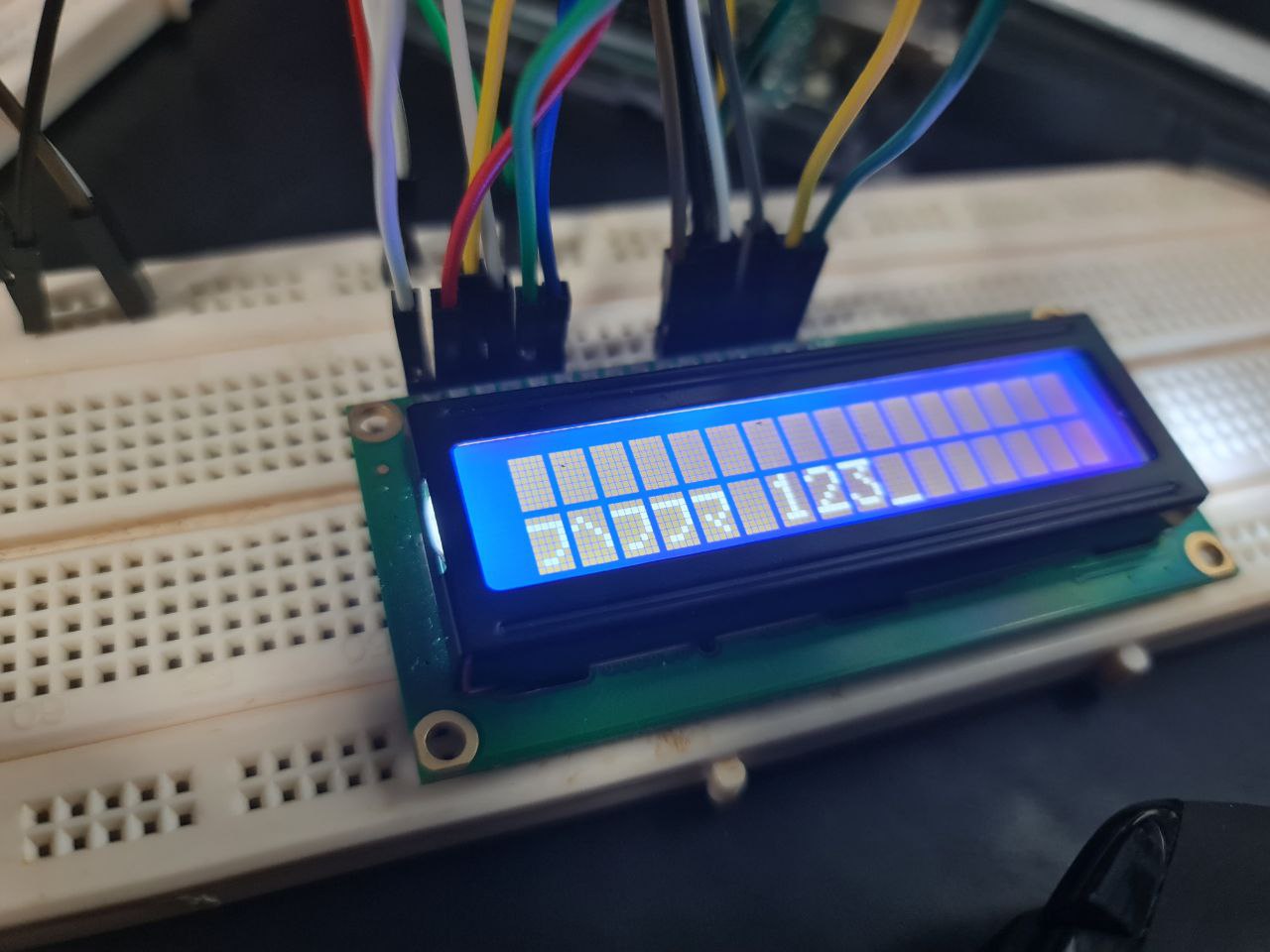
Hi, I have been stuck on this for hours and can't seem to get why my LCD is printing garbled texts even with the most basics of code/setup. I'm using an Arduino Uno with a 16x2 LCD which are connected without a potentiometer as that was one of the requirements given to me. My Pin connections are shown in the image below together with the basic code I am using to test the LCD.
Thanks, but I have already checked the wiring multiple times, changed breadboards,wires and for my current project as much as I would like to, I'm not allowed to use an I²C interface.
Try moving the contrast control to a PWM pin that is not adjacent to the data pin. As a quick test, I would just move the analogWrite() to the end of setup, to see if the text gets sent to the display correctly without the PWM signal being active. It seems odd that the correct number of characters are displayed, and the text is printed on the wrong line, yet the display appears to have been initialized correctly.
I have moved the analog write to the the end of setup and changed the contrast control pin to 8 instead of 6 which is has no data pin beside it. This however, does not change the LCD display, it is still the same as shown in the images above. I do agree that it seems odd as having just tested the LCD to display numbers, surprisingly it can display numbers but not characters.
The display has been tested to work fine on another Uno board with the same wiring configuration. For the case of wiring do you perhaps have any specific wire connections that might be causing this issue? As I have even tested the wires with a multimeter and they all seem to be working as intended.
I moved your topic to a more appropriate forum category @i_eat_wires.
The UNO R4 WiFi category you chose is only used for discussions directly related to the UNO R4 WiFi board.
In the future, please take the time to pick the forum category that best suits the subject of your question. There is an "About the _____ category" topic at the top of each category that explains its purpose.
It appears that there was an issue with the connections to LCD DB6 and DB7 pins.
For some reason whenever either one was supposed to be 1 the other pin would be set to high as well.
This caused a shift to other characters in the font table whenever either D7 or D3 of the byte was a 1 since it would cause the two upper bits of a nibble to set high.
i.e.
0x48 would turn in to 0xcc
0x45 would turn in to 0xc5
0x4c would turn into 0xcc
0x4f would turn into 0xcf
This explains why you saw odd Japanese characters for "HELLO" but not for " 123" as the "HELLO" characters were shifting to a different part of the font table but the " 123" was not.
Then the question becomes why?
It is odd because usually whenever there is some kind of short, a LOW beats out a HIGH in that if two signals are shorted and either one is low, both will be low.
In this case it is opposite.
Since it is working on another Arduino board,
I'm guessing either some kid of weird/bad wiring or a bad processor on the board that is not working.