#include <AccelStepper.h>
#include <Wire.h>
#include <LiquidCrystal_I2C.h>
#include <Keypad.h>

AccelStepper stepper1(AccelStepper::FULL2WIRE, 10, 11);
AccelStepper stepper2(AccelStepper::FULL2WIRE, 12, 13);
LiquidCrystal_I2C lcd(0x27, 2, 1, 0, 4, 5, 6, 7, 3, POSITIVE);  // Set the LCD I2C address

const byte ROWS = 4; //four rows
const byte COLS = 3; //three columns
char keys[ROWS][COLS] = {
  {'1','2','3'},
  {'4','5','6'},
  {'7','8','9'},
  {'*','0','#'}
};
byte rowPins[ROWS] = {6, 5, 4, 3}; //connect to the row pinouts of the keypad
byte colPins[COLS] = {9, 8, 7}; //connect to the column pinouts of the keypad
Keypad kpd = Keypad( makeKeymap(keys), rowPins, colPins, ROWS, COLS );

int spd = 1000;    // The current speed in steps/second
int sign = 1;      // Either 1, or 0. Can use to change to reverse if sign= -1
String RPM=("RPM");
String Steps=("Steps per Second");
String disp=("Running at:"); //A display string so user knows input will be performed
String disp2=("Steps per Second:"); //Secondary Display String
int input=0;

void setup()
{
  Serial.begin(9600);
  lcd.begin(20,4);

  lcd.setCursor(0,0);

  stepper1.setMaxSpeed(64000); //Setting max speed of 240 RPM if Steps are 400 On Off On
  stepper1.setAcceleration(6400); //Max acceleration
  stepper1.setSpeed(3200);    //Initial Starting Speed, not important 3200=120 RPM only for stepper1();
                              //Because of Step Rate of stepper1(); driver

  stepper2.setMaxSpeed(100000); //Setting max speed of 240 RPM if Steps are 400 On Off On
  stepper2.setAcceleration(6400); //Max acceleration
  stepper2.setSpeed(4266);    //Initial Starting Speed, not important, 2133=20 RPM only for stepper2();
                              //because of Step Rate of stepper1(); driver

  lcd.print("Enter RPM for");
  lcd.setCursor(0,1);
  lcd.print("Stepper 1 (120 RPM)");
  lcd.setCursor(0,2);
  lcd.print("Add 1000 to RPM to");
  lcd.setCursor(0,3);
  lcd.print("change Stepper 2 20");
}

void loop()
{

  String input_String; //String for receving Serial.read(); and converting to int value_RPM
  String num; //A display string so user knows input will be performed at num RPM
  int key=kpd.getKey();

  if(key != NO_KEY){ //Making sure key is available before taking any action
    if(key == '#'){
    lcd.setCursor(0,2);
    lcd.print("Received:"); //Letting user know input was received
    lcd.setCursor(0,3);
    lcd.print(input);  //Printing what int we got

    if(input==9999){
      stepper1.setSpeed(0);
      stepper2.setSpeed(0);
      lcd.clear();
      lcd.print("All motion stopped");
      lcd.setCursor(0,1);
      lcd.print("Press reset button:");
      lcd.setCursor(0,2);
      lcd.print("Resume Motion or");
      lcd.setCursor(0,3);
      lcd.print("Turn off power");
    }
    else if (input >= 1000 && input <= 2000){ //This if only for stepper 2, makes sure that the input is over 1000 so we know
                        //User wants to modify stepper 2. Add 1000 to whatever RPM value you desire to control stepper 2
      lcd.clear();
      lcd.print("Modifying speed of Stepper 2");
      input = input-1000; //Once confirmed that stepper 2 is being controlled, reduce to normal values and function normally

      if (input == 1) {  // Rotates forward, useless for now but if you want to add reverse functionality it is useful
      disp=("Rotating Forward");
      sign = 1;

      }

    else if (input == 0){  // stop. Once stopped, it will not restart

      disp=("Rotation Stopping \n");
      spd = 0;
      num= "0";
      lcd.clear();
      lcd.print("You have stopped the motor. To resume motion, reupload the program");

      }

    else{

      spd=input/0.0046875; //Ratio for OFF ON OFF S1 S2 S3 steps. Don't question it, this is different for
                        //stepper1(); as the steps/rev are different
      num=(spd);        //Convert spd back to string to display and manipulate easier

      }

    stepper2.setSpeed(sign * spd); //Keep this for future reverse functionality
    lcd.clear();
    lcd.setCursor(0,0);
    lcd.print(disp + input + " " + RPM); //Final confirmation of action Arduino is taking
    lcd.setCursor(0,1);
    lcd.print(disp2); //Displayed in steps per second
    lcd.setCursor(0,2);
    lcd.print(num + " For Stepper 2");
    lcd.setCursor(0,3);
    lcd.print("Ready for RPM change");
    }


   else if(input<1000){ //This else for only stepper 1
    lcd.clear();
    lcd.print("Modifying speed of Stepper 1");
    if (input == 1) {  // Rotates forward, useless for now but if you want to add reverse functionality it is useful
      disp=("Rotating Forward: ");
      sign = 1;

    }

      else if (input == 0){  // stop. Once stopped, it will not restart

        disp=("Rotation Stopping \n");
        spd = 0;
        num= "0";
        lcd.clear();
        lcd.print("You have stopped the motor. To resume motion, reupload the program");

      }

    else{

      spd=input/0.0375; //Ratio for ON OFF ON S1 S2 S3 steps. Don't question it, this is different for
                        //The second motor as the steps/rev are different
      num=(spd);        //Convert spd back to string to display and manipulate easier

      }

      stepper1.setSpeed(sign * spd); //Keep this for future reverse functionality
      lcd.clear();
      lcd.setCursor(0,0);
      lcd.print(disp + input + " " + RPM); //Final confirmation of action Arduino is taking
      lcd.setCursor(0,1);
      lcd.print(disp2); //Displayed in steps per second
      lcd.setCursor(0,2);
      lcd.print(num + " For Stepper 1");
      lcd.setCursor(0,3);
      lcd.print("Ready for RPM change");
      }

    input=0;

  }
  else{
    input = input*10;
    input = input + key - '0';
    lcd.clear();
    lcd.print(input);

  }
  }
  stepper1.runSpeed(); //Running arduino at desired speed
  stepper2.runSpeed();
}
That's the main code I'm using.
This code right here:
#include <AccelStepper.h>
AccelStepper stepper1(AccelStepper::FULL2WIRE, 2, 5); // for a driver with step and direction

void setup()
{
  Serial.begin(9600);
    stepper1.setMaxSpeed(12800);
    stepper1.setAcceleration(11000);
}
void loop()
{
    stepper1.runToNewPosition(1600);
    stepper1.setCurrentPosition(0);
}
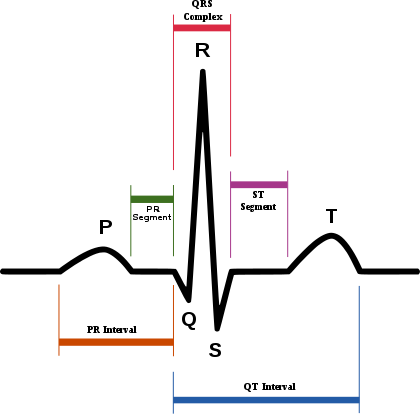
Was just a small proof of concept to show I could attempt to simulate the abnormal sine wave of the sinus rhythm. Basically I need the simulated sinus rhythm replicated as data that a machine can use to synchronize itself to the rotation of the stepper motor. This machine only takes inputs from an ECG/EKG so I need to convert the rotation of the stepper motor into a similar output of that of an ECG/EKG so I'm turning it into an abnormal sine wave. I don't want it to move with the ECG, I want the machine using the ECG reading to synchronize itself to the movement of the stepper motor so it knows where to look at each position of the stepper motor's movement. The reason I want the cam lobe is because I thought I could recreate such an output using the depression to recreate such a thing.