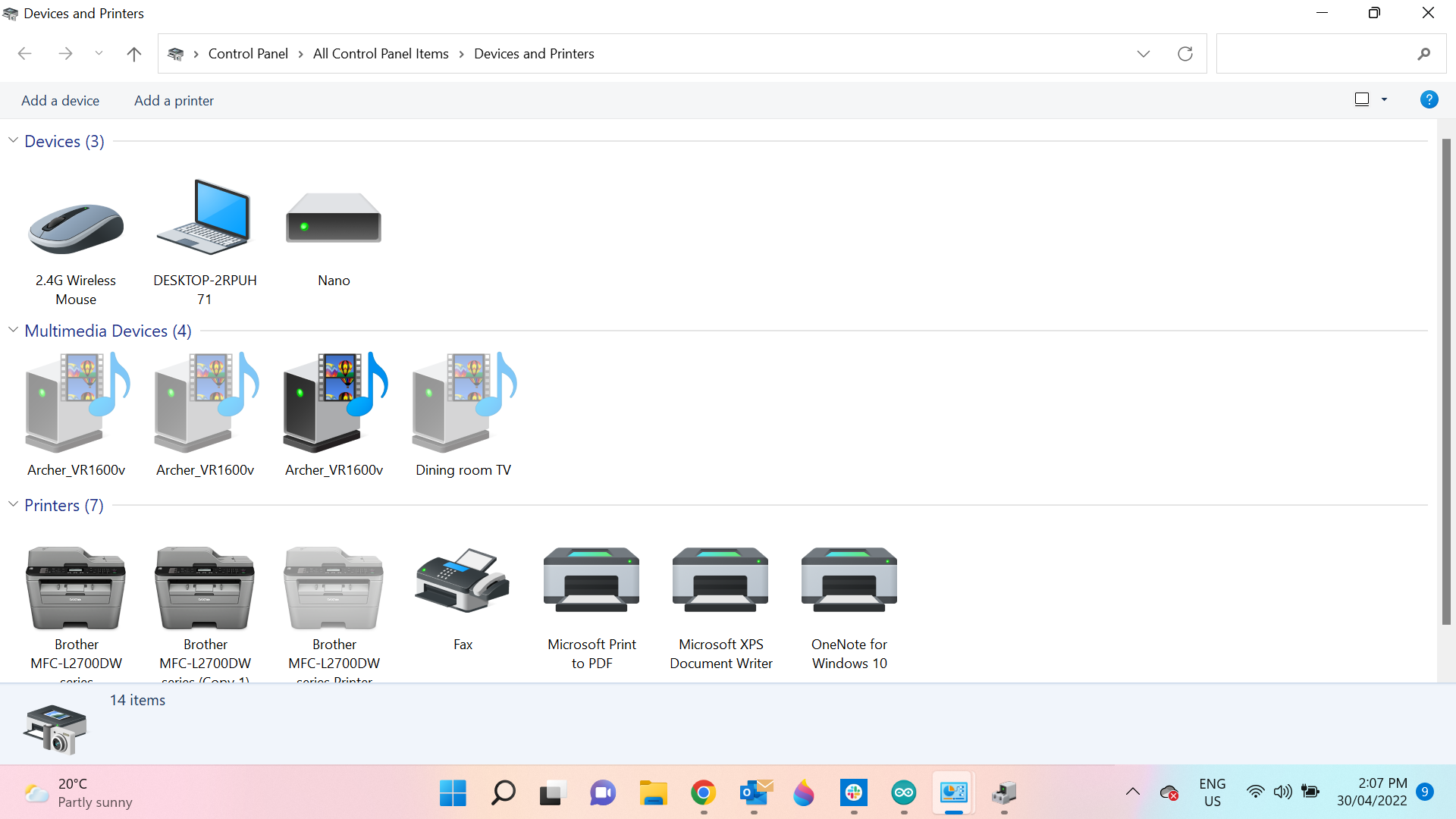
I cant get Arduino 1.8.19 to talk to Windows 11. Doesn't give me the Port to select when uploading Blink to my Uno ????
Windows config problem . did work on windows 10 .
I cant get Arduino 1.8.19 to talk to Windows 11. Doesn't give me the Port to select when uploading Blink to my Uno ????
Windows config problem . did work on windows 10 .
In your Arduino IDE, click:
TOOLS >> PORT >> pick your port
then:
TOOLS >> BOARD >> pick your board
Hi
Want let me select a "PORT " Blank here
Error message for Blink is
Arduino: 1.8.19 (Windows 10), Board: "Arduino Uno"
Sketch uses 924 bytes (2%) of program storage space. Maximum is 32256 bytes.
Global variables use 9 bytes (0%) of dynamic memory, leaving 2039 bytes for local variables. Maximum is 2048 bytes.
An error occurred while uploading the sketch
avrdude: ser_open(): can't open device "\.\COM4": The system cannot find the file specified.
This report would have more information with
"Show verbose output during compilation" *** This not available JonL added ***
option enabled in File -> Preferences.
If the "PORT" heading (TOOLS >> PORT) is gray, then either the USB cable is bad (do not use a generic USB cable, most are used for power only, but Arduino needs it to be for DATA), or a computer/operating system startup not allowing "user" access to hardware devices... if BIOS existed, I would tell you to look there. BUT FIRST, be sure your USB cable is a DATA cable.
Hi USB 4 wires , red , black power , green white data , check with my meter.
Reply via smartphone
Okay. Does your computer operating system show that a device is inserted when you plug in the Arduino (a tone or the device manager shows something inserted)?
Windows 11 device manager all USB say " working " , cant see where i can send another screen dump/picture . Forum says only one image allowed . as above i use a mouse connected to the USB Port
Nano is my USB Memory stick .
Do you have another Arduino, or another USB anything? It may be that you have too many devices connected (your system may only allow 1 when normally 2 or 4).
The "Arduino 1.8.19" is your Arduino IDE (software). What Arduino Hardware are you using?
Remove your memory stick and insert the Arduino cable... then look at device manager.
[EDIT]
Oh! All arduino ship with "Blink" code already loaded. When you plug your Arduino into the USB port, do you see a built-in LED on your Arduino blinking at 1 blink per second?
[/EDIT]
Hi , yes its blinking at 1 blink over second , but I have used this UNO board , for other stuff , and have since reloaded blink , or maybe my friend did on his machine, but was getting errors as well . Unless boards default to Blink all by themselves ?
Work out how to send a screenshot device manager soon .
Thanks xfpd
The board holds the last valid sketch. So, the board works. Last sketch was BLINK. Take the board to another computer and upload a modified "blink"... like this one... : )
/*
  SOS
  ====
  Morse code SOS on BUILTIN LED.

  Timing in Morse Code is based on the length of the dit (dot).
  - dit = 1 unit
  - dah = 3 units
  - gap = 1 unit between dit and dah
  - letter gap = 3 units between letters
  - word gap = 7 units between words
*/

void setup() {
  // initialize digital pin LED_BUILTIN as an output.
  pinMode(LED_BUILTIN, OUTPUT);
}

void loop() {
  int i;  // counter
  int dit  = 100;     // 1 time unit of 100 milliseconds
  int dah  = 3 * dit;
  int gap  = 1 * dit;  // intra-element gap
  int lgap = 3 * dit;  // intra-letter gap
  int wgap = 7 * dit; // intra-word gap

  digitalWrite(LED_BUILTIN, LOW);  // turn the LED off by making the voltage LOW
  delay(wgap);                    // wait 7 units of time

  for (i = 0; i < 3; i++) {
    digitalWrite(LED_BUILTIN, HIGH); // turn the LED on (HIGH is the voltage level)
    delay(dit);                      // wait 1 unit of time
    digitalWrite(LED_BUILTIN, LOW);  // turn the LED off by making the voltage LOW
    delay(gap);                      // wait 1 unit of time
  }

  delay(lgap);

  for (i = 0; i < 3; i++) {
    digitalWrite(LED_BUILTIN, HIGH);
    delay(dah);
    digitalWrite(LED_BUILTIN, LOW);
    delay(gap);
  }

  delay(lgap);

  for (i = 0; i < 3; i++) {
    digitalWrite(LED_BUILTIN, HIGH);
    delay(dit);
    digitalWrite(LED_BUILTIN, LOW);
    delay(gap);
  }

  delay(wgap);
}
This topic was automatically closed 180 days after the last reply. New replies are no longer allowed.