Ghost RISING interrupts

When detecting interrupts, i see rising interrupts while the value had not gone down first and vise verse... Independent from what causes the change on a digital pin, i would expect that it goes up and down equally.

situation:
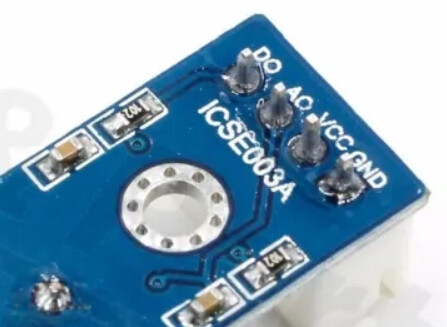
A CNY70 detects the reflecting '0' on the last digit of my analog gas meter. A lm393 based comparator board converts this to a digital signal which goes (10m away) to port D2 of a Nano Avery board where a CHANGE interrupt is trapped to count the number of zeroes that pass.
The digital value starts HIGH; when a '0' passes, the analog input of the comparator drops and the digital output goes to LOW for two or more seconds. When i poll these analog and digital values at a small interval, i see that this pattern run nicely. So actually, the process is slow enough to detect it in a normal loop(), i just like to do it via interrupts because that's how it should be.

the problem:
Apart from the expected pattern of falling - rising interrupts, i also see rising interrupts when the level was high already and falling when it was low. The number of ghost rising interrupts is much higher that the number of ghost falling interrupts and often even larger that the number of real rising interrupts.

the code:
Stripped down to the minimum for showing the behavior, the sketch looks like:

volatile unsigned int countFall = 0;      
volatile unsigned int countRise = 0;  
volatile int lastState = HIGH;          
volatile unsigned int lowAlready = 0;
volatile unsigned int highAlready = 0;

void setup() {
  Serial.begin(9600);
  pinMode(2, INPUT);
  attachInterrupt(digitalPinToInterrupt(2), pin_ISR, CHANGE);
}


void loop() {
  Serial.print( countFall); Serial.print("\t");
  Serial.print( countRise); Serial.print("\t");
  Serial.print( lowAlready); Serial.print("\t");
  Serial.print( highAlready); Serial.print("\t");
  Serial.println();
  delay(1000);
}

void pin_ISR() {
  if (digitalRead(2) == HIGH){
    countRise++;
    if(lastState == HIGH){
        highAlready++;
    }
    lastState= HIGH;
  }else{
    countFall++;
    if(lastState == LOW){
        lowAlready++;
    }
    lastState= LOW;
  }
}

checked already:

time between real and ghost events.
A ghost interrupt sometimes comes immediately after a valid interrupt, like 28 micros. But there can also be several second or more in between. Typically, after starting the sketch when no gas is consumed, the first interrupt after some time is a ghost rising one.

analog value of the digital pin.
I may call it a 'digital value' but how clean is that? So on another port, i also measured the analog value of this. It appeared that during ghost rising interrupts, the analog value is around 980, so almost 5V. Don't know if it says much because the interrupt likely responds to something that is much faster than measuring the analog value, but clearly, the interrupt is not just fluctuating around 2.5 volts.

Does anybody have an explanation for this behavior and preferably a solution?

I'm in transit, but noticed this. Is there any reason you could not try INPUT_PULLUP mode?

This feels like a noise problem, can you draw a schematic of how your device is wired?

Can you take a picture of the physical circumstances and/or say a bit about that?

Another possibility for wasting spending time in an environment where real world issues won't be is to throw the code into a simukator and rig it up to test you logic.

I like this one:

HTH

a7

When in the main loop and working with any variable that changes within an interrupt routine, first turn off interrupts, then take a copy of the variable, then enable interrupts. Now you can work with the copy without getting corrupt data.

Here's an example where you can switch on/off some nasty bounce (rising, falling, or both). You can change the frequency and duty cycle of the pwm to match your project (default 1000Hz, 50% duty).

Also, ISR debounce code was added.
Copy/paste your code to compare ...

Thanks for the ideas.
I ddin't use INPUT_PULLUP because the lm393 actively gives an output level and never leaves the port floating.
Of course i tried it but it didn't solve the issue.

The physical setup is very experimental. On the board:


the 4-pin connector goes to the gas meter via an old telephone extension cord.

then at the gas meter there is this:


I will make a drawing of it because from the picture it is not so clear.
I used a board like this LM393 Comparator module - Bits & Parts Elektronica (is it allowed here to refer to webshops?)
From this, i cut out the 10k pullup resistor to the input pin and instead put a 100k potmeter between +5v and the input. This is because 10k appeared to low and calibration of the input level is rather sensitive to this resistor.
Furthermore, i added a 1M resistor between the digital output and the input to add some hysteresis. The 3 wires at the top go to the CNY70 in front of the gas meter: grd, anode of the led, collector of the phototransistor.
I also have the feeling that it is some noise, maybe because of the long cabling. I live on a house boat so the gas meter is in the garden. Maybe i should add a small capacitor somewhere.

@dlloyd,
Thanks. I added the noInterrupts() / interrupts() stuff, but it didn't change anything. Just out of curiosity: is there a specific reason why you declared countRiseCopy as global and volatile?

I will try if i can get an output out of the simulator that represents the reality.

No, reason - countRiseCopy can be local to the loop and need not be declared volatile.

I think adding hysteresis was a good idea. The main issue is probably as described on page 6 "APPLICATIONS INFORMATION" here.

Perhaps just using the A0 output rather than the D0 output would be a quick and easy solution.

Alternatively, if you need to use D0, the extra switching interrupts could be debounced as in the example. The PWM Breakout frequency and duty can be adjusted to match the max the D0 signal's appearance (without noise or bounce). Then the Bounce Breakout can add some noise on rising, falling or both edges. Adjust as necessary and test your code.

Ok, but if i use the analog value (or remove the lm393 board completely) i probably would prefer to just poll it at an interval of 500ms or less, then i can determine in code what is considered 'high' and 'low'.

Meanwhile....
i disconnected the sensor so that the input of the lm393 would always be pulled up, still interrupts.
Then i disconnected the lm393 board from the cable and connected the digital pin of the cable to 5v over 100kΩ, still interrupts.
To be sure, i finally did the same at the breadboard, now everything stayed quiet.

So the noise is picked up by the cable or there is a bad connection....
To be continued when there is a better cable. For now i'll just check the analog value. Thanks for the advises.

Or, both.

Your unshielded cable is a longwire antenna! Fluorescent lighting, AC spikes from appliances with motors, and stray AC all induce a voltage in your wiring.

emc - How to terminate shielded cables between PCBs? - Electrical Engineering Stack Exchange

Avoid Instrumentation Problems by Properly Installing Low-Voltage Wiring | EC&M (ecmweb.com)

This topic was automatically closed 180 days after the last reply. New replies are no longer allowed.