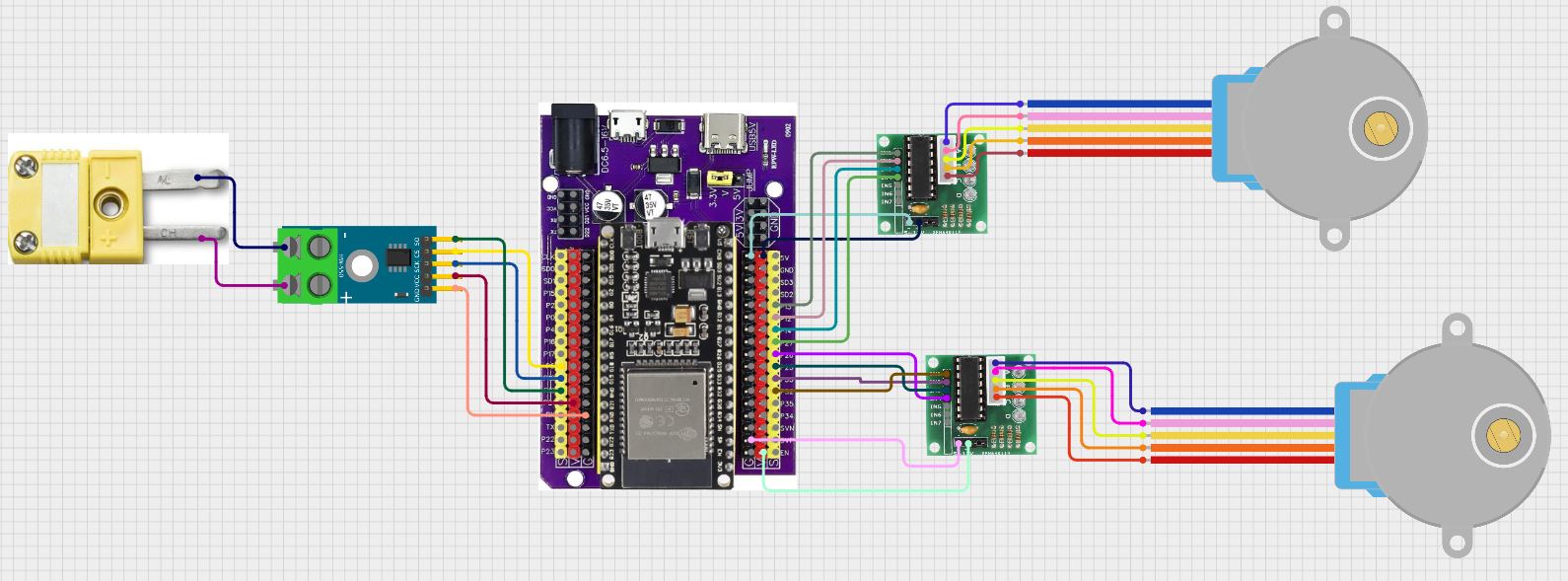
I am trying to add some temperature control to my grill (but also fits on the stove top for oil temp for instance). I am using an ESP32 DEV board with a break out board. The movement is a couple of 28BYJ-48 5V stepper motors driven by two ULN2003 driver boards. A MAX6675 Module + K Type Thermocouple is used for temperature readings. I started with one stepper on ESP pins 13-12-14-27. It worked perfectly but I needed to add a second burner to reach my desired set point (at least in winter). I added the second motor on pins 32-33-25-26 but it doesn't move. The motor #1 ULN2003 board all leds light up for every movement, which is multiple steps. Motor #2 ULN2003 has only two leds illuminate alternately. I've swapped motors, driver boards, breakout boards, ESP32 boards, and power supplies with the same results. I am left with either an issue with the code that I can't figure out or some choice of pin issue that I can't find. Any help would be appreciated.

#include <WiFi.h>
#include <ESPAsyncWebServer.h>
#include <Stepper.h>
#include <max6675.h>
#include <PID_v1.h>
#include <vector> // Include the vector library
// Access Point credentials
const char* ssid = "ESP32_Grill_Control";
const char* password = "12345678";
// Network Config (Optional static IP setup)
IPAddress local_IP(192, 168, 1, 1);
IPAddress gateway(192, 168, 1, 1);
IPAddress subnet(255, 255, 255, 0);
// Create AsyncWebServer instance
AsyncWebServer server(80);
// MAX6675 pins
#define SCK 18 // Clock pin
#define CS 5 // Chip select pin
#define MISO 19 // Master in, slave out pin
// Stepper motor pins and settings
#define IN1 13 // Motor input pin 1
#define IN2 12 // Motor input pin 2
#define IN3 14 // Motor input pin 3
#define IN4 27 // Motor input pin 4
#define IN1_B 32 // Second stepper input pin 1
#define IN2_B 33 // Second stepper input pin 2
#define IN3_B 25 // Second stepper input pin 3
#define IN4_B 26 // Second stepper input pin 4
const int stepsPerRevolution = 2048; // Number of steps per revolution for the stepper
Stepper myStepper(stepsPerRevolution, IN1, IN3, IN2, IN4);
Stepper myStepperB(stepsPerRevolution, IN1_B, IN3_B, IN2_B, IN4_B);
// PID variables
double Setpoint, Input, Output; // Setpoint, input (current temperature), and output (control signal)
double Kp = 2.0, Ki = 5.0, Kd = 1.0; // Initial PID constants
PID myPID(&Input, &Output, &Setpoint, Kp, Ki, Kd, DIRECT); // Create PID controller instance
// Thermocouple and stepper variables
MAX6675 thermocouple(SCK, CS, MISO); // Thermocouple sensor instance
int maxSteps = 4606; // Maximum stepper position (steps)
int stepperPosition = 0; // Current stepper position in steps
// Create a vector to store temperature log
std::vector<String> tempLog;
// HTML for the web page
const char index_html[] PROGMEM = R"rawliteral(
<!DOCTYPE HTML>
<html>
<head>
<title>ESP32 PID Controller</title>
<meta name="viewport" content="width=device-width, initial-scale=1">
</head>
<body>
<h2>PID-Controlled Stepper Motor</h2>
<!-- Form to set the temperature -->
<form id="setpointForm">
<label for="temp">Set Temperature (°F): </label>
<input type="number" id="temp" name="temp">
<input type="submit" value="Set">
</form>
<!-- Form to update PID constants -->
<form id="pidForm">
<div>
<label for="kp">Kp: </label>
<input type="number" step="0.1" id="kp" name="kp" value="2.0">
</div>
<div>
<label for="ki">Ki: </label>
<input type="number" step="0.1" id="ki" name="ki" value="5.0">
</div>
<div>
<label for="kd">Kd: </label>
<input type="number" step="0.1" id="kd" name="kd" value="1.0">
</div>
<input type="submit" value="Update PID">
</form>
<p id="message"></p>
<p>Current Temperature: <span id="currentTemp">--</span>°F</p>
<p>Stepper Position: <span id="stepPosition">--</span>%</p>
<p><a href="/download">Download Temperature Log</a></p> <!-- Link to download the log -->
<!-- JavaScript to handle form submissions and periodic updates -->
<script>
document.getElementById('setpointForm').addEventListener('submit', function(event) {
event.preventDefault();
const temp = document.getElementById('temp').value;
fetch(`/setpoint?temp=${temp}`)
.then(response => response.text())
.then(data => {
document.getElementById('message').innerText = data;
});
});
document.getElementById('pidForm').addEventListener('submit', function(event) {
event.preventDefault();
const kp = document.getElementById('kp').value;
const ki = document.getElementById('ki').value;
const kd = document.getElementById('kd').value;
fetch(`/pid?kp=${kp}&ki=${ki}&kd=${kd}`)
.then(response => response.text())
.then(data => {
document.getElementById('message').innerText = data;
});
});
setInterval(() => {
fetch('/status')
.then(response => response.json())
.then(data => {
document.getElementById('currentTemp').innerText = data.temperature;
document.getElementById('stepPosition').innerText = data.stepperPosition;
});
}, 1000);
</script>
</body>
</html>
)rawliteral";
// Function to set stepper pins to high impedance mode (reduce power consumption)
void setPinsToHighImpedance() {
pinMode(IN1, INPUT); // Set pin 1 (13) to high impedance
pinMode(IN2, INPUT); // Set pin 2 (12) to high impedance
pinMode(IN3, INPUT); // Set pin 3 (14) to high impedance
pinMode(IN4, INPUT); // Set pin 4 (27) to high impedance
pinMode(IN1_B, INPUT); // Set pin 1_B (32) to high impedance
pinMode(IN2_B, INPUT); // Set pin 2_B (33) to high impedance
pinMode(IN3_B, INPUT); // Set pin 3_B (25) to high impedance
pinMode(IN4_B, INPUT); // Set pin 4_B (26) to high impedance
}
// Function to update stepper position based on PID output
void updateStepperPosition() {
int targetSteps = map(constrain(Output, 0, 100), 0, 100, 0, maxSteps); // Map PID output to stepper range
int stepsToMove = targetSteps - stepperPosition; // Calculate steps to move
if (stepsToMove != 0) {
// Activate stepper motor by setting pins to output for motor 1
pinMode(IN1, OUTPUT);
pinMode(IN2, OUTPUT);
pinMode(IN3, OUTPUT);
pinMode(IN4, OUTPUT);
// Activate stepper motor by setting pins to output for motor 2
pinMode(IN1_B, OUTPUT);
pinMode(IN2_B, OUTPUT);
pinMode(IN3_B, OUTPUT);
pinMode(IN4_B, OUTPUT);
myStepper.step(stepsToMove); // Move stepper 1 by the required steps
myStepperB.step(stepsToMove); // Move stepper 1 by the required steps
stepperPosition += stepsToMove; // Update stepper position
// Set both steppers back to high impedance
setPinsToHighImpedance();
}
}
// Handle temperature setpoint update
void handleSetpoint(AsyncWebServerRequest *request) {
if (request->hasParam("temp")) {
// Convert Fahrenheit input to Celsius for the PID
double tempF = request->getParam("temp")->value().toDouble();
Setpoint = (tempF - 32) * 5.0 / 9.0; // Convert Fahrenheit to Celsius
request->send(200, "text/plain", "Setpoint updated to " + String(tempF) + "F");
} else {
request->send(400, "text/plain", "Invalid request");
}
}
// Handle PID constant update
void handlePID(AsyncWebServerRequest *request) {
if (request->hasParam("kp") && request->hasParam("ki") && request->hasParam("kd")) {
// Retrieve PID constants from the request
Kp = request->getParam("kp")->value().toDouble();
Ki = request->getParam("ki")->value().toDouble();
Kd = request->getParam("kd")->value().toDouble();
myPID.SetTunings(Kp, Ki, Kd); // Update PID constants
request->send(200, "text/plain", "PID constants updated: Kp=" + String(Kp) + ", Ki=" + String(Ki) + ", Kd=" + String(Kd));
} else {
request->send(400, "text/plain", "Invalid request");
}
}
// Handle status request
void handleStatus(AsyncWebServerRequest *request) {
// Convert temperature to Fahrenheit for display
double tempF = Input * 9.0 / 5.0 + 32.0;
// Send temperature and stepper position as JSON
String json = "{\"temperature\":" + String(tempF) + ",\"stepperPosition\":" + String((stepperPosition * 100) / maxSteps) + "}";
request->send(200, "application/json", json);
}
// Handle log download request
void handleDownload(AsyncWebServerRequest *request) {
String logContent;
for (const auto& entry : tempLog) {
logContent += entry + "\n";
}
request->send(200, "text/plain", logContent);
}
void setup() {
Serial.begin(115200); // Initialize serial communication
// Initialize thermocouple
Input = thermocouple.readCelsius();
// Initialize PID
myPID.SetMode(AUTOMATIC); // Set PID mode to automatic
myPID.SetOutputLimits(0, 100); // Limit PID output to 0-100%
// Initialize stepper
myStepper.setSpeed(10); // Set stepper speed
setPinsToHighImpedance(); // Reduce power consumption by setting pins to high impedance
// Set up Access Point mode
WiFi.softAPConfig(local_IP, gateway, subnet); // Optional: Configure static IP
WiFi.softAP(ssid, password);
// Setup server routes
server.on("/", HTTP_GET, [](AsyncWebServerRequest *request) {
request->send_P(200, "text/html", index_html); // Serve the main HTML page
});
server.on("/setpoint", HTTP_GET, handleSetpoint); // Handle temperature setpoint update
server.on("/pid", HTTP_GET, handlePID); // Handle PID constant update
server.on("/status", HTTP_GET, handleStatus); // Handle status requests
server.on("/download", HTTP_GET, handleDownload); // Handle log download requests
// Start server
server.begin();
}
unsigned long lastLogTime = 0; // Variable to store the last log time
void loop() {
// Read the current temperature from the thermocouple
Input = thermocouple.readCelsius();
if (isnan(Input)) {
Serial.println("Failed to read temperature"); // Log error if temperature read fails
return;
}
// Log the current temperature in Fahrenheit every 10 seconds
if (millis() - lastLogTime >= 10000) { // Check if 10 seconds have passed
double tempF = Input * 9.0 / 5.0 + 32.0;
String logEntry = String(millis() / 1000) + "," + String(tempF);
tempLog.push_back(logEntry);
lastLogTime = millis(); // Update the last log time
}
// Compute the PID output
myPID.Compute();
// Update the stepper motor position
updateStepperPosition();
// Add debugging output (optional)
Serial.print("Input Temp (C): ");
Serial.print(Input);
Serial.print(" | Setpoint (C): ");
Serial.print(Setpoint);
Serial.print(" | PID Output: ");
Serial.print(Output);
Serial.print(" | Stepper Position: ");
Serial.println(stepperPosition);
// Delay for stability
delay(2000); // 2-second delay
}