shows me the following error and this is even though I have the library installed.
I don't know what to do and it's very frustrating.
please help me
C:\Users\vitoa\AppData\Local\Temp.arduinoIDE-unsaved2024216-8856-15jmuxl.nn4x\sketch_mar16a\sketch_mar16a.ino:1:10: fatal error: ESP32Servo.h: No such file or directory #include <ESP32Servo.h>
^~~~~~~~~~~~~~
compilation terminated.
exit status 1
Compilation error: ESP32Servo.h: No such file or directory
#include <ESP32Servo.h>

Servo myservo;  // Creating a servo object

int servoPin = 22; // Pin for servo connection

void setup() {
  myservo.attach(servoPin);  // Attaching the servo to the pin
  myservo.write(0); // Initial position at 0 degrees
  delay(1000); // Delay for 1 second
}

void loop() {
  // Rotate servo to 90 degrees
  myservo.write(90);
  delay(1000); // Delay for 1 second

  // Rotate servo back to 0 degrees
  myservo.write(0);
  delay(1000); // Delay for 1 second
}
This is the easiest way to tidy up the code and add the code tags
Start by tidying up your code by using Tools/Auto Format in the IDE to make it easier to read. Then use Edit/Copy for Forum and paste what was copied in a new reply. Code tags will have been added to the code to make it easy to read in the forum thus making it easier to provide help.
I hope that your Arduino files are still okay, or else you have to uninstall it and remove everything (but not your projects) and install it again.
Which Arduino board have you selected ?
I tried the "ESP32 Dev Module".
Do you use the Arduino IDE 2.3.2 (the newest version at the moment) ?
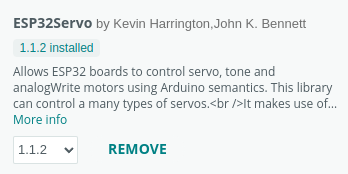
Click in the left bar on the icon for the libraries and check the ESP32Servo library.
I have this one:
Do you know where your projects are ?
Go to menu: File / Preferences
Look at the "Sketchbook location".
Go there, and go into the "libraries" folder. Then find the "ESP32Servo" folder and check if the library files are in the "src" folder.
Long long time ago, the Arduino IDE did not work with online drives and had trouble with a project divided over different drives. It is possible that your OneDrive settings causes the trouble.
I don't know what else it could be. It compiles on my computer.
Hi @vito_a. I'm going to ask you to post the full verbose output from a compilation.
This procedure is not intended to solve the problem. The purpose is to gather more information.
Please do this:
Select File > Preferences... (or Arduino IDE > Settings... for macOS users) from the Arduino IDE menus.
The "Preferences" dialog will open.
Check the box next to "Show verbose output during: ☐ compilation" in the "Preferences" dialog.
Click the "OK" button.
The "Preferences" dialog will close.
Select Sketch > Verify/Compile from the Arduino IDE menus.
Wait for the compilation to fail.
You will see a "Compilation error: ..." notification at the bottom right corner of the Arduino IDE window. Click the "COPY ERROR MESSAGES" button on that notification.
Open a forum reply here by clicking the "Reply" button.
Click the <CODE/> icon on the post composer toolbar.
This will add the forum's code block markup (```) to your reply to make sure the error messages are correctly formatted.
Press the Ctrl+V keyboard shortcut (Command+V for macOS users).
This will paste the compilation output into the code block.
Move the cursor outside of the code block markup before you add any additional text to your reply.
Click the "Reply" button to post the output.
In case the output is longer than the forum software will allow to be added to a post, you can instead save it to a .txt file and then attach that file to a reply here:
Open a forum reply here by clicking the "Reply" button.
Click the "Upload" icon () on the post composer toolbar:
The "Open" dialog will open.
Select the .txt file you saved from the "Open" dialog.
Click the "Open" button.
The dialog will close.
Click the "Reply" button to publish the post.
Alternatively, instead of using the "Upload" icon on the post composer toolbar as described in steps (5) - (7) above, you can simply drag and drop the .txt file onto the post composer field to attach it.

 This procedure is not intended to solve the problem. The purpose is to gather more information.
 ) on the post composer toolbar: