@bperrybap
I just tried all the "Hello World examples for these:
hd44780_HC1627_I2C
hd44780_I2Cexp
hd44780_I2Clcd
hd44780_NTCU165ECPB
hd44780_NTCU20025ECPB
hd44780_NTCUUserial
hd44780_pinIO
hd44780_I2Cexp flashed "Hello World" across the screen and then the LED started flashing. It is like it worked for a few milliseconds and then broke.
Every single example turns the backlight on, but only hd44780_I2Cexp writes anything (albeit very, very briefly).
How about the one that worked briefly.
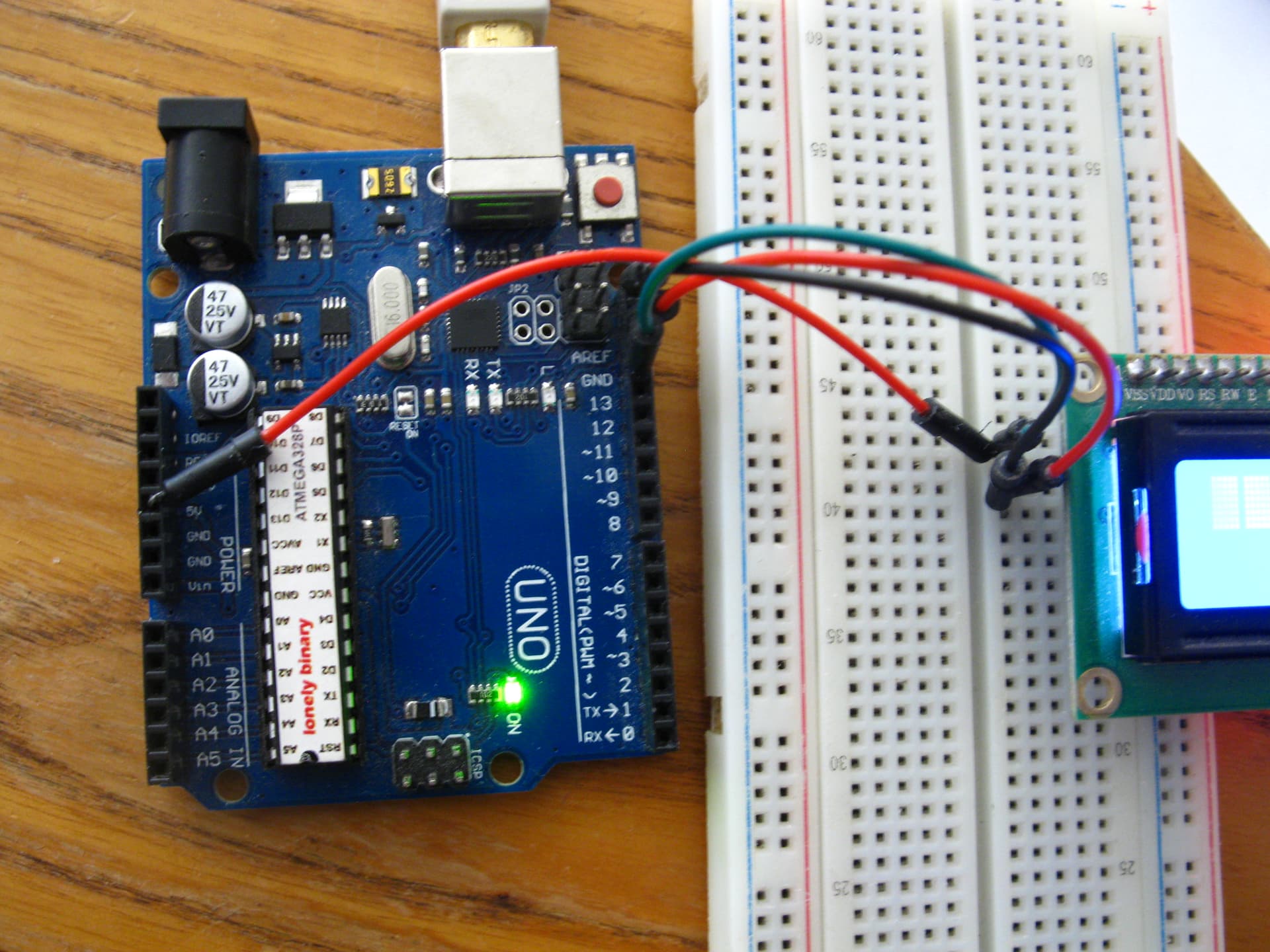
And do please double-check you connections are secure. I looked at the pics, and even magnified, I can't tell the state of the connections on the LCD end.
// vi:ts=4
// ----------------------------------------------------------------------------
// HelloWorld - simple demonstration of lcd
// Created by Bill Perry 2016-07-02
// bperrybap@opensource.billsworld.billandterrie.com
//
// This example code is unlicensed and is released into the public domain
// ----------------------------------------------------------------------------
//
// This sketch is for LCDs with PCF8574 or MCP23008 chip based backpacks
// WARNING:
//	Use caution when using 3v only processors like arm and ESP8266 processors
//	when interfacing with 5v modules as not doing proper level shifting or
//	incorrectly hooking things up can damage the processor.
//
// Sketch prints "Hello, World!" on the lcd
//
// If initialization of the LCD fails and the arduino supports a built in LED,
// the sketch will simply blink the built in LED.
//
// NOTE:
//	If the sketch fails to produce the expected results, or blinks the LED,
//	run the included I2CexpDiag sketch to test the i2c signals and the LCD.
//
// ----------------------------------------------------------------------------
// LiquidCrystal compability:
// Since hd44780 is LiquidCrystal API compatible, most existing LiquidCrystal
// sketches should work with hd44780 hd44780_I2Cexp i/o class once the
// includes are changed to use hd44780 and the lcd object constructor is
// changed to use the hd44780_I2Cexp i/o class.

#include <Wire.h>
#include <hd44780.h>                       // main hd44780 header
#include <hd44780ioClass/hd44780_I2Cexp.h> // i2c expander i/o class header

hd44780_I2Cexp lcd; // declare lcd object: auto locate & auto config expander chip

// If you wish to use an i/o expander at a specific address, you can specify the
// i2c address and let the library auto configure it. If you don't specify
// the address, or use an address of zero, the library will search for the
// i2c address of the device.
// hd44780_I2Cexp lcd(i2c_address); // specify a specific i2c address
//
// It is also possible to create multiple/seperate lcd objects
// and the library can still automatically locate them.
// Example:
// hd4480_I2Cexp lcd1;
// hd4480_I2Cexp lcd2;
// The individual lcds would be referenced as lcd1 and lcd2
// i.e. lcd1.home() or lcd2.clear()
//
// It is also possible to specify the i2c address
// when declaring the lcd object.
// Example:
// hd44780_I2Cexp lcd1(0x20);
// hd44780_I2Cexp lcd2(0x27);
// This ensures that each each lcd object is assigned to a specific
// lcd device rather than letting the library automatically asign it.

// LCD geometry
const int LCD_COLS = 16;
const int LCD_ROWS = 2;

void setup()
{
int status;

	// initialize LCD with number of columns and rows:
	// hd44780 returns a status from begin() that can be used
	// to determine if initalization failed.
	// the actual status codes are defined in <hd44780.h>
	// See the values RV_XXXX
	//
	// looking at the return status from begin() is optional
	// it is being done here to provide feedback should there be an issue
	//
	// note:
	//	begin() will automatically turn on the backlight
	//
	status = lcd.begin(LCD_COLS, LCD_ROWS);
	if(status) // non zero status means it was unsuccesful
	{
		// hd44780 has a fatalError() routine that blinks an led if possible
		// begin() failed so blink error code using the onboard LED if possible
		hd44780::fatalError(status); // does not return
	}

	// initalization was successful, the backlight should be on now

	// Print a message to the LCD
	lcd.print("Hello, World!");
}

void loop() {}
Yes, they are very secure. @bperrybap told me to post this on a new topic.
I have used this LCD with other libraries with no issues, but I'd like to use HD44780.
First,
The only i/o class that will work with the h/w you have is hd44780_I2Cexp so running examples for other h/w doesn't make sense.
If you are not clear on the hd44780 library layout and its i/o classes, see the hd44780 wiki:
This looks like a h/w issue.
The I2Cexp diagnostic sketch was able to see the PCF8574 chip when it scanned the I2C bus for it.
The begin() in the hd44780_I2Cexp i/o class initialization code returned -4 (RV_ENXIO) which means no PCF8574 chip responded at any PCF8574 address when scanning the I2C bus for it.
You had mentioned in another thread that the backpack was responding at different/multiple I2C addresses.
All of this leads me to suspect a h/w issue on the backpack.
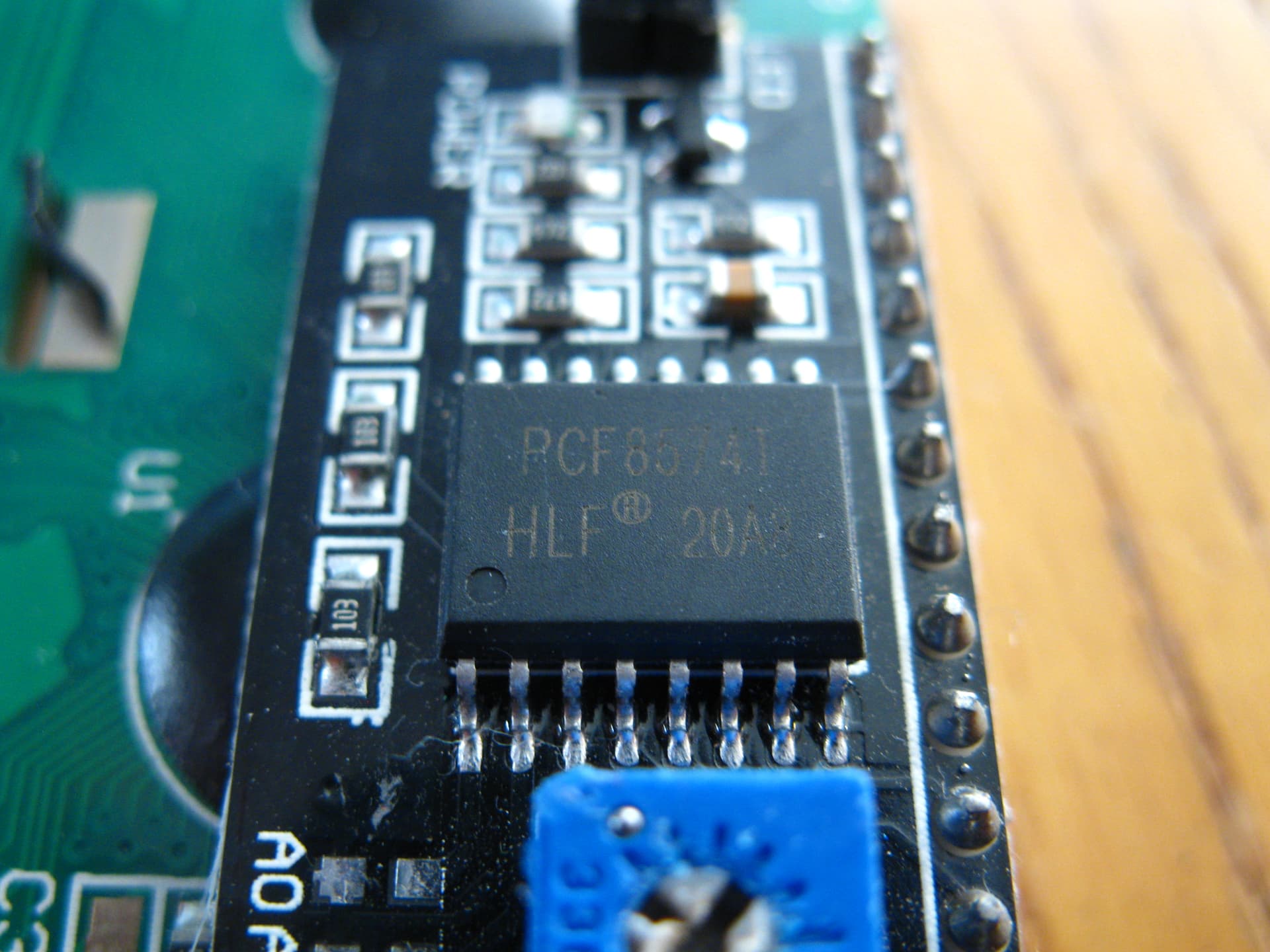
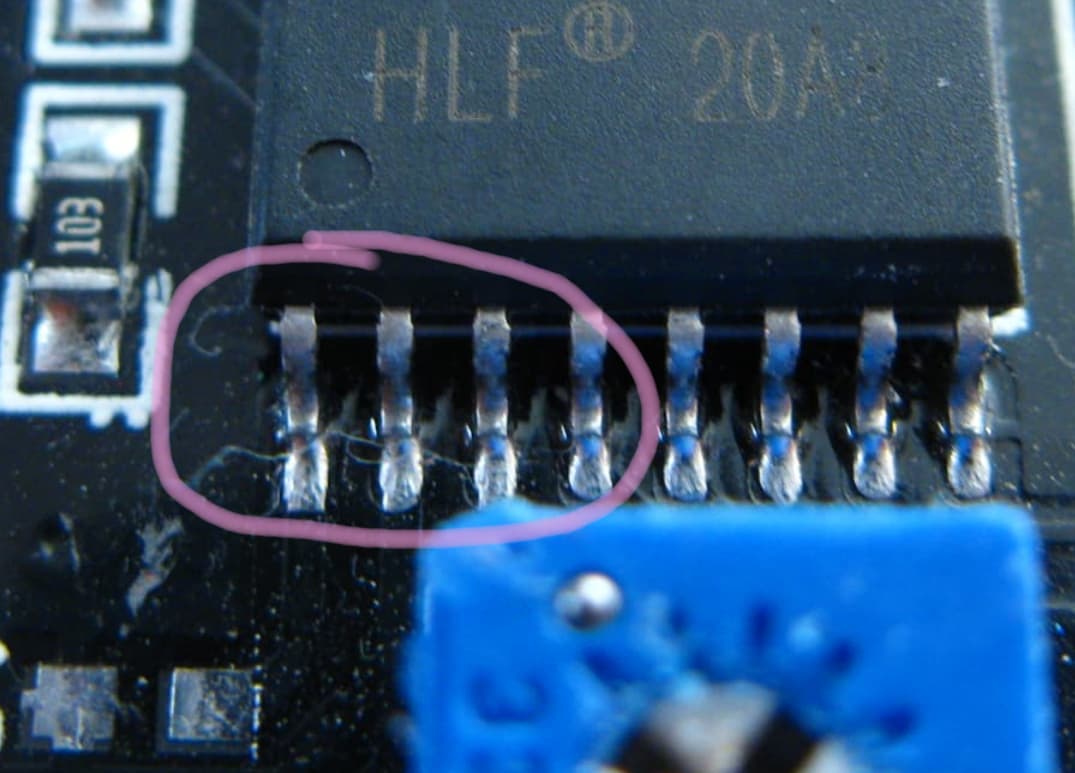
In one of your photos, it looks like there may be some kind of trash laying across the first 3 or 4 pins of the PCF8574 chip. Perhaps a piece of thread, or a very fine wire?
Pins 1,2, & 3 of the pcf8574 chip are the address selection pins.
Have a close look at this area of the PCF8574 chip to see if you see anything.
A few years ago there was a case of tiny threads laying across a couple of LCD pins (not the PCF8574 chip) which caused the LCD to not work. Once the threads were cleared away, it worked properly.
Yes a strand of dog fur from my dog. I blew it off and it still doesn't work when I reupload that code.
Doesn't explain why other libraries would work.. I had code from the LiquidCrystal_I2C.h already running, didn't unplug it or anything, just uploaded the HD44780 code.
The hd44780_I2Cexp i/o class works very differently when it comes to low level PCF8574 initialization than other libraries.
LiquidCrystal_I2C does not do any probing. It must be told the i2c address.
hd44780_I2Cexp does some probing to figure out a few things vs having to be manually configured.
If there are issues addressing the pcf8574 chip then unexpected things can happen. You have already said that you had issues with an I2C scanner working with this backpack.
If the PCF8574 on the backpack is not working properly, then there is some kind of h/w issue.
The hd44780_I2Cexp i/o class scans the bus looking for a response to locate the i2c address of the pcf8574, if there is a h/w issue that prevents this from reliably working, then the hd44780_I2Cexp i/o class can have issues initializing.
A few more questions.
Details really matter so correct information is vital.
You said when you ran the hd44780_I2Cexp i/o class HelloWorld, it
flashed "Hello World" across the screen and then the LED started flashing. It is like it worked for a few milliseconds and then broke.
After initialization, The sketch sends "Hello, World!" to the library to be printed on the display.
But in your case the comma was dropped and there was no exclamation point and then the Uno onboard LED started flashing?
This is very odd behavior since the sketch and library won't/can't blink the on board LED (the one on the UNO board) after initialization.
i.e. there is nothing in the sketch that will cause the on board LED to blink after the LCD initialization is successful.
Are you sure about this?
If the on board LED is blinking, what type of blink is it?
Is it blinking a error code? like some number of flashes then a pause?
Do you have a logic analyzer that you use to look at the i2c bus signals?
I would like to get to the bottom of this.
Very nice photos, BTW.
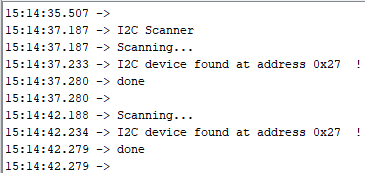
What happens when you run the i2c_scanner sketch in the Wire library?
Does the issue go away if you hard code the address?
i.e.
modify the constructor in the hd44780_I2Cexp HelloWorld sketch to include the address.
I.e. (i put 0x27 but use whatever the i2c address is)
So when doing auto locate, nothing is on the display and the blink code is 4 which matches the -4 error code that was reported in I2CexpDiag.
That is what I would expect - as the behaviors are consistent with each other.
About the only difference between the scan done in the sketch by I2CexpDiag and the i2c_scanner vs the scan done in the library is the scan in the library starts much quicker in the library since the sketch will have several 10s of milliseconds between the call to Wire.begin() and the scan starting.
vs in the library it is immediate.
Also the scan in the library only scans the addresses of the PCF8574 chips vs the sketch scans are scanning all the addresses so there is quite a bit of additional time before reaching the addresses for the PCF8574.
Just reaching at straws but it can take a few milliseconds before the pullups on the i2c bus signals charge up. The Wire library should ensure that the bus is ready to use after Wire.begin() is called.
Or perhaps that particular chip has a longer amount of time to be ready to be addressed after the bus glitches during the Wire library initialization.
I wish I could test that specific hardware and look at the signals to see what is actually happening.
One thing to try would be add a delay after Wire.begin() is called in the library.
You would have to edit hd44780_I2Cexp.h and add a call to delay after the Wire.begin call.
i.e. around line 378 right after here:
	 * So we go ahead and call it here.
	 */
	Wire.begin();
add a delay(50) after that Wire.begin()
This should be way more than the time it takes for the pullups to fully charge up and/or more than enough time for the signals to settle to idle state to allow the pcf8574 to be ready to be addressed.
If that fixes it, then there is an initialization issue in Wire library that is triggered by a combination of your backpack and how the hd44780 library uses the Wire library.
i.e. the Wire library is allowing a sketch or library to use the i2c bus before all the slaves are ready to be accessed.
If this is the case, I could put a work around in the hd44780 library.
(there are already some work arounds in it for other Wire library & core issues)
Photo #3 in post #2 shows a regular PCF8574T backpack with 4k7 pullups and address 0x27.
Even if the I2C bus was fully loaded with maximum 400pF capacitance 4k7 * 400pF = 1880ns.
i.e. 1.8us or 0.0018ms
Unless I have missed something there is no copy-pasteable Diagnostic output in this thread.
Just a set of (excellent) photos and screenshots. (and a link to a useless video)
David.
Edit. There is something odd about the photos in #2.
The soldering all looks good. But I have never seen a backpack with a straight 4-pin header.
They normally have angle headers. Easy for Duponts but no good for breadboard.
@outbackhut,
Please copy-paste the whole output from Bill Perry's diagnostic sketch. i.e. copy-paste from the Serial Terminal .... not a screenshot.
After the signals are low, it takes time for them to rise all the way back up to VCC (or what the final VCC should be) through the pullups.
The time varies depending on the bus voltage and the value of the pullup and where the voltage is at the time.
Normally this is quite fast (like 10s or a few hundred ns) and not an issue but I have seen cases where there are issues because of the time it takes.
For example, when mixing 3v and 5v parts where the 3v high signals are either just out of spec for the 5v inputs or right on the edge. A 3v signal can take long enough to rise up to be seen by a 5v input that there may need to be some additional time added in s/w to account for this. There is actually some code in the hd44780 library to deal with this in the hd44780_pinIO class that extends some timing on the E signal to ensure the LCD sees it going high before dropping it back down.
Without it the added time, the 3v ESP parts can not reliably control a 5V LCD.
I have also seen some situations at power up.
Things can get weird at powerup, since devices including the processor can start running before the VCC is all the way up to its final target voltage.
i.e. setup() can be called before VCC is all the way up to 5v.
While not related to i2c pullups, power up can create some issues with respect to the hd44780 LCD since the LCD needs 40ms after voltage reaches 2.7v
Pretty much every hd44780 LCD library has a delay in its initialization code for this timing since if setup() immediately calls the LCD library begin() function, the LCD will not be ready to go yet.
Interestingly, there is an additional 1 second delay in the LiquidCrystal_I2C library in the begin() code that is called after Wire.begin() but before it does the LCD initialization. Prior to that 1 second delay it just wrote a zero to the PCF8574 output port.
This delay has always been in this code. No other library does this.
I have no clue why this delay is there, as IMO, it should not be necessary but it is a difference in that library vs all the others.
It may be masking some other issue or maybe it was just there for some really slow LCDs the original author was using at the time that needed more than 40ms at power up and he never tracked down the cause but it "worked" with this added 1 second delay.
One of the reasons I really want to track this down, is I have seen this issue (or least an issue that sounds like this one) once before a few years ago.
Unfortunately, after the person with the issue found something that "worked" for them, the person didn't want to work with me to track down what the issue really was to resolve it and they wouldn't send me the h/w.
And since nobody else was seeing this had ever seen it or could replicate the issue, it was just dropped. But it always bothered me.