Hello, so I am making an Arduino program for a NASA watering system. I have put the things I am supposed to do underneath this. I have fully plugged in the Arduino to the breadboard, but I am unsure about my code. I have also attached a diagram of my Arduino board. It is an ELEGOO Mega 2560.
The code:
int buttonPin1 = 1;
int buttonPin2 = 2;
int LEDred = 8;
int A = 0;
int B = 0;

void setup()
{
  pinMode(LEDred, OUTPUT);
  pinMode(buttonPin1, INPUT);
  pinMode(buttonPin2, INPUT);
}

void loop()
{
  A = digitalRead(buttonPin1);
  B = digitalRead(buttonPin2);
  if (A == HIGH || B == HIGH)
  {
    digitalWrite(LEDred, HIGH);
  }
  else
  {
    digitalWrite(LEDred, LOW);
  }
}
The Task:
To implement the logic of the watering system of Experiment 1 using an Arduino board (Mega 2560), assume you have four buttons or microswitches to emulate the operation of the sensors and by interacting with the buttons you can create all the input combinations of the truth table (see Figure 1). To test the output of the logic there is also an LED which will be ON when the output variable, F, is high or ONE, as per the truth table of the circuit. You need to build the circuit and write the code so that it implements the logic of the watering system by turning on the LED when it’s supposed to be as per the requirements. Your code should also send message to the serial monitor of the Arduino IDE to print the status of the buttons and LED at any time. The message to the monitor must have the following format
“A, Switch= 1; B, Moisture=0; C, Light=1; D, Door=0 ; Output, F= 1”
For protection, each button needs to be attached with a 10 kΩ resistor. Attach one of the resistor’s leads to the button, and the other lead to the ground bus (the one with the “–” sign), as shown in Figure 1.
Buttons are connected to Arduino to the Pin 2, 4, 8, and 12. LED is connected to the Pin 13 of the board through a 220Ω resistor. One end of the 220Ω resistor is connected to the Pin 13 of the board and the other end is connected to the anode (long leg) of the LED and the cathode (short leg) of the LED is connected to the ground bus.
int buttonPin1 = 1;
int buttonPin2 = 2;
int LEDred = 8;
int A = 0;
int B = 0;
void setup()
{
pinMode(LEDred, OUTPUT);
pinMode(buttonPin1, INPUT);
pinMode(buttonPin2, INPUT);
}
void loop()
{
A = digitalRead(buttonPin1);
B = digitalRead(buttonPin2);
if (A == HIGH || B == HIGH)
{
digitalWrite(LEDred, HIGH);
}
else
{
digitalWrite(LEDred, LOW);
}
}
How about changing the code so at least it uses the connections given in the really clear instructions you posted? Your Fritzy seems to show the same connections but your code doesn't.
1. Your buttons (K1, K2, K3, K4) in Fig-1 are connected respectively with DPin-2, DPin-4, DPin-8, DPin-12. The LEDred is connected with DPin-13.
Figure-1:
2. The symbolic names (that you have given) of your --
Button K1 is: buttonPin1
Button K2 is: buttonPin2
LED is: LEDred
3. The above symbolic names must be given proper numerical name/identification so that the software/code can recognize/address them. Accordingly, you can write the following definitions:
int buttonPin1 = 2;     // (not int buttonPin1 = 1 as K1 is connected with DPin-2)
int buttonPin1 = 4;
int LEDred = 13;       //(not int LEDred = 8 as the LED is connected with DPin-13)
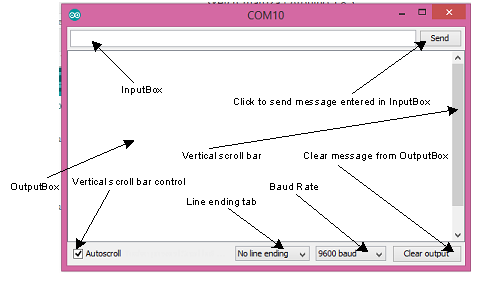
4. To send a message (say: Arduino) to the OutputBox of the Serial Monitor (Fig-2), we execute the following code:
Serial.print("Arduino")
Serial.println();      //to bring the cursor at the next line
Figure-2:
5. Now, try to bring corrections in the following lines of your sketch in the light of the comments of this post and previous posts. Please, post the corrected sketch.
int buttonPin1 = 1;
int buttonPin2 = 2;
int LEDred = 8;
srnet:
I would agree with @Robin2's comments, do you really think its right to ask the volunteers on these forums to help you do your college homework ?
If this is part of your chosen career, dont you think you would gain a great deal by doing your own research ?
At least the OP is up-front about this being coursework.
I have to agree with srnet. But, to the OP, you will get a lot more respectful answers if you try to make your code work, then tell us what error messages you are getting, or how the program is not doing what you expect.