I use P10 SMD outdoor panel and esp32 controller, and I follow the tutorial on youtube from utech "https://youtu.be/34B4FqgmSSc?si=NphyZaQfVP_f4VvG" with pin mapping as below
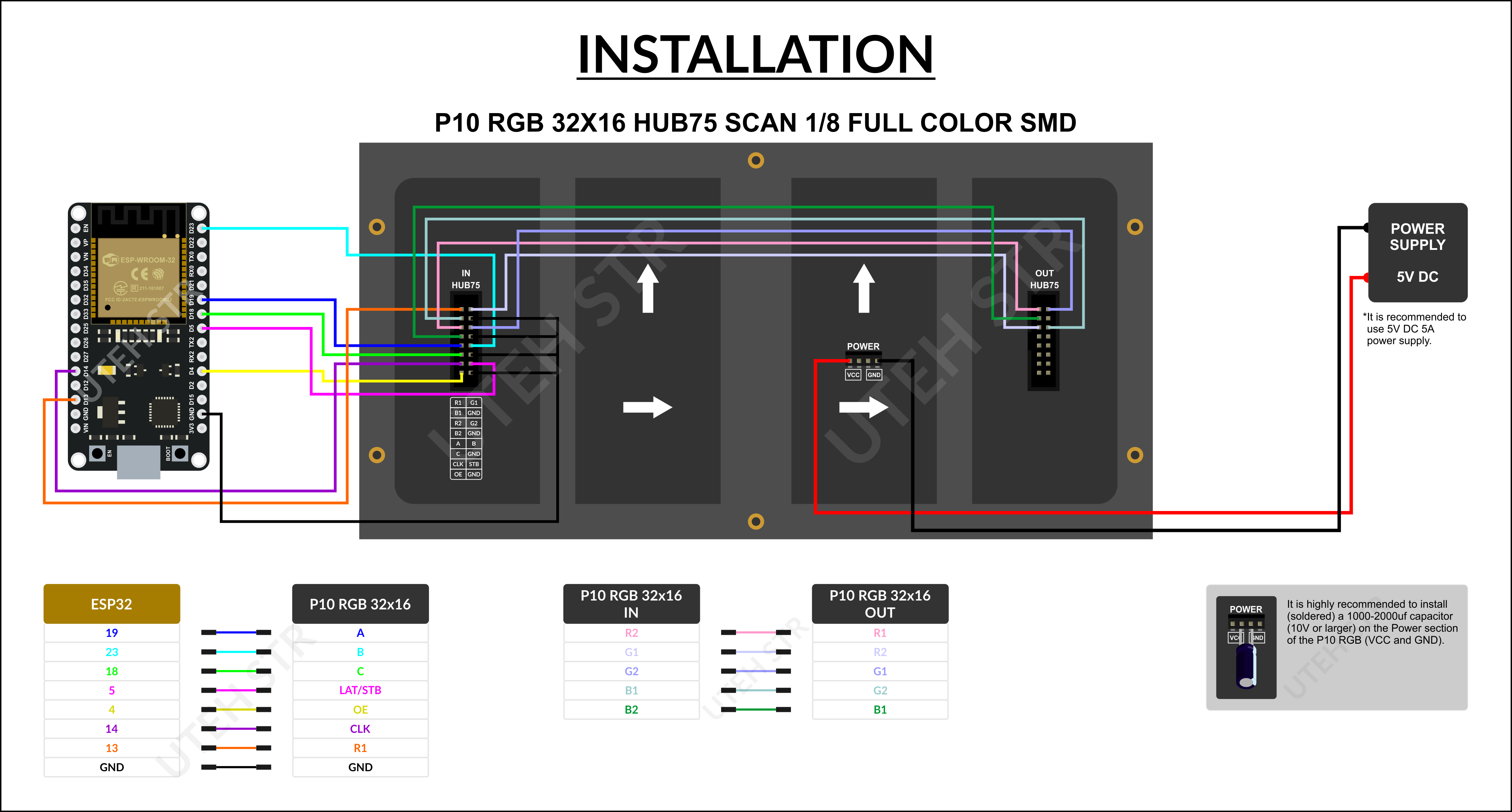
and this is the link to the P10 panel that I use P10 SMD RGB 1/4 SCAN
//>>>>>>>>>>>>>>>>>>>>>>>>>>>>>>>>>>>>>>>>>>>>>>>>>>>>>>>>>>>>>>>>>>>>>>>>>>>>>>>>>>>>>>>>> 01_Test_P10_RGB_32x16
// This is how many color levels the display shows - the more the slower the update.
//#define PxMATRIX_COLOR_DEPTH 4
// Defines the speed of the SPI bus (reducing this may help if you experience noisy images).
// The original value of PxMATRIX_SPI_FREQUENCY in the PxMatrix library example is 20000000.
// I changed the value to 10000000 because if I use the value 20000000, then "ghosting" or "noise" appears on my P10 32x16 RGB panel.
// Each panel may be a different case. If "ghosting" or "noise" appears on your P10 RGB panel, try changing the PxMATRIX_SPI_FREQUENCY value.
// You can use the values 20000000, 15000000, 10000000 and 8000000. Or you can also try using other values.
#define PxMATRIX_SPI_FREQUENCY 10000000
// Creates a second buffer for backround drawing (doubles the required RAM).
//#define PxMATRIX_double_buffer true
//----------------------------------------Including Libraries.
#include <PxMatrix.h>
//----------------------------------------
//----------------------------------------Pins for LED MATRIX.
#define P_LAT 5
#define P_A 19
#define P_B 23
#define P_C 18
#define P_OE 4
//----------------------------------------
// Defines the width and height of the panel in pixels.
#define matrix_width 32
#define matrix_height 16
// Timer setup.
// Create a hardware timer of ESP32.
hw_timer_t * timer = NULL;
portMUX_TYPE timerMux = portMUX_INITIALIZER_UNLOCKED;
// This defines the 'on' time of the display is us.
// The larger this number, the brighter the display. If too large the ESP will crash.
uint8_t display_draw_time = 30; // 30-70 is usually fine.
// Declaring the "PxMATRIX" object as a "display" and its settings.
PxMATRIX display(matrix_width, matrix_height, P_LAT, P_OE, P_A, P_B, P_C);
//----------------------------------------Some standard colors.
// display.color565(R value = 0-255, G value = 0-255, B value = 0-255);
uint16_t myRED = display.color565(255, 0, 0);
uint16_t myGREEN = display.color565(0, 255, 0);
uint16_t myBLUE = display.color565(0, 0, 255);
uint16_t myWHITE = display.color565(255, 255, 255);
uint16_t myYELLOW = display.color565(255, 255, 0);
uint16_t myCYAN = display.color565(0, 255, 255);
uint16_t myMAGENTA = display.color565(255, 0, 255);
uint16_t myVIOLET = display.color565(127, 0, 255);
uint16_t myBLACK = display.color565(0, 0, 0);
uint16_t myCOLOR_ARRAY[8] = {myRED, myGREEN, myBLUE, myWHITE, myYELLOW, myCYAN, myMAGENTA, myVIOLET};
//----------------------------------------
//________________________________________________________________________________ IRAM_ATTR display_updater()
// Interrupt handler for Timer.
void IRAM_ATTR display_updater(){
// Increment the counter and set the time of ISR.
portENTER_CRITICAL_ISR(&timerMux);
display.display(display_draw_time);
portEXIT_CRITICAL_ISR(&timerMux);
}
//________________________________________________________________________________
//________________________________________________________________________________ display_update_enable()
// Subroutine to enable and disable interrupt timers.
void display_update_enable(bool is_enable) {
if (is_enable){
timer = timerBegin(0, 80, true);
timerAttachInterrupt(timer, &display_updater, true);
timerAlarmWrite(timer, 1500, true);
timerAlarmEnable(timer);
}
else{
timerDetachInterrupt(timer);
timerAlarmDisable(timer);
}
}
//________________________________________________________________________________
//________________________________________________________________________________ VOID SETUP()
void setup() {
// put your setup code here, to run once:
delay(2000);
Serial.begin(115200);
Serial.println();
// Display initialization.
display.begin(4); //--> Value 8 for 1/8 row scan panel.
delay(100);
// Enable Timer Interrupts.
display_update_enable(true);
delay(100);
display.clearDisplay();
delay(1000);
display.setBrightness(125); //--> Range from 0 to 255.
delay(100);
display.fillScreen(myRED);
delay(2000);
display.fillScreen(myGREEN);
delay(2000);
display.fillScreen(myBLUE);
delay(2000);
display.fillScreen(myWHITE);
delay(2000);
display.clearDisplay();
delay(1000);
display.setTextWrap(false);
display.setTextSize(1);
display.setRotation(0);
delay(100);
display.fillScreen(display.color565(255, 0, 0));
display.setTextColor(display.color565(255, 255, 255));
display.setCursor(0, 0);
display.print("UTEH");
display.setTextColor(display.color565(255, 255, 255));
display.setCursor(15, 9);
display.print("STR");
delay(5000);
display.clearDisplay();
delay(1000);
}
//________________________________________________________________________________
//________________________________________________________________________________ VOID LOOP()
void loop() {
// put your main code here, to run repeatedly:
int myCOLOR_ARRAY_Length = sizeof(myCOLOR_ARRAY) / sizeof(myCOLOR_ARRAY[0]);
for (byte i = 0; i < myCOLOR_ARRAY_Length; i++) {
display.setTextColor(myCOLOR_ARRAY[i]);
display.setCursor(0, 0);
display.print("1234");
display.setCursor(0, 9);
display.print("ABCD");
delay(2500);
display.clearDisplay();
delay(1000);
display.setTextColor(myCOLOR_ARRAY[i]);
display.setCursor(4, 0);
display.print("1234");
display.setCursor(4, 9);
display.print("ABCD");
delay(2500);
display.clearDisplay();
delay(1000);
display.setCursor(9, 0);
display.print("1234");
display.setCursor(9, 9);
display.print("ABCD");
delay(2500);
display.clearDisplay();
delay(1000);
}
}
//________________________________________________________________________________
//<<<<<<<<<<<<<<<<<<<<<<<<<<<<<<<<<<<<<<<<<<<<<<<<<<<<<<<<<<<<<<<<<<<<<<<<<<<<<<<<<<<<<<<<<
but the led light does not light up according to the code I made


