I am a beginner who has just started with Arduino and until now I have not done quite much with Arduino except the very basics. Yesterday, my brother was surfing Amazon for some digital alarm clocks and I found two that seemed quite interesting. But sadly both of them are expensive for a college goer like me - more so because I think I can build one which has some from both of them merged into one.
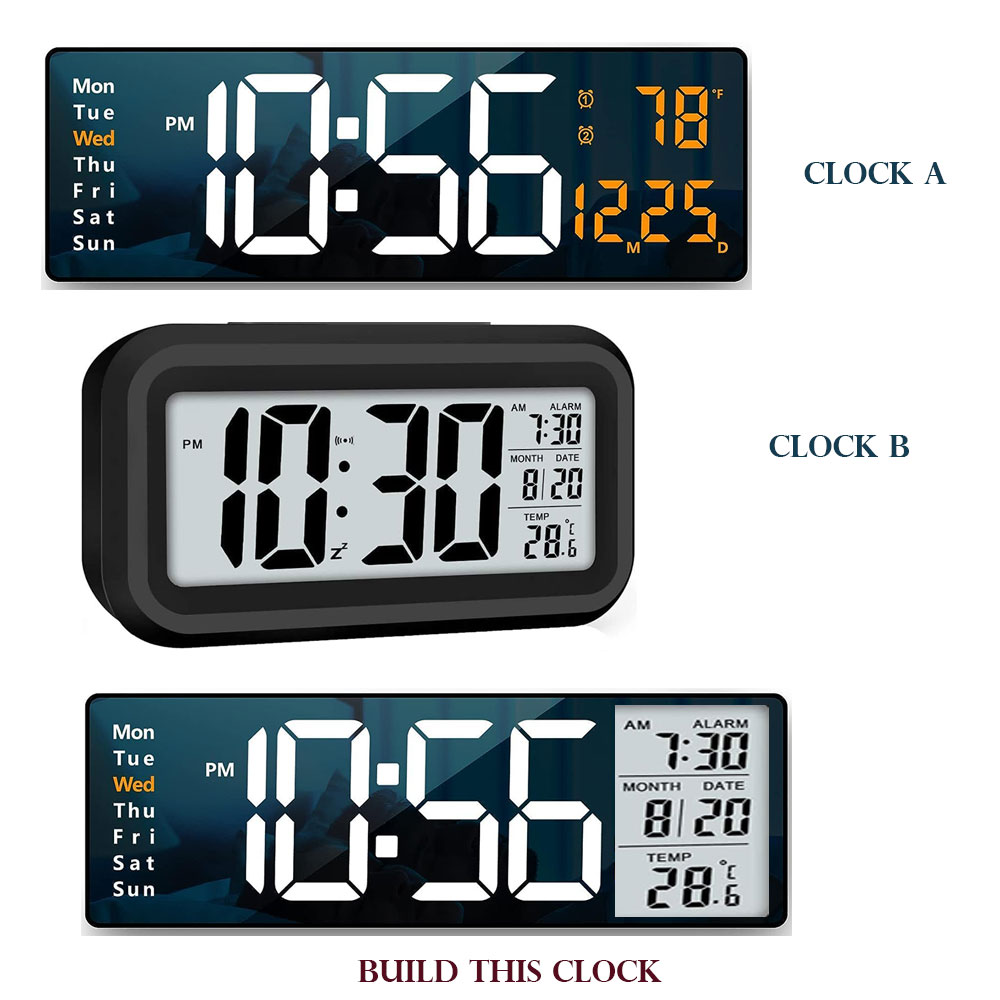
Here is the image of the clocks I saw and liked and the one that I want to build is the last one (see attached Image please)
I have watched some YouTube videos where they made clocks the DIY way. So I figured out that for the main Time Parts (10:56 on the last image) I will be required to use the 7-segment displays.
As I would want it not to lose time, I would also be needed to use a DS3231 Module - which would store time even when there is a power outage.
I would also want to connect it to display time from my cell phone or Internet, so probably instead of Arduino, a better choice would be ESP32 (to be honest, I haven’t even seen it in real time yet - just to give you an idea of how basic I am right now).
For the Temperature - I think DHT11 or DHT 22 would be okay if not great.
The problem is I am unable to figure out the how to for the following -
The days on the left - is it using some LCD or OLED display? How come they look so clean and perfect?
What do I use to display the right side (where it displays the Alarm, The Month and Date and the Temp so neat).
The clean look can also be by using some kind of diffusors - but I am not sure which one would I need).
Ideally, right now I am looking help in figuring out the BOM (Bill of Materials). Eventually when I start off with it I will surely need assistance with circuits and maybe codes. I will post them as I make progresses.
As the community here is much more aware than many I know in person, I thought to ask it here. Any help would be welcome and I would be thankful.
I would start with a 4x20 LCD display, these are easy to program and it has enough place to put all data on it. Later you can upgrade the display routines with a fancier display.
DATE 25-08-31
TIME 14:25:00
ALRM 06:00:00
TEMP 25.2C
Probably you can do the same if you order several thousand screens in one order.
For sure, someday when I would be rich enough who knows! Right now, as a student, I would love to learn more before I can think to become an entrepreneur
These are humidity sensors with temperature sensing as a secondary function for calculating humidity. It would be easier and more accurate to use a actual temperature sensor if you don’t need the humidity. Something like a DS18B20.
The project is definitely possible but! The most difficult thing will be to find a display that you want. The displays shown are probably custom. This link may help: How much does a custom LCD cost?
The pic below is about fifteen years old, but shows what can be done with Arduino. This is a 240x400 and measures 54x90. The pic is larger than life size, and it looks a bit better in real life than the photo might suggest…. but a more modern OLED display might have cleaner resolution.
Everything needed to do this is in the Henning Karlsen library from RinkyDink Electronics. That library even comes with a (gasp!) PDF manual for a leisurely evening’s read.
Even with parallel drive like this has, a graphic LCD like the above can be slow but it allows you to do more or less what you like - and even do graphs! With the appropriate sensors, you could display temperature and humidity on a live graph - something that might be hard to find trawling Amazon.
If you use an ESP-32 you might not need an RTC module and maybe not the time library either. You simply use the local oscillator and set the clock from the Internet when the power comes back on, followed by updates at regular intervals, like once a day.
Building something that has a combination of features that you cannot buy is a good reason to use Arduino to build your own.
Saving money is almost always not a good reason to use Arduino. Once you figure out exactly what components are needed, including stuff like wires and an enclosure, they will probably total to more than those expensive products you found. On top of that you will need various tools to complete the project. Plus your own time, of course, especially if electronics is not the subject you are studying.
Re-using components from commercial products often involves a process of "reverse-engineering" that product to learn how it's various components interact with each other. This is advanced stuff and may involve expensive equipment like oscilloscopes and logic-analysers, and years of experience. It's absolutely not something to recommend to beginners!
the most challenging part of building a clock may be the cage around it… It takes skill to make a nice design and then put that together from wood or whatever…
3D printing makes things easier, but I expect you do not own a 3D printer…
Those sort of clocks are highly customised, built in thousands and at costs you couldn't get close to.
They are often "radio" clocks relying on a broadcast time signal, but your examples don't seem to have the antenna icon.
It would be a challenge to do just one of the functions and end up with something presentable.
I've been fascinated by clocks and accuracy. You might find it satisfying to try something like a GPS clock, an MSF or DCF77 clock, all doable with an Arduino.
MSF and DCF77 are the radio time signals broadcast in the UK and Germany. America and Japan have similar systems.
You can pick up receiver modules quite cheaply and there is quite a lot of information on the web on how to implement them. I currently have a cheap GPS antenna on the roof and a DCF77 module stuck to the bedroom window.
It's extremely satisfying to see the time signals coming in and have a clock running with split second accuracy.
The DS3231 is very good, but will drift. My estimate is about one second gain or loss per two months.
Steer clear of the Nano R4 built in RTC. Currently under test, but not looking good. Gaining nearly 70 seconds a day.. Might be OK if you just want the year and month.
Was that for me?
Have about four "radio controlled" clock/alarm/moon phase/temperature all about 10 years old.
Some I've hacked to provide an RTC adjustment.
The clocks are fine for the kitchen but the receiver/Arduino option gives you something more customisable.
Once locked on, the clock to clock agreement is remarkable.
I am a big fan of Arduino Clocks and have built several models. As you are a beginner you should not dream of a model with such a lot of functionality. For implementing all of the functions you mentioned in your first model you will have a lot of trouble. I can show you a very simple alarm clock which I recently built and is easy for starters. It shows the time and date picked from the internet and lets you program an alarm time choosing music tracks. All it has is a ESP32-C3 supermini processor, a TFT 160x128 display, a DFPlayer and 3 buttons. If you like it you can add functionality one by one and learn about these step by step.
Yes, I did intend the battery (coin?) version - which can store date and time in case of a power outage.
Tbh, when I was doing some basic stuff, I did use one 4x20 LCD and though it wasnt something quite fancyful, I could manage to get the date and time displayed. Later though we used the LCD to display messages about today’s tasks - but was still complicated - owing to the continuous edits to the ino file (on almost a regular basis) and keeping it powered.
But yeah, I think it might be a point to start off with.