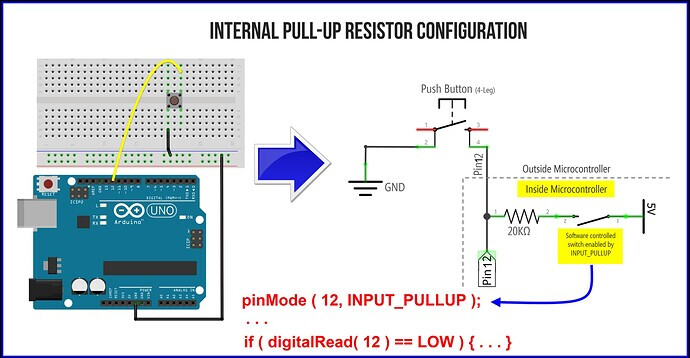
I am learning Arduino IDE code for one of my semester final projects, and I am attempting to make a Simon Says game. I have run into the problem of the code entering "Limbo" after receiving an input, and just not running until a button is pressed again, where it then runs once only. What am I missing? Help is appreciated, and I need it kind of quickly, since its due thursday. Thanks!
Ignoring all previous updates below the code, I figured out the original problem. I forgot to put a line of code that de increments the array to the correct slot, instead of the one past it. Now I have a New problem where it simply never comes up as false, nor does it it wait for an input. Any input will cause it to run through the entire loop regardless of the while loop checking the value of "phase" not even a wrong input.
It is also not triggering the "startInput" variable to beome 0 after selecting the wrong variable, even though nothing would cause it to remain 1. What am I missing?

This now the most up to date code of the project, with the new problem at hand
//Constants setting pin Values
const byte buttonRedPin = 2;
const byte buttonGrnPin = 3;
const byte buttonYelPin = 4;
const byte buttonBluPin = 5;
const byte ledRedPin = 13;
const byte ledGrnPin = 12;
const byte ledYelPin = 11;
const byte ledBluPin = 10;
//Variables for Button states and string value
byte buttonStateRed = 1;
byte buttonStateGrn = 1;
byte buttonStateYel = 1;
byte buttonStateBlu = 1;
byte startInput = 0;
int arrayDigit = 0;
byte pressInput = 0;
byte phase = 0;
//Array Setup
int orderArray[99];
//Setup script, Define port functions of pins
void setup() {
  Serial.begin(9600);
  pinMode(ledRedPin, OUTPUT);
  pinMode(ledGrnPin, OUTPUT);
  pinMode(ledYelPin, OUTPUT);
  pinMode(ledBluPin, OUTPUT);
  pinMode(buttonRedPin, INPUT);
  pinMode(buttonGrnPin, INPUT);
  pinMode(buttonYelPin, INPUT);
  pinMode(buttonBluPin, INPUT);
  randomSeed(digitalRead(7));
}
//Loop script, god help us all
void loop() {
  //ButtonState Qualifiers
  buttonStateRed = digitalRead(buttonRedPin);
  buttonStateGrn = digitalRead(buttonGrnPin);
  buttonStateYel = digitalRead(buttonYelPin);
  buttonStateBlu = digitalRead(buttonBluPin);
  //Transient Mode Screen
  if (startInput == 0) {
    if (buttonStateRed == 0 || buttonStateGrn == 0 || buttonStateYel == 0 || buttonStateBlu == 0) {
      startInput = 1;
    } else {
      digitalWrite(ledRedPin, HIGH);
      delay(80);
      digitalWrite(ledGrnPin, HIGH);
      delay(80);
      digitalWrite(ledYelPin, HIGH);
      delay(80);
      digitalWrite(ledBluPin, HIGH);
      delay(80);
      digitalWrite(ledRedPin, LOW);
      delay(80);
      digitalWrite(ledGrnPin, LOW);
      delay(80);
      digitalWrite(ledYelPin, LOW);
      delay(80);
      digitalWrite(ledBluPin, LOW);
      delay(80);
    }
    //Start of Games Code
  } else {
    delay(200);
    while (orderArray[arrayDigit] > 0) {
      arrayDigit++;
    }
    orderArray[arrayDigit] = random(1, 5);
    while (arrayDigit > 0) {
      digitalWrite((orderArray[arrayDigit]) + 9, HIGH);
      delay(300);
      digitalWrite((orderArray[arrayDigit]) + 9, LOW);
      arrayDigit--;
    }
    digitalWrite((orderArray[arrayDigit]) + 9, HIGH);
    delay(300);
    digitalWrite((orderArray[arrayDigit]) + 9, LOW);
    while (orderArray[arrayDigit] > 0) {
      arrayDigit++;
    }
    arrayDigit--;
    phase = 1;
    while (phase == 1) {
      pressInput = 0;
      while (pressInput == 0) {
        buttonStateRed = digitalRead(buttonRedPin);
        buttonStateGrn = digitalRead(buttonGrnPin);
        buttonStateYel = digitalRead(buttonYelPin);
        buttonStateBlu = digitalRead(buttonBluPin);
        if (buttonStateRed == 0 || buttonStateGrn == 0 || buttonStateYel == 0 || buttonStateBlu == 0) {
          if (buttonStateRed == 0) {
            pressInput = 4;
          } else if (buttonStateGrn == 0) {
            pressInput = 3;
          } else if (buttonStateYel == 0) {
            pressInput = 2;
          } else if (buttonStateBlu == 0) {
            pressInput = 1;
          }
        }
      }
      Serial.print(pressInput);
      Serial.print(orderArray[arrayDigit]);
      if (orderArray[arrayDigit] == pressInput) {
        if (arrayDigit > 0) {
          arrayDigit--;
          Serial.print(8);
        } else {
          phase = 0;
          Serial.print(7);
        }
      }
      if (orderArray[arrayDigit] != pressInput) {
        //END SEQUENCE
        phase = 0;
        pressInput = 0;
        startInput = 0;
        //while(orderArray[arrayDigit] > 0){
        //arrayDigit++;
        //}
        //orderArray[arrayDigit] = 0;
        //while(arrayDigit > 0){
        //arrayDigit--;
        //orderArray[arrayDigit] = 0;
        //}
      }  //end sequence while
      pressInput = 0;
    }  //phase while
  }    //Else
  //Delay for code loop cause???
  delay(10);
}  //loop end