Help with IR proximity Code

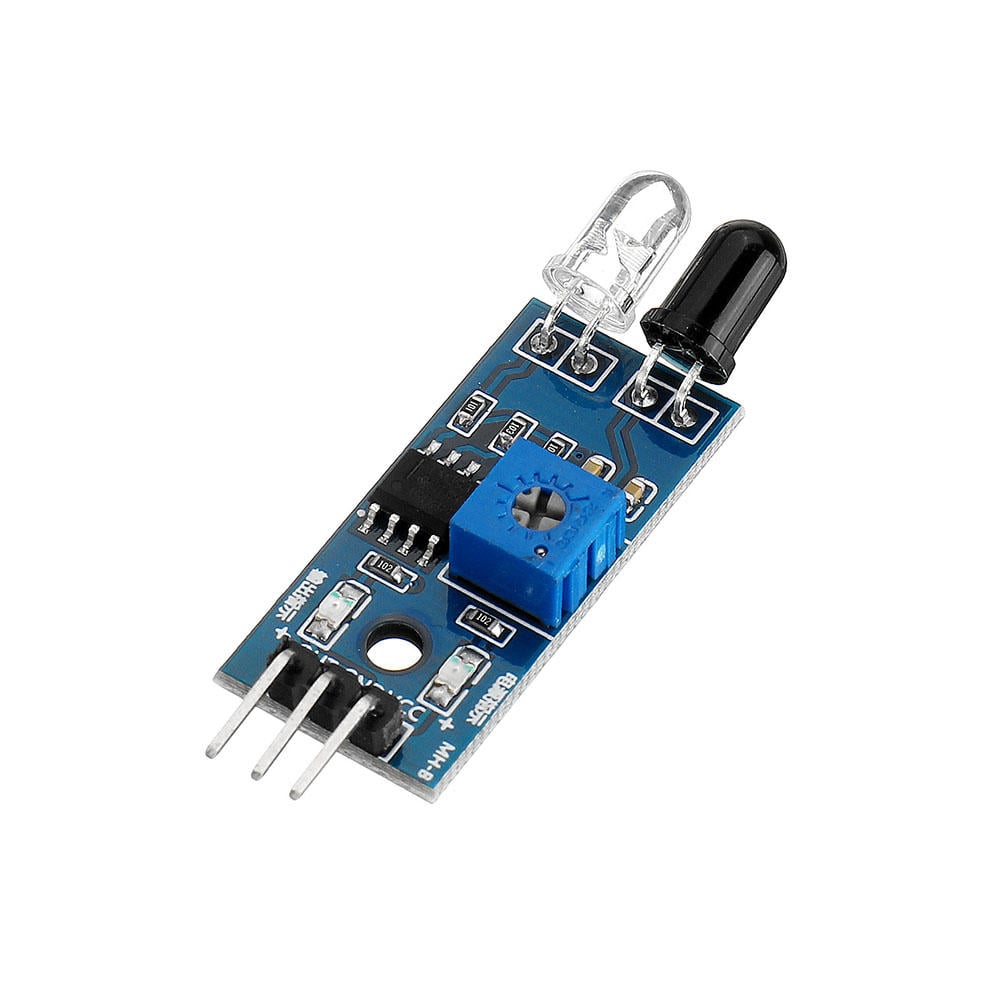
Hi, I'm trying to wrap my head around this problem. I'm using a IR proximity sensor for a general purpose soap dispenser. This is battery powered hence, instead of the IR transmitter LED being constantly in 'on' state, it is being pulsed. So in case of the proximity of an object (a hand), the output of the IR module is also pulsed. Once, the output goes low (proximity), is detected by Arduino Nano, which then triggers a foaming pump for 1 second. This, goes fine, until, the hand stays under the sensor for more than a second. This causes the pump to remain on continuously.

It would be ideal if once the pump turns off after a second, and if the hand is still present, the pump remains off, until, the hand is removed once and put back again.

Here is the code I'm working with:

#include <Blinkenlight.h>
#include <digitalWriteFast.h>
#include <SimpleTimer.h>

#define irSensorPin 2  // IR sensor module
#define mosfetPin 13   // Pump
#define irLED A0       // IR transmitter diode

SimpleTimer mosfetLatchingPeriod(1000);  // (1000 = 1 second)
bool irSensorPinState;

Blinkenlight led(irLED);
SpeedSetting mySettings = {
  .on_ms = 50,
  .off_ms = 0,
  .pause_ms = 0,
  .ending_ms = 200,
};

void setup() {
  Serial.begin(9600);

  pinMode(A0, OUTPUT);
  pinMode(mosfetPin, OUTPUT);
  pinMode(irSensorPin, INPUT);
  pinMode(irLED, OUTPUT);

  led.setSpeed(mySettings);
  led.pattern(1, true);
}

void loop() {
  irSensorPinState = digitalReadFast(irSensorPin);

  if (!irSensorPinState) {
    mosfetLatchingPeriod.reset();
    digitalWriteFast(mosfetPin, HIGH);
  } else if (mosfetLatchingPeriod.isReady()) {
    led.update();
    digitalWriteFast(mosfetPin, LOW);
  }
}


I'd appreciate any help with this project.

Please bring up pen and paper and draw schematics. A mobile photo of the drawing and posting it would give us a base from where code reading feels meaningful.

Check out the StateChangeDetection example (file->exampels->02.digital->State Change Detection) to learn how to detect when your sensor goes low, not if your sensor is low.

Bascially, you have to introduce another variable and remember what you did last time through loop().

Your biggest problem is that the sensor reading isn't synchronized with the LED's illumination.
If you synchronize it, you can determine if the hand is still there or has been removed.
Check the library to see if it tells you the LED status and read it when it's lit.
This way, you won't be able to reactivate the pump until you remove your hand.

I add: I wouldn't use libraries for this; it's simpler without them.
As @DrDiettrich You have the tools available in the IDE examples.

You better use kind of BlinkWithoutDelay to activate the sensor for short pulses. Have the pump ON while an obstacle (hand) is detected.

How often are the pulses? How much energy will be saved? Maybe time a controlled experiment.

Washing my hands ten times a shift, if I used a wash basin and the soap dispenser did not work immediately (like a dispenser should), I would dismantle the container for the soap and tell the management to ensure their equipment works... or it's like not having it at all.

First, does it have to be battery operated? No possibility of unobtrusive external wiring?

Ditto IR pair? Would a carefully positioned LDR/photodiode be possible? Or PIR?

Like @xfpd in post 7 I’d place high priority on very fast response. Say < 250 ms. So I suspect a pulsed IR Tx approach with a significantly longer period would not cut the mustard.

What are your battery replacement plans?

I grew up around electric fences that cycled one time each second. Holding the conductor during an "ON" cycle produced an uncomfortable feeling of a hammer traveling up your arm and hitting your shoulder (and probably more, unseen events in my body). Sometimes, rather than walking a few hundred meters to the insulated gate, we would attempt to pass through the fence by "testing" it with a fast tap-of-the-hand, accepting a mild shock to indicate the fence was on, go to the gate. If, however, the test resulted in no shock, a second test was done (or... see sentence two), and if not in the mood for hammer time, a third test. SOMETIMES, timing was just too perfect, and after the repeated tests, all "false," a full grab of the fence resulted in the hammer, a scream, and a walk to the gate. Life was different.

Soap: If I put my hand under a sensing dispenser and no soap was dispensed in a reasonable amount of time (1/4 second) I would move my hand out, then back, maybe two or three times. At that point "hammer time" would be dealt to the dispenser as I let out a reflexive scream due to memories, dispensing long repressed justice. Evening the score for everyone who felt it.

In loving memory of this repeated event, burned into my DNA, I cobbled a sketch in the simulator to celebrate my "hands on" experience with just-the-wrong-timing...

(p.s. If object is present through lockout, soap will be dispensed on the counter top... I am not going to fix that, since all dispensers have signs of post-use-dispensing... I figure it was intentional, and still is)

sketch.ino
// https://forum.arduino.cc/t/help-with-ir-proximity-code/1392801/

// IR proximity sensor with intermittent transmit.
// Sense proximate object
// Dispense soap for one second
// Lockout dispensing after one second until object moves away

#define rxPin 2
#define txPin 3
#define lockoutPin 11
#define PUMP A0

bool dispensing = false, lockout = false;

unsigned long dispenseTimer, dispenseTimeout = 1000;
unsigned long lockoutTimeout = 5000;
unsigned long pulseTimer, pulseTimeout = 250;

void setup() {
  pinMode(rxPin, INPUT_PULLUP);
  pinMode(PUMP, OUTPUT);
  pinMode(txPin, OUTPUT);
  pinMode(lockoutPin, OUTPUT);
}

void loop() {
  pulseTransmnitter(); // toggle IRTX
  dispenseSoap();
}

void pulseTransmnitter() {
  if (millis() - pulseTimer > pulseTimeout && digitalRead(rxPin) == HIGH) { // pulse transmitter
    pulseTimer = millis();
    digitalWrite(txPin, !digitalRead(txPin));
  }
}

void dispenseSoap() {
  if (digitalRead(txPin) == HIGH) { // if transmitter ON
    if ((digitalRead(rxPin) == LOW) && (dispensing == false)) { // object detected while not dispensing
      digitalWrite(PUMP, HIGH); // pump ON
      dispensing = true; // dispensing
    } else {
      digitalWrite(PUMP, LOW); // pump OFF
    }
  }

  if ((dispensing == true) && (lockout == false)) { // dispensing, lockout not active
    if (millis() - dispenseTimer > dispenseTimeout) {
      dispenseTimer = millis();
      digitalWrite(PUMP, HIGH); // dispense
      digitalWrite(txPin, LOW); // turn off transmitter because lockout will occurr
      lockout = true; // enable lockout
      delay(dispenseTimeout); // dispense in a blocking delay (nothing needs to be detected)
    }
  }

  if (lockout == true) { // do not allow sensing or dispensing
    digitalWrite(PUMP, LOW);
    digitalWrite(lockoutPin, HIGH);
    delay(lockoutTimeout); // blocking everything
    dispensing = false; // allow dispensing
    lockout = false; // end lockout
    digitalWrite(lockoutPin, LOW);
  }
}
diagram.json for wokwi.com
{
  "version": 1,
  "author": "foreignpigdog x",
  "editor": "wokwi",
  "parts": [
    { "type": "wokwi-arduino-nano", "id": "nano", "top": -4.8, "left": 9.1, "attrs": {} },
    {
      "type": "wokwi-led",
      "id": "led1",
      "top": -70.8,
      "left": -5.4,
      "attrs": { "color": "orange", "flip": "1" }
    },
    {
      "type": "wokwi-led",
      "id": "led2",
      "top": -70.8,
      "left": 109.8,
      "attrs": { "color": "blue", "flip": "1" }
    },
    { "type": "wokwi-text", "id": "text1", "top": -67.2, "left": 144, "attrs": { "text": "TX" } },
    { "type": "wokwi-text", "id": "text2", "top": -67.2, "left": 86.4, "attrs": { "text": "RX" } },
    {
      "type": "wokwi-text",
      "id": "text3",
      "top": -67.2,
      "left": -38.4,
      "attrs": { "text": "PUMP" }
    },
    { "type": "wokwi-slide-switch", "id": "sw1", "top": -53.2, "left": 60.7, "attrs": {} },
    {
      "type": "wokwi-text",
      "id": "text4",
      "top": -93.65,
      "left": 25.86,
      "attrs": { "text": "LOCK" }
    },
    {
      "type": "wokwi-led",
      "id": "led3",
      "top": -70.8,
      "left": 23.4,
      "attrs": { "color": "cyan", "flip": "1" }
    },
    {
      "type": "wokwi-text",
      "id": "text5",
      "top": -76.8,
      "left": 28.8,
      "attrs": { "text": "OUT" }
    }
  ],
  "connections": [
    [ "nano:3", "led2:A", "blue", [ "v0" ] ],
    [ "nano:2", "sw1:2", "orange", [ "v-9.6", "h-19.2" ] ],
    [ "nano:GND.2", "led2:C", "black", [ "v0" ] ],
    [ "nano:GND.3", "led1:C", "black", [ "v0", "h-115.2" ] ],
    [ "nano:A0", "led1:A", "gold", [ "v0", "h-48" ] ],
    [ "nano:GND.3", "led3:C", "black", [ "v0", "h-96" ] ],
    [ "nano:11", "led3:A", "cyan", [ "v0" ] ],
    [ "nano:GND.3", "sw1:3", "black", [ "v0", "h-57.6" ] ]
  ],
  "dependencies": {}
}
image

ezgif-5d88f709658a54

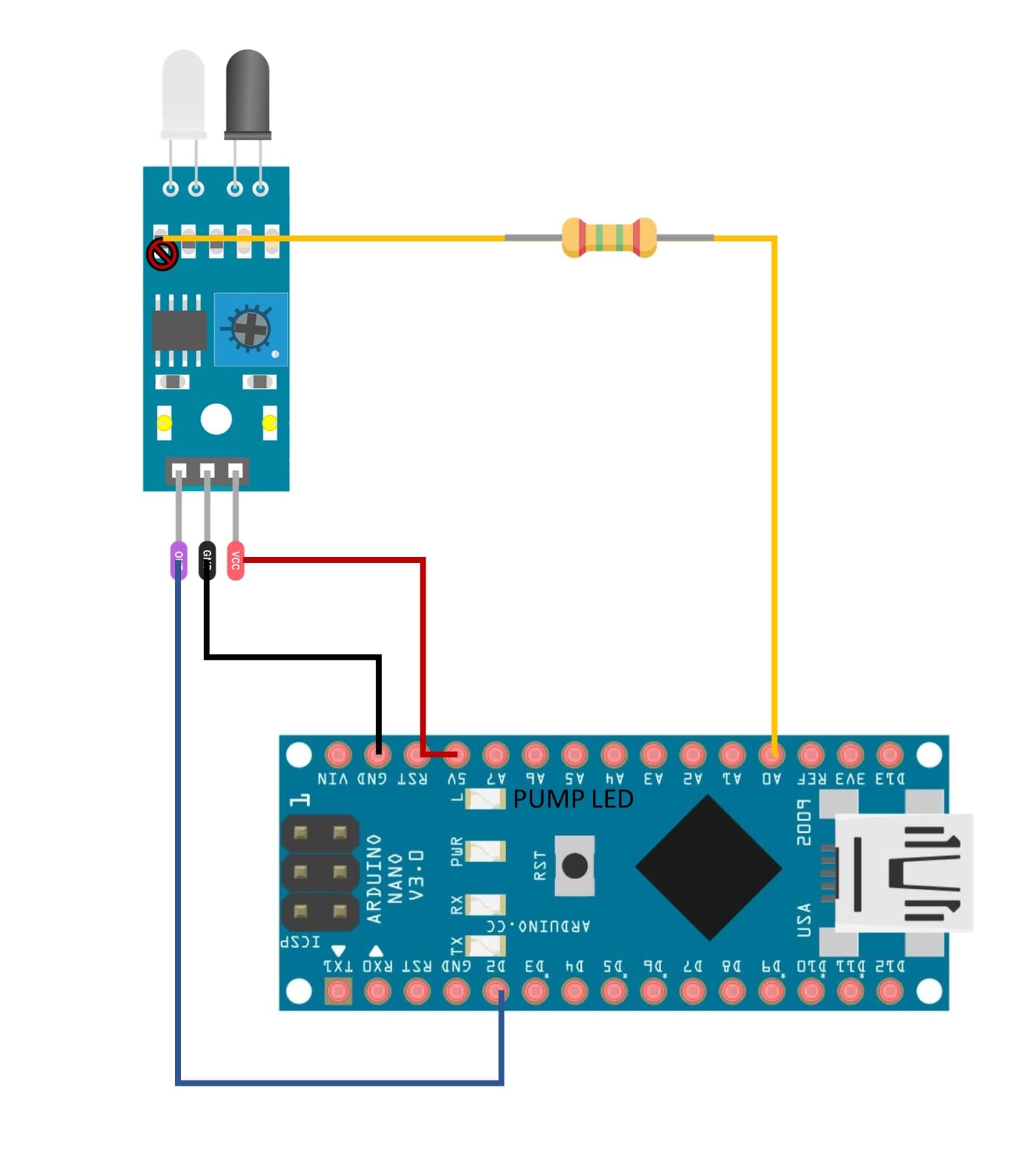
Sorry for the delay, here is the schematic I could come up with.

Please note that the series resistor of the transmitter LED on the proximity module is removed. instead, the LED is directly powered by the Arduino via a 120ohm series resistor.

Thanks for the suggestion. Actually, this is the bit I'm struggling with. I'd appreciate if you have a snippet that can be introduced into the code.

This project has come into existence realizing that I have a least 4 Mi automatic soap dispensers lying dysfunctional with similar point of failure. They all leak at some point (always around the plumbing that connects to the outlet) affecting the mainboard in due course, until the unit stops functioning. I wish to revive them instead of replacing them with similar products. Also, trying to keep the aesthetics and functioning.

Edit: As for metrics, with the IR transmitter LED consistently in 'ON' state, the module itself draws 28mA. This is with the power on LED on the module removed. When pulsed with 25ms on time with a 200ms delay between pulses, the current is about 1mA.

I can hope of not being fired from my own residence :grinning_face:
This is in a domestic setting. As for the performance, it seems satisfactory for personal use. I really do not wish to throw away the hardware that has the potential to work again. There are a few Mi soap dispensers that have refused to work, with plumbing leakage as point of failure. This issue may resurface, but then I would know what part to replace. I'm also going to shift the project to Attiny85 @1 Mhz.

Just sharing the real-time working of the principle hardware to simulate reliability of sensor response. It is the continuous operation of the pump (represented by LED at pin 13) when the hand remains in the proximity of the sensor that I need help.

20250701_210538-ezgif.com-resize

Yes, that is possible, however I prefer short pulses to save battery power instead of 50% duty cycle in the case of BlinkWithoutDelay.

Yes I thought that too. I had the timing situation in mind. I did look into the library, and there is a isOn(); function. I believe the state of the LED can otherwise be read by digitalRead of the LED pin as well? So, maybe not an exclusive function?

As short as you code it. But if you did not understand the principle of BlinkWithoutDelay then you should look for a simpler hobby or for paid assistance.

The snippet is the example. You need to give it a try. This is not a free code writing service. People are happy to help you when you are trying.

Appreciate the suggestion. However I am clueless of where would I like to use it. I can try if you can point to what I can do if the state of the sensor is known.

Here's a simple 1 second "ON delay" sketch you might try.

uint32_t timer;
int delayTime = 1000;
const byte triggerPin = 2; // input
const byte led = LED_BUILTIN;
bool timing;
bool trigger;
bool lastTrigger = true;

void setup()
{
  pinMode(led,OUTPUT);
  pinMode(triggerPin,INPUT_PULLUP);
}

void loop()
{
   trigger = digitalRead(triggerPin);
   if(trigger != lastTrigger)
   {
     delay(30); // debounce time
     lastTrigger = trigger;
     if(!timing && !lastTrigger)
     {
       timer = millis();
       timing = true;
     }  
   }
    if(millis() - timer > delayTime)
      timing = false;
    digitalWrite(led,timing); // output
     
}

If "LOW" then pump.
if "HIGH" then do nothing.
See post #9.

Ok, so I looked for an example of how blink without delay can be used and also found an example, however I still do not know how this helps in the situation.

Example:

#define LED_PIN 13
#define LED_ON 800       //milliseconds
#define LED_OFF 200

unsigned long ms;        //time from millis()
unsigned long msLast;    //last time the LED changed state
boolean ledState;        //current LED state

void setup(void)
{
    pinMode(LED_PIN, OUTPUT);
}

void loop(void)
{
    ms = millis();
    blinkLED();
}

void blinkLED(void)
{
    if (ms - msLast > (ledState ? LED_ON : LED_OFF)) {
        digitalWrite(LED_PIN, ledState = !ledState);
        msLast = ms;
    }
}

Can you please guide me where I can use it to resolve the continuous operation of the pump due to presence of the hand under the sensor?