Help with ModBus RTU Master-Slave: SimpleModbus [SOLVED]

Hi Majunath,

There is a temperature sensor connected in the arduino nano's port A5.

Master (PLC) should ask the value of the sensor from slave (arduino nano)
-> arduino answers the value using modbus rtu protocol with rs485. Nothing else for now.

I just need to know if this schematic (picture from my post before) is correct.
And I'm not fully sure about the code.. Maybe someone could give me an example?

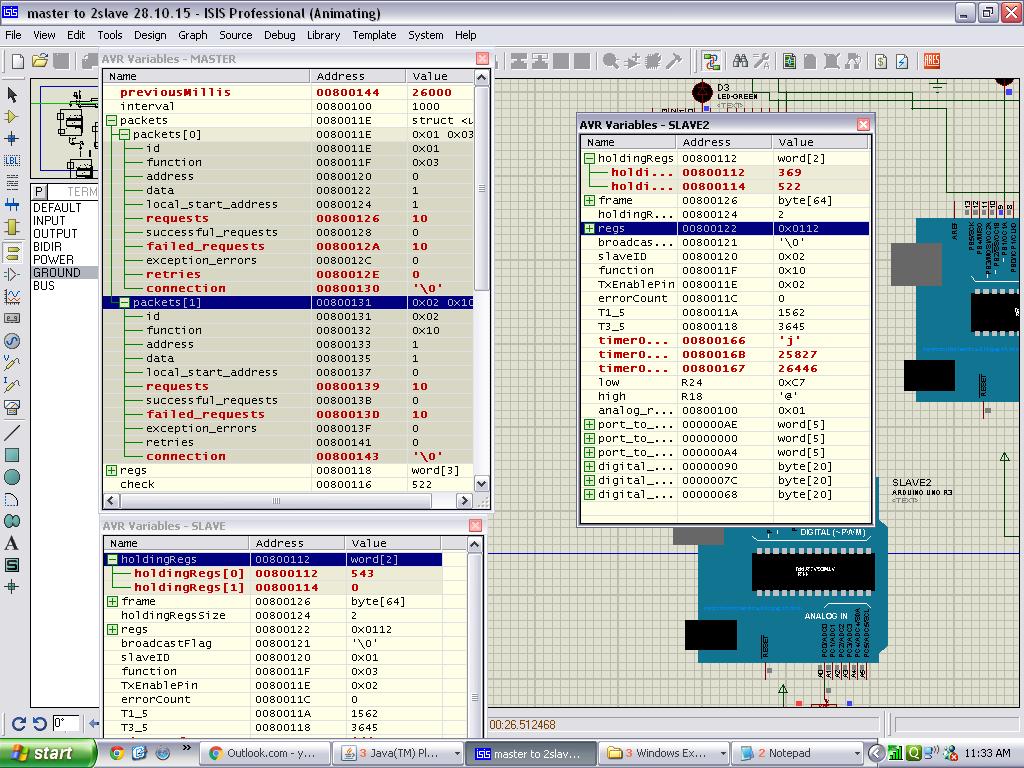
Hey guys I figured it out that it gets stored in au16data variable in proteus where i can check this data out, but still I don't no in which memory it is getting stored or do it take random available memory! But for now its ok for me, as it is getting at least transfer so now i can at least check it with diff software. If I came across any problem I will post over here thanks!
Now I am trying to make use of function 16 and write some numbers on slave registers, lets see how it goes!
Thanks for your help friends!

Hey friends,
First of all sorry for multiple posts,
I got success in establishing 3rd function that is reading from slave memory location, thanks a lot for it!
But now I am unable to establish function 16! as code that I share above is only for query to an slave device, not to write it!
I found only one library and example which can make function 16 I am sharing that here.

#include <SimpleModbusMaster.h>

/*
   The example will use packet1 to read a register from address 0 (the adc ch0 value)
   from the arduino slave (id=1). It will then use this value to adjust the brightness
   of an led on pin 9 using PWM.
   It will then use packet2 to write a register (its own adc ch0 value) to address 1 
   on the arduino slave (id=1) adjusting the brightness of an led on pin 9 using PWM.
*/

//////////////////// Port information ///////////////////
#define baud 9600
#define timeout 1000
#define polling 200 // the scan rate
#define retry_count 10

// used to toggle the receive/transmit pin on the driver
#define TxEnablePin 2 

#define LED 9

// The total amount of available memory on the master to store data
#define TOTAL_NO_OF_REGISTERS 1

// This is the easiest way to create new packets
// Add as many as you want. TOTAL_NO_OF_PACKETS
// is automatically updated.
enum
{
  PACKET1,
  PACKET2,
  TOTAL_NO_OF_PACKETS // leave this last entry
};

// Create an array of Packets to be configured
Packet packets[TOTAL_NO_OF_PACKETS];

// Masters register array
unsigned int regs[TOTAL_NO_OF_REGISTERS];

void setup()
{
  // Initialize each packet
  modbus_construct(&packets[PACKET1], 1, READ_HOLDING_REGISTERS, 0, 1, 0);
  modbus_construct(&packets[PACKET2], 1, PRESET_MULTIPLE_REGISTERS, 1, 1, 0);
  
  // Initialize the Modbus Finite State Machine
  modbus_configure(&Serial, baud, SERIAL_8N2, timeout, polling, retry_count, TxEnablePin, packets, TOTAL_NO_OF_PACKETS, regs);
  
  pinMode(LED, OUTPUT);
}

void loop()
{
  modbus_update();
  
  regs[0] = analogRead(0); // update data to be written to arduino slave
  
  analogWrite(LED, regs[0]>>2); // constrain adc value from the arduino slave to 255
}

Slave code:-

#include <SimpleModbusSlave.h>

/* 
   SimpleModbusSlaveV10 supports function 3, 6 & 16.
   
   This example code will receive the adc ch0 value from the arduino master. 
   It will then use this value to adjust the brightness of the led on pin 9.
   The value received from the master will be stored in address 1 in its own
   address space namely holdingRegs[].
   
   In addition to this the slaves own adc ch0 value will be stored in 
   address 0 in its own address space holdingRegs[] for the master to
   be read. The master will use this value to alter the brightness of its
   own led connected to pin 9.
   
   The modbus_update() method updates the holdingRegs register array and checks
   communication.

   Note:  
   The Arduino serial ring buffer is 64 bytes or 32 registers.
   Most of the time you will connect the arduino to a master via serial
   using a MAX485 or similar.
 
   In a function 3 request the master will attempt to read from your
   slave and since 5 bytes is already used for ID, FUNCTION, NO OF BYTES
   and two BYTES CRC the master can only request 58 bytes or 29 registers.
 
   In a function 16 request the master will attempt to write to your 
   slave and since a 9 bytes is already used for ID, FUNCTION, ADDRESS, 
   NO OF REGISTERS, NO OF BYTES and two BYTES CRC the master can only write
   54 bytes or 27 registers.
 
   Using a USB to Serial converter the maximum bytes you can send is 
   limited to its internal buffer which differs between manufactures. 
*/

#define  LED 9  

// Using the enum instruction allows for an easy method for adding and 
// removing registers. Doing it this way saves you #defining the size 
// of your slaves register array each time you want to add more registers
// and at a glimpse informs you of your slaves register layout.

//////////////// registers of your slave ///////////////////
enum 
{     
  // just add or remove registers and your good to go...
  // The first register starts at address 0
  ADC_VAL,     
  PWM_VAL,        
  HOLDING_REGS_SIZE // leave this one
  // total number of registers for function 3 and 16 share the same register array
  // i.e. the same address space
};

unsigned int holdingRegs[HOLDING_REGS_SIZE]; // function 3 and 16 register array
////////////////////////////////////////////////////////////

void setup()
{
  /* parameters(HardwareSerial* SerialPort,
                long baudrate, 
		unsigned char byteFormat,
                unsigned char ID, 
                unsigned char transmit enable pin, 
                unsigned int holding registers size,
                unsigned int* holding register array)
  */
  
  /* Valid modbus byte formats are:
     SERIAL_8N2: 1 start bit, 8 data bits, 2 stop bits
     SERIAL_8E1: 1 start bit, 8 data bits, 1 Even parity bit, 1 stop bit
     SERIAL_8O1: 1 start bit, 8 data bits, 1 Odd parity bit, 1 stop bit
     
     You can obviously use SERIAL_8N1 but this does not adhere to the
     Modbus specifications. That said, I have tested the SERIAL_8N1 option 
     on various commercial masters and slaves that were suppose to adhere
     to this specification and was always able to communicate... Go figure.
     
     These byte formats are already defined in the Arduino global name space. 
  */
	
  modbus_configure(&Serial, 9600, SERIAL_8N2, 1, 2, HOLDING_REGS_SIZE, holdingRegs);

  // modbus_update_comms(baud, byteFormat, id) is not needed but allows for easy update of the
  // port variables and slave id dynamically in any function.
  modbus_update_comms(9600, SERIAL_8N2, 1);
  
  pinMode(LED, OUTPUT);
}

void loop()
{
  // modbus_update() is the only method used in loop(). It returns the total error
  // count since the slave started. You don't have to use it but it's useful
  // for fault finding by the modbus master.
  
  modbus_update();
  
  holdingRegs[ADC_VAL] = analogRead(A0); // update data to be read by the master to adjust the PWM
  
  analogWrite(LED, holdingRegs[PWM_VAL]>>2); // constrain adc value from the arduino master to 255
  
  /* Note:
     The use of the enum instruction is not needed. You could set a maximum allowable
     size for holdinRegs[] by defining HOLDING_REGS_SIZE using a constant and then access 
     holdingRegs[] by "Index" addressing. 
     I.e.
     holdingRegs[0] = analogRead(A0);
     analogWrite(LED, holdingRegs[1]/4);
  */
  
}

1.But I didn't understand exactly where in here we are defining function which we need to execute either 3 or 16!
2.I tried this code in circuit I attached but it giving errors count 19 and all requests are get failed so communicating at all! I am shearing the pictures of these too, so if there is any suggestions for me it would be lot helpful for me!

yatin,

Please read the documentation thoroughly to know exactly the process and limitations for Arduino.
You need to read the documentation that goes with the library for SimpleModbusMaster or you will not understand some of the very important details that you will need to know.

Manjunath

Hi Manjunath,
Thanks for your suggestion, I read those documents it made many of my concepts clear and also provide great idea about this library and framing of protocol!
Still I have following problems,
1.There are many resistors are suggested for pulling purpose but as I am using it on proteus not on hardware and also not using computer interface so do I still need max232 kind IC's and those pull up resistors.
2. In my above shared program do I need any additional delays?
3. Right now I am making 10 requests and all of them getting failed with exception errors for the above shared hardware configuration, so where am i doing wrong?
And really thankful for your suggestions and guidelines.
Yatin

Hey Monk_duck 1,
I am not good in this section yet, but read this following link It may give you little idea, and help you out from your difficulties.
https://drive.google.com/folderview?id=0B0B286tJkafVYnBhNGo4N3poQ2c&usp=drive_web&tid=0B0B286tJkafVSENVcU1RQVBfSzg
If you have already read this then sorry, let some expert give you the answer!
Yatin

Yatin,

1.There are many resistors are suggested for pulling purpose but as I am using it on proteus not on hardware and also not using computer interface so do I still need max232 kind IC's and those pull up resistors.

As per your shared block diagram"schematic.JPG" you connect the circuit wright.

If you connected like this I think its wrong.You need to add some circuit like RS485 for Modbus.

Even your not mention what kind of application is doing.?
what is you goal?

clearly explain what you want do with using 2 arduino pcb? and how much distance needs between
2 arduinos?
I mean if you want to use some feets distance ,the maximum cable length is 50 feet for RS232.

RS485 must work, for more than 1000 meters with similar baud rate by using telephone twisted cable pair. The cable resistance also < 200 ohm.

Check your driver for the proper functioning

See these basic fundamentals behind the RS 232 and RS 485. OK.

Based on circuit you must use some resisters and capacitor because they reduce noise and increase
communication signal strength. OK.

  1. In my above shared program do I need any additional delays?

Avoiding the delays in your code is become good program. OK.

  1. Right now I am making 10 requests and all of them getting failed with exception errors for the above shared hardware configuration, so where am i doing wrong?

yes your doing absolutely wrong and look at code and start debug your code your self its very easy.
you need to read again document for why exception errors will come.OK.

Look Arduino is so easy to do coding and debugging as well as you find very working library for your task.
Go ahead good luck Yatin !

---- Manjunath

Manjunathele
Hey thanks a lot!

what you want do with using 2 arduino pcb? and how much distance needs between
2 arduinos?

I want to make a program for my sensors to make them communicate with PLCs at the end, this is my final goal!
But for now to start with, I am trying to Make it run with simulating software's so right now I don't have distance problem, ( thanks for that tip as I have to consider this when I will implement this on hardware)
And now I solved my problem and now all attempts are getting successful, thanks for your advice to read data!
So as it is running on proteus I will test it with modbus testers and then I will make Hardware after its success!
Thanks for your help, thanks a lot!

Yatin

Hey,
Thanks for all your help guys, this program is running awesomely on mod testers also, but I am facing problem when I go to interface multiple slave on software! After reading all program I only found a single command where I should define my command i.e.

modbus_configure(&Serial, 9600, 1, 2, HOLDING_REGS_SIZE, holdingRegs);

  // modbus_update_comms(baud, id) is not needed but allows for easy update of the
  // port variables and slave id dynamically in any function.
  modbus_update_comms(9600, 1);

In this section only making change to following for my second slave other every thing is same,

modbus_configure(&Serial, 9600, 2, 2, HOLDING_REGS_SIZE, holdingRegs);

  // modbus_update_comms(baud, id) is not needed but allows for easy update of the
  // port variables and slave id dynamically in any function.
  modbus_update_comms(9600, 2);

But I don't no why it is not runing, it is sending data succesfully when only one id but when I tried to send on one of two ID it is geting time out.
So is there any thing that I am missing to change?
Is it any delay problem, because my slave are receiving data which master writing using function 16, but they are not responding or may be master not receiving and attempt gets failed, so I am not understanding the problem.
also attaching my hardware I don't think there is any problem in it as it runs properly in single!
So if anyone who could help me out of this it would be a appreciated!

I am thinking that this is more likely a hardware error on proteus as he displaying error for multiple slave about my masters RX pin is getting logic contentions. I am not understanding is it a proteus fault or my hardware is wrong, or is a programming fault.I didn't able to solve above problem, but now I am assuming it as a proteus problem so I started doing this system with hardware.
As I mentioned earlier my program is properly running on proteus with external modbus tester also. But now when I made hardware using max 485 with computer I am unable to get successful tries all of my attempts are getting time out.
I attached my circuit diagram used for max 485.
To check hardware I checked with serial write and read programs and bot are working it means my hardware is allowing arduino to write and read from computer on serial port.
I also on doubt of delay so I put 1000 polling and 5000 timeout, still its not functioning!
Can any body help me over my problem?

Yatin

max485.JPG

Hello juanB I've implemented your code to communicate with PLC via rs485 but without any success please help me out. :confused:

Mohit-singh
Please post your status, your hardware diagrammed, program so that some one here can help you out.
No one could help you out until you share your problem?
What you exactly implemented?
Is slave are receiving data?
What is exact problem?
Yatin

hi every one,
I am trying to run code of my earlier posts from long here is my problem!
It is running on proteus properly.
But when I am trying to run it as slave and my computer as master with master simulator, my slave is receiving data properly
This is I checked with following code

#include <LiquidCrystal.h>

// initialize the library with the numbers of the interface pins
LiquidCrystal lcd(12, 11, 6, 5, 4, 3);
int check;
void setup() {
  // set up the LCD's number of columns and rows:
  lcd.begin(16, 2);
  // initialize the serial communications:
  Serial.begin(9600);
}

void loop() {
  // when characters arrive over the serial port...
  if (Serial.available()) {
    // wait a bit for the entire message to arrive
    delay(20);
    // clear the screen
    lcd.clear();
    // read all the available characters
    while (Serial.available() > 0) {
      // display each character to the LCD
      lcd.print(Serial.read());
      //check = Serial.read();
      //Serial.print("check");
    }
  }
}

and my lcd is showing exactly same data which my proteus lcd showing me, so i guess my arduino uno is receiving data, but when I use program

#include <SimpleModbusSlave_DUE.h>
#include <LiquidCrystal.h>

// initialize the library with the numbers of the interface pins
LiquidCrystal lcd(12, 11, 6, 5, 4, 3);


/* 
   SimpleModbusSlaveV10_DUE supports function 3, 6 & 16.
   
   This example code will receive the adc ch0 value from the arduino master. 
   It will then use this value to adjust the brightness of the led on pin 9.
   The value received from the master will be stored in address 1 in its own
   address space namely holdingRegs[].
   
   In addition to this the slaves own adc ch0 value will be stored in 
   address 0 in its own address space holdingRegs[] for the master to
   be read. The master will use this value to alter the brightness of its
   own led connected to pin 9.
   
   The modbus_update() method updates the holdingRegs register array and checks
   communication.

   Note:  
   The Arduino serial ring buffer is 64 bytes or 32 registers.
   Most of the time you will connect the arduino to a master via serial
   using a MAX485 or similar.
 
   In a function 3 request the master will attempt to read from your
   slave and since 5 bytes is already used for ID, FUNCTION, NO OF BYTES
   and two BYTES CRC the master can only request 58 bytes or 29 registers.
 
   In a function 16 request the master will attempt to write to your 
   slave and since a 9 bytes is already used for ID, FUNCTION, ADDRESS, 
   NO OF REGISTERS, NO OF BYTES and two BYTES CRC the master can only write
   54 bytes or 27 registers.
 
   Using a USB to Serial converter the maximum bytes you can send is 
   limited to its internal buffer which differs between manufactures. 
*/

#define  LED 13  

// Using the enum instruction allows for an easy method for adding and 
// removing registers. Doing it this way saves you #defining the size 
// of your slaves register array each time you want to add more registers
// and at a glimpse informs you of your slaves register layout.

//////////////// registers of your slave ///////////////////
enum 
{     
  // just add or remove registers and your good to go...
  // The first register starts at address 0
  ADC_VAL,     
  PWM_VAL,        
  HOLDING_REGS_SIZE // leave this one
  // total number of registers for function 3 and 16 share the same register array
  // i.e. the same address space
};

unsigned int holdingRegs[HOLDING_REGS_SIZE]; // function 3 and 16 register array
unsigned int check;
////////////////////////////////////////////////////////////

void setup()
{
  /* parameters(HardwareSerial* SerialPort,
                long baudrate, 
                unsigned char ID, 
                unsigned char transmit enable pin, 
                unsigned int holding registers size,
                unsigned int* holding register array)
  */
	// set up the LCD's number of columns and rows:
  lcd.begin(16, 2);
  modbus_configure(&Serial, 9600, 1, 2, HOLDING_REGS_SIZE, holdingRegs);

  // modbus_update_comms(baud, id) is not needed but allows for easy update of the
  // port variables and slave id dynamically in any function.
  modbus_update_comms(9600, 1);
  
  pinMode(LED, OUTPUT);
}

void loop()
{
  // modbus_update() is the only method used in loop(). It returns the total error
  // count since the slave started. You don't have to use it but it's useful
  // for fault finding by the modbus master.
  digitalWrite(13, HIGH); 
  modbus_update();
  
  holdingRegs[ADC_VAL] = analogRead(A0); // update data to be read by the master to adjust the PWM
  
  analogWrite(LED, holdingRegs[PWM_VAL]>>2); // constrain adc value from the arduino master to 255
  check=holdingRegs[PWM_VAL];
  lcd.clear();
  lcd.write(check);
  delay(30);
  
   digitalWrite(13, LOW);
  /* Note:
     The use of the enum instruction is not needed. You could set a maximum allowable
     size for holdinRegs[] by defining HOLDING_REGS_SIZE using a constant and then access 
     holdingRegs[] by "Index" addressing. 
     I.e.
     holdingRegs[0] = analogRead(A0);
     analogWrite(LED, holdingRegs[1]/4);
  */
  
}

My lcd is showing 0.
and no message is getting send back to master!
So I am not understanding where is fault exactly!
I am in real need of help on this please some one suggest me something on it I am stucked and dont no what to do!

Hello again.

I checked SimpleModbusMasterManual.pdf from here juanB libraries. JuanB explains there how to do hardware connection for arduino slave.
After I did this connection, I can't download my code anymore to arduino.

arduino says:

avrdude: stk500_recv(): programmer is not responding
avrdude: stk500_getsync() attempt 1 of 10: not in sync: resp=0x01
avrdude: stk500_recv(): programmer is not responding

Code I'm downloading:

#include <SimpleModbusSlave.h>

/* 
   SimpleModbusSlaveV10 supports function 3, 6 & 16.
   
   This example code will receive the adc ch0 value from the arduino master. 
   It will then use this value to adjust the brightness of the led on pin 9.
   The value received from the master will be stored in address 1 in its own
   address space namely holdingRegs[].
   
   In addition to this the slaves own adc ch0 value will be stored in 
   address 0 in its own address space holdingRegs[] for the master to
   be read. The master will use this value to alter the brightness of its
   own led connected to pin 9.
   
   The modbus_update() method updates the holdingRegs register array and checks
   communication.

   Note:  
   The Arduino serial ring buffer is 64 bytes or 32 registers.
   Most of the time you will connect the arduino to a master via serial
   using a MAX485 or similar.
 
   In a function 3 request the master will attempt to read from your
   slave and since 5 bytes is already used for ID, FUNCTION, NO OF BYTES
   and two BYTES CRC the master can only request 58 bytes or 29 registers.
 
   In a function 16 request the master will attempt to write to your 
   slave and since a 9 bytes is already used for ID, FUNCTION, ADDRESS, 
   NO OF REGISTERS, NO OF BYTES and two BYTES CRC the master can only write
   54 bytes or 27 registers.
 
   Using a USB to Serial converter the maximum bytes you can send is 
   limited to its internal buffer which differs between manufactures. 
*/

#define  LED 9  

// Using the enum instruction allows for an easy method for adding and 
// removing registers. Doing it this way saves you #defining the size 
// of your slaves register array each time you want to add more registers
// and at a glimpse informs you of your slaves register layout.

//////////////// registers of your slave ///////////////////
enum 
{     
  // just add or remove registers and your good to go...
  // The first register starts at address 0
  ADC_VAL,     
  PWM_VAL,        
  HOLDING_REGS_SIZE // leave this one
  // total number of registers for function 3 and 16 share the same register array
  // i.e. the same address space
};

unsigned int holdingRegs[HOLDING_REGS_SIZE]; // function 3 and 16 register array
////////////////////////////////////////////////////////////

void setup()
{
  /* parameters(HardwareSerial* SerialPort,
                long baudrate, 
		unsigned char byteFormat,
                unsigned char ID, 
                unsigned char transmit enable pin, 
                unsigned int holding registers size,
                unsigned int* holding register array)
  */
  
  /* Valid modbus byte formats are:
     SERIAL_8N2: 1 start bit, 8 data bits, 2 stop bits
     SERIAL_8E1: 1 start bit, 8 data bits, 1 Even parity bit, 1 stop bit
     SERIAL_8O1: 1 start bit, 8 data bits, 1 Odd parity bit, 1 stop bit
     
     You can obviously use SERIAL_8N1 but this does not adhere to the
     Modbus specifications. That said, I have tested the SERIAL_8N1 option 
     on various commercial masters and slaves that were suppose to adhere
     to this specification and was always able to communicate... Go figure.
     
     These byte formats are already defined in the Arduino global name space. 
  */
	
  modbus_configure(&Serial, 9600, SERIAL_8N2, 1, 2, HOLDING_REGS_SIZE, holdingRegs);

  // modbus_update_comms(baud, byteFormat, id) is not needed but allows for easy update of the
  // port variables and slave id dynamically in any function.
  modbus_update_comms(9600, SERIAL_8N2, 1);
  
  pinMode(LED, OUTPUT);
}

void loop()
{
  // modbus_update() is the only method used in loop(). It returns the total error
  // count since the slave started. You don't have to use it but it's useful
  // for fault finding by the modbus master.
  
  modbus_update();
  
  holdingRegs[ADC_VAL] = analogRead(A0); // update data to be read by the master to adjust the PWM
  
  analogWrite(LED, holdingRegs[PWM_VAL]>>2); // constrain adc value from the arduino master to 255
  
  /* Note:
     The use of the enum instruction is not needed. You could set a maximum allowable
     size for holdinRegs[] by defining HOLDING_REGS_SIZE using a constant and then access 
     holdingRegs[] by "Index" addressing. 
     I.e.
     holdingRegs[0] = analogRead(A0);
     analogWrite(LED, holdingRegs[1]/4);
  */
  
}

So if someone could check my hardware connection and tell, if they find anything problematic, please respond.. As far as I understand, capasitors are only for stabilazing the voltage level, so I didn't add those yet.

EDIT: Thanks yatin. So I disconnect all the wiring, and the arduino program downloaded ok. Then I wired it back again, one wire at the time. Problem seems to be the wire between arduino pin RX0 and AMD485 R0. When it is connected, program won't be downloaded to arduino. Any ideas how to solve this? Any other than downloading without wires?

Monk it happens some time just make sure any serial simulator or other software is not running.
Also try again with restarting your computer still if it is showing same then takeout your serial pin connection and then upload code!

Guys I am in Real need please can some one help me on my issue?

I'm trying to use the same library and code for read some registers from a power meter PM9C by schneider electric, but i get many error mesages, could somebody help me?

Hello Mazc,
Can u please post your code with photo or errors you are getting so we can help you out properly!
Regards
Yatin

Well, i was trying to use the library <ModbusRtu.h>

#include <ModbusRtu.h>

uint16_t au16data[16]; //!< data array for modbus network sharing
uint8_t u8state; //!< machine state
uint8_t u8query; //!< pointer to message query
/**
 *  Modbus object declaration
 *  u8id : node id = 0 for master, = 1..247 for slave
 *  u8serno : serial port (use 0 for Serial)
 *  u8txenpin : 0 for RS-232 and USB-FTDI 
 *               or any pin number > 1 for RS-485
 */
Modbus master(0,0,2); 


modbus_t telegram[2];

unsigned long u32wait;

void setup() {
  // telegram 0: read registers
  telegram[0].u8id = 1; // slave address
  telegram[0].u8fct = 3; // function code (this one is registers read)
  telegram[0].u16RegAdd = 1020; // start address in slave
  telegram[0].u16CoilsNo = 1; // number of elements (coils or registers) to read
  telegram[0].au16reg = au16data; // pointer to a memory array in the Arduino
  
  master.begin( 9600 ); // baud-rate at 19200
  master.setTimeOut( 5000 ); // if there is no answer in 5000 ms, roll over
  u32wait = millis() + 1000;
  u8state = u8query = 0; 
}

void loop() {
  switch( u8state ) {
  case 0: 
    if (millis() > u32wait) u8state++; // wait state
    break;
  case 1: 
    master.query( telegram[u8query] ); // send query (only once)
    u8state++;
  u8query++;
  if (u8query > 2) u8query = 0;
    break;
  case 2:
    master.poll(); // check incoming messages
    if (master.getState() == COM_IDLE) {
      u8state = 0;
      u32wait = millis() + 1000; 
    }
    break;
  }

  Serial1.println(au16data[16],DEC);

}

but i was only getting some strange symbols in the serial monitor with or withouth the slave device connected, then i decide to use the same library than you, because this is the biggest post with a lot of information that i have found, but I'm getting this errors:

Arduino: 1.6.6 Hourly Build 2015/11/03 04:46 (Windows 7), Board: "Arduino/Genuino Mega or Mega 2560, ATmega2560 (Mega 2560)"

elmasbueno:16: error: 'packetPointer' does not name a type

packetPointer packet1 = &packets[PACKET1];

^

C:\Users\Casa\Documents\Arduino\elmasbueno\elmasbueno.ino: In function 'void setup()':

elmasbueno:22: error: 'packet1' was not declared in this scope

modbus_construct(packet1, 1, READ_HOLDING_REGISTERS, 1008, 1, readRegs);

^

elmasbueno:24: error: too few arguments to function 'void modbus_configure(HardwareSerial*, long int, unsigned char, long int, long int, unsigned char, unsigned char, Packet*, unsigned int, unsigned int*)'

modbus_configure(&Serial, baud, SERIAL_8E1, timeout, polling, retry_count, TxEnablePin, packets, TOTAL_NO_OF_PACKETS);

^

In file included from C:\Users\Casa\Documents\Arduino\elmasbueno\elmasbueno.ino:1:0:

C:\Users\Casa\Documents\Arduino\libraries\SimpleModbusMasterV2rev2/SimpleModbusMaster.h:134:6: note: declared here

void modbus_configure(HardwareSerial* SerialPort,

^

C:\Users\Casa\Documents\Arduino\elmasbueno\elmasbueno.ino: In function 'void loop()':

elmasbueno:33: error: 'writeRegs' was not declared in this scope

writeRegs[0] = analogRead(A0); // update data to be written to arduino slave

^

exit status 1
'packetPointer' does not name a type

This report would have more information with
"Show verbose output during compilation"
enabled in File > Preferences.

I never face such errors in my trials with arduino UNO. I just curious that did you add the library in your sketch to the library location?
It can cause so many errors while compiling
So double check librariy is properly added or not
Regards
Yatin