Hi Speed serial data transfer PC to Arduino via USB2

Some background.
I have a system that uses a PC to transfer data to an external USB device using the USB2
port. The data transfer has to be relatively hi-speed and ideally not require the PC to be involved in this data transfer, once initiated.

To do this I use a Digital I/O card that has a USB2 interface. Origially I had a different device that used the standard HID USB driver. However, that driver was too slow. I then changed to the device that I now use, that comes with its own fast driver for USB2.

With the DIO USB device, I am able to send data to it using USB, then I signal that device to now transfer that information to external hardware using 3 signal wires, Clock, data and strobe. The DIO card does this very nicely without requiring the PC.

This setup has been satisfactory for several years, meeting all my requirements. The problem I now have is that this particular device is becoming quite expensive.

So my thinking was, I could use an Arduino. It has a USB interface. I have previously written code that addressed the internal functions of the AtMega chip directly, so I have some experiance coding the chip registers directly.

All I need to do is send 16 bytes twice to the Arduino. Then the Arduino would generate from this data, appropiate clock/data/strobe signals to the external hardware.

The 32 byte data transfer needs to be no more than 1mSec to complete. In other words, 256 bits transfered in 1mSec. That is 256kHz bit rate to transfer.

The USB serial connection to the Arduino seems to be only sending information to the PC. Except when downloading the code to the Arduino. I want to go the other way, that is, have the PC send information to the Arduino.

My questions are can this be done ?
Are there any projects provided by other users that meet this specification ?
I since found this very helpful post which answers some of my questions regarding 'sending' data to an Arduino.https://forum.arduino.cc/t/serial-input-basics-updated/382007

Do you know what driver your DIO card uses?

I think on the Arduino side there is no problem. On the PC side, the USB serial interface is not handled in a particularly fast way, the Windows API looks like a serial port. While you can select a high baud rate in Windows, you might not get a high bandwidth or predictable latency.

The manufacturers of the DIO card ([https://accesio.com/]) provide the driver for their card, which I have to install. It is fast and latency is not a problem. I have been using it for more than ten years. With the fall of the NZD against the USD, as I said, they are becoming too expensive.

Coupled with the fact that the card has an issue with the USB interface chip that they use. It is easily damaged by spikes etc. Then the card loses communications thus rendering the device useless.

Accessio provide a SDK interface, so I can call their functions directly from my C++ code in my PC app.

Since I started this topic I have read a bit more about the Arduino serial routines, and I see that they are capable of communications with a PC in both directions. I'm only guessing, but I imagine the Arduino uses the standard Windows HID driver. I guess I can check in Device Manager to see.

I think all Arduino Unos use USB Serial (CDC). On the official board, this is provided by a ATmega16U2 chip. Clones often use CH340.

Other boards like Nano are also USB serial, possibly with FTDI chip.

FTDI has several modules that convert USB to SPI/Parallel/I2C that will operate a 3Mbytes.
So you can send your data directly to the Arduino and bypass the USB-UART interface.

That is very interesting Jim.

Currently I use Intel NUCs as my PC. These have only USB ports, so I would be committed to use a USB cable from PC to Arduino. Therefore it would be nice if I can use the USB port already provided on the Arduino, and a standard USB cable.

I've been using the Arduino Mega for most of my Arduino projects. It is cheap (from China) and has multiple I/O and extensive interrupt capability. A very powerful little machine for a few dollars.

I guess the next thing is to just try it.

If I open Device Manager in Windows, I can access the USB Com ports under the heading
'Ports (COM & LPT1)'. From there I can I can select 'USB Serial Device (COM5)'. If I click on this heading, then a dialog opens and there is a tab, 'Port Settings', in which it goes up to a maximum of 128000 bits per second.

A quick Google tells me there is a lot of information regarding programing the USB ports in Windows, so I guess I have some study to do...

I see there are WinUSB functions available.

With my current app I have the luxury of not having to do this. All the necessary routines are provided by the IO card manufacturer.

I also use a high resolution camera that only works on USB3. Basler, the camera manufacturer, supplies a SDK for controlling the camera, so once again I do not have to worry about the USB nuts and bolts.

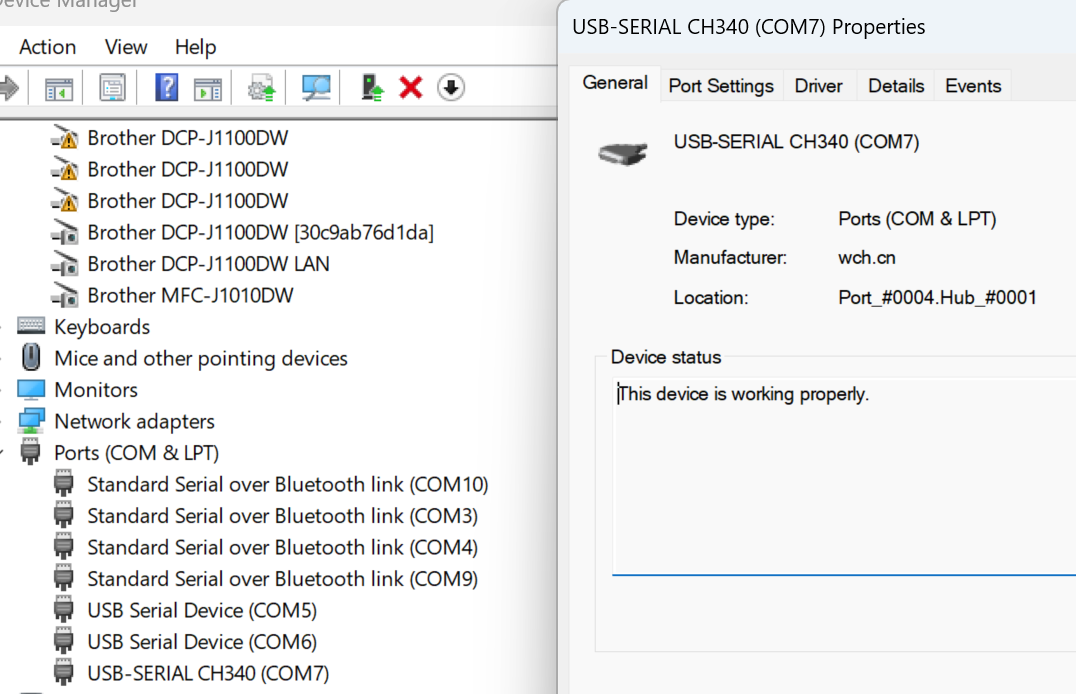
I hooked up my Mega board and then saw this in Device manager

It shows the Mega board on COM7 and using the CH340 chip as Bob suggests.

When one uploads compiled code to the Arduino, what baud rate is being used ?
I'm trying to get my head around the USB connection.
The function Serial.begin(speed); I'm assuming, sets the baud rate for the serial monitor.
I changed the baud rate in my PC and in the Arduino and deliberately had these mismatched (different rates). It didn't seem to make any difference. Code uploaded just the same.

That depends on the board. For a Mega it's 115200, for a Nano with old bootloader it's 57600 and for a Nano with new bootloader it's 115200. You can find that in the file boards.txt the board packages; but it might be easier to check it by using the verbose output during upload and analysing the output.

As far as I know, the baud rate setting in device manager only influences a default baud rate when using the command prompt; but I might be mistaken.

Thanks. I could not find that file, boards.txt ?

Standard location for all board packages is C:\Users\yourUsername\AppData\Local\Arduino15\packages. You'll need to navigate to the correct directory; e.g. for Arduino AVR based boards (e.g. Uno, Mega etc) C:\Users\yourUsername\AppData\Local\Arduino15\packages\arduino\hardware\avr\1.8.6

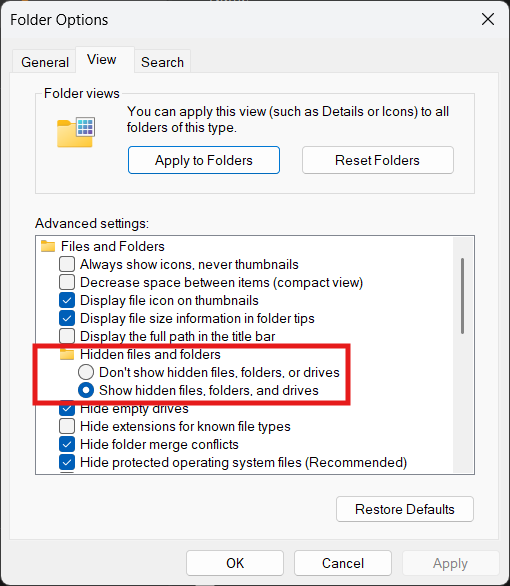
The directories might be hidden by Windows; in that case you can make them visible using (tools →) options in windows explorer.

Ah, so much to learn. So little time.

Thanks sterretje, I found the file and yes, upload speed is 115200 as you state above.

Actually, I always have Hidden Files showing. I like to know what is there. Old school.

I came across this useful post.
https://forum.arduino.cc/t/howto-anatomy-of-the-boards-txt-file-for-custom-boards/154989

You mention Verbose Output above. Is that a setting option in the IDE ?
(Ah, found that setting in 'Preferences')

@kavala this thread in the Tutorials forum discusses two way comms using Python on the PC.
Two ways communication between Python3 and Arduino.._gaMTI4Mjk0NzQ2Mi4xNzQyNTA1NjUx*_ga_NEXN8H46L5*MTc0MjUwNTY1MC4xLjAuMTc0MjUwNTY1MC4wLjAuOTU5NTY1OTY5

A good start would be to try a Python script on the PC and 'echo' a few bytes back from your Arduino Mega board. After that try and redirect the stream to an external hardware device. Your required baud rate should not be a problem.

Very Interesting.
I've only skimmed through the post but I see that it is saying that the Arduino will reboot upon receiving data at it's USB port.

That could be a problem for me as, if I can get this working, I intend to send a packet of 32 bytes to the Arduino, 12 times per second. I don't want the Arduino to reboot on each occasion.

The poster does suggest some work-arounds. That wouldn't be a problem for me if I had to do some small modifications to the Arduino.

I have not used Python. I see it is not very different from what I am used to (C++), so I guess I could learn.

Right now, I will stick with C++ because I have all the tools for that. Also, my Windows application, which I intend to upgrade with this modification, is quite extensive and is all written in C++.

I'm going to persevere for now and see if I can use Microsoft WinUSB routines to implement what I need.

Please explain FTDI ?

It might be possible to avoid this in the way your application configures the port. The Arduino Mega 2560 board automatically resets when the DTR (data terminal ready) or RTS (request to send) serial control signals are asserted by the PC. So if you can write the code in your application in a way that causes it to not asserting either of those signals, then it won't reset the Arduino board.

If you aren't able to do this in your application code, then you can use the alternative approach of disabling the auto-reset circuit on the board through hardware instead of software, as described in the tutorial.

The Tutorial you refer to is for the Mega328. I'm assuming the Meg2560 is similar.
Not that I'm fixed on the 2560. I can use any board for a new app.
It's just that right now I have a bunch of clone 2560's boards that I bought from China.