Good day,
Any body can help me with how to read and write from eeprom memory?
I try read and write but i fail in that
I want to store 6 value only
One with decimal, i tride to read it
They result 255 on all variable
And in writting they didnt do that.
And the other question on how to do same
With SD is there a way to load code from
SD or run it fromthere to save space on the controller?
Sayed:
Good day,
Any body can help me with how to read and write from eeprom memory?
I assume you are using the native EEPROM library, which comes with the arduino IDE?
Have you successfully tried the basic example sketches like eeprom read and eeprom write?
One with decimal, i tride to read it
I assume you mean a number with digits after the decimal point like e.g. 100.45?
eeprom can only store bytes. (value from 0 - 255)
You wil have to somehow break you number into byte-sized units. How exactly, will depend on the range of values which you would like to store.
There are also extended eeprom libraries, which can store values other than bytes. However if even the basic example sketches don't work for you, then get this going first.
They result 255 on all variable
And in writting they didnt do that.
255 is the default value, if nothing has been written to this particular eeprom byte.
Apparently the "write" didn't work, or you are writing and reading from different places in the eeprom.
And the other question on how to do same
With SD
I assume you have a SD card reader attached and your SD card is recognized?
First try the basic example sketches from the Arduino IDE.
The next step would then be how to organize your data into a file.
is there a way to load code from
SD
http://forum.arduino.cc/index.php?topic=16812.0
or run it from there to save space on the controller?
That would be a very large sketch. If you are really running out of program memory space, the most simple thing is to upgrade to a different controller/arduino board.
I've seen people load graphics or text from SD, but code? Maybe possible with http://bitlash.net/
However to be honest with you, this seems way over the top for you, judging from the kind of questions you ask.
I suggest you get the basic functionality working first.
You will find that the more specific your question is, and the more details you provide, the more likely people with be able to give helpful answers.
Whishing you success
Thomas
thank you very much Thomas i do your suggestion and it help me, i was thinking that i can write as int name and there value and it record in the eeprom but now i understand that i should only choice place to write then choice it again to read from same place and for the decimal point i just develop equation by multiplying and subtracting from the value in order to store it there,
about SD card i will write what i have done later
Now i connect the SD card again and the data start to logged where it test the SD card later on the computer,
then i return the SD card Back but it around 1 minute then the SD card holder become hot and i check the SD card with the computer again then i note that SD card no more work!
i connect the SD card as the following link
http://arduinolearning.com/learning/basics/sd-card-example.php
any idea?
Sayed:
around 1 minute then the SD card holder become hot and i check the SD card with the computer again then i note that SD card no more work!
i connect the SD card as the following link
SD card example - Arduino Learning
any idea?
Unfortunately this link does not explain that arduinos work with 5V, but all SD cards work with 3.3V.
Not all SD card adapters / shields / breakout boards include a 3.3V voltage regulator.
Even some adapters that do have a voltage regulator, they still connect the arduino pins directly with the SD card (for example the LC Studio adapter, pictured in the above link). Not all SD cards survive 5V on their data pins.
So the recommended adapter is one with a 3.3V voltage regulator AND a voltage level shifting circuit for the data lines.
I'm sorry about the dead card. It's a shame that the 5V/3.3V voltage issue isn't communicated clearer in the official arduino example.
All the best
Thomas
thanks Thomas,
i just buy new one and connect the shield to 3.3V and data logger work fine,
now is there any way to store or load code for arduino from SD card to save space in the arduino memory?
Sayed:
thanks Thomas,
i just buy new one and connect the shield to 3.3V and data logger work fine,
Which shield and which card adapter are you using?
now is there any way to store or load code for arduino from SD card to save space in the arduino memory?
I've never done this and I haven't seen anyone do it. Have you tried http://bitlash.net/ ?
As mentioned in reply #1, the easiest is to upgrade to a board with larger flash memory.
Thomas
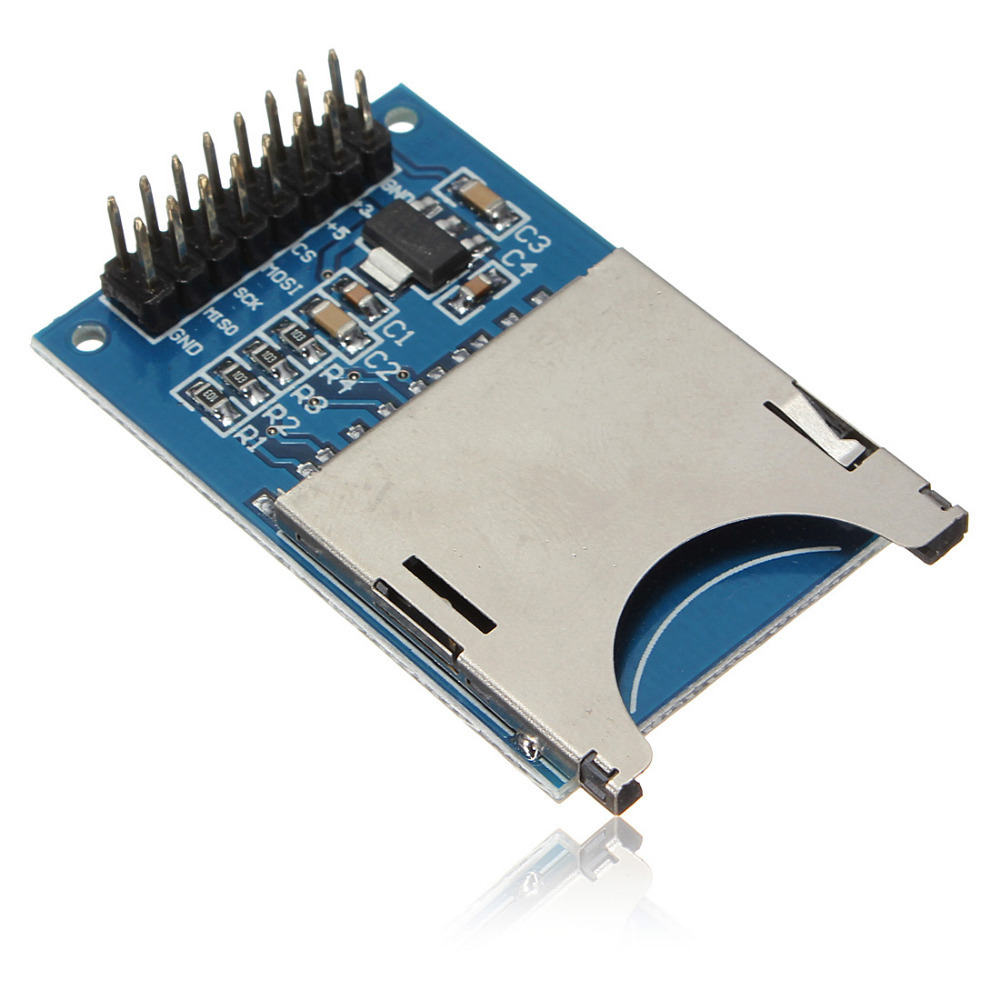
the one i use as the following
but it fail again in record where i need timer for record and change the logger file
if you can help me
#include <Wire.h>
#include <Scheduler.h>
#include <SD.h>
#include <SPI.h>
// Setup a oneWire instance to communicate with any OneWire devices
const int chipSelect = 10;
String dataString = "";
unsigned long timenw=0;
unsigned long timepr4=0;
int dayc1;
unsigned long hourc1=0;
unsigned long day;
char filename[11]= {'\0'};;
File dataFile;
void setup() /----( SETUP: RUNS ONCE )----/
{
Serial.begin(9600);
while (!Serial) {
; // wait for serial port to connect.
//dayc1=EEPROM.read(6);
}
Serial.print("Initializing SD card…");
pinMode(10, OUTPUT);
if (!SD.begin(chipSelect))
{
Serial.println("Card failed, or not present");
return;
}
Serial.println("card initialized.");
}/--(end setup )---/void Sd(){
timenw=millis();
day=dayc1;
if (dayc1==255){
dayc1=0;
}if (timenw-timepr4>=10000){
timepr4=timenw;
hourc1=hourc1+1;
if(hourc1<=23){
if(hourc1==23){
hourc1=0;
dayc1=dayc1+1;
}
}
}
String dataString = "";
if(timenw-timepr4>5000){
dataFile = SD.open(filename, FILE_WRITE);
dataString +="Temperature : ";
// dataString += String(tempC);
timepr4=timenw;
Serial.println(dataString);
dataFile.close();
}else {
Serial.println("error opening datalog.txt");
Serial.println("error opening datalog.txt");
dataFile = SD.open(filename, FILE_WRITE);
dataFile.close();
}}
void loop() /----( LOOP: RUNS CONSTANTLY )----/
{
Sd();
}/* --(end main loop )-- /
/ ( THE END ) */
Your SD card adapter does NOT have a logic level shifter from 5V to 3.3V.
It is a LC Studio model or a copy of it.
You didn't write which arduino board you are using.
If you use this SD adapter on a 5V controller board, you will get unreliable results, because the card receives 5V on its inputs.
If you use it on a 3.3V controller board, you will have to bridge the 3.3V voltage regulator on the SD adapter, or else the supply voltage for the card will be too low.
Thomas
See my comments below. I think you need to have a second look at
and at the example scripts.
  String dataString = "";
  if(timenw-timepr4>5000){
      dataFile = SD.open(filename, FILE_WRITE);  // the variable "filename" is never filled with an actual file name like "mylogfile.txt", as far as I can tell.
      dataString +="Temperature : ";
//    dataString += String(tempC);
      timepr4=timenw;
      Serial.println(dataString);
      dataFile.close(); // you've now closed the file without ever writing into it.
    }else {
      Serial.println("error opening datalog.txt");
      Serial.println("error opening datalog.txt");
      dataFile = SD.open(filename, FILE_WRITE);
      dataFile.close();
    }

  }
Happy coding!
Thomas
That SD card appears to me to have a 3.3V regulator and resistor dividers for the control signals.
Might be okay for slow SD cards, operating faster SD cards it may have issues.
You will have better luck using a card that is fully buffered for SCK, MOSI, and CS going to the card and MISO coming back. I use cd74HC4050 for going to, and 74HC125 for coming back - I have CS going to the '125 also so the card is not on the SPI bus at all when it is not selected, and doesn't impact other devices driving MISO.
See the upper right here:
CrossRoads:
That SD card appears to me to have a 3.3V regulator and resistor dividers for the control signals.
I have an LC Studio adapter which looks exactly like the one pictured above.
At first I also took those resistors for dividers. But thats not the case. They are pull-up resistors to 3.3V.
Who knows what the designer intended there..
I verified that on my adapter, and Bill Greiman also pointed this post out to me:
In the schematics you can see the wiring of the resistors.
Thomas
thanks all,
i note that the problem come if i remove this
if (!SD.begin(chipSelect))
{
Serial.println("Card failed, or not present");
return;
}
Serial.println("card initialized.");
i have other code which longer but my problem when i add this code the board Arduino UNO Mega328P
sketch become full
the SD card library take now 30% of the 32 kByte
is there any thing i can remove from SD.h in order to become less in size?
i will order Mega2560 but now i need to run the code in order to test it before getting the Mega2560