I want to use all 6 Analog Inputs and an external ds1307 Real Time Clock that uses I2C. I want to use the external RTC because I have read about the bad accuracy of the RTC included with the Rev4.
The I2C uses the last two Analog input pins. When I try to read AI 5, the RTC outputs bad data. It works correctly if I don’t try to read AI 5.
The AI read and the clock read are in different functions. It isn’t necessary to read both at the same time. Is there a way I can switch between using the ports as AI and I2C? That would disable I2C while doing analog reads and disable analog while reading the clock.
You can use an external 4051 analog multiplxer chip to acquire as many as 8 analog signals over any one of A0-A3 pins, and you use A4-A5/SDA-SCL as I2C Bus.
The QWIIC Connector (Fig-1) of R4UNOWiFi supports an I2C (I could not try due to lack of special 4-pin cable) Bus.
Figure-1:
I have tested your code of post #4 (with SDA = DPin-4, SCL = DPin-5) and UNOR3 as an I2C Slave. The UNOR4 does not find the Slave at address 0b00100011. (The Slave is nicely found when A4/SDA, A5/SCL I2C Bus is used.)
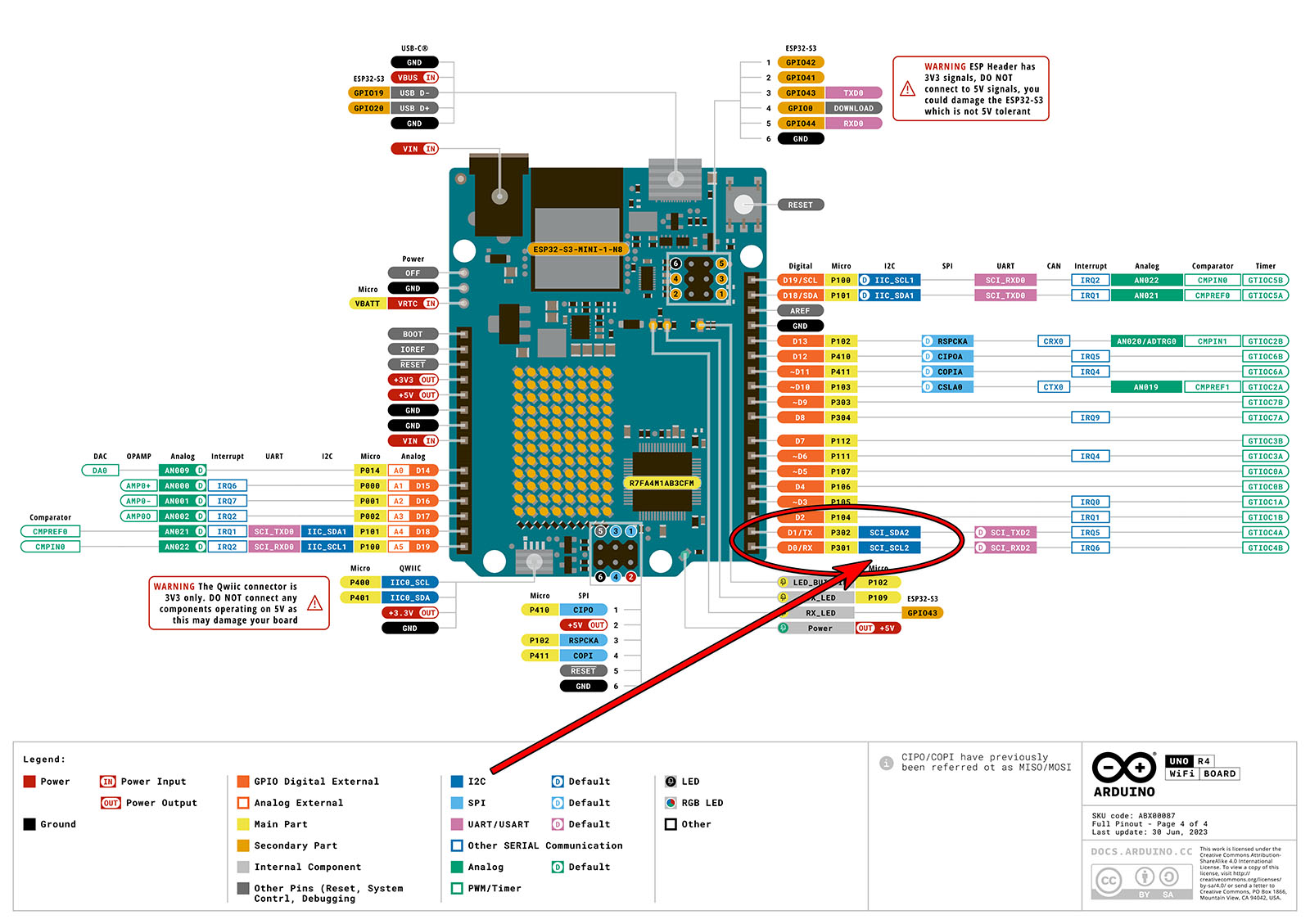
The Advanced Section (last page) of the UNO R4 WiFi FULL Pinout shows D0 (P301) has the optional SCI-SCL2 I2C definition and D1 (P302) has the optional SCI-SDA2 I2C definition.
I have not tried using the function on any other digital pins than D0/D1 as shown in the pinout diagram.
But I can confirm it works on D0/D1 with the UNO R4 WiFi as the Master.
I have tried the following sketches with 3rd I2C Bus on DPin-0 (SCL) and 1 (SDA). After uploading, I have disconnected the USB cable from PC and powered the UNOR4 from 5V supply of UNOR3. The result is that the Slave is not found as is indicated by the continuous flashing of onboard LED at 100 ms interval. Please, post the sketches that you had executed along with your setup (did you keep the USB cable with the UNOR4?). Master Sketch:
#include <Wire.h>

int sda_pin = 1;
int scl_pin = 0;
TwoWire Wire2(scl_pin, sda_pin, ADDRESS_MODE_7_BITS, true);

void setup() {
  Wire2.begin();

  Serial.begin(9600);
  while (!Serial); // Leonardo: wait for Serial Monitor
  Serial.println("\nI2C Scanner");
}

void loop() {
  int nDevices = 0;

  Serial.println("Scanning...");

  for (byte address = 1; address < 127; ++address) {
    // The i2c_scanner uses the return value of
    // the Wire.endTransmission to see if
    // a device did acknowledge to the address.
    Wire2.beginTransmission(address);
    byte error = Wire2.endTransmission();

    if (error == 0) {
      Serial.print("I2C device found at address 0x");
      if (address < 16) {
        Serial.print("0");
      }
      Serial.print(address, HEX);
      Serial.println("  !");

      ++nDevices;
    } else if (error == 4) {
      Serial.print("Unknown error at address 0x");
      if (address < 16) {
        Serial.print("0");
      }
      Serial.println(address, HEX);
    }
  }
  if (nDevices == 0) {
    Serial.println("No I2C devices found\n");
  } else {
    Serial.println("done\n");
  }
  delay(5000); // Wait 5 seconds for next scan
}
And the Serial Monitor results:
Scanning...
I2C device found at address 0x5D !
done
I have used this 3rd I2C bus many times for sensors without issue.
In my post #9, I connected UNOR4WiFi with UNOR3 using your proposed 3rd I2C Bus on DPin-0 and DPin-1. Unfortunately, the Master could not detect the UNOR3-Slave at address 0x23. Moreover, the DPin-0/1 is the UART Port which remains engaged with PC and IDE and is good for program deugging. Theoretically, the 3d I2C Bus should work for any DPin.
Thank you for your sketche which I will try with BME280 (PTH) sensor.
Hi @GolamMostafa - I hope it works out for you and on other digital pins.
I personally used D0 & D1 because Arduino called out their I2C function in the Advanced section of the Full Pinout, and I only otherwise need the Serial Monitor which goes through the ESP32 to the USB-C port...
Referring to post #11@flynace, the following code contains arguments that allow to define any DPin for the SDA/SCL lines of the proposed 3rd I2C Bus. The code/sketch is compiled/uploaded, but it (post #5) does not work.
In the User's Manual, I have been able to discover that there are two I2C Buses (Fig-1) supported by the R7FA4M1 MCU. I undrstand that IIC0 bus is available on A4/A5 (SDA/SCL) pins and IIC1 is available on the 4-pin Qwiic connector of the of UNOR4WiFi Board. I am curious to know if the 3rd I2C Bus metioned by @flynace is a sofftware I2C Bus?
Let that curiosity lead you to reading the data sheet and you will learn that the chip also has SCI capability that can be programmed to implement Simple IIC (Master only). D0/D1 have this capability.
It is now 1:28 AM. Inshallah, I will test the above findings (of @flynace , @EmilyJane , and @Delta_G) tomorrow and will appear with results/difficuties.
Using Wire2 initialized as @GolamMostafa does in his sketch, the I2C scanner can find an SSD1306 OLED display, DS3231 RTC, and the EEPROM chip on the DS3231 board, but not a Nano running as a slave. All of these devices are connected to the I2C bus simultaneously.
Using Wire, all devices are found.
Using Wire2, the Adafruit_SSD1306 sample sketch runs properly on the OLED.