How to calculate sensor reading average on Arduino?

I'm following this instructables Frequency Counter, but the result is very noisy, it jumps up and down too much. I've been reading some average tutorial but doesnt understand at all. How do I still make the arduino to calculate the frequency every 500ms, but only shows the average on LCD every 1000ms? Or is that not how it works? Any help would be very appreciated. Thank you

#include <LiquidCrystal.h>

LiquidCrystal lcd(11, 7, 5, 4, 3, 2);

const int pulsePin = 12; // Input signal connected to Pin 12 of Arduino

int pulseHigh; // Integer variable to capture High time of the incoming pulse

int pulseLow; // Integer variable to capture Low time of the incoming pulse

float pulseTotal; // Float variable to capture Total time of the incoming pulse

float frequency; // Calculated Frequency

void setup() {

pinMode(pulsePin, INPUT);

lcd.begin(16, 2);

lcd.setCursor(0, 0);

lcd.print("Instructables");

lcd.setCursor(0, 1);

lcd.print(" Freq Counter ");

delay(5000);

}

void loop() {

lcd.setCursor(0, 0);

lcd.print("Frequency is ");

lcd.setCursor(0, 1);

lcd.print(" ");

pulseHigh = pulseIn(pulsePin, HIGH);
pulseLow = pulseIn(pulsePin, LOW);

pulseTotal = pulseHigh + pulseLow; // Time period of the pulse in microseconds
frequency = 1000000/ pulseTotal; // Frequency in Hertz (Hz)

lcd.setCursor(0, 1);
lcd.print(frequency);

lcd.print(" Hz");

delay(500);

}
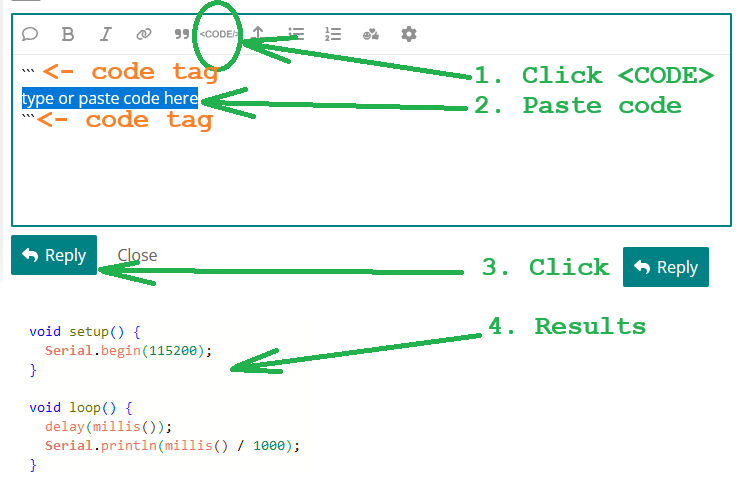
Instructables are often named “Destructables”… Never mind. Please extract and produce key information here according to How to get the best out of this forum - Development Tools / IDE 1.x - Arduino Forum.

No helper wants to plow entire projects to find the needed information.

Perhaps twice a second the values are the same?

Format your code and place it in a code block.

Sorry I cannot follow your code as it is a word salad. You would calculate the average the same way as you do on paper, you add a group of numbers and then divide by the number of members in the group.

One way is to Count pulses using an interrupt.
Every 500 ms, compute frequency = pulses / 0.5 s.
Save value
Reset the counter.
Do it again, then add the saved value and the current value and divide by 2, then display it.

Or simply add the two readings then divide by 2 and then compute frequency. There are a lot of other ways of doing this.

thank you for your input, i ended up with doing the average every 5 seconds using millis()

thank you for your advice, i did the average every 5 seconds with millis(). Turns out the issue is from a bad usb cable that i use to power on the board, running it with battery remove the problem entirely its crazy. Now it has the same reading as my oscilloscope.

yes, a lot of ways and that get me confused, finally got it done. Powering the board through usb just gave me whole lot of experience i suppose.

The code that you posted will only give a work for frequencies above approximately 31Hz (for a 50% duty cycle square wave).

The function pulseIn( ) returns a value of data type 'unsigned long'. You are using data type 'int' for the variables pulseHigh and pulseLow.

An int can only store values up to 32,767. This means that if the time measured by pulseIn( ) is above 32.767ms, then the value will overflow and give a negative result.

If you change the data type for pulseHigh, pulseLow and pulseTotal to 'unsigned long' then the frequency counter will work down to 1Hz.
If you want to measure frequencies below 1Hz, then you will also need to increase the timeout used by pulseIn( ).

wow, this is very neat actually. Thank you so much. The lowest I’ve measured was 36Hz, but it could actually go much lower, so I’ve never actually encountered this problem