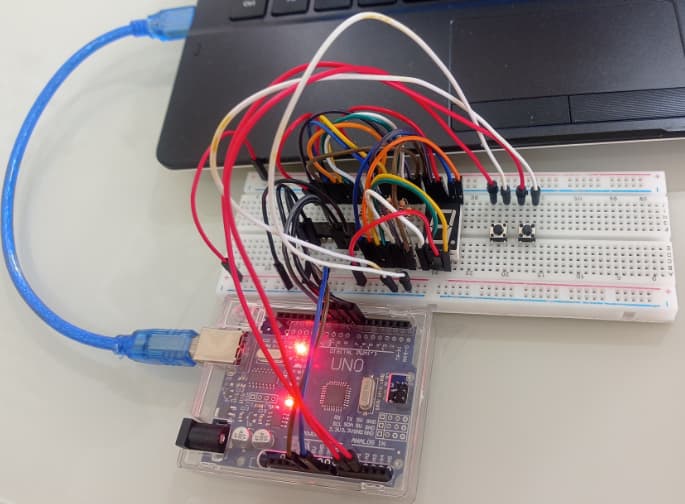
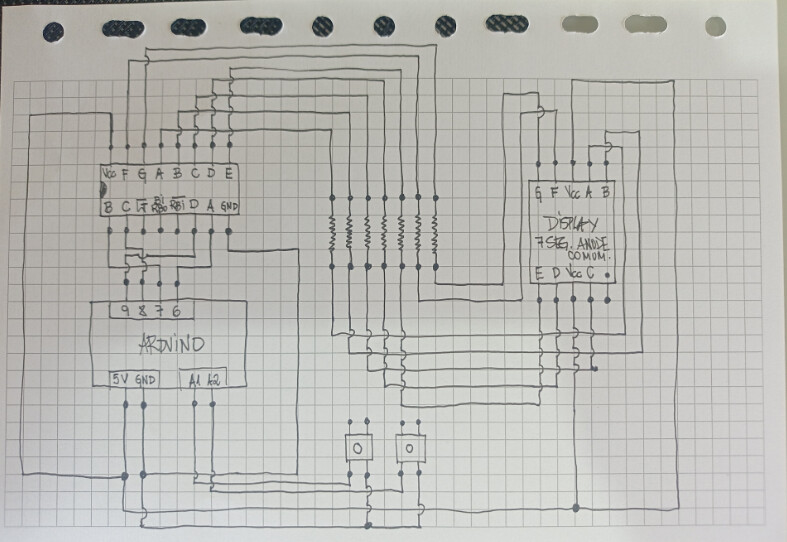
Hi @johnwasser
Your code is a very good example to show how far the "expert blindness for beginner difficulties" is going and how much this impacts easyness of understanding:
I added outputting the "elapsedtime" to the serial monitor but the time is not updating while the stop-watch is running.
I'm a pretty experienced programmer and still had difficulties to understand the logic of your code by reading it. Why the heck does elapsedtime not update???
So I added my own variables to make it happen.
Now imagine a beginner: How should a beginner ever come behind why elapsedtime is not updating inside the added function that simply prints elapsedtime to the serial monitor???
Here is my code-version
void PrintFileNameDateTime() {
Serial.println( F("Code running comes from file ") );
Serial.println( F(__FILE__) );
Serial.print( F(" compiled ") );
Serial.print( F(__DATE__) );
Serial.print( F(" ") );
Serial.println( F(__TIME__) );
}
// easy to use helper-function for non-blocking timing
boolean TimePeriodIsOver (unsigned long &startOfPeriod, unsigned long TimePeriod) {
unsigned long currentMillis = millis();
if ( currentMillis - startOfPeriod >= TimePeriod ) {
// more time than TimePeriod has elapsed since last time if-condition was true
startOfPeriod = currentMillis; // a new period starts right here so set new starttime
return true;
}
else return false; // actual TimePeriod is NOT yet over
}
unsigned long MyTestTimer = 0; // Timer-variables MUST be of type unsigned long
const byte OnBoard_LED = 13;
const unsigned long ReadyToStart = 1000;
const unsigned long WatchRunning = 50;
const unsigned long WatchStopped = 250;
unsigned long myStartTime;
unsigned long myStopTime;
unsigned long BlinkPeriod;
void BlinkHeartBeatLED(int IO_Pin, int BlinkPeriod) {
static unsigned long MyBlinkTimer;
pinMode(IO_Pin, OUTPUT);
if ( TimePeriodIsOver(MyBlinkTimer, BlinkPeriod) ) {
digitalWrite(IO_Pin, !digitalRead(IO_Pin) );
}
}
/////////////////////////////////////
// Stopwatch Example
//
// Written by: John Wasser
/////////////////////////////////////
const byte StartButtonPin = A1; // Button wired from pin to GND
const byte StopResetButtonPin = A2; // Button wired from pin to GND
bool StartButtonWasPressed = false;
bool StopResetButtonWasPressed = false;
unsigned long DebounceTimer = 0;
const unsigned DebounceTime = 10;
bool IsRunning = false;
unsigned long ElapsedTime = 0;
unsigned long LastStartTime = 0;
unsigned long PrintTimer = 0;
void ClearSerialMonitor() {
for (int i = 0; i < 50; i++) {
Serial.println();
}
}
void ShowTimeInSerialMonitor() {
static unsigned long myElapsedTime;
if (IsRunning) {
myElapsedTime = millis() - myStartTime;
}
else {
myElapsedTime = myStopTime - myStartTime;
}
if ( TimePeriodIsOver(PrintTimer,100) ) {
ClearSerialMonitor();
Serial.print("Johns ElapsedTime: ");
Serial.print(ElapsedTime);
Serial.println(" milliseconds");
Serial.print("myElapsedTime: ");
Serial.print(myElapsedTime);
Serial.println(" milliseconds");
}
}
static void ShowTheTime() {
ShowTimeInSerialMonitor();
static unsigned long lastDisplayTime = 0;
unsigned long displayTime = ElapsedTime;
if (IsRunning)
displayTime += millis() - LastStartTime;
if (displayTime != lastDisplayTime) {
lastDisplayTime = displayTime;
  // This is where you would put your code to display the time
  byte seconds = displayTime / 1000;
  byte unitsDigit = seconds % 10;

  // Units Digit
  digitalWrite(6, unitsDigit & 0x01);  // Low bit
  digitalWrite(7, unitsDigit & 0x02);
  digitalWrite(8, unitsDigit & 0x04);
  digitalWrite(9, unitsDigit & 0x08);  // High bit
}
}
void setup() {
Serial.begin(115200);
Serial.println("Setup-Start");
PrintFileNameDateTime();
delay(200);
pinMode(StartButtonPin, INPUT_PULLUP);
pinMode(StopResetButtonPin, INPUT_PULLUP);
BlinkPeriod = ReadyToStart;
}
void loop() {
BlinkHeartBeatLED(OnBoard_LED, BlinkPeriod);
unsigned long currentTime = millis();
bool startButtonIsPressed = digitalRead(StartButtonPin) == LOW;
bool stopResetButtonIsPressed = digitalRead(StopResetButtonPin) == LOW;
  // State Change Detection and debounce
  if (startButtonIsPressed != StartButtonWasPressed &&
      currentTime - DebounceTimer > DebounceTime) {
    // Button has changed state
    StartButtonWasPressed = startButtonIsPressed;
    DebounceTimer = currentTime;
    if (startButtonIsPressed) {
      myStartTime = millis();
      BlinkPeriod = WatchRunning; // added for debugging
      // Just Pressed START
      if (!IsRunning) {
        // Starting/Restarting the timer
        LastStartTime = currentTime;
        IsRunning = true;
      }
      else {
        // Pausing the timer
        IsRunning = false; // Paused
        ElapsedTime += currentTime - LastStartTime;
      }
    }
  }
// State Change Detection and debounce
if (stopResetButtonIsPressed != StopResetButtonWasPressed &&
currentTime - DebounceTimer > DebounceTime) {
// Button has changed state
StopResetButtonWasPressed = stopResetButtonIsPressed;
DebounceTimer = currentTime;
if (stopResetButtonIsPressed) {
BlinkPeriod = WatchStopped; // added for debugging
myStopTime = millis();
// Just Pressed STOP/RESET
if (IsRunning) {
// Pausing the timer
IsRunning = false; // Paused
ElapsedTime += currentTime - LastStartTime;
}
else {
// Was not running so reset everything
ElapsedTime = 0;
myStartTime = 0;
myStopTime = 0;
IsRunning = false;
BlinkPeriod = ReadyToStart; // added for debugging
}
}
}
ShowTheTime();
}
additionally this part of your code
// State Change Detection and debounce
if (startButtonIsPressed != StartButtonWasPressed &&
currentTime - DebounceTimer > DebounceTime) {
// Button has changed state
StartButtonWasPressed = startButtonIsPressed;
DebounceTimer = currentTime;
if (startButtonIsPressed) {
myStartTime = millis();
BlinkPeriod = WatchRunning; // added for debugging
// Just Pressed START
if (!IsRunning) {
// Starting/Restarting the timer
LastStartTime = currentTime;
IsRunning = true;
}
else {
// Pausing the timer
IsRunning = false; // Paused
ElapsedTime += currentTime - LastStartTime;
}
}
}
is mixing debouncing and some other logic.
me personal I think the code would become easier to understand if there are functions
that do one thing
one function check for button-press including debouncing
another function only doing stop-watch logic.
as similar as possible as handling a "classical" stop-watch
pressing start which makes "something run"
pressing stop which stops "the running" (= stops the counting up)
best regards Stefan