This tutorial shall show how to provide an easy to read schematic of your wiring and how you should
not
post fritzing pictures
don't post frizzy-pictures like that!
if you look at this pictures please tell me the IO-pin-numbers!
What ?? You can't read the IO-pin-numbers? You have to download the picture and than zoom in.
Don't you have time?
You have to download the datasheet of the chip and then look up which pin is connected to what.
take additional time to count through the chip-pins and carefully compare with the datasheet!

You give other users
extra work
for looking up datasheets to analyse what is connected to what.
that's how
careless amateurs
are doing it
.
.
a
hand-drawn
circuit diagram that follows the rules of
professional
circuit diagram drawing shows you are a carefully working hobby electronics engineer
This example is drawn extra-fast, extra-wiggly to demonstrate the important information is not in a straight line or a detailed picture. The important information is in giving only the important information.

By the way the above schematic is missing some wires that are nescessary to make it work
Here is a second example.
This picture looks fancy but is hard to analyse.
Too low resolution too many wires jumping around.

Well this is a somehow better attempt.
higher resolution which wire goes from where to where is easier to see.
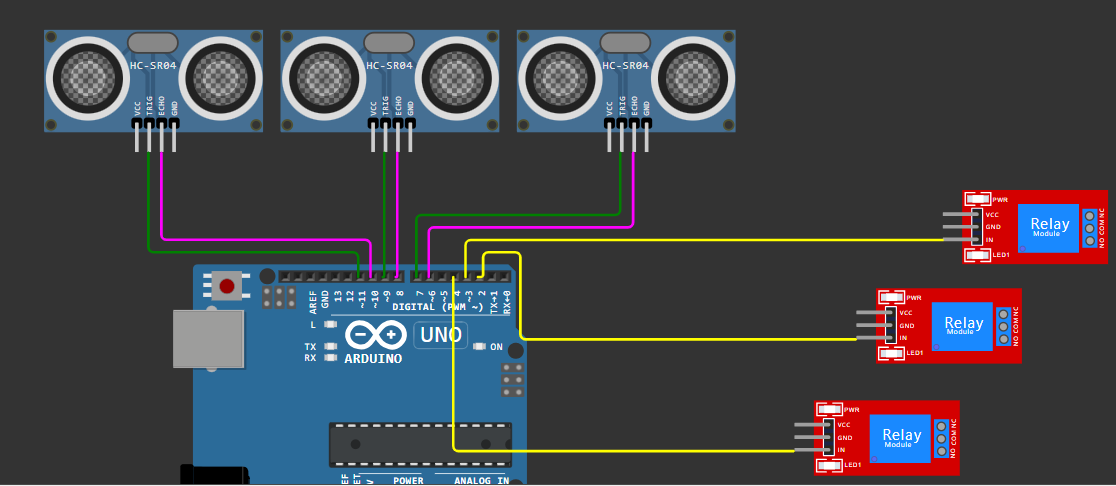
Still this picture can't compete with this one for the following reasons:
- all relevant information is there
- all ir-relevant information is left out
- much clearer wiring very easiy to follow what is connected to what.

It is the opposite of fancy. But is is very efficient. Quick to draw. Very quick to analyse.
And this is what makes a schematic professional.
best regards Stefan


