How to receive multiple variables from the serial port and then convert them into a float?

spaces are automatically delimiters ('white space' along with newline, etc) so the following works OK

if (sscanf(myData, "%f%f%f", &y1, &y2, &y3) == 3) {

given "125.75 61.73 243.69" would display

parsed three floats ok
float y1 = 125.75
float y2 = 61.73
float y3 = 243.69

Edit: explicitly putting space ib the conversion string works as well

    if (sscanf(myData, "%f %f %f", &y1, &y2, &y3) == 3) {

Thank you to both of you! I have been able to make some progress on the code! I apologize for not specifying what the microcontroller was; it is an UNO as you guys had guessed!

Right now the problem I'm facing is that when I try to divide y2 by y1 it says that

 error: 'y2' was not declared in this scope

 divide = y2/y1;

          ^~

y1, y2 and y3 appear to be float variables when printed out, but after the if statement I am unsure what becomes of the nature of the variables.

Is there something I am missing?

char myData[30] = { 0 };

float a = 0;
float b = 0; 
float c = 4;

void setup() {
  Serial.begin(115200);
  Serial.print("Enter three variables seprated by spaces");
  Serial.println();
  
}

void loop() {
  byte n = Serial.available();
  if (n != 0) {
    byte m = Serial.readBytesUntil('\n', myData, 30);
    myData[m] = '\0';  //null-byte
    float y1, y2, y3;
    if (sscanf(myData, "%[^','],%[^','],%s", s1, s2, s3) == 3) {
      y1 = atof(s1);
      y2 = atof(s2);
      y3 = atof(s3);
      Serial.println("parsed three strings ok");
      Serial.print("float y1 = ");
      Serial.println(y1, 2);
      Serial.print("float y2 = ");
      Serial.println(y2, 2);
      Serial.print("float y3 = ");
      Serial.println(y3, 2);
    } else Serial.println("error in input!");
  }

a = y2/y1;
b = y3 * c;


if(a>0 && b>0)

{


Serial.print("Division of y2 by y1: ");
Serial.println(a);


Serial.print("Answer of 4 multiplied by y3: ");
Serial.println(b);

}

  
} 

For a beginner, make ALL variables as global. That means define all of them before your first line of code.

y1 y2 and y3 are defined inside the if statement

if (n != 0) {
    byte m = Serial.readBytesUntil('\n', myData, 30);
    myData[m] = '\0';  //null-byte
    float y1, y2, y3;
    if (sscanf(myData, "%[^','],%[^','],%s", s1, s2, s3) == 3) {
.....
    } else Serial.println("error in input!");
  }

a = y2/y1;
b = y3 * c;

the a=y2/y1;is outside the scope

Okay! That makes sense! Is there a way to get y1 y2 and y3 outside of the if statement, or should I just put a=y2/y1; inside the if statement?

yes - there is no point doing the calculation if you have not got valid input data

That helped! Thank you!

One last problem and then I think I should be good! I've been working your help out separate code than the one I want to use it on, just to eliminate potential errors. Essentially something works on the scratch sheet of code, if you will, but doesn't on my main code. Any thoughts?

Scratch code

// parse serial data input 125.75, 61.73,243.69

char myData[30] = { 0 }, s1[10], s2[10], s3[10];


float a = 0;
float b = 0; 
float c = 4;
int count=0;

void setup() {
  Serial.begin(115200);
  Serial.print("Enter three variables seprated by spaces");
  Serial.println();
  
}

void loop() {
  byte n = Serial.available();
  if (n != 0) {
    byte m = Serial.readBytesUntil('\n', myData, 30);
    myData[m] = '\0';  //null-byte
    float y1, y2, y3;
    if (sscanf(myData, "%[^','],%[^','],%s", s1, s2, s3) == 3) {
      y1 = atof(s1);
      y2 = atof(s2);
      y3 = atof(s3);
      Serial.println("parsed three strings ok");
      Serial.print("float y1 = ");
      Serial.println(y1, 2);
      Serial.print("float y2 = ");
      Serial.println(y2, 2);
      Serial.print("float y3 = ");
      Serial.println(y3, 2);

      a = y1/y2;
      b = y3;
      
    } else Serial.println("error in input!");
  }


if(a>0 && count<1)
{

  if(b <= a) //This works just fine here***
  {


Serial.print("Division of y2 by y1: ");
Serial.println(a);


Serial.print("Answer of 4 multiplied by y3: ");
Serial.println(b);

count++; //Just so it prints out once

  }

}

  
}

Main code

void loop() 
{
  // Get the weight on the scale.
  float weight;
  weight = scale.get_units();
  float percentage;
  
  
  byte n = Serial.available();
  if (n != 0) {
    byte m = Serial.readBytesUntil('\n', myData, 30);
    myData[m] = '\0';  //null-byte
    float input, lower, upper;
    if (sscanf(myData, "%[^','],%[^','],%s", s1, s2, s3) == 3) {
      input = atof(s1);
      lower = atof(s2);
      upper = atof(s3);
      Serial.println("parsed three strings ok");
      Serial.print("float input = ");
      Serial.println(input, 2);
      Serial.print("float lower = ");
      Serial.println(lower, 2);
      Serial.print("float upper = ");
      Serial.println(upper, 2);

      
      // Calculate the percentage and trucate at the integer value
      percentage = (weight / input * 100);

    }
  }

  
  // Test the weight being applied to the scale.
  if (weight > 15){
    if (lower <= percentage && percentage <= upper) { //But doesn't here here***

//Rest of the code follows

With the error being

error: 'lower' was not declared in this scope

and

error: 'upper' was not declared in this scope
See the { in the if statement? It's matching }, 10-15 lines later, comes before your use of upper and lower, but with that } those variables were destroyed. It's called variable scope.
Hint - In your IDE, put your cursor on that { - note how the matching } hilites? Simply put, that shows you the 'lifetime' for anything declared within the {}. Others will now chime in with all the exceptions to that, of course.

Okay! So when I do that now I get no output on the serial port. Is this something to do with my void disp_msg function? (I didn't think it would effect the output code aside from what it was supposed to do, so that is why I didn't share it last time, sorry!)

void loop() 
{
  // Get the weight on the scale.
  float weight;
  weight = scale.get_units();


  byte n = Serial.available();
  if (n != 0) {
      byte m = Serial.readBytesUntil('\n', myData, 30);
      myData[m] = '\0';  //null-byte
      float input, lower, upper;
      if (sscanf(myData, "%[^','],%[^','],%s", s1, s2, s3) == 3) {
          input = atof(s1);
          lower = atof(s2);
          upper = atof(s3);
          Serial.print("float input = ");
          Serial.println(input, 2);
          Serial.print("float lower = ");
          Serial.println(lower, 2);
          Serial.print("float upper = ");
          Serial.println(upper, 2);
          Serial.println();
    
    
          // Calculate the percentage and trucate at the integer value
            float percentage;
          percentage = (weight / input * 100);

    
      // Test the weight being applied to the scale.
      if (weight > 15){
          if (lower <= percentage && percentage <= upper) {
            disp_msg("% of weight",percentage,weight);
          } else {
            if(percentage < lower){
               disp_msg("Warning Add more",percentage,weight);
            } else {
              disp_msg("Warning Too much",percentage,weight);
            }
          }
          
        delay(2000);  // Show the message for x seconds
        lcd.clear();  // Clear the LCD.
        //delay(1000);  // Wait x more seconds before testing the weight again.  
        
      }
    
    }
  
  }

  
}

void disp_msg(String text_var, float pct_var, float weight_var)
{
  Serial.println("Weight: " + String(weight_var) + " lbs."); 
  Serial.println("Percent Weight: " + String(pct_var) + "%");
  Serial.println(String(round(pct_var)) + "%");
  Serial.println(text_var);
  Serial.println();

  lcd.clear();
  lcd.setCursor (0, 0); 
  lcd.print(text_var);
  lcd.setCursor(0, 1);
  lcd.print(String(round(pct_var)) + "%");

}

If your input string contains float numbers and you are using sscanf() function to separate them on UNO Platform, you will not be successful as 8-bit AVR like UNO does not support sscanf() function for float numbers (post #17 @horace); instead, use strtok() function (post #14).

gave us a sample of the data you input to the serial monitor
I would recommend you use strtok() from post 14 - sscanf() is a problem when attempting to read floating point data on low power microcontrollers

I used strtok() and I'm still not getting an output in the serial port.

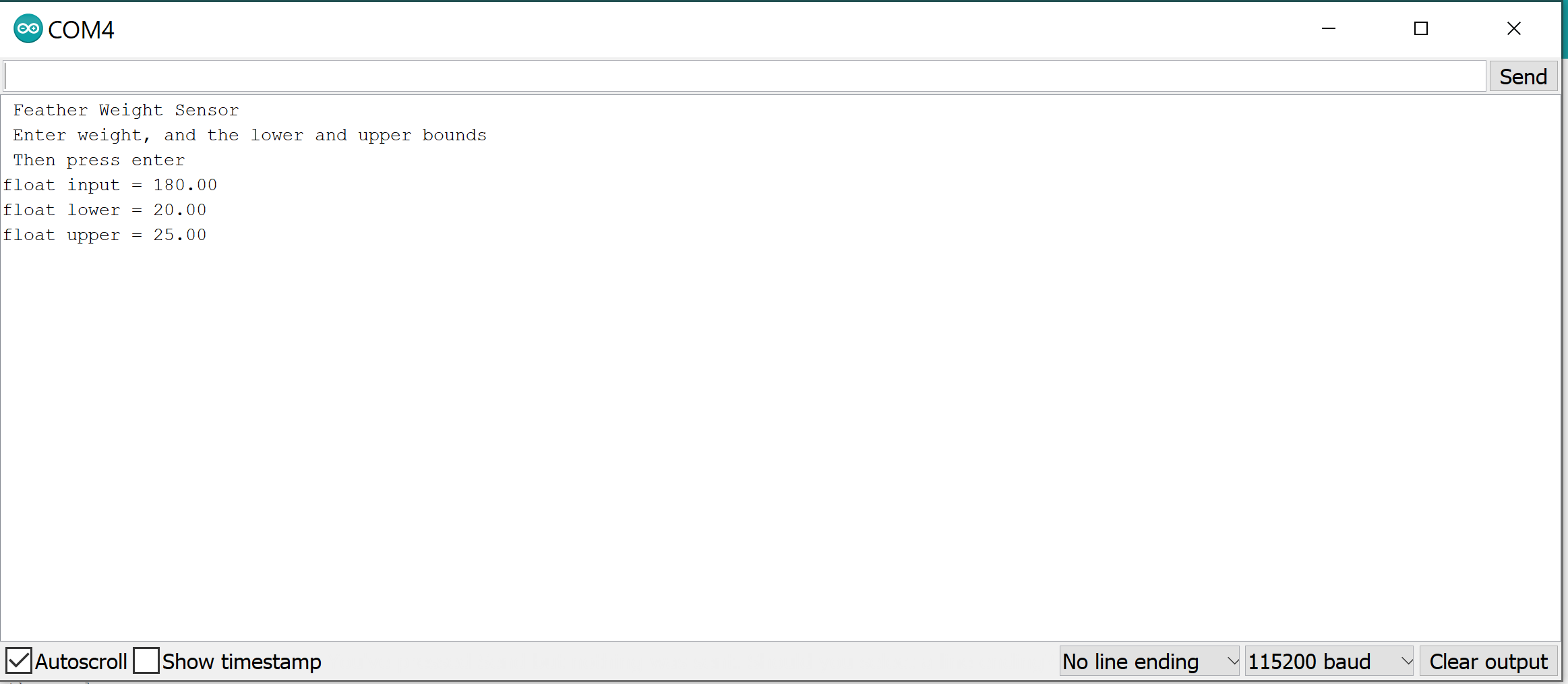
Here's what the serial port looks like! What I'm making is a weight sensor, so it should display the message I showed in post #29 when I apply weight to the scale, but when I do, the message isn't displayed.

Please, describe in plain text what is the source of your data, the type of communication channel, the format/type of the data you are receiving, and what you want to do with the data.

Your original difficulty was to extract individual float type data items from a message and then save them into variables. You had already received the solution to that problem.

Looks like you are getting Serial output.

What is supposed to happen if (weight <= 15)? I might try commenting it out and trying:

      // Test the weight being applied to the scale.
//      if (weight > 15){
      if (true){
          if (lower <= percentage && percentage <= upper) {

That worked! Thank you! And @ GolamMostafa I apologize, I did already receive the answer to my original problem, but then realized a new problem stemmed from that. I will be sure to either research that separately or ask as another post in the forum. I will make sure to do that moving forward!

Thank you all for your help! I appreciate each one of you for taking time to help me!

Thank you!