Hi my Http post doesnt fire looking at coding examples I cant see why.
void sendHomeSeerCommand(String HScommand)
  {

    Serial.println("ethernet part");
    byte server[] = {192,168,0,60};
    String PostData = "/JSON?request=controldevicebylabel&ref=" + HScommand ;

    Serial.println(PostData);

    EthernetClient client ;
    if (client.connect(server, 8080)) {

      Serial.println("in if statement");

      client.println("POST /JSON HTTP/1.1");
      client.println("Host: 192.168.0.60");
      client.println("User-Agent: Arduino/1.0");
      client.println("Connection: close");
       client.println("Content-Type: application/x-www-form-urlencoded;");
      client.print("Content-Length: ");
      client.println(PostData.length());
      client.println();
      client.println(PostData);
    Serial.println("trying to post");
    Serial.println(PostData);
    Serial.println("posted");
    }
    else {
    Serial.println("connection failed");
  }
}
in my setup i have
 pinMode(10, OUTPUT);
  digitalWrite(10, HIGH); // disable Ethernet

//Network card setup
Ethernet.begin(mac, ip);
I am also using the sd card slot on the ethernert card and copied the code this says it disables the ethernet card. If I rem it out then I get SD card fail.
I am unsure on whats wrong and is it possible to have the SD card working and the ethernet port?
thanks for all help jasemilly
system
April 16, 2018, 9:46pm
2
Hi my Http post doesnt fire
Are you expecting it to burst into flames?
The code that calls that function seems to have gone up in smoke, along with your serial output.
is it possible to have the SD card working and the ethernet port?
Of course it is.
PaulS:
haha sorry it doesnt execute is a better way of phrasing it.
The code that calls that function seems to have gone up in smoke, along with your serial output.
I thought it would be just my sd card reader is on a Ethernet shield, perhaps a very slim possibility that it you couldn't
The Client.connect doesn't execute, I am also watching network activity using wireshark.
system
April 17, 2018, 9:13am
4
The Client.connect doesn't execute
Nonsense. The connect() call may return an error, but, once again, you MUST post your code, or stop posting. Without seeing ALL of your code AND your serial output, we can NOT help you.
Here is my full code, I have tried a second Arduino and changed network cable the problem still exists.
if I copy and paste the Url into a browser it works, this is on localhost, this machine connects via Wifi I don't know if this makes a difference. Thanks for assistance
#include <SPI.h>
#include <Ethernet.h>
#include <SD.h>

byte mac[] = { 0xDE, 0xAD, 0xBE, 0xEF, 0xFE, 0xED };
byte ip[] = { 192,168,0,170 };


void setup()
{

 Serial.begin(9600);

//Network card setup
Ethernet.begin(mac, ip);
 delay(500);
Serial.println("ready");

}

void loop()
{

String mypass;
mypass = "&label=on";
sendHomeSeerCommand(mypass);
  Serial.println();
  delay(1500);
}

  void sendHomeSeerCommand(String HScommand)
  {

    Serial.println("ethernet part");
    byte server[] = { 192,168,0,60 };
//    String PostData = "/JSON?request=controldevicebylabel&ref=" + HScommand ;
String PostData = "/JSON?request=controldevicebylabel&ref=18&label=off";
    Serial.println(PostData);

    EthernetClient client ;

     int ret = client.connect(server, 8080) ;
     if (ret==1)
     {

      Serial.println("in if statement");

      client.println("POST /JSON HTTP/1.1");
      client.println("Host: 192.168.0.60");
      client.println("User-Agent: Arduino/1.0");
      client.println("Connection: close");
       client.println("Content-Type: application/x-www-form-urlencoded;");
      client.print("Content-Length: ");
      client.println(PostData.length());
      client.println();
      client.println(PostData);
    Serial.println("trying to post");
    Serial.println(PostData);
    Serial.println("posted");
    }
    else {
    Serial.println("connection failed");
    Serial.println(ret);
  }
}
system
April 19, 2018, 11:44am
6
AND your serial output
Is STILL missing. I guess you don't want help.
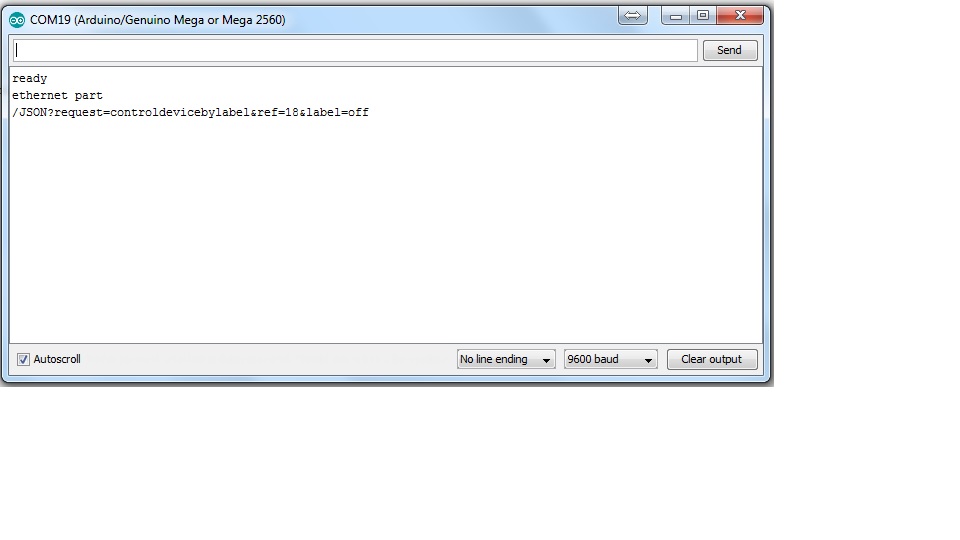
Serial output sorry on the delay
system
April 20, 2018, 6:07pm
8
The Serial Monitor does NOT display pictures.
Sorry I took a screen shot of the serial monitor and uploaded that, I am unaware of a better way.
system
April 20, 2018, 10:30pm
10
I am unaware of a better way.
The Serial Monitor displays text AS TEXT. Copy and paste works for everybody else.
ok thanks didnt realise.
here is the output
ready
system
April 21, 2018, 9:59pm
12
     int ret = client.connect(server, 8080) ;
     if (ret==1)
     {
So, you've determined, based on the lack of the "in if statement" message, that ret is not 1. What IS it? What does that mean?
Debugging is NOT a matter of just asking others for help.