I need help with some code I am writing

i am writing code to make a servo and led activate at the push of a button, it give me this message when I am uploading and i am still learning so I dont know what im doing wrong. It gives me this message. (Find at bottom of comment after my code)

My code is this:

/*
   Created by ArduinoGetStarted.com

   This example code is in the public domain

   Tutorial page: https://arduinogetstarted.com/tutorials/arduino-button-servo-motor
*/

#include <Servo.h>

// constants won't change
const int BUTTON_PIN = 7; // Arduino pin connected to button's pin
const int SERVO_PIN  = 9; // Arduino pin connected to servo motor's pin
const int LED_PIN = 3;
Servo servo; // create servo object to control a servo

// variables will change:
int angle = 0;          // the current angle of servo motor
int lastButtonState;    // the previous state of button
int currentButtonState; // the current state of button

void setup() {
  Serial.begin(9600);                // initialize serial
  pinMode(BUTTON_PIN, INPUT_PULLUP); // set arduino pin to input pull-up mode
  servo.attach(SERVO_PIN);           // attaches the servo on pin 9 to the servo object

  servo.write(angle);
  currentButtonState = digitalRead(BUTTON_PIN);
}

void loop() {
  lastButtonState    = currentButtonState;      // save the last state
  currentButtonState = digitalRead(BUTTON_PIN); // read new state

  if (lastButtonState == HIGH && currentButtonState == LOW) {
    Serial.println("The button is pressed");

    // change angle of servo motor
    if (angle == 0)
      angle = 180;
    else if (angle == 180)
      angle = 0;

    // control servo motor arccoding to the angle
    servo.write(angle);
  }

  void setup() {
    //put your setup code here, to run once:
    pinMode(3, OUTPUT);
    }

  void loop() {
    Serial.begin(9600);
    digitalWrite(13, HIGH);
    delay(0);
    digitalWrite(13, LOW);
    delay(500);
    }

This is the message


Arduino: 1.8.12 (Windows 10), Board: "Arduino Uno"

C:\Users\lwesr\OneDrive\Documents\Arduino\sketch_dec18a\sketch_dec18a.ino: In function 'void loop()':

sketch_dec18a:49:16: error: a function-definition is not allowed here before '{' token

   void setu`Preformatted text`p() {

                ^

sketch_dec18a:55:13: error: a function-definition is not allowed here before '{' token

 void loop() {

             ^

sketch_dec18a:61:2: error: expected '}' at end of input

  }`Preformatted text`

  ^

exit status 1
a function-definition is not allowed here before '{' token

This report would have more information with
"Show verbose output during compilation"
option enabled in File -> Preferences.Preformatted te

xtPreformatted text
if it helps here is the separated code

/*
Created by ArduinoGetStarted.com

This example code is in the public domain

Tutorial page: https://arduinogetstarted.com/tutorials/arduino-button-servo-motor
*/

#include <Servo.h>

// constants won't change
const int BUTTON_PIN = 7; // Arduino pin connected to button's pin
const int SERVO_PIN = 9; // Arduino pin connected to servo motor's pin
const int LED_PIN = 3;
Servo servo; // create servo object to control a servo

// variables will change:
int angle = 0; // the current angle of servo motor
int lastButtonState; // the previous state of button
int currentButtonState; // the current state of button

void setup() {
Serial.begin(9600); // initialize serial
pinMode(BUTTON_PIN, INPUT_PULLUP); // set arduino pin to input pull-up mode
servo.attach(SERVO_PIN); // attaches the servo on pin 9 to the servo object

servo.write(angle);
currentButtonState = digitalRead(BUTTON_PIN);
}

void loop() {
lastButtonState = currentButtonState; // save the last state
currentButtonState = digitalRead(BUTTON_PIN); // read new state

if (lastButtonState == HIGH && currentButtonState == LOW) {
Serial.println("The button is pressed");

// change angle of servo motor
if (angle == 0)
  angle = 180;
else if (angle == 180)
  angle = 0;

// control servo motor arccoding to the angle
servo.write(angle);

}

void setup() {
//put your setup code here, to run once:
pinMode(3, OUTPUT);
}

void loop() {
Serial.begin(9600);
digitalWrite(13, HIGH);
delay(0);
digitalWrite(13, LOW);
delay(500);
}

Do us a favor and post your code properly so that it is easy to copy to a text editor or the IDE. Read the forum guidelines to see how to properly post code and some hints on how to get the most from this forum.
Use the IDE autoformat tool (ctrl-t or Tools, Auto format) before posting code in code tags.

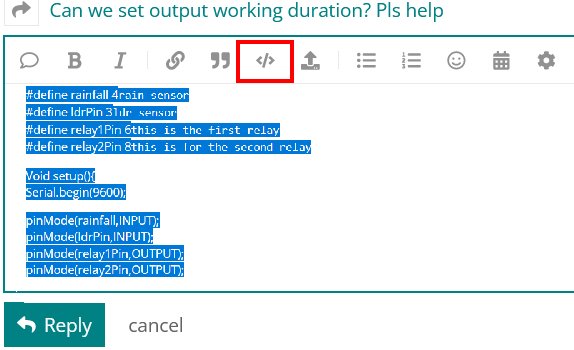
You can go back and fix your original posts by highlighting the code and clicking the </> in the menu bar.
code tags new

Please use code tags when posting. Also, before posting code, "autoformat" it, by pressing CRTL-T in the Arduino IDE.

In this case, the resulting indentation may reveal a missing brace.

An Arduino sketch can have only 1 loop() function and 1 setup() function. Yours has 2 of each. You need to consolidate the codes from the setup() functions into 1 and same with the loop() code.

And the loop() function is not properly closed with a } (as mentioned by @jremington).

Do not put Serial.begin() in loop(). It belongs only in setup().

as a beginner, from the preceding comments, you’ll learn that compilers are very strict in spelling, layout and language.

setip probably wasn’t what you were thinking…

You need to be careful, and read the error messages. They’re put in to help.

Sorry. This is my first time using this

This topic was automatically closed 180 days after the last reply. New replies are no longer allowed.