I2Cwrapper library for easy implementation of I2C target devices

Hi all,

the new I2Cwrapper firmware and library framework is now available in the Arduino library manager.

It aims to simplify the flexible implementation of Arduino based I2C target devices (formerly: slave devices) . Its core cares for all the necessary I2C overhead like onReceive() and onRequest() ISRs, interpreting a command and preparing a reply, error handling, etc., while the target functionality, like controlling steppers or reading sensors, is delegated to interchangeable modules.

Typically, you can use I2Cwrapper to integrate peripherals without dedicated I2C interface and/or use the target's own peripherals in an I2C-bus environment. The firmware is tested for plain Arduinoss, ESP32, ESP8266, and ATtiny platforms.

Currently, the following modules are included and ready for use:

  • AccelStepperI2C: Control up to eight stepper motors with acceleration control via Mike McCauley's AccelStepper library, and up to two end stops per stepper. Uses a state machine and an optional controller interrupt line to prevent I2C bus clogging.
  • ServoI2C: Control servo motors via I2C just like the plain Arduino Servo library.
  • PinI2C: Control the digital and analog in- and output pins of the target device via I2C, similar to an IO-expander. Works just like the plain Arduino pinMode(), digitalRead(), etc. commands.
  • ESP32sensorsI2C: Read an ESP32's touch sensors, hall sensor, and (if available) temperature sensor via I2C. Uses the optional controller interrupt line to inform the controller about a touch button press.
  • TM1638lite: Read buttons from and control the single and seven-segment LEDs of up to four TM1638 modules like the ubiquitous LED&Key module via I2C. Uses Danny Ayers' TM1638lite library.

Writing and implementing your own modules is relatively easy, as all the I2C stuff is already taken care of. A couple of modules that I plan to include in some future release are

  • SonarI2C module with support for 1 to n ultrasonic distance sensors
  • InfraredI2C module with support for infrared remote receivers
  • TFT_I2C module based on (a subset of) Ucglib or Adafruit's GFX lib for SPI bus color TFTs
  • DCmotorI2C control module for different kinds of DC motor drivers

Find more details on the project page at github.

Jan

1 Like

That is a lot of work. I'm glad to see that you use the Wire library in a straightforward way.

You mention the ATtiny85. I think that others want to use ATtiny85 as Targets, but there are different environments/cores for the ATtiny85. Perhaps you can explain more in that paragraph.

Adafruit has a wrapper, which makes it almost impossible to understand what is going on: https://github.com/adafruit/Adafruit_BusIO.
My own wrapper was not possible in the way that I had in mind and I will not finish it.
Perhaps you can explain how it is different from the Adafruit wrapper and if you are going to implement the SPI bus.

I'm using SpenceKondes ATtinyCore, please look up the details are in the Readme. Worked like a charm on a Digispark in my tests with the TM1638 module.

I don't know the Adafruit wrapper. From the short readme, it is "only" a wrapper, while this project includes a modular and extensible firmware framework.

And this is meant as an I2C thing only.

tl,dr: Both libraries are not competing alternatives, but aimed at very different situations.

I had a closer look at the Adafruit_BusIO project. I think it is aimed at this situation:

  • [Arduino as I2C/SPI controller] <---> [I2C/SPI peripheral]

I2Cwrapper is aimed at this situation:

  • [Arduino as I2C controller] <---> [Arduino as I2C target] <---> [non I2C peripheral/target's own resources]

If I'd known about the BusIO project, I might have used it for the lower level communication, instead of implementing my own solution, which is built around the SimpleBuffer.h class, which is based on code snippets from Nick Gammon.

I2Cwrapper, however, is much more. BusIO is for the controller's side only. You'd still have to implement your own onRequest(), onReceive(), error handling, etc. if you'd want to use it to implement an I2C target.

I2Cwrapper comes with a complete firmware for the I2C-target, which already deals with everything but the functionality specific for some peripheral, which is implemented in modules. This makes implementing new peripherals easy, much of it is actually a relatively mindless routine.

As the simplest example, you could have a look at the PinI2C module which makes another Arduino's pins usable over I2C, similar to some I2C port extender chip, and mimicks the conventional Arduino pin control functions.

The PinI2C.h interface looks very similar to the native Arduino.h interface:

class PinI2C
{
public:  
  /*!
   * @brief Constructor.
   * @param w Wrapper object representing the target the pins are connected to.
   */
  PinI2C(I2Cwrapper* w);
  void pinMode(uint8_t, uint8_t);
  void digitalWrite(uint8_t, uint8_t);
[...]
private:
  I2Cwrapper* wrapper;
};

It's implementation in PinI2C.cpp, though, is quite different (these are slightly simplified snippets for demonstration purposes):

// examplary void function
void PinI2C::pinMode(uint8_t pin , uint8_t mode) {
  wrapper->prepareCommand(pinPinModeCmd, myNum);
  wrapper->buf.write(pin);
  wrapper->buf.write(mode);
  wrapper->sendCommand();  
}

// examplary non void function
int PinI2C::digitalRead(uint8_t pin) {
  wrapper->prepareCommand(pinDigitalReadCmd, myNum);
  wrapper->buf.write(pin);
  int16_t res = -1;
  if (wrapper->sendCommand() and wrapper->readResult(pinDigitalReadResult)) {
    wrapper->buf.read(res);
  }
  return res;  
}

All this code does is wrapping function calls into commands and sending them to the target, and, for non-void functions, receiving their response and returning it.

The matching firmware module PinI2C_firmware.h does the unwrapping. It does so by injecting code into the firmware.ino framework at defined places, in this case into the central switch-clause within the processMessage() function:

#if MF_STAGE == MF_STAGE_processMessage

case pinPinModeCmd: {
  if (i == 2) { // 2 uint8_t received?
    uint8_t pin; bufferIn->read(pin);
    uint8_t mode; bufferIn->read(mode);
    pinMode(pin, mode);
  }
}
break;

case pinDigitalReadCmd: {
  if (i == 1) { // 1 uint8_t received?
    uint8_t pin; bufferIn->read(pin);
    bufferOut->write((int16_t)digitalRead(pin)); // int is not 2 bytes on all Arduinos (sigh)
  }
}
break;
[...]

Modules can also inject code in other places like include section, declaration section, setup(), or main loop(), if they need to. PinI2C is very simple, so it does very little in other sections. This is all it injects into the setup() function:

#if MF_STAGE == MF_STAGE_setup
log("PinI2C module enabled.\n");
#endif

This is the controller addressing a target which runs the firmware with the PinI2C module enabled (from examples/Pin_control.ino):

[...]
I2Cwrapper wrapper(i2cAddress); // each target device is represented by a wrapper...
PinI2C pins(&wrapper); // ...that the pin interface needs to communicate with the controller
[...]
void setup()
{
  if (!wrapper.ping()) {
    halt("Target not found! Check connections and restart.");
  }
  wrapper.reset(); // reset the target device to its initial state
  pins.pinMode(dPinIn, INPUT); // INPUT_PULLUP will also work
  pins.pinMode(dPinOut, OUTPUT);
  pins.pinMode(aPinIn, INPUT);
  pins.pinMode(aPinOut, OUTPUT);  
}

void loop()
{
  pins.digitalWrite(dPinOut, pins.digitalRead(dPinIn));
  pins.analogWrite(aPinOut, pins.analogRead(aPinIn)/4);
[...]

The three files above is all it takes for a new module which implements some new peripheral. The PinI2C and TM1638liteI2C modules took me each about 2h to write and test. There's documented templates for these three files to help adding a new module.

And you practically don't have to worry about any I2C stuff while doing so.
1 Like

Something to think about:
If you really want to make this a full all encompassing wrapper, then you cannot assume that the name of the "wire" library header is called Wire.h nor can you assume that the "wire" object is called Wire.

i.e. suppose someone wants to use this on a platform that supports multiple i2c buses using say Wire and Wire2 and wants to use the Wire2 bus for the wrapped object?
or wants to use something like SoftwareWire instead of the Wire library
or the wire library object is not called Wire
or the wire library header file is not called Wire.h
or the wire library Wire object class is not TwoWire

I had a similar dilemma for a LCD library that used i2c.
I supported it using a C++ templated class.
If you haven't looked at C++ templates, templates can do some magical things.
With templated classes all the code must be in the .h file with no .cpp file.

For this library, it looks like it would require that the I2CWrapper class become a templated class.
It would need to be handed the class/name and object name of the "wire" object as template paramaters when declaring the I2CWrapper class object.

Newer versions of C++ support an auto type as well as supporting default template parameters that could eliminate having to pass in the wire object class as a template parameter and also provide some defaults for backward compatibility when no template parameters are used which would be ideal, but I ran into two issues when trying to do this.

  1. Not all Arduino platform cores are using new enough gcc tools for this support
  2. The Arduino.cc AVR platform forces the compiler to run in an older mode and thereby disables the support for this.

My solution was to ALWAYS pass in both the wire object class and the wire object as template parameters. This also means that it cannot be backward compatible with object declarations that are not passing in any template parameters.
This is very much not ideal but it does allow the template to work and adjust to any/all environments.

In your case it would change the object declaration to something like this:
I2Cwrapper<decltype(WIRE_OBJECT_NAME), WIRE_OBJECT> wrapper(i2cAddress);

you can then create a reference to the proper wire object within the object.

In my case
I declared the object in the sketch as:

hd44780_AIP31068<decltype(Wire), Wire> lcd(I2C_ADDR);

There are two template parameters.
Wire is the name of the wire object being used and the decltype() will present the class of the object.

Within the templated class header file, I declared the class as:

template <class T_WIRE_OBJ, T_WIRE_OBJ& WIRE_OBJ> class hd44780_AIP31068 : public hd44780 
{

and declared a private object reference within the template to reference the "wire" object as:

T_WIRE_OBJ& _wire = WIRE_OBJ; // wire object to use for instance

referenced the "wire" objectin the templated class as:

_wire.endTransmission();

It is nice as it allows it to work on with any "wire" compatible library and any wire object name, but it does require that the two templated parameters always be passed in so it is a bit "ugly".

--- bill

I see your point, @bperrybap . But why not simply use an optional parameter of type TwoWire for the constructor?

Jan

Some have taken a similar approach, (i.e. pass in a pointer to the Wire object)
But the class name is not always TwoWire so that type of solution fails for those cases.

You can't have an optional constructor parameter for this situation unless the classname and the default wire library object are consistent.
The optional constructor parameter would need to be specified either with a default or as multiple constructors (an overload).
Either way, a class name would have to be specified which would mean assuming the class name of TwoWire which may not exist in some environments.
In the case of an optional parameter using a default value, if not specified, it would have to assume not only the class name but also the wire object name; either one or both may not exist.

These days Arduino core platforms do tend to use TwoWire for their h/w Wire API compatible i2c library class name. A few years back, there were a a couple of platforms that did provide a wire object called Wire but the class name was not TwoWire

That said, TwoWire is not used for the software implementations.
For example, SoftWire, SoftwareWire, or TinyWireM
do not use TwoWire for their wire object and the wire object name is under control of the user as it is declared in the sketch.

There is also how to handle a situation where the user may be wanting to use multiple i2c busses, say the h/w one, which may use TwoWire and a software one which might use SoftwareWire for the class name of the wire object?
A compiled .cpp file implementation cannot readily work with objects that use different classes.

If you want a solution that works for all implementations, the code cannot assume the wire library header file name, nor the name of wire library object nor its class name and the only way I've seen to be able to do all that is to use a templated class where the class and object can be template parameters and all the code is in the header file with no .cpp file (which is normal for a templated class)

--- bill

Understood. Can I ask you, are we having this conversation because you have an actual use case that is not supported by I2Cwrapper as of now, or is this of a more general nature?

Just comments of a general nature.
I saw the library and thought it was interesting and was offering some comments that I thought might be helpful, but I'm not currently actually using the library.

--- bill

Ok, so thanks again, I really appreciate your input and sympathize with the more universal and future safe approach you're suggesting.

However, this is not a route I intend to take at the moment for a couple of reasons. For one, I personally do not need the cases you list covered at the moment, I'm perfectly happy to have this working flawlessly for all my needs, something I would have not expected when I started.
Apart from that it's mostly a pareto thing. I expect these cases to be relatively rare, so my personal cost benefit ratio speaks against it. I will keep this issue in mind, though, particularly if there should be an actual need for it. And of course I'd be open to talk about a pull request.

BTW, as an update, here are two of my own use cases I'm working on ATM.

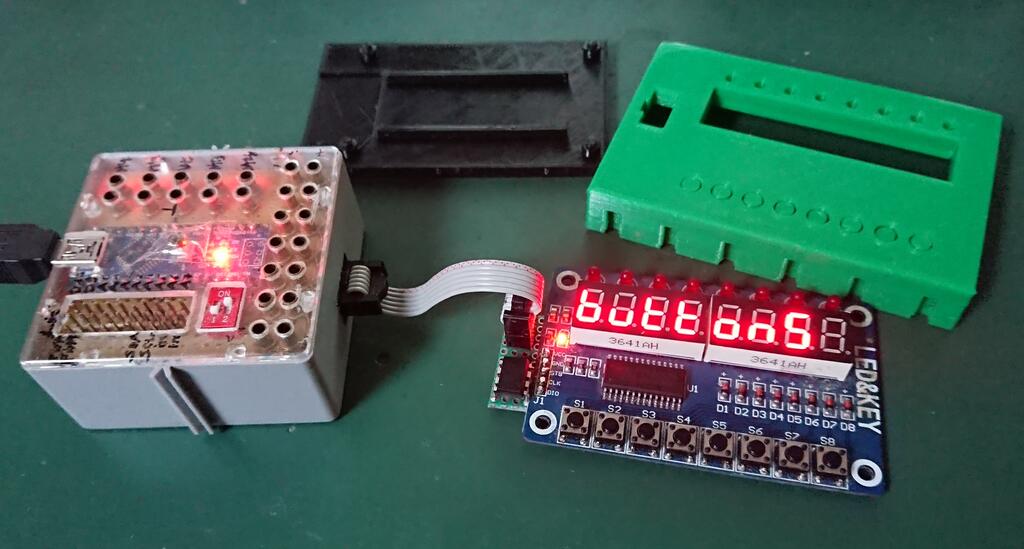
This is an ATtiny85 acting as I2C target interface to a LED&Key module with the TM1638 chip, controlled over I2C by an Arduino nano which uses TM1638liteI2C.h to address it.

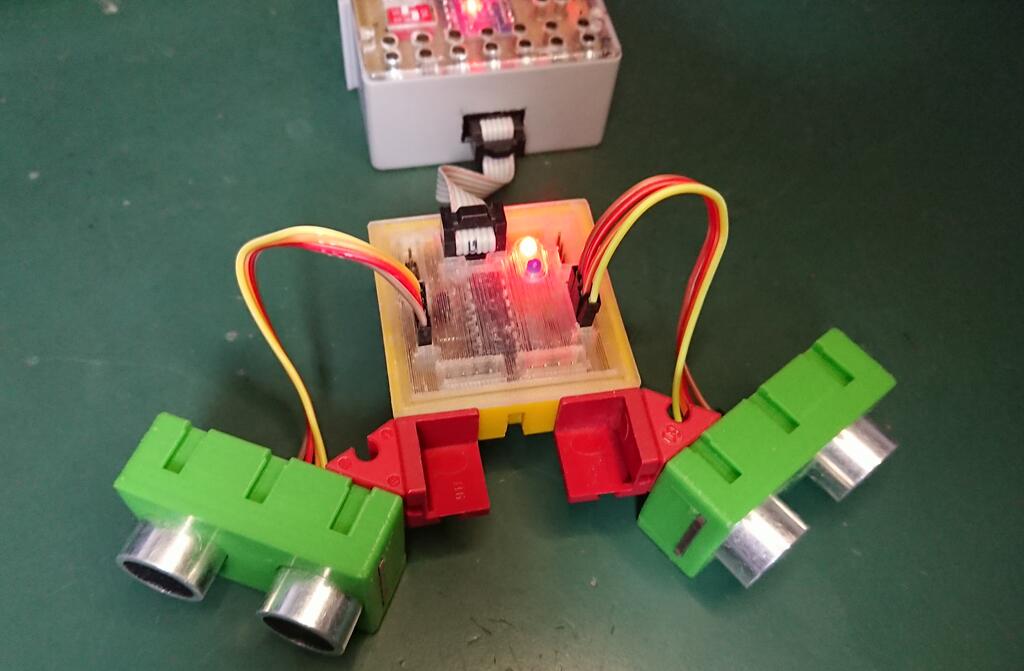
And this is an ATtiny84 running up to six sonar sensor modules and acting as I2C target, interfacing their output under a single I2C address to the controller. Note that the sonarI2C module is yet to be released.

Silly question, perhaps. How would one go about adding support for a device such as an MCP23017 I/O expander to this? Is this a simple addition of a module, and if so, is there an example of such a module to follow? I'm interested in how this would be done, but as my project is pretty far along the path, I doubt I would incorporate this at this time. My use case would be quite rudimentary, simply setting pin directions and pullups, then reading/writing full ports.
Thanks

I'm not sure I understand your question. MCP23017 already is an I2C device, so to add it to one of the above setups, you would just add it to the I2C bus, together with the "emulated" I2C target devices implemented with the I2Cwrapper firmware.

This project is meant for interfacing devices and hardware to the I2C bus that lack an I2C interface.

So in theory, you could replace an MCP23017 with some Arduino compatible (preferably with many I/O pins, ATtiny4313 comes to mind) running I2Cwrapper firmware and the PinI2C module. But I don't think this is what you want.

Thanks, that clarifies it. I'll slink away for the moment.

@bperrybap

I've been giving this issue some more thought, recently, partly because you have valid point, and partly because I ran into the same problem in a completely different project.

Similar to you, I'm writing a library for an I2C sensor, which in my case has a single fixed I2C address. I plan to address more than one of these sensors from a controller (master), which at the same time needs to be a target (slave). Since a multiplexer is too much effort and I can spare the pins, I plan to use one of the Software Wire libraries for addressing the sensors, and the hardware I2C for acting as target.

So some further questions and thoughts regarding this problem and your approach.

  1. First, is your example published, so that I can have a look at your approach in practice?

  2. Your approach needs all viable libraries to implement the interface established by the Wire library, i.e. implement beginTransmission(), endTransmission(), write(), available() etc., correct? Which implies that libraries which don't stick to that model, like e.g. BitBang_I2C will not work with the templated solution, so that it will not give users complete freedom regarding the choice of I2C library and is not entirely future proof, right?

So did you consider other solutions, which my be less elegant or efficient, but more thorough, and which both would avoid having to change existing controller/master code. I'm thinking of two.

  1. At its root, this problem comes from insufficient foresight in software design. If Arduino would have implemented TwoWire as an abstract class, only defining the interface, and provided a HardwareTwoWire class derived from that, we wouldn't talk about this problem, assuming that each third party/software Wire lib would also be derived from the abstract class. With a bit of overhead, though, a project could fill this gap by defining such an abstract class themselves and providing "translating" wrapper classes for TwoWire and all other I2C libraries one wants to support, which of course comes with a bit of runtime overhead. Our own libraries would then use overloading or optional parameters to pass in an object of this abstract class, defaulting to an object of the TwoWire translator/wrapper class. This solution could be shared between device specific I2C libraries, like yours and mine, so one would not have to reinvent the wheel. Other than the templated solution, users would have complete freedom in their choice of Wire-like library, as long as there is a wrapper library which translates the abstract class interface calls to calls to the specific library.

  2. And then, what about the brute force method: If we're sticking to the standard Wire interface, again, couldn't we use a preprocessor macro to define the I2C library to use (Wire, SofwareWire etc.)? Not very elegant, but in effect it should be able to do the job, or am I overlooking sth.?

Jan

Not published yet. It will be part of future release of the hd44780 library which is an entire library package that includes multiple i/o classes for multiple i/o interfaces not just i2c.
i.e. is more than just a library that uses a "wire" library.
If you PM me we can discuss off line and I can get you access to some not yet released code to look at.

Correct.
But most i2c libraries do implement the Arduino "Wire" library API and for those that don't well, that means even bigger changes for any code that wants to use them.
These days, pretty much all the i2c libraries that ship with a 3rd party core platform support the Wire API.
Over the years I've seen a few independent 3rd party ic2 libraries choose to take a different API path. A few are radically different in that they are non blocking which is not only a change to the API but also its semantics which is a VERY big change and often bridge too far to support.
I didn't worry about those that did not support a "Wire" library API.
IMO, It is just too much work to support them for their very limited market share / use, especially if wanting to support both the "Wire" API and then these alternate APIs and semantics.

Yeah everything Arduino pretty much originated as a total hack, done by a group of people that originally didn't have much s/w development experience. It shows, so many things that were done had/have lots of rookie mistakes.
But I won't go so far as to say the main problem for Wire is that there is not an abstract class.
That would just be just one way of doing this, i.e. an abstract class is just an implementation detail for something that could be handled in more than one way.

Not sure what you mean by "more thorough"
using a template does not require any changes to any of the Wire library code.
The templated class is in the library that uses the "wire" library not the "Wire" library.

At one point there was some effort put into creating a wrapper API class for the "Wire" library by a few people.
One quite serious effort was done by the SoftwareWire library.
It created a wrapper i/o class for the API and used virtual functions and it did function.
However, There were 3 major issues with doing this.

  1. Issues using virtual funtions
    If using virtual functions, ALL the code will end up getting linked in, including functions that are never called /used. This is an unfortunate side effect of virtual functions that breaks the linkers ability to remove "dead" functions. There used to be a way to patch the C++ vtable entries for unused virtual functions in your code with zero pointers to allow the linker to remove unsued functions. But gcc removed that capability a few years ago. So that means that now when using virtual functions, ALL the code behind them will ALWAYS be linked in, resulting in much larger images, particularly in something like a "Wire" library since an application typically only does master or slave and not both.

  2. the best way to do this is not fully backward compatible
    The SoftwareWire library attempted to implement something like this a few years ago and it broke several libraries that still worked with the standard Wire library. There were ways to work around this but it isn't fully backward compatible.
    It may require tweaks to the sketch, a library that used it, and looking forward it would require ALL i2c "wire" libraries that decided to use it to make chanages, at which point it would break 100% of all the existing code that used the Wire library.
    i.e. there is simply no way to migrate to this type of layered API interface and maintain full backward comparability.

  3. performance.
    For the SoftwareWire library the new way of doing things came with not only a big code size hit, but also a significant performance hit as well.

After the negative feedback, SoftwareWire library reverted back to the more common way of implementing the Wire library.

It can potentially work. But there are limitations so it may or may not work.
A big one for you for the specific case you sighted (using multiple "wire" libraries, or Wire objects) is that it can't be used to use multiple wire objects or libraries at once. i.e. it can only be used to trick the library to use a single wire library / object.

This methodology does work with the existing released hd44780 library and users can use SoftwareWire instead of Wire for the hd44780_I2Cexp i/o class by creating a define to change "Wire" to be the name of the wire object.

But like I said there are some limitations to this methodology and the code has to be done a certain way so depending on how the code that uses the "wire" library was written and the "wire" libraries involved and whether the code is in a sketch or a library, it may or may not be possible.

Depending on the i2c "wire" library being used, there may be different things that have to altered / configured. Like for example, you may have to alter the wire object name, or you may have to alter the wire object class, or potentially both.

In the best case scenario when using cpp to adjust/configure things for an alternate environment, you can only select a single environment.
i.e. you can use cpp macros to trick the code to use Wire or to use SoftWare Wire
But you can never use more than a single wire library or object.
The cpp methodology cannot be used to support more than a single "wire" object or more than a single "wire" library.

AND.... using that methodology only works if the library using the "wire" library is templated or is manually configured by say using a header file to control which "wire" library or object is used.

Since libraries are separate compilation units, you can not put a #define in a sketch and have it be used by cpp to alter the code in the separately compiled library.
But... If the library uses templates, then the templates (the templated classes) are compiled with the sketch and not separately.
This will allow doing things like using a #define to alter what the class does as the class code can then use cpp conditionals.

In the hd44780 library, all the i/o classes under it are templated classes.
This means that the i/o classes are not pre-compiled with the hd44780 library.
They are compiled with the sketch.
This allows using a define in the sketch to remap the name of the Wire object - which is the only thing needed since the "Wire" object class name name itself is never reference.

But I only intended this #define method (ugly HACK!) of configuring the "wire" object in hd44780 was only a temporary step.
In fact I really didn't even want to show how this can be done as it is just a hack.
The long term goal always was to allow sketch to configure this stuff from the sketch in a more standardized way.
A C++ template can be used to morph based on the desired "wire" object when the hd44780 library object is declared & defined.
The newer (but not yet released) hd44780 i/o classes support this.

This allows the user to simply include in the sketch whatever header is needed by his choice of i2c library and tell the i/o class which "wire" object to use when declaring & defining the hd44780 object and everything morphs to use it, including of multiple wire objects or multiple i2c libraries are used.

But unfortunately for me there is no way to make this backward compatible with the existing hd44780 library i/o classes. And THAT has been my dilemma for quite some time.
In my case since there is too much existing code that uses the existing hd44780 library i/o classes out there, I can't break them, so I will have to release new i/o classes that use different class declarations. It will be better in the long run.

This backward compatibility issue, is why I thought I'd provide some feedback to you about multiple i2c libraries, wire objects, multiple buses, etc...
So you can think about what you want to do and if desired, potentially tweak it before there are too many users of the code.

--- bill

I'm glad you did. However, after finding this and this and after having realized that this is an age old problem which has no entirely satisfying solution and seemingly no perspective of getting one, it all leaves me somewhat clueless. Interesting, though, to see my initial feeling about an abstract class being mentioned there, too, btw.

Even if I think that the limitations and clumsiness of a macro approach might be tolerable, I tend to agree that a templated class is probably the way to go.

What I really don't like about it, though, is that while solving a minority demand, i.e. compatibility with non Wire.h libraries, we're imposing this on a majority of end users, most of which won't understand the magic and reasoning behind it:

Besides, I feel that the template stuff is adding an extra level of obfuscation to an already overly obfuscated language. That's why I was happy avoiding it apart from the occasional copy & paste up to now. Anyway, I'll add this issue to the I2Cwrapper to do list. Let's see where this will lead to.
Jan

PS: I just discovered the AceWire library which seems to be taking that exact route. Supposedly at very little to no extra performance cost:

AceWire uses several techniques to reduce or completely eliminate the overhead of inserting a wrapper class to translate the API

I think I'll give that one a try in my current project to see if I'd want to use it for I2Cwrapper, too.

Oh, and I also realize that the "wrapper" term might already be a bit overused, but I fear it's a bit too late to change that.

Jan

Hi there,

v0.5.0 was just released. It adds support for TFT and other displays which are supported by Oli Kraus' Ucglib library by adding the UcglibI2C module.

It enables you to include a non-I2C TFT or other display in an I2C-bus environment. There are some restrictions to watch out for relating to timing and memory (limited font space). Otherwise, you can expect to make your TFT work over I2C with little noticeable differences in most situations.

Find more info here.

I recently uploaded a video which shows I2Cwrapper working in a more complex real world example.

It uses three independent devices which each implement I2C targets (slaves) with different I2Cwrapper modules:

  • an ATmega328P running the I2Cwrapper firmware with the AccelStepperI2C module interfaces the stepper motor driver via I2C
  • an ATtiny85 running the I2Cwrapper firmware with the (not yet published) RotaryEncoderI2C module reads a quadrature encoder and interfaces it via I2C
  • an LGT8F328P-LQFP32 Chinese Arduino Pro mini clone running the I2Cwrapper firmware with the UcglibI2C module interfaces an SPI-bus TFT display

All devices additionally have the _addressFromFlash_firmware.h module enabled, so that their I2C-address can easily changed via I2C-command.

Everything is controlled over I2C by a Wemos D1 mini ESP8266 device.

More info on the 3D-printed quadrature encoder module can be found here (in German).

1 Like

This topic was automatically closed 180 days after the last reply. New replies are no longer allowed.