I recently installed IDE 2.0.0 on my laptop (i5, 16GM ram, 1TBG SSD, Win10 Pro) and seems to take an age to compile anything. It take 100 seconds to complile a simple Blink sketch for an ESP32 Wrover Dev module which is only about 10 lines of code.
Selecting an Arduino Nano as the target board speeds things up a great deal.
The cause of unexpectedly slow compilations is often found to be the "on access" or "real time" scanning done by antivirus software. You can try TEMPORARILY disabling your antivirus for a single compilation to see if the problem goes away, then turn the antivirus back on.
If the problem doesn't occur with the antivirus off you will need to adjust the settings of your antivirus to put the appropriate file, folder, or process on the "allow list" so it doesn't interfere with compilation.
Please be cautious about working without an antivirus. This is only about temporarily disabling it for a quick test. If you don't feel comfortable doing that, fine. You can try going straight to configuring the antivirus to not interfere with the Arduino software.
I found the same under Win 10 pro (I9, 256G, NVMe SSD) had also become very slow at compiling!
Was the same under IDE1.8.19 or IDE2.0.0
I had sketches for ESP32's that were frustratingly taking well in excess of 10's minuits to compile.
The reason for the slow compiling under Win 10 is described together with a solution in Post #8
I didn't fancy removing Win 10 & re-installing everting again, so I took the option to setup my PC as a dual boot with Win10 pro or Linux Mint 21
Now running either of the Arduino IDE's under Linux mint, things now compile in 10's seconds rather than 10's minuits under Win 10
I was recently 'upgrading' my desktop from Windows 7 to Windows 10. This was a resonable spec machine, but old PC, I7, 2.4Ghz, 16GB RAM, OS on a dedicated SSD. Arduino IDE 1.8.13.
The Windows 10 install was from scratch, latest build
The performance of the finished install was completly terible compared to the aging Windows 7 install, around 3 times slower opening applications etc. Arduino IDE the same, 3 times slower to load and compile.
So I abondoned Windows 10 and installed Windows 8 instead. The performance of Windows 8 was very much better than the performance of Windows 10 on the same hardware, around 3 times faster in fact.
There is something about Windows 10 that does not like old PC hardware it appears.
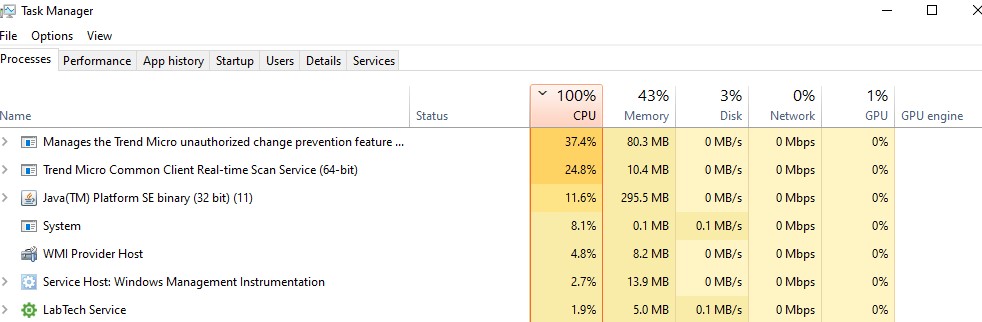
Thanks all for the comments. I uninstalled IDE V2.0.0 and installed 1.8.19 but the result was the same. Our corporate IT does not allow me to dissable the real-time scanning Anti-virus software (Trend Micro) even temporarily but taking a look at task manager revealed that, during compile, CPU usage goes to 100% with Trend Micro tasks using up about 60%
I ran into this problem today compiling a large sketch (multiple files) with 2.0.0 and it was horrendous, the CPU was up to 100% the IDE was unresponsive and sounds similar to what you are describing, if i let it compile it would tap out after a couple of minutes with a connect lost error, wouldn't even compile, i added the TEMP folder to the exclusions list on the AV but it didn't help.
I uninstalled 2.0.0 and installed 1.8.19 and it ran smooth, no lag, responsive, compiled fast and uploaded fast, so not sure if that helps anyone (on Win10)
The directories "Arduino" and "ArduinoData" were added to my AV exclusion list and that has speeded up compilation by a factor of 5 so a sketch that previously took 10 minutes to compile now takes only 2. Having said that, a Raspberry Pi4 compiles the same sketch in about 1 minute.
I found the same dramatic slow down with IDE version2 and solved it by removing IBM Trusteer (Rapport) Bank recommended protection software. I have fed the issue by to software developers
 TEMPORARILY
 rather than 10's minuits under Win 10