#include "MIDIUSB.h"
#include <Keypad.h>
const byte ROWS = 6;
const byte COLS = 4;
const byte ROW2S = 6;
const byte COL2S = 4;
const float LogMultiplier = 25.0;  // Adjust the mapping of time to velocity
const int NB_BUTTONS = ROWS * COLS;
const int PRESET = 1;
int k = 100;
int notes[PRESET][NB_BUTTONS] = {37, 43, 49, 55, 38, 44, 50, 56, 39, 45, 51, 57, 40, 46, 52, 58, 41, 47, 53, 59, 42, 48, 54, 60}; //Preset 0
char keys[ROWS][COLS] = {
  {37, 43, 49, 55},
  {38, 44, 50, 56},
  {39, 45, 51, 57},
  {40, 46, 52, 58},
  {41, 47, 53, 59},
  {42, 48, 54, 60}
};
//Keypad pins
byte rowPins[ROWS] = {7, 6, 5, 4, 3, 2}; //connect to the row pinouts of the kpd +
byte colPins[COLS] = {A0, A1, A2, A3}; //connect to the column pinouts of the kpd -
Keypad kpd1 = Keypad( makeKeymap(keys), rowPins, colPins, ROWS, COLS );

char key2s[ROW2S][COL2S] = {
  {37, 43, 49, 55},
  {38, 44, 50, 56},
  {39, 45, 51, 57},
  {40, 46, 52, 58},
  {41, 47, 53, 59},
  {42, 48, 54, 60}
};
//Keypad pins
byte rowPin2s[ROW2S] = {15, 14, 16, 10, 9, 8}; //connect to the row pinouts of the kpd +
byte colPin2s[COL2S] = {A0, A1, A2, A3}; //connect to the column pinouts of the kpd -
Keypad kpd2 = Keypad( makeKeymap(key2s), rowPin2s, colPin2s, ROW2S, COL2S );

unsigned int buttons_state[NB_BUTTONS] = {0, 0, 0, 0, 0, 0, 0, 0, 0, 0, 0, 0, 0, 0, 0, 0, 0, 0, 0, 0, 0, 0, 0, 0};
int selected_preset = 0;
void setup() {
 Serial.begin(9600);
 delay(200);
}

void loop() {
 if (kpd1.getKeys()) {
    for (int i = 0; i < LIST_MAX; i++) // Scan the whole key list.
    {
      if ( kpd1.key[i].stateChanged )   // Only find keys that have changed state.
      {
        buttons_state[kpd1.key[i].kcode] = kpd1.key[i].kstate;//vi tri cua nut nhan
        unsigned long BreakTime[kpd1.key[i].kstate];
        if (kpd1.key[i].kstate == 0) { //DOWN
          BreakTime[kpd1.key[i].kstate] = millis();
        }
            if (kpd2.getKeys()) {
              for (int k = 0; k < LIST_MAX; k++)
              {
                if ( kpd2.key[k].stateChanged == kpd1.key[i].stateChanged)
                {
                if (kpd2.key[k].kstate == 1) { //DOWN

               unsigned long velocityTime = millis() - BreakTime[kpd1.key[i].kstate];
               int logTime = LogMultiplier * log(velocityTime);
               byte velocity = 223 - constrain(logTime, 1, 127);                   // Longer time, lower velocity
               noteOn(0, notes[selected_preset][kpd1.key[i].kcode], velocity);
               MidiUSB.flush();
               Serial.println(velocityTime);
               Serial.println(velocity);
                    }
                }
              }
        }

        if (kpd1.key[i].kstate == 3) { //UP
        key_up(kpd1.key[i].kcode);
        }
      }
    }
  }
}

//Key up (unpressed)
void key_up(int key) {
    noteOff(0, notes[selected_preset][key], 0);
    MidiUSB.flush();
}
void noteOn(byte channel, byte pitch, byte velocity) {
  midiEventPacket_t noteOn = {0x09, 0x90 | channel, pitch, velocity};
  MidiUSB.sendMIDI(noteOn);
}

void noteOff(byte channel, byte pitch, byte velocity) {
  midiEventPacket_t noteOff = {0x08, 0x80 | channel, pitch, velocity};
  MidiUSB.sendMIDI(noteOff);
}

* 1. * Danh sách các mục
It seems as though you are effectively turning two 6X4 keypads into one 12X4 keypad (because the columns are shared).
I guess that you need simply one 12X4 array and treat the whole thing as a single 12X4 keypad.
I need two kepad because i have one old yamaha electric piano, the layout it allready had, can you fix my code?
Have you the original code with just one keypad ?
I find out the code in that topic
You've told @johnwasser that your code works but slowly. However, the code looks strange to me because you are testing buttons from keypad2 only if something on keypad1 is pressed, for example:
if ( kpd2.key[k].stateChanged == kpd1.key[i].stateChanged)
and it looks like the keypads should be operated independently.
Can you just start with one keypad and get that working together with your electric piano or, even easier, just get a demonstration program working with a two or three tactile buttons instead of a keypad. Once you have got that far, it would be an easy matter to get it working with both keypads.

we have to botton in one note of piano, when i put the key down, we will get two deffrent time, the problem is two keboad have to had the same row pin
On the underside of that keyboard with all the wires coming out, are those components diodes ?
If you are going to arrange the keys in a matrix and you want to press multiple keys simultaneously, then there has to be diodes in the circuit. However, then you must then connect these correctly. See What is the actual circuitry of a keypad and the switch - #2 by LarryD
yes, those are diodes. I'm using this keboad whithout velocity, so i'm trying to make one with velocity, hope that you can help me check code and fix if you can.
Show (a) the code which you are using for the non-velocity version and (b) a wiring diagram of how you think those keys on the keyboard are organised/interconnected including the diodes.
Your picture appears to show two Nanos (or similar size devices) connected to a wiring "loom". Can you also explain that.
#include <midi_serialization.h>
#include <usbmidi.h>
#include <Keypad.h>
const byte ROWS = 5;
const byte COLS = 5;
const int NB_BUTTONS = ROWS * COLS;
const int PRESET = 7;
int notes[PRESET][NB_BUTTONS] = {
{24, 29, 34, 39, 44, 25, 30, 35, 40, 45, 26, 31, 36, 41, 46, 27, 32, 37, 42, 47, 28, 33, 38, 43, 48}, //Preset 0
{36, 41, 46, 51 ,56,37, 42, 47, 52 ,57,38, 43, 48, 53 ,58,39, 44, 49, 54 ,59,40, 45, 50, 55 ,60}, //Preset 1
{48, 53, 58, 63, 68,49, 54, 59, 64, 69,50, 55, 60, 65, 70,51, 56, 61, 66, 71,52, 57, 62, 67, 72}, //Preset 2
{60, 65, 70, 75, 80,61, 66, 71, 76, 81,62, 67, 72, 77, 82,63, 68, 73, 78, 83,64, 69, 74, 79, 84}, //Preset 3
{72, 77, 82, 87, 92,73, 78, 83, 88, 93,74, 79, 84, 89, 94,75, 80, 85, 90, 95,76, 81, 86, 91, 96}, //Preset 4
{84, 89, 94, 87, 88,85, 90, 95, 100, 105,86, 91, 96, 101, 106,87, 92, 97, 102, 107,88, 93, 98, 103, 108},//Preset 5
{96, 101, 106, 111, 116,97, 102, 107, 112, 117,98, 103, 108, 113, 118,99, 104, 109, 114, 119,100, 105, 110, 115, 120} //Preset 6
};
char keys[ROWS][COLS] = {
{36, 41, 46, 51 ,56},
{37, 42, 47, 52 ,57},
{38, 43, 48, 53 ,58},
{39, 44, 49, 54 ,59},
{40, 45, 50, 55 ,60}
};
//Keypad pins
byte rowPins[ROWS] = {2, 3, 4, 5, 6}; //connect to the row pinouts of the kpd -
byte colPins[COLS] = {7, 8, 9, 10, 16}; //connect to the column pinouts of the kpd +
Keypad kpd = Keypad( makeKeymap(keys), rowPins, colPins, ROWS, COLS );
unsigned int buttons_state[NB_BUTTONS] = {0, 0, 0, 0, 0, 0, 0, 0, 0, 0, 0, 0, 0, 0, 0, 0, 0, 0, 0, 0, 0, 0, 0, 0, 0};
const int buttonPin = 15;
const int buttonPin2 = 14;
int buttonState = 0;
int buttonState2 = 0;
int selected_preset = 2;
int selected_button = 2;
int selected_button2 = 2;
void setup() {
Serial.begin(115200);
pinMode(buttonPin, INPUT_PULLUP);
pinMode(buttonPin2, INPUT_PULLUP);
}
void loop() {
USBMIDI.poll();
buttonState = digitalRead(buttonPin);
buttonState2 = digitalRead(buttonPin2);
if (buttonState == LOW) {
if (selected_button < 6){
selected_button++;
selected_preset = selected_button;
selected_button2 = selected_preset;
Serial.println(selected_preset);
delay(500);
}
}
if (buttonState2 == LOW) {
if (selected_button2 > 0){
selected_button2--;
selected_preset = selected_button2;
selected_button = selected_preset;
Serial.println(selected_preset);
delay(500);
}
}
if (buttonState == LOW && kpd.getKeys()) {
delay(50);
}
if (buttonState2 == LOW && kpd.getKeys()) {
delay(50);
}
if (buttonState == LOW && buttonState2 == LOW) {
delay(50);
}
if (kpd.getKeys()) {
for (int i = 0; i < LIST_MAX; i++) // Scan the whole key list.
{
if ( kpd.key[i].stateChanged ) // Only find keys that have changed state.
{
buttons_state[kpd.key[i].kcode] = kpd.key[i].kstate;//vi tri cua nut nhan
if (kpd.key[i].kstate == 1) { //DOWN
Serial.println("Sending note on");
Serial.println(buttons_state[kpd.key[i].kcode]);
key_down(kpd.key[i].kcode);
}
if (kpd.key[i].kstate == 3) { //UP
Serial.println("Sending note off");
key_up(kpd.key[i].kcode);
}
}
}
}
}
//Key down (pressed)
void key_down(int key) {
sendNote(0, notes[selected_preset][key], 127);
Serial.println(notes[selected_preset][key]);
USBMIDI.flush();
}
//Key up (unpressed)
void key_up(int key) {
sendNoteoff(0, notes[selected_preset][key], 0);
USBMIDI.flush();
}
void sendNote(uint8_t channel, uint8_t note, uint8_t velocity) {
USBMIDI.write((velocity != 0 ? 0x90 : 0x80) | (channel & 0xf));
USBMIDI.write(note & 0x7f);
USBMIDI.write(velocity &0x7f);
}
void sendNoteoff(uint8_t channel, uint8_t note, uint8_t velocity) {
USBMIDI.write((velocity = 0 ? 0x90 : 0x80) | (channel & 0xf));
USBMIDI.write(note & 0x7f);
USBMIDI.write(velocity &0x7f);
}[quote="6v6gt, post:13, topic:1180657, full:true"]
[quote="haophan156, post:12, topic:1180657"]
I'm using this keboad whithout velocity,
[/quote]
Show (a) the code which you are using for the non-velocity version and (b) a wiring diagram of how you think those keys on the keyboard are organised/interconnected including the diodes.
Your picture appears to show two Nanos (or similar size devices) connected to a wiring "loom". Can you also explain that.
[/quote]
this is the code im using for my midi 25 key, it work well, and it just have one botton in one key note, but in yamaha electric piano we have two botton in one key note, and the layout is 11x6 matric, two matric for 61 key note,

this is the code im using for my midi 25 key, it work well, and it just have one botton in one key note, but in yamaha electric piano we have two botton in one key note, and the layout is 11x6 matric, two matric for 61 key note,


For a velocity sensitive keyboard you can have a key state array with a
entry for each key, based on the two scan results for upper and lower
switches. The key states are:
- Unpressed (upper and lower open)
- Press started (upper closed, lower open)
- Press complete (upper and lower closed) (aftertouch)
- Release started (upper closed, lower open)
- Release finished (upper and lower open)
Looking at those key states they are defined not only by the upper and
lower switch states but also by whether they key is rising or falling i.e. the
previous state.
The normal sequence of key state transitions is 1, 2, 3, 4, 5, 1. Code
should also cope with 1, 2, 1, the key starts to depress but then goes up again,
so no MIDI is generated. Also with 4, 3, 4, key starts to rise but then goes
back to fully depressed, so no MIDI is generated.
At states 2 and 4 you get the current time and store it. At states 3 and 6
you get the current time, compare it to the stored time, and then compute the
velocity, which in MIDI is a 7-bit value where 1 is very soft (a long time
between the two switches) and 127 is hard (a fast time between the two
switches). Zero has a special meaning (a Note-On with velocity of zero
means Note-Off). You would need to decide a minimum and maximum time
to map to 1 and 127. This could be a linear relationship or you could allow
various velocity curves.
Then at state 3 you send a MIDI Note-On command with velocity and go
to state 4. At state 6 you send a MIDI Note-Off command with velocity and
go to state 1. If your keyboard has a single pressure sensor, then you can also
measure and send MIDI Channel Aftertouch during key stage 3.
and i try do the the velocity with input_pullup , and it send me data i want to do, the code i get in the link
//luc nhan phim
const byte KeyCount = 6;
const float LogMultiplier = 22.0;  // Adjust the mapping of time to velocity

byte Make1ContactPins[KeyCount] = {
  2, 3, 4, 5, 6, 7
};

byte Make2ContactPins[KeyCount] = {
  8, 9, 10, 16, 14, 15
};

const byte SwitchStateIdle = 0b01;  // Break contact closed (0), Make contact open (1)
byte SwitchState[KeyCount];

unsigned long BreakTime[KeyCount];

//---------------------------------------------

void setup()
{
  Serial.begin(115200);
  delay(200);
  for (int i = 0; i < KeyCount; i++)
  {
    SwitchState[i] = SwitchStateIdle;
    pinMode(Make1ContactPins[i], INPUT_PULLUP);
    pinMode(Make2ContactPins[i], INPUT_PULLUP);
  }
}
void loop()
{
  // scan switches
  for (int key = 0; key < KeyCount; key++)
  {
    byte oldState = SwitchState[key];
    byte newState = digitalRead(Make1ContactPins[key]) << 1 | digitalRead(Make2ContactPins[key]);
    SwitchState[key] = newState;

    if (newState == oldState)
      continue;  // No state change so nothing to do

    switch (oldState << 2 | newState)
    {
      case 0b1101:  // Idle to Make1
        BreakTime[key] = millis();
        break;

      case 0b0100:  // Make1 to Make1+Make2
        {
          unsigned long velocityTime = millis() - BreakTime[key];
          int logTime = LogMultiplier * log(velocityTime);
          byte velocity = 128 - constrain(logTime, 1, 127);                   // Longer time, lower velocity
          if (velocity >> 2){
          midiSend(velocity);  // send midi note on
          }
        }
        break;

  }
}
}

// Send a general MIDI message
void midiSend(byte data2){
  Serial.println(data2);
}
OK. So the code works for 6 piano keys each of which has two tactile button switches.
Now you want to extend it to all piano 61 keys on the Yamaha keyboard.
Q1. Is that correct ?
You have shown this picture.

Q2. Is this the Yamaha keyboard ?
Q3. What are the 2 small blue circuit boards connected to the wiring ?
Q4. You have shown pictures of the tactile buttons behind the keys but these pictures appear to have been taken from MIDI keyboard with velocity sensitivity (PASSIVE version) - #10 by petelms . Is your keyboard identical to the one in that thread ?
Q5. Did you get the contents of post #18 from a web search or ChatGPT like tool ?
1, yes, i want to work like 6 piano keys each of which has two tactile button switches. but for two keypad layout,
2, yes, it is yamaha keyboad

3, two small blue circuit boards connected to the wiring are arduino pro micro
4, this is picture of my keyboard:
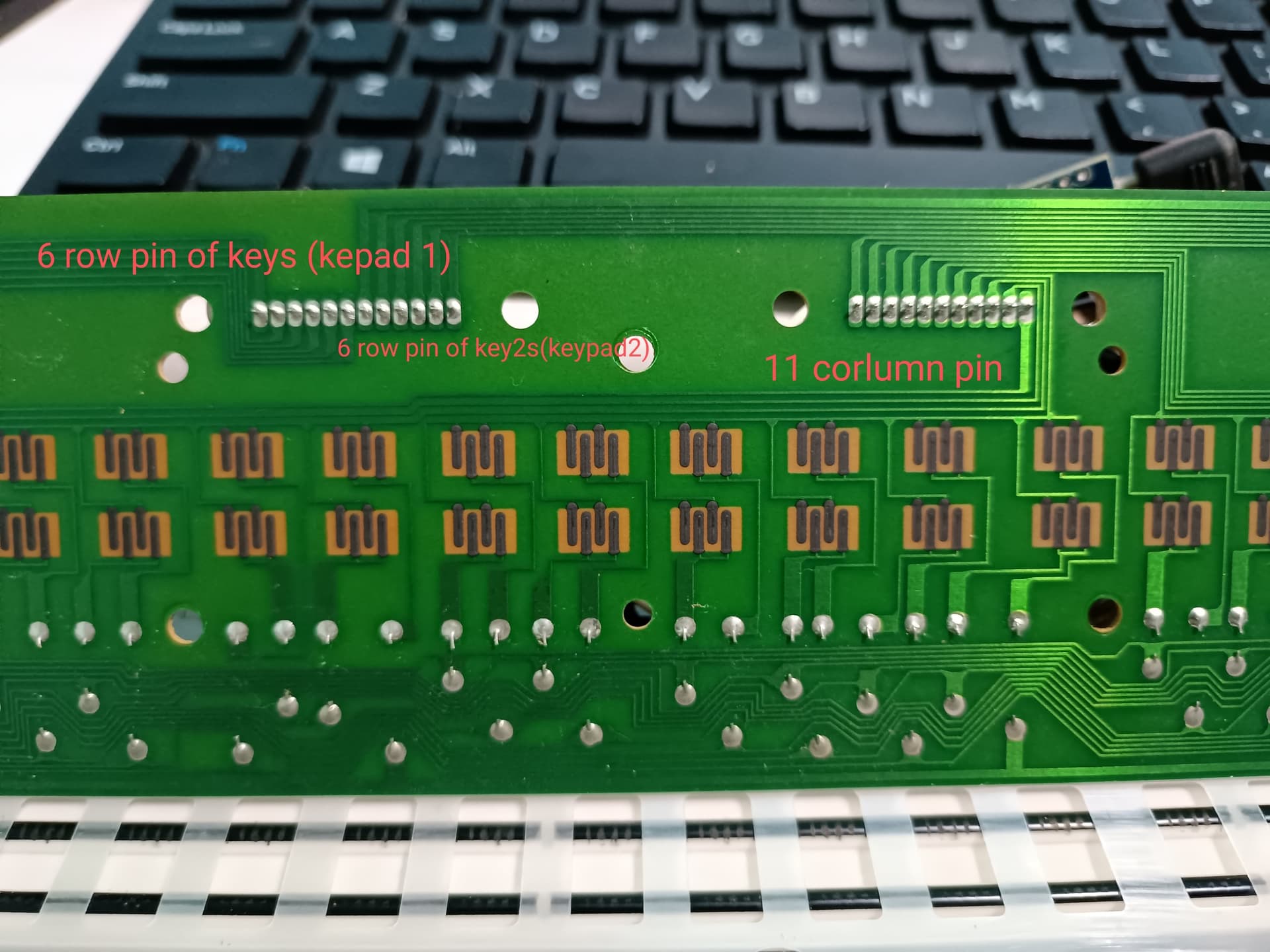
it work like the toppic i show you, 2 button is not press at a same time, because one button is higher than other,
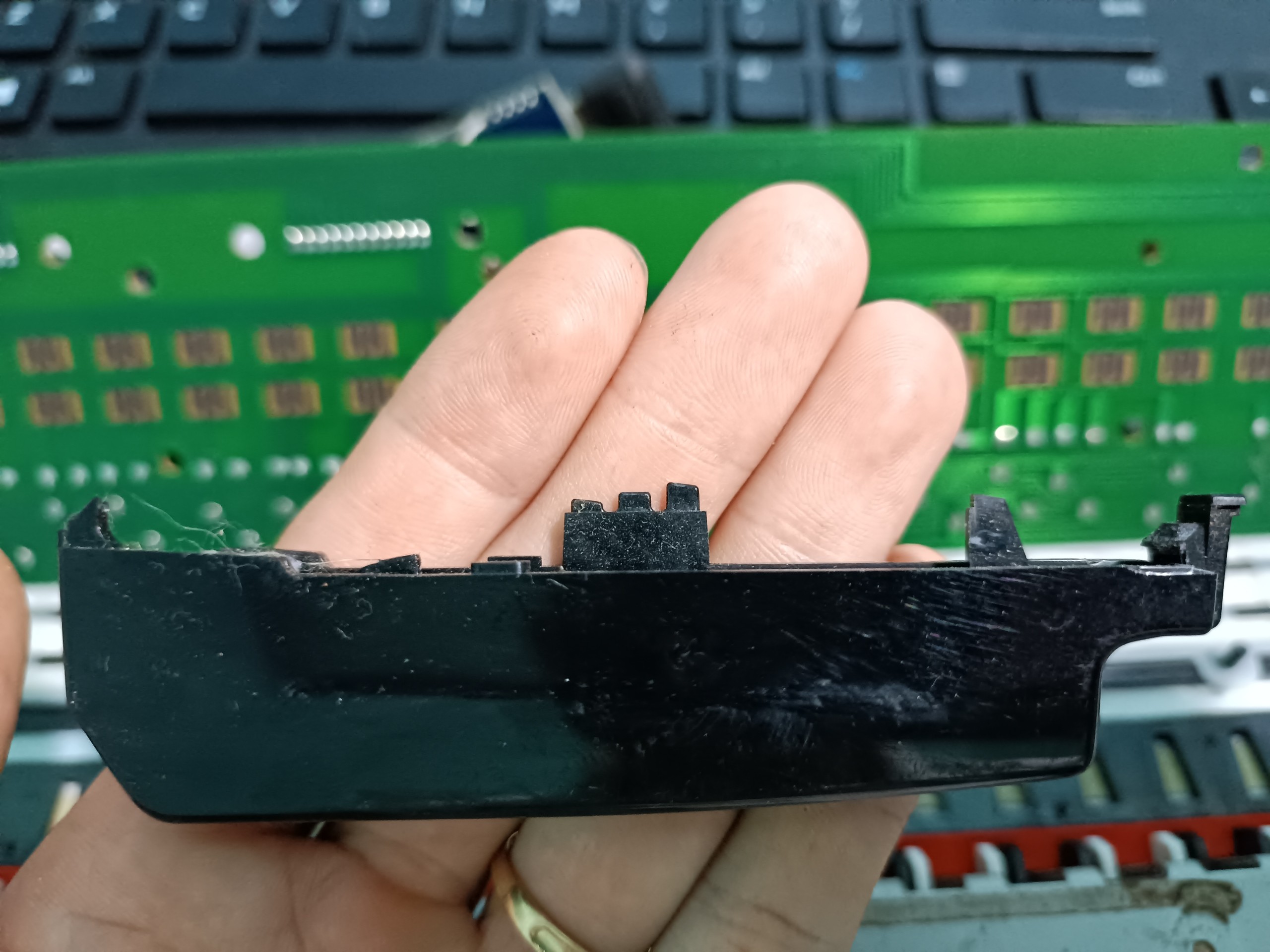
5, I'm working 2 year in this project, but I can't find out the way,
I hope you can help
thank you for your time.