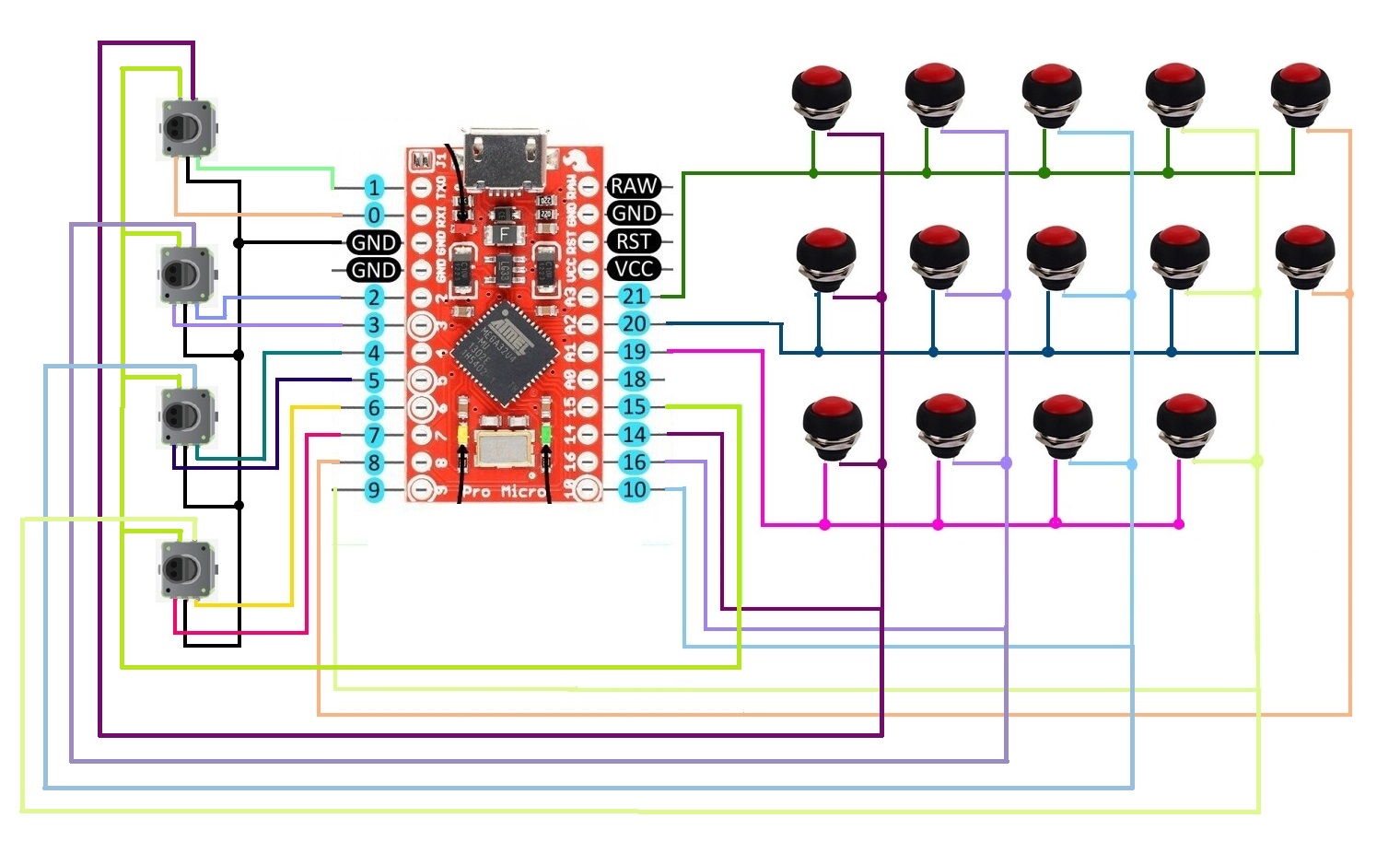
Intégration code joystick dans code existant

Bonjour !

voilà, j'ai une bouton box avec quelques boutons et je souhaiterais y ajouter un joystick Arduino.
J'ai déjà le code qui va très bien pour mes boutons existant, mais je ne sais pas comment et surtout où dans ce code rajouter celui du joystick (et éventuellement l'adapter à mon branchement sur la Micro).

Si quelqu'un (et forcément qu'il est ici... :wink:) pouvait m'aiguiller ce serait super sympa :slightly_smiling_face:

Je peux fournir le code d'origine, le code du joystick ainsi que que le schéma de câblage

Merci d'avance !

Hello, il faut poster tes éléments et indiquer le type de platine que tu utilises.

voila mon schéma de câblage


le code que j'utilise sur la Micro Pro actuellement

//BUTTON BOX 
//USE w ProMicro
//Tested in WIN10 + Assetto Corsa
//AMSTUDIO
//20.8.17

#include <Keypad.h>
#include <Joystick.h>

#define ENABLE_PULLUPS
#define NUMROTARIES 4
#define NUMBUTTONS 24
#define NUMROWS 5
#define NUMCOLS 5


byte buttons[NUMROWS][NUMCOLS] = {
  {0,1,2,3,4},
  {5,6,7,8,9},
  {10,11,12,13,14},
  {15,16,17,18,19},
  {20,21,22,23},
};

struct rotariesdef {
  byte pin1;
  byte pin2;
  int ccwchar;
  int cwchar;
  volatile unsigned char state;
};

rotariesdef rotaries[NUMROTARIES] {
  {0,1,24,25,0},
  {2,3,26,27,0},
  {4,5,28,29,0},
  {6,7,30,31,0},
};

#define DIR_CCW 0x10
#define DIR_CW 0x20
#define R_START 0x0

#ifdef HALF_STEP
#define R_CCW_BEGIN 0x1
#define R_CW_BEGIN 0x2
#define R_START_M 0x3
#define R_CW_BEGIN_M 0x4
#define R_CCW_BEGIN_M 0x5
const unsigned char ttable[6][4] = {
  // R_START (00)
  {R_START_M,            R_CW_BEGIN,     R_CCW_BEGIN,  R_START},
  // R_CCW_BEGIN
  {R_START_M | DIR_CCW, R_START,        R_CCW_BEGIN,  R_START},
  // R_CW_BEGIN
  {R_START_M | DIR_CW,  R_CW_BEGIN,     R_START,      R_START},
  // R_START_M (11)
  {R_START_M,            R_CCW_BEGIN_M,  R_CW_BEGIN_M, R_START},
  // R_CW_BEGIN_M
  {R_START_M,            R_START_M,      R_CW_BEGIN_M, R_START | DIR_CW},
  // R_CCW_BEGIN_M
  {R_START_M,            R_CCW_BEGIN_M,  R_START_M,    R_START | DIR_CCW},
};
#else
#define R_CW_FINAL 0x1
#define R_CW_BEGIN 0x2
#define R_CW_NEXT 0x3
#define R_CCW_BEGIN 0x4
#define R_CCW_FINAL 0x5
#define R_CCW_NEXT 0x6

const unsigned char ttable[7][4] = {
  // R_START
  {R_START,    R_CW_BEGIN,  R_CCW_BEGIN, R_START},
  // R_CW_FINAL
  {R_CW_NEXT,  R_START,     R_CW_FINAL,  R_START | DIR_CW},
  // R_CW_BEGIN
  {R_CW_NEXT,  R_CW_BEGIN,  R_START,     R_START},
  // R_CW_NEXT
  {R_CW_NEXT,  R_CW_BEGIN,  R_CW_FINAL,  R_START},
  // R_CCW_BEGIN
  {R_CCW_NEXT, R_START,     R_CCW_BEGIN, R_START},
  // R_CCW_FINAL
  {R_CCW_NEXT, R_CCW_FINAL, R_START,     R_START | DIR_CCW},
  // R_CCW_NEXT
  {R_CCW_NEXT, R_CCW_FINAL, R_CCW_BEGIN, R_START},
};
#endif

byte rowPins[NUMROWS] = {21,20,19,18,15}; 
byte colPins[NUMCOLS] = {14,16,10,9,8}; 

Keypad buttbx = Keypad( makeKeymap(buttons), rowPins, colPins, NUMROWS, NUMCOLS); 

Joystick_ Joystick(JOYSTICK_DEFAULT_REPORT_ID, 
  JOYSTICK_TYPE_JOYSTICK, 32, 0,
  false, false, false, false, false, false,
  false, false, false, false, false);

void setup() {
  Joystick.begin();
  rotary_init();}

void loop() { 

  CheckAllEncoders();

  CheckAllButtons();

}

void CheckAllButtons(void) {
      if (buttbx.getKeys())
    {
       for (int i=0; i<LIST_MAX; i++)   
        {
           if ( buttbx.key[i].stateChanged )   
            {
            switch (buttbx.key[i].kstate) {  
                    case PRESSED:
                    case HOLD:
                              Joystick.setButton(buttbx.key[i].kchar, 1);
                              break;
                    case RELEASED:
                    case IDLE:
                              Joystick.setButton(buttbx.key[i].kchar, 0);
                              break;
            }
           }   
         }
     }
}


void rotary_init() {
  for (int i=0;i<NUMROTARIES;i++) {
    pinMode(rotaries[i].pin1, INPUT);
    pinMode(rotaries[i].pin2, INPUT);
    #ifdef ENABLE_PULLUPS
      digitalWrite(rotaries[i].pin1, HIGH);
      digitalWrite(rotaries[i].pin2, HIGH);
    #endif
  }
}


unsigned char rotary_process(int _i) {
   unsigned char pinstate = (digitalRead(rotaries[_i].pin2) << 1) | digitalRead(rotaries[_i].pin1);
  rotaries[_i].state = ttable[rotaries[_i].state & 0xf][pinstate];
  return (rotaries[_i].state & 0x30);
}

void CheckAllEncoders(void) {
  for (int i=0;i<NUMROTARIES;i++) {
    unsigned char result = rotary_process(i);
    if (result == DIR_CCW) {
      Joystick.setButton(rotaries[i].ccwchar, 1); delay(50); Joystick.setButton(rotaries[i].ccwchar, 0);
    };
    if (result == DIR_CW) {
      Joystick.setButton(rotaries[i].cwchar, 1); delay(50); Joystick.setButton(rotaries[i].cwchar, 0);
    };
  }
}

ce code correspond à ce branchement sur une arduino micro pro

et voici le code du joystick que je voudrais intégrer au précèdent code suivant branchement du schéma sur arduino micro

personne pour m'aider ??

Bonsoir nico70000

Il ne faut pas mettre des copies d'écran d'un code, c'est inutilisable, copies et colles ton code, entre les balises.

Cordialement
jpbbricole

const int SW_pin = 8; // digital pin connected to switch output // à adapter
const int X_pin = A0; // analog pin connected to X output // à adapter
const int Y_pin = A1; // analog pin connected to Y output // à adapter
void setup() {
pinMode(SW_pin, INPUT); //Set pushbutton as input
digitalWrite(SW_pin, HIGH); //Set SW_pin High
}
void loop() {
int XValue = analogRead(X_pin); // Read the analog value from the joystick X-axis
int YValue = analogRead(Y_pin); // Read the analog value from the joystick Y-axis
int SwValue = digitalRead(SW_pin); // Read the digital value from the joystick button

Je viens de le mettre dans une seconde page du fichier, mais ça me rapporte une erreur au moment de la compilation...

D:\Simulateur\Fabrication\Bouton Box\ARDUINO_BUTTON_BOXV2\ARDUINO_BUTTON_BOX_MICROPRO\Joystick.cpp: In function 'void setup()':
D:\Simulateur\Fabrication\Bouton Box\ARDUINO_BUTTON_BOXV2\ARDUINO_BUTTON_BOX_MICROPRO\Joystick.cpp:5:17: error: 'INPUT' was not declared in this scope
pinMode(SW_pin, INPUT PULLUP); //Set pushbutton as input
^~~~~
D:\Simulateur\Fabrication\Bouton Box\ARDUINO_BUTTON_BOXV2\ARDUINO_BUTTON_BOX_MICROPRO\Joystick.cpp:5:1: error: 'pinMode' was not declared in this scope
pinMode(SW_pin, INPUT PULLUP); //Set pushbutton as input
^~~~~~~
D:\Simulateur\Fabrication\Bouton Box\ARDUINO_BUTTON_BOXV2\ARDUINO_BUTTON_BOX_MICROPRO\Joystick.cpp:6:22: error: 'HIGH' was not declared in this scope
digitalWrite(SW_pin, HIGH); //Set SW_pin High
^~~~
D:\Simulateur\Fabrication\Bouton Box\ARDUINO_BUTTON_BOXV2\ARDUINO_BUTTON_BOX_MICROPRO\Joystick.cpp:6:1: error: 'digitalWrite' was not declared in this scope
digitalWrite(SW_pin, HIGH); //Set SW_pin High
^~~~~~~~~~~~
D:\Simulateur\Fabrication\Bouton Box\ARDUINO_BUTTON_BOXV2\ARDUINO_BUTTON_BOX_MICROPRO\Joystick.cpp: In function 'void loop()':
D:\Simulateur\Fabrication\Bouton Box\ARDUINO_BUTTON_BOXV2\ARDUINO_BUTTON_BOX_MICROPRO\Joystick.cpp:9:14: error: 'analogRead' was not declared in this scope
int XValue = analogRead(X_pin); // Read the analog value from the joystick X-axis
^~~~~~~~~~
D:\Simulateur\Fabrication\Bouton Box\ARDUINO_BUTTON_BOXV2\ARDUINO_BUTTON_BOX_MICROPRO\Joystick.cpp:11:15: error: 'digitalRead' was not declared in this scope
int SwValue = digitalRead(SW_pin); // Read the digital value from the joystick button
^~~~~~~~~~~
D:\Simulateur\Fabrication\Bouton Box\ARDUINO_BUTTON_BOXV2\ARDUINO_BUTTON_BOX_MICROPRO\Joystick.cpp:11:34: error: expected '}' at end of input
int SwValue = digitalRead(SW_pin); // Read the digital value from the joystick button
^

exit status 1

Compilation error: 'INPUT' was not declared in this scope

Bonjour,

C'est INPUT_PULLUP et non INPUT PULLUP


Comme ceci ? car j'ai la même erreur...

tu peux mettre la nouvelle sortie d'erreur de compilation?

Puisque ton code est dans un .cpp (un onglet je suppose) :
#include <Arduino.h>

j'ai l'impression que le code ne correspond pas au montage

Bonjour ! Donc je dois mettre le code du joystick où exactement pour qu'il fonctionne ?

le code du joystick ? Pourquoi il ne correspond pas au montage ?

Tu ajoutes simplement :
#include <Arduino.h>
Au début de ton fichier .cpp

J'ai ce code erreur maintenant....

D:\Simulateur\Fabrication\Bouton Box\ARDUINO_BUTTON_BOX- PERSO\ARDUINO_BUTTON_BOX_MICRO\Joystick.cpp: In function 'void loop()':
D:\Simulateur\Fabrication\Bouton Box\ARDUINO_BUTTON_BOX- PERSO\ARDUINO_BUTTON_BOX_MICRO\Joystick.cpp:12:34: error: expected '}' at end of input
int SwValue = digitalRead(SW_pin); // Read the digital value from the joystick button
^

exit status 1

Compilation error: expected '}' at end of input