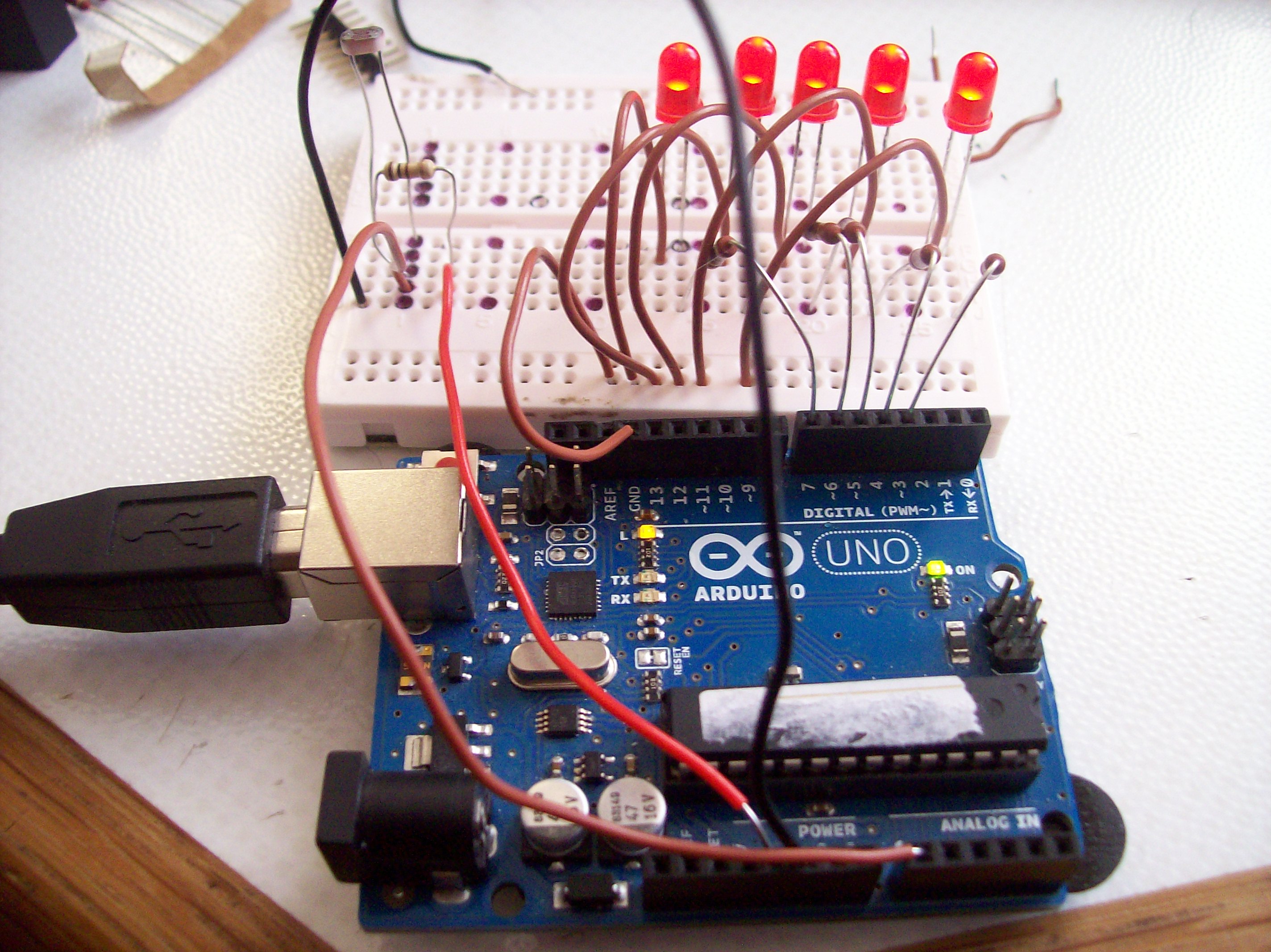
Hi I have just had solar PV installed, and I have discovered that by counting the LED flashes on the meter, I can get an Idea of production.
I have extensively searched the net for a way of monitoring and calculating this for me , and have found the LDR / photo diode schematic, but all the information pertains to a data logger.
Is there a sketch that reads the led flash,then times the interval between them, and then can indicate to me via simple LEDs at what level the panels are producing power? maybe like a VU meter.
I think it is very low level, but am surprised that I have not discovered it yet!
It is extremely low level -- low enough to the point that nobody bothers to explain it. If you want to get your feet wet with the Arduino this would be a good project to get started with, and there are plenty of people here to help you when you get stuck, but if you want someone to do all the work for you then you should post in the "Gigs and Collaborations" forum and include how much you're willing to pay for the project completion.
Chagrin:
It is extremely low level -- low enough to the point that nobody bothers to explain it. If you want to get your feet wet with the Arduino this would be a good project to get started with, and there are plenty of people here to help you when you get stuck, but if you want someone to do all the work for you then you should post in the "Gigs and Collaborations" forum and include how much you're willing to pay for the project completion.
Thankyou Chagrin
I will try to find a solution, there are plenty of examples , they just need linking up by the looks of it.
I have my Forth head on I think I could do it that way, I like to see things all in one script, I have worked better by looking a and altering existing code, so this is a challenge to me.
As you say, this is perfect for me to understand my Arduino better, and that what I will do.
Can I update this thread as to my progress and invite help/feedback?
not the ideal solution but should help you getting started,
duration can be measured with the millis() function,
remember the last time of a pulse and ....
Will the manufacturer tell you what the LED blink frequency actually means?
If not, to have a calibrated device, you will have to determine that for yourself.
You might measure power (or current) output and attempt to correlate output with blink frequency.
Look on the meter's nameplate. You should find an energy constant labelled kh or ki or ks or kp depending on the manufacturer. Also look for the units, always expressed as (Wh or VAh), but if not present, it can be determined from what's labeled on the readout (KWh or KVAh). For example, if all you see is kWh, then the energy constant is Wh (watt-hours). For electronic meters it's usually 1.0 and for mechanical meters it's usually 7.2.
If you need to measure the energy consumed (KWh or KVAh) this is the easiest task to accomplish. All that's needed is to count (totalize) led flashes or disk revolutions. If the Ks is 1.0 Wh, then a count of 1000 = 1 kWh
If you need to measure or track the power (kW or kVA), then you'll need to measure and record the elapsed time between pulses as well as totalizing the pulses. Another method would be to time stamp each pulse. This is where data logging becomes necessary.
Note that some meters types will only give quick impulses of around 5 ms, others (rare) might use 50% duty cycle.
Tip: You can see if an infrared meter led is working by temporarily turning on a substantial load (dryer or oven). Then use a camera view screen or a smartphone with camera turned on to see the infrared led flashing. Of course, this will also work to test if an infrared remote control is functional.
Thank you for all your replies so far ,
I have made some progress.
I am using this sketch that was originally for a lap counter I found written by Claudiu Cristian, with a few mods to the code I have managed to time the pulses of a flash light and display the results on a TV screen with tv out.
I now need assistance to work out how to read the Pulse time (timing) and run my formula* over the reading so I can display it on the screen. Any ideas?
here is what I have so far.
I am using Arduino 1.0.1 and an UNO
/*
LDR pulse counter based on a Lap counter Written by
by Claudiu Cristian from his blog @ http://kumuya.blogspot.co.uk/2012/02/speed-measurement-with-arduino.html
I saw this and Thought,.. :-) So I have managed to display the Pulse time on a TV with TVout.
This only uses one LDR.
TODO
work out how to read 'timing' and use my meter calculation to display the amount of KW my solar PV is pushing out at any given time.
Power (kW) = 3600 (secs in 1hr) divided by (the seconds between flashes * number of Imp/kWh printed on meter)
modifications By Carl (me) 16/3/14
*/


#include <TVout.h>
#include <video_gen.h>
#include <fontALL.h>
TVout TV;
int zOff = 150;
int xOff = 0;
int yOff = 0;
int cSize = 50;
int view_plane = 64;


unsigned long time1;
int photocellPin_1 = 0;     // 1st sensor is connected to a0
int photocellReading_1;     // the analog reading from the analog port
int photocellPin_2 = 0;     // 2nd sensor is connected to a0 too, Only one LDR used
int photocellReading_2;     // the analog reading from the analog port
int threshold = 950;        //value below sensors are trigerd
float pulseTime;              // declaration of Pulse variable
float timing;
unsigned long int calcTimeout = 0; // initialisation of timeout variable

void setup(void) {
  // We'll send debugging information via the Serial monitor
  Serial.begin(9600);
}

void loop(void) {
  photocellReading_1 = analogRead(photocellPin_1);  //read out values for sensor 1 threshold >
  photocellReading_2 = analogRead(photocellPin_1);  //read out values for sensor 2  threshhold <
  // if reading of first sensor is smaller than threshold starts time count and moves to calculation function
  if (photocellReading_1 > threshold) {
   time1 = millis();
   startCalculation();
 }
}

// calculation function
void startCalculation() {
  calcTimeout = millis(); // asign time to timeout variable
  //we wait for trigger of sensor 2 to start calculation - otherwise timeout
  while (!(photocellReading_2 < threshold)) {
    photocellReading_2 = analogRead(photocellPin_2);
    if (millis() - calcTimeout > 30000) return; //30 second wait
  }
  timing = ((float) millis() - (float) time1) / 1000.0; //computes time in seconds
  pulseTime = 1000 / timing;  // timing is the pulse time
  delay(100);
  Serial.print(timing);
  Serial.print("\n");
 TV.begin(NTSC);
 TV.clear_screen();
TV.select_font(font8x8);
TV.println(0,78,"Secs");
TV.println(78,78,timing); //still getting the hang of the display

}
the formula is ...
Power (kW) = 3600 (secs in 1hr) divided by (the seconds between flashes * number of Imp/kWh printed on meter (1000))
/*
LDR pulse counter based on a Lap counter Written byby Claudiu Cristian from his blog @ http://kumuya.blogspot.co.uk/2012/02/speed-measurement-with-arduino.html
I saw this and Thought,.. :-)
This only uses one LDR.
The LED output Code was kindly written by  'robtillaart' from this forum thread http://forum.arduino.cc/index.php?

topic=225442.msg1636531#msg1636531
@TODO
Tidy up the code,Build it and install to my meter.
16/3/14 Carl.
*/


const int LED[]  = { 3, 4, 5, 6, 7 };  // array with led pin numbers

unsigned long time1;
int photocellPin_1 = 0;     // 1st sensor is connected to a0
int photocellReading_1;     // the analog reading from the analog port
int photocellPin_2 = 0;     // 2nd sensor is connected to a0 too, Only one LDR used
int photocellReading_2;     // the analog reading from the analog port
int threshold = 950;        //value below sensors are trigerd
float pulseTime;              // declaration of Pulse variable
float timing;
unsigned long int calcTimeout = 0; // initialisation of timeout variable

void setup(void) {
  // We'll send debugging information via the Serial monitor
  Serial.begin(9600);
}

void loop(void) {
  photocellReading_1 = analogRead(photocellPin_1);  //read out values for sensor 1 threshold >
  photocellReading_2 = analogRead(photocellPin_1);  //read out values for sensor 2  threshhold <
  // if reading of first sensor is smaller than threshold starts time count and moves to calculation function
  if (photocellReading_1 > threshold) {
   time1 = millis();
   startCalculation();
 }
}

// calculation function
void startCalculation() {
  calcTimeout = millis(); // asign time to timeout variable
  //we wait for trigger of sensor 2 to start calculation - otherwise timeout
  while (!(photocellReading_2 < threshold)) {
    photocellReading_2 = analogRead(photocellPin_2);
    if (millis() - calcTimeout > 30000) return; //30 second wait
  }
  timing = ((float) millis() - (float) time1) / 1000.0; //computes time in seconds
  pulseTime = 1000 / timing;  // timing is the pulse time
  delay(100);
  Serial.print(timing);
  Serial.print("\n");
  showLeds(3600/timing/1000);

  }


 void showLeds(unsigned long timing)
{
    // exponential scale
    digitalWrite(LED[4], (timing > 1.3) );  // over 2750 W
    digitalWrite(LED[3], (timing > 1.5) );  // 2400 W
    digitalWrite(LED[2], (timing > 2.0) );  // 1800 W
    digitalWrite(LED[1], (timing > 3.0) );  // 1200 W
    digitalWrite(LED[0], (timing > 6.0) );  // 600 W
}
I have tested it at my desk and its all in working order, however there must be glaring errors in my code or better ways to do things at least. So please feel free to improve upon it.
better assign such expression to a variable and print that.
Now it seems like an int but in fact it is a float as timing is a float
/*
LDR pulse counter based on a Lap counter Written byby Claudiu Cristian from his blog @ http://kumuya.blogspot.co.uk/2012/02/speed-measurement-with-arduino.html
 I saw this and Thought,.. :-)
 This only uses one LDR.
 The LED output Code was kindly written by  'robtillaart' from this forum thread http://forum.arduino.cc/index.php?

 topic=225442.msg1636531#msg1636531
 @TODO
 Tidy up the code,Build it and install to my meter.
 16/3/14 Carl.
 */


const int LED[]  = {
  3, 4, 5, 6, 7 };  // array with led pin numbers

unsigned long time1;

const int photocellPin = 0;     // 1st sensor is connected to a0
int photocellReading;         // the analog reading from the analog port
const int threshold = 950;      // value below sensors are trigerd
unsigned long timing;

void setup(void)
{
  Serial.begin(9600);
}

void loop(void)
{
  if (analogRead(photocellPin) > threshold)
  {
    time1 = millis();
    while ( analogRead(photocellPin) >= threshold )
    {
      if (millis() - time1 > 30000) return; // 30 second wait
    }

    timing = millis() - time1;  // computes time in milliseconds
    // NO NEED TO CONVERT
    delay(100);
    Serial.print("TIMING: ");
    Serial.println(timing);
    showLeds(timing);
  }
}


void showLeds(unsigned long timing)
{
  // exponential scale  NUMBERS MIGHT NEED TO BE ADJUSTED
  digitalWrite(LED[4], (timing > 1000) );  // over 2750 W
  digitalWrite(LED[3], (timing > 500) );  // 2400 W
  digitalWrite(LED[2], (timing > 250) );  // 1800 W
  digitalWrite(LED[1], (timing > 100) );  // 1200 W
  digitalWrite(LED[0], (timing > 50) );  // 600 W
}

 ,
,