"Issue with Modbus RTU Communication Using RS485 Module - No Expected Response"

Hello so I'm new in this field and I'm trying this code to see if the Modbus RS485 will response but unfortunately it doesn't response

so here's the code

#include <SoftwareSerial.h>

#define RX_PIN 4   // RO pin (Receive Output)
#define TX_PIN 5   // DI pin (Data Input)
#define DE_PIN 6   // DE (Data Enable) pin
#define RE_PIN 7   // RE (Receive Enable) pin

SoftwareSerial modbusSerial(RX_PIN, TX_PIN);

void setup() {
  Serial.begin(115200);        // Debugging output
  modbusSerial.begin(115200);  // Match sensor baud rate

  pinMode(DE_PIN, OUTPUT);
  pinMode(RE_PIN, OUTPUT);

  digitalWrite(DE_PIN, LOW);  // Set to receive mode
  digitalWrite(RE_PIN, LOW);  // Set to receive mode
}

void loop() {
  byte request[] = {0x01, 0x03, 0x00, 0x00, 0x00, 0x02, 0xC4, 0x0B}; 

  digitalWrite(DE_PIN, HIGH);  // Enable transmission
  digitalWrite(RE_PIN, HIGH);  // Disable receiving
  delay(10);
  
  modbusSerial.write(request, sizeof(request));  // Send request
  delay(10);
  
  digitalWrite(DE_PIN, LOW);  // Disable transmission
  digitalWrite(RE_PIN, LOW);  // Enable receiving

  delay(100);

  while (modbusSerial.available()) {
    Serial.print(modbusSerial.read(), HEX);
    Serial.print(" ");
  }
  Serial.println();
  
  delay(2000);
}

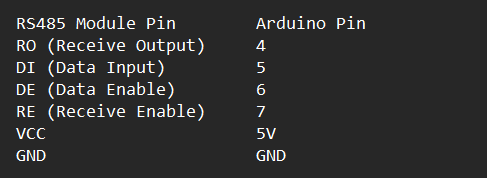
heres the wiring table

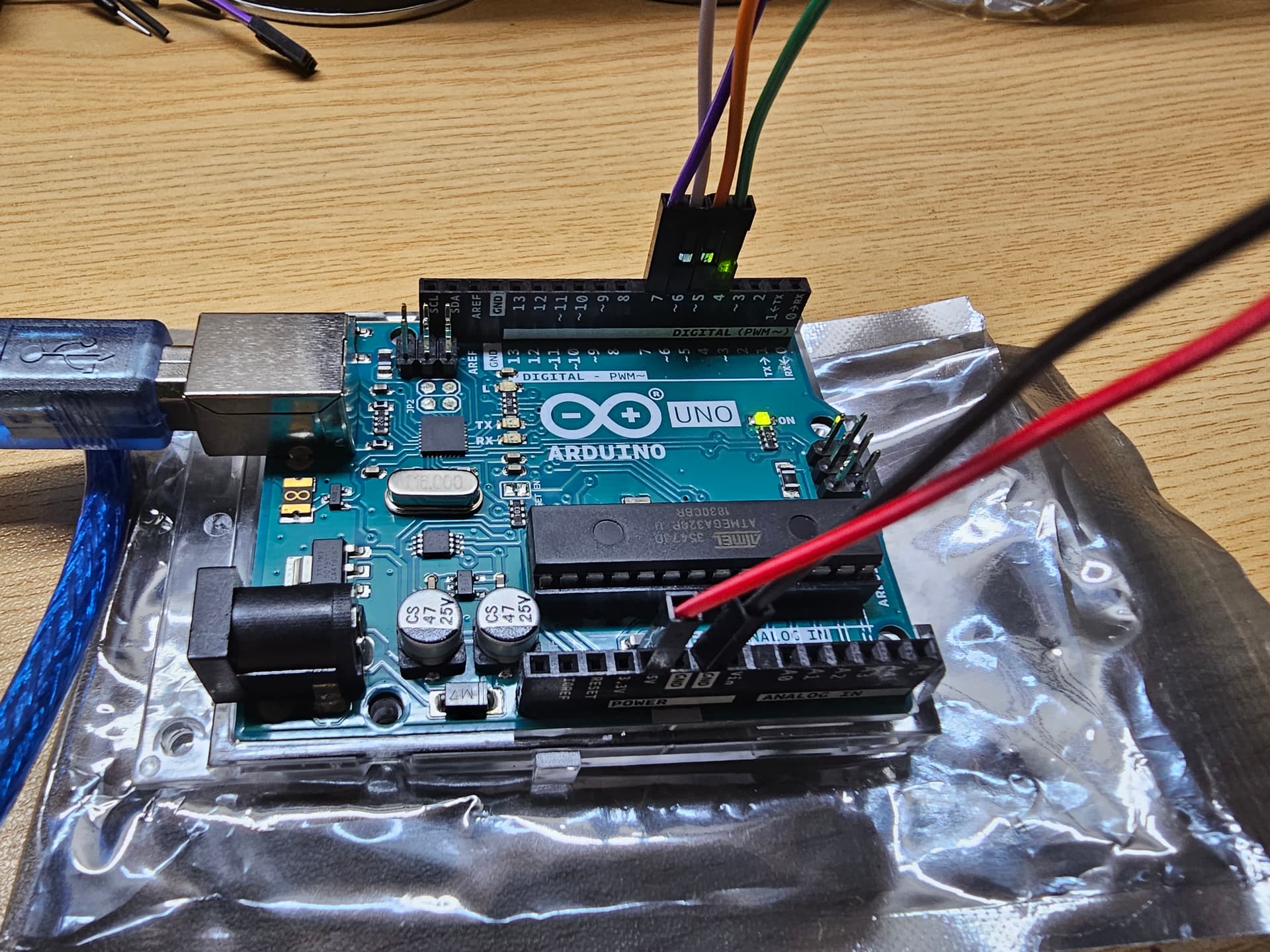
This is how I wired It


This may be obvious, but your RS485 is not connected to anything?

Otherwise, frequent problems are incorrect baud rate, incorrect slave address, A/B swapped.

1 Like

Hello umm sorry but im new to this how will I know if its incorrect baud rate and slave address?

originally this is what I am trying to do

but since it didn't give the correct feedback, it has come to my conclusion that there must be a problem with my RS485? the diagram in the link is what it looked at first I just remove the sensor, because I'm trying to see if the Rs485 will give me my byte request

Hi @ayetski ,

did you try the Arduino example code that the link provides if you scroll down to the end?

It uses a baudrate of 9600 instead of 115200.

And I could not find this request

byte request[] = {0x01, 0x03, 0x00, 0x00, 0x00, 0x02, 0xC4, 0x0B}; 

but this

const byte nitro[] = {0x01,0x03, 0x00, 0x1e, 0x00, 0x01, 0xe4, 0x0c};
const byte phos[] = {0x01,0x03, 0x00, 0x1f, 0x00, 0x01, 0xb5, 0xcc};
const byte pota[] = {0x01,0x03, 0x00, 0x20, 0x00, 0x01, 0x85, 0xc0};

Are you using a different device?

ec2021

1 Like

Ah, the perennial soil sensor project. A major problem is that there are many variations of soil sensors, some are compatible some are not. So unless you have the exact same sensor as the article, you will likely run into problems.

If you don't have the exact same sensor, then you will need a detailed datasheet for it, giving default baud rate, slave address, Modbus register addresses.

Personally I would start this project with a Modbus slave I know works, then I can test the software and connections work as expected. Then the only variable is the actual slave I want to talk to. You can simulate a Modbus slave with another Arduino, so it does not have to be expensive.

It also helps to have a scope or logic analyzer to really confirm the comms is as expected.

1 Like

oh hello, so I change the whole code to this because I'm focusing on the RS485 and to see if it will output my bud request which suppose to give me this
that's why the code that I have shown is different
and yes I'm using the same device I just remove the sensor part and focus on the modbus

Please don't mind but I will leave this issue to @bobcousins who has already experience with Modbus usage ...

Good luck to both of you!
ec2021

1 Like

This topic was automatically closed 180 days after the last reply. New replies are no longer allowed.