Hello folks, I have an interesting problem.
I have an RS485 sensor that communicates over modbus. When the sensor is connected to the PC via a USB to 485 converter , I send the sensor a request and I get a correct reply. I then connect the sensor to my Arduino (WAN 1310) , send it the same request frame and I get the correct reply back. Strange thing is, this nice behaviour only works with the sensors default address 01. As soon as I give the sensor any other address, it communicates well on the PC (I send a request and I get a correct response) but I get no response what so ever from the Arduino.
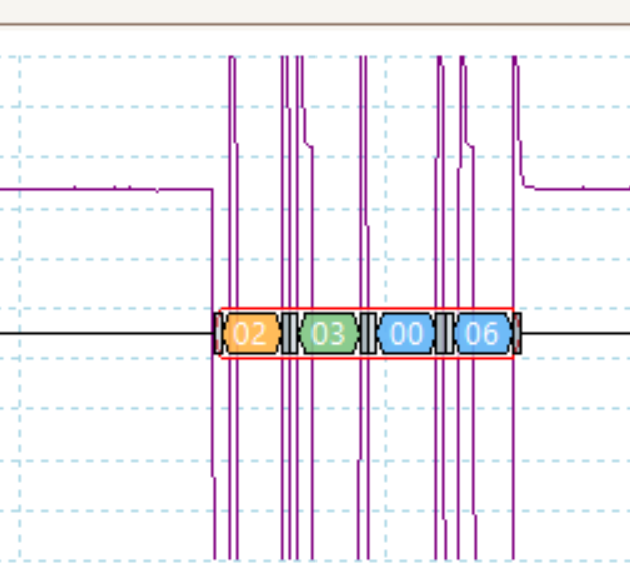
I used my oscilloscope to read the modbus messages and as you can see, when the address is 01, I manage to send a request and get a valid reply back. But, as soon as I change the address to 02, say, only the first four bytes of the request are transmitted, the other four bytes are missing, and, as a consequence, I get no valid reply. Has anyone come across this behaviour before or has any idea of what could be going on? If so, if you wouldn’t mind sharing the details on how to resolve the issue, that would be much appreciated. Thank you.

You forgot to post your code!
There has been a lot of talk about this recently about this problem with RS485 on the Arduino discord channel. With plenty of screenshots, waveforms and code. If anyone is interested in seeing what info has been posted already. In the general-help section.
When I get home from work I’ll try to post what I’ve tried so far and display the waveforms etc.
If you want help from this forum post the relevant information to this forum!
As I said above, once I get home from work, possibly tomorrow, I’ll post the waveforms and diagrams I’ve been creating in the meantime.
Still no code in the post.
SoftwareSerial mySerial(10,11); //Rx , Tx

#define RE 7
#define DE 6

//const byte code[] = {0x01, 0x03, 0x00, 0x0D, 0x00, 0x01, 0x15, 0xC9};
//const byte code[] = {0x01, 0x03, 0x00, 0x06, 0x00, 0x01, 0x64, 0x0B}; // Address1, high precision 0006 USE
const byte code[] = {0x02, 0x03, 0x00, 0x06, 0x00, 0x01, 0x64, 0x38};


void setup() {
  Serial.begin(9600); // Begin Serial at 9600 Baud.
  mySerial.begin(9600); // Begin Serial comms (Tx & Rx) at 9600 Baud.
  pinMode(RE, OUTPUT); // Declare pin 7 (RE) as an output.
  pinMode(DE, OUTPUT); // Declare pin 6 (DE) as an output.

}

void loop() {

  if (mySerial.available() == 0) {

    digitalWrite(RE, HIGH); // Set RE, HIGH (along with DE, above, to enable a transmit request from Arduino).
    digitalWrite(DE, HIGH); // Set DE, HIGH (along with RE, next line, to enable a transmit request from Arduino).x

    mySerial.write(code, sizeof(code) / code[0]); // Send the transmit request frame to the sensor.
    mySerial.flush(); // Wait for transmission of outgoing serial data to complete.
    digitalWrite(RE, LOW); // Set RE, LOW (along with DE, above, to enable a response from sensor).
    digitalWrite(DE, LOW); // Set DE, LOW (along with RE, next line, to enable a response from sensor).
  }

  delay(1000);
  Serial.println( mySerial.available());

  byte buffer[7];

  for(int i = 0; i < 7; i++) {
      Serial.print(" ");
      Serial.print(buffer[i], HEX);
    }
    Serial.println();


  if (mySerial.available() >= 7) {

    mySerial.readBytes(buffer, 7);


    float pH = buffer[3] << 8 | buffer[4];

    Serial.print("pH: ");
    Serial.print(pH/100);
    Serial.println(" pH");


  }

  delay(1000);
}```That line is wrong. It will send only 4 bytes instead of 8.
Why don't you use one of the available libraries but send fixed byte arrays?
@pylon Thanks for the message. But, why does it work for address one? The messages look fine. There was no change to the code other than the address and the corresponding request frame. Thanks for the suggestion, do you know any such library that will work with the WAN 1310 Arduino (it does not use software serial).
Let's see what the line resolves to for address 2:
mySerial.write(code, 8 / 2);
But for address 1:
mySerial.write(code, 8 / 1);
I guess your original intention was to write that line:
mySerial.write(code, sizeof(code) / sizeof(code[0]));
As you already know what size the elements of the array have, this division is just a source of errors.
ModbusMaster? ArduinoModbus (don't use that one on AVR Arduinos like the UNO!)?
You’re a star  . I don’t know why I never noticed that. I have corrected the error and can now communicate with the sensor. Thank you for your help.
@pylon Do you have any idea how to send the following request gram using the ModbusMaster library. I’m having trouble working out how to send a request and receive / interpret the response from the sensor using that library.
Post the Modbus manual of your device!
@pylon Soil NPK Sensor.pdf (393.9 KB)
That cannot be the device you read in the code above. There you tried to read register 6 but this manual says that only register 30, 31, 32, 256 and 257 exist.
The manual info is wrong, I used modbus software to determine the correct frame to use. The actual inquiry frame should be.
The examples of the library shows you how to use the library. Your hex numbers in above code represents:
readHoldingRegisters(6, 1);