Joining Arduino Devices using RS485

Hi all,

I need to do the following:

  1. Connect multiple Arduino devices in a daisy chain (I can only find pictures for 2 connected devices online)
  2. The Master is a ESP32 (3.3v logic) and the other 24 are 5V Arduino Nano's

I have successfully used RS485, with two nano's using 2x RS485 Converter boards and managed two way (half duplex) communication (I have reasons why I don't want to use I2C/IIC).

However, when I attempt to use my ESP8226MOD / NodeMCU as a Master (I connected the device, a Logic Level Converter and a RS485 converter board) spurious data appeared in serial monitor and the communications failed, when trying to talk to a 5V Nano.

Please can someone point me or tell me:

  1. How to wire a 3.3v logic board like the NodeMCU with a 5V Nano
  2. How to wire 3 of them together (so I can figure out how to wire 24 slave nano's plus the nodeMCU master) Note, they will all be less than a meter apart.

Many thanks

TK

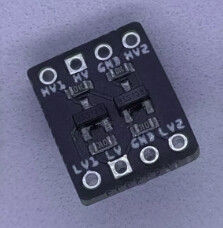
PS Will this work ?? as I've not used this TTL board before.
reference: ESP8266 - RS485 | ESP8266 Tutorial

which serial library did you use?
in the following I used EspSoftSerial

// RS485 using ESP8266 SoftwareSerial pin D5 Rx and pin  D6 Tx

#include <SoftwareSerial.h>

// RS485 VCC ESP8266 to to 3.3V
// ESP8266 pin Rx GPIO14 (D5) to RS485 RO
// ESP8266 pin  x GPIO12 (D6) to RS485 DI
SoftwareSerial RS485Serial(D5, D6);  //14, 12);

// RS485 DE and RE to ESP32 pins 18 and 19
#define DE D7  //RS485 Direction control pin
#define RE D8  //RS485 Direction control pin

#define RS485Transmit HIGH
#define RS485Receive LOW

void setup() {
  while (!Serial)    ;
  delay(1000);
  // Start the built-in serial port, probably to Serial Monitor
  Serial.begin(115200);
  Serial.println("\n\nESP8266 to RS485 - Use Serial Monitor, type in upper window, ENTER");
  pinMode(DE, OUTPUT);
  pinMode(RE, OUTPUT);
  digitalWrite(DE, RS485Receive);  // Disable RS485 Transmit
  digitalWrite(RE, RS485Receive);  // Disable RS485 Transmit
  RS485Serial.begin(9600);         //Initialize software serial with baudrate of 115200
}

// loop sending data from Mega to RS485 and receiving data
void loop() {
  // read characaters from Serial Monitor transmit over RS485
  if (Serial.available()) {            // Arduino Serial data avaliable?
    digitalWrite(DE, RS485Transmit);   // Enable RS485 Transmit
    digitalWrite(RE, RS485Transmit);   // Enable RS485 Transmit
    RS485Serial.write(Serial.read());  // Send byte to Remote Arduino
    RS485Serial.flush();               // wait for byte to be transmitted
    digitalWrite(DE, RS485Receive);    // Disable RS485 Transmit
    digitalWrite(RE, RS485Receive);    // Disable RS485 Transmit
  }
  // read characaters from RS485 display on serial monitor
  if (RS485Serial.available())         // RS485 serial data available?
    Serial.write(RS485Serial.read());  // read character and display it
}

in the following

the ESP8266 TTL-RS485 module is connected to a PC using a FTDI USB-RS485-WE-1800-BT

ESP8266 to PC via RS485 serial monitor output

ESP8266 to RS485 - Use Serial Monitor, type in upper window, ENTER
test1 from PC RS485
test2 from PC 1234567890
test3 from PC abcdef

terminal emulator output on PC (local echo enabled)

hello from esp8266
test2 from esp8266
test1 from PC RS485
test2 from PC 1234567890
test3 from esp8266 abcdefghijk
test3 from esp8266 abcdefgh
test3 from PC abcdef

make sure you terminate the RS485 bus with 120ohm resistors

Thanks for the fast reply. I used the RS485Serial (see code below)

#include <SoftwareSerial.h>

#define RE_PIN 2  // Pin to control RE (Receiver Enable)
#define DE_PIN 3  // Pin to control DE (Driver Enable)

SoftwareSerial RS485Serial(10, 11);  // RX (D10), TX (D11)

String messages[] = {"Hello Slave!", "Message 2", "Message 3"};  // Messages to send
int messageIndex = 0;  // Index of the current message
bool waitingForAck = false;  // Flag to track if waiting for acknowledgment

void setup() {
  pinMode(RE_PIN, OUTPUT);
  pinMode(DE_PIN, OUTPUT);
  digitalWrite(RE_PIN, LOW);  // Set to receive mode initially
  digitalWrite(DE_PIN, LOW);  // Disable driver initially

  RS485Serial.begin(9600);  // Initialize SoftwareSerial for RS485
  Serial.begin(9600);       // Initialize hardware Serial for debugging
  Serial.println("Master Initialized");
}

void loop() {
  if (messageIndex < 3 && !waitingForAck) {
    // Send the current message
    digitalWrite(DE_PIN, HIGH);  // Enable driver (transmit mode)
    digitalWrite(RE_PIN, HIGH);  // Disable receiver
    RS485Serial.println(messages[messageIndex]);  // Send the message
    digitalWrite(DE_PIN, LOW);   // Disable driver
    digitalWrite(RE_PIN, LOW);   // Enable receiver (receive mode)

    Serial.println("Sent: " + messages[messageIndex]);

    waitingForAck = true;  // Set flag to wait for acknowledgment
  }

  // Check for acknowledgment from the slave
  if (waitingForAck && RS485Serial.available()) {
    String response = RS485Serial.readString();
    if (response.startsWith("ACK")) {
      Serial.println("Received ACK from slave");
      waitingForAck = false;  // Reset flag
      messageIndex++;         // Move to the next message
    }
  }

  delay(100);  // Small delay to avoid flooding the loop
}

The code works fine using two 5V nanos (The above is for master code, I have another for the slave), my issue seems to be getting a device of a lower voltage to work with the 5v Nanos, the Logic Level Converter stopped my nodemcu from getting fried but the data coming to/from it was compromised.

What is the benefit of using your software serial ? - I am new to this.

Many thanks

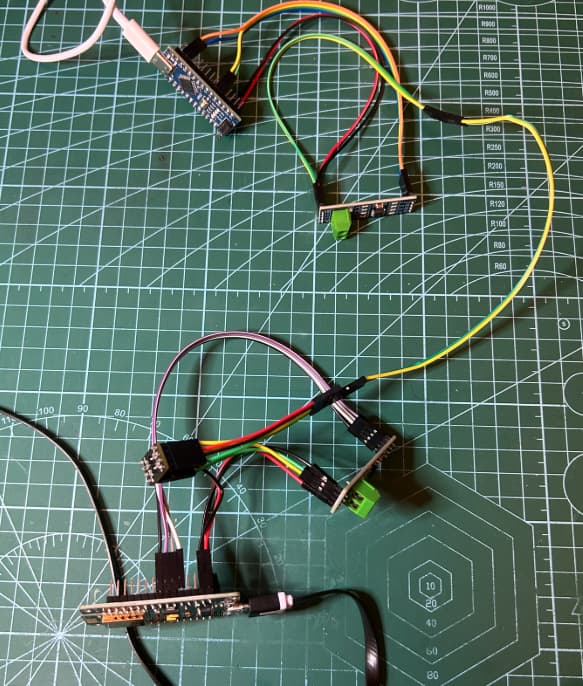
If you look at the picture:

I have two Arduino Nano's - Circled in Black
I have two RS485 Converter boards - Circled in Red
with a Purple and White wire running between them.

The left hand Nano is the Master and the right hand one is the slave. However, what I need to do is to get the NodeMCU (3.3v logic and not 5v) circled in Blue, on the right to become the master. If you look carefully, the NodeMCU has a Logic level convertor and an RS845 Converter board next to it .. I wired it up so that the NodeMCU was connected to the slave Nano (I disabled the Master Nano, for now) and reran my program. Unfortunately, whilst it appeared to work spurious characters appeared in the serial monitor around the data transmission and the RS845 comms failed.

This is what I need to overcome

Many thanks

Pins that work with Nano, don't necessarely work with ESP8266, for example 10 and 11 are connected to flash memory and shouldn't be used.
You could use for example 4 / 5 for RE/DE and 12 / 13 for rx/tx (GPIO numbering).

1 Like

EspSoftSerial is specifically designed for the ESP family

I used the following pins

// RS485 VCC ESP8266 to to 3.3V
// ESP8266 pin Rx GPIO14 (D5) to RS485 RO
// ESP8266 pin  x GPIO12 (D6) to RS485 DI
SoftwareSerial RS485Serial(D5, D6);  //14, 12);

// RS485 DE and RE to ESP32 pins 18 and 19
#define DE D7  //RS485 Direction control pin
#define RE D8  //RS485 Direction control pin

1 Like

Great,

I'll rework the pins and give it another bash

Thanks very much

:slight_smile:

Apologies, I did use different pins for the NodeMCU ..

Questions

  1. I used pins, 1, 2, 3 and 4 (see code below) - Do I still need to change them ?
  2. How do I get the library command to look at correct SoftwareSerial / EspSoftSerialRx (do I just "include library" / "add the ZIP file") ?

Thank you very much

#include <SoftwareSerial.h>

#define RE_PIN D2  // Pin to control RE (Receiver Enable) - Changed to D2
#define DE_PIN D3  // Pin to control DE (Driver Enable) - Changed to D3
#define DI_PIN D4  // Pin for Data In (RX) - Changed to D4
#define DO_PIN D1  // Pin for Data Out (TX) - Changed to D1

SoftwareSerial RS485Serial(DI_PIN, DO_PIN);  // RX (D4), TX (D1) - Using defined pins

String messages[] = {"Hello Slave!", "Message 2", "Message 3"};  // Messages to send
int messageIndex = 0;  // Index of the current message
bool waitingForAck = false;  // Flag to track if waiting for acknowledgment

void setup() {
  pinMode(RE_PIN, OUTPUT);
  pinMode(DE_PIN, OUTPUT);
  digitalWrite(RE_PIN, LOW);  // Set to receive mode initially
  digitalWrite(DE_PIN, LOW);  // Disable driver initially

  RS485Serial.begin(9600);  // Initialize SoftwareSerial for RS485
  Serial.begin(9600);       // Initialize hardware Serial for debugging
  Serial.println("Master Initialized");
}

void loop() {
  if (messageIndex < 3 && !waitingForAck) {
    // Send the current message
    digitalWrite(DE_PIN, HIGH);  // Enable driver (transmit mode)
    digitalWrite(RE_PIN, HIGH);  // Disable receiver
    RS485Serial.println(messages[messageIndex]);  // Send the message
    RS485Serial.flush(); // Crucial: Ensure data is sent before disabling driver
    digitalWrite(DE_PIN, LOW);   // Disable driver
    digitalWrite(RE_PIN, LOW);   // Enable receiver (receive mode)

    Serial.println("Sent: " + messages[messageIndex]);

    waitingForAck = true;  // Set flag to wait for acknowledgment
  }

  // Check for acknowledgment from the slave
  if (waitingForAck && RS485Serial.available()) {
    String response = RS485Serial.readStringUntil('\n'); // Read until newline for better reliability
    response.trim(); // Remove any leading/trailing whitespace

    if (response == "ACK") { // Use direct string comparison for accuracy
      Serial.println("Received ACK from slave");
      waitingForAck = false;  // Reset flag
      messageIndex++;         // Move to the next message
    } else {
      Serial.print("Received unexpected response: ");
      Serial.println(response);
      // Consider resending the message or handling the error
    }
  }

  delay(100);  // Small delay to avoid flooding the loop
}

I expect that Esp8266 would not boot if RS485 module had pullup on RE pin.

certainly can be a problem - have simplified code to use DE and RE both linked to pin 7

// RS485 using ESP8266 SoftwareSerial pin D5 Rx and pin  D6 Tx
// set Tools/Board NodeMCU 1.0 (ESP-12 Module)

// load EspSoftwareSerial from https://docs.arduino.cc/libraries/espsoftwareserial/
#include <SoftwareSerial.h>
// RS485 VCC ESP8266 to to 3.3V
// ESP8266 pin Rx GPIO14 (D5) to RS485 RO
// ESP8266 pin  x GPIO12 (D6) to RS485 DI
SoftwareSerial RS485Serial(D5, D6);  //14, 12);

// RS485 DE and RE to ESP32 pin 7
#define DE_RE D7  //RS485 Direction control DE and RE jumpered together

#define RS485Transmit HIGH
#define RS485Receive LOW

void setup() {
  while (!Serial)
    ;
  delay(1000);
  // Start the built-in serial port, probably to Serial Monitor
  Serial.begin(115200);
  Serial.println("\n\nESP8266 to RS485 - Use Serial Monitor, type in upper window, ENTER");
  pinMode(DE_RE, OUTPUT);
  digitalWrite(DE_RE, RS485Receive);  // Disable RS485 Transmit
  RS485Serial.begin(9600);            //Initialize software serial with baudrate of 115200
}

// loop sending data from Mega to RS485 and receiving data
void loop() {
  // read characaters from Serial Monitor transmit over RS485
  if (Serial.available()) {              // Arduino Serial data avaliable?
    digitalWrite(DE_RE, RS485Transmit);  // Enable RS485 Transmit
    RS485Serial.write(Serial.read());    // Send byte to Remote Arduino
    RS485Serial.flush();                 // wait for byte to be transmitted
    digitalWrite(DE_RE, RS485Receive);   // Disable RS485 Transmit
  }
  // read characaters from RS485 display on serial monitor
  if (RS485Serial.available())         // RS485 serial data available?
    Serial.write(RS485Serial.read());  // read character and display it
}

Nano code

// Arduino Uno/Nano RS485 using AltSoftSerial

#include <AltSoftSerial.h>
#define SSerialTxControl 3  //RS485 Direction control DE & RE jumpered together

#define RS485Transmit HIGH
#define RS485Receive LOW

// use AlTSoftSerial from https://www.pjrc.com/teensy/td_libs_AltSoftSerial.html
AltSoftSerial RS485Serial;  // RX on pin 8, TX on pin 9

void setup() 
{
  while (!Serial)
    ;
  delay(1000);
  Serial.begin(115200);
  Serial.println("\n\nNano to RS485 - Use Serial Monitor, type in upper window, ENTER");
  Serial.println("Use Serial Monitor, type in upper window, ENTER");
  pinMode(SSerialTxControl, OUTPUT);
  digitalWrite(SSerialTxControl, RS485Receive);  // Init Transceiver
  RS485Serial.begin(9600);  // set the RS485 data rate
}

void loop() {
  if (Serial.available()) {
    char byteReceived = Serial.read();
    digitalWrite(SSerialTxControl, RS485Transmit);  // Enable RS485 Transmit
    RS485Serial.write(byteReceived);                // Send byte to Remote Arduino
    RS485Serial.flush();
    digitalWrite(SSerialTxControl, RS485Receive);  // Disable RS485 Transmit
  }
  if (RS485Serial.available())  //Look for data from, RS485
  {
    char byteReceived = RS485Serial.read();  // Read received byte
    Serial.write(byteReceived);              // Show on Serial Monitor
  }
}  

ESP8266 serial monitor output

ESP8266 to RS485 - Use Serial Monitor, type in upper window, ENTER
hello from nano
test2 from nano 1234567890
test3 from nano abcdefghijklmnopqrstuvwxyz

nano serial monitor output

Nano to RS485 - Use Serial Monitor, type in upper window, ENTER
Use Serial Monitor, type in upper window, ENTER
hello from ESP8266
test2 from esp8266 0987654321
test3 from esp8266 ahatsvgmjkdoierm fdocvuyhnmerdloxdjeswlwemjksjnhjmxzkjsxj

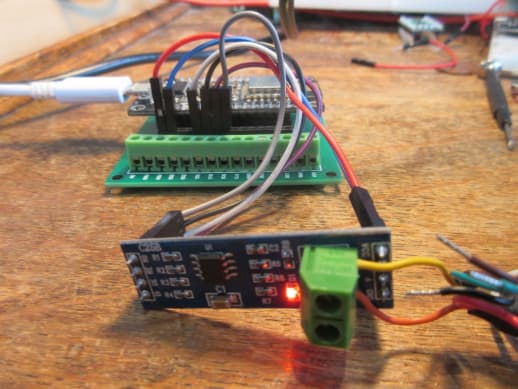
photo

1 Like

Thank you so much, that's really helpful. I too managed to get it to work between a ESP32 and a Nano (see pic below)

One extra, perhaps unnecessary, step that I took was to use a Logic Level Converter

As I'm paranoid about frying the ESP but the way you've set yours up suggests that I needn't have worried. Fortunately, I have managed to send and receive messages, so I know the set up is good. This said, I might try to simplify?

As an aside, I had a "senior moment" about adding the correct ESP library and kicked myself when I realised I just needed to go into the library manager and install it!

I can now move on to the next step of my project which is connecting the master ESP to multiple Nano's using RS485, instructing them to perform actions and getting them to report back once complete. I will need to consider if I keep the slave "done" messages locally and get the server to look for it (to avoid clashes) or if getting the slaves to send a message back will work. I guess trial and error will guide me and by keeping the RX and TX on separate lines, it should be easier to set up collision correction/management.

Thanks again!

:slight_smile:

FYI

Working ESP Master code used ..

#include <SoftwareSerial.h>

#define RE_PIN D8  // Receiver Enable (RE)
#define DE_PIN D7  // Driver Enable (DE)

#define TX_PIN D6  // RS485 TX (Data Out)
#define RX_PIN D5  // RS485 RX (Data In)

SoftwareSerial RS485Serial(RX_PIN, TX_PIN);  // Software Serial for RS485

String messages[] = {"Hello Slave!", "Message 2", "Message 3"};
int messageIndex = 0;
bool waitingForAck = false;
const int timeout = 3000;  // 3 seconds timeout for ACK

void setup() {
  pinMode(RE_PIN, OUTPUT);
  pinMode(DE_PIN, OUTPUT);

  digitalWrite(RE_PIN, LOW);  // Start in receive mode
  digitalWrite(DE_PIN, LOW);

  Serial.begin(9600);  // Debugging via USB Serial
  RS485Serial.begin(9600);  // RS485 using SoftwareSerial

  Serial.println("Master Initialized");
}

void loop() {
  if (messageIndex < 3 && !waitingForAck) {
    sendMessage(messages[messageIndex]);
    waitingForAck = true;
  }

  // Wait for acknowledgment with timeout
  unsigned long startTime = millis();
  while (waitingForAck && millis() - startTime < timeout) {
    if (RS485Serial.available()) {
      String response = RS485Serial.readString();
      response.trim();  // Remove extra newline characters
      Serial.println("Response: " + response);

      if (response.startsWith("ACK")) {
        Serial.println("Received ACK from slave");
        waitingForAck = false;
        messageIndex++;
        break;
      }
    }
  }

  if (waitingForAck) {
    Serial.println("Error: No ACK received, moving to next message.");
    waitingForAck = false;  // Prevent freezing
    messageIndex++;
  }

  delay(100);
}

void sendMessage(String message) {
  digitalWrite(DE_PIN, HIGH);
  digitalWrite(RE_PIN, HIGH);  // Enable transmit mode
  delay(10);  // Ensure bus stabilization

  RS485Serial.println(message);
  RS485Serial.flush();  // Ensure message is fully sent

  Serial.println("Sent: " + message);

  delay(10);  // Allow time for transmission
  digitalWrite(DE_PIN, LOW);
  digitalWrite(RE_PIN, LOW);  // Enable receive mode
}

and working NANO slave code

#include <SoftwareSerial.h>

#define RE_PIN 2  // Receiver Enable (RE)
#define DE_PIN 3  // Driver Enable (DE)

SoftwareSerial RS485Serial(10, 11);  // RX (D10), TX (D11)

unsigned long processingStartTime = 0;  // Timestamp when processing starts
bool isProcessing = false;              // Flag to indicate if processing is ongoing
String currentMessage = "";             // Stores the current message being processed

void setup() {
  pinMode(RE_PIN, OUTPUT);
  pinMode(DE_PIN, OUTPUT);
  digitalWrite(RE_PIN, LOW);  // Start in receive mode
  digitalWrite(DE_PIN, LOW);  // Start with driver disabled

  RS485Serial.begin(9600);  // RS485 using SoftwareSerial
  Serial.begin(9600);       // Debugging

  Serial.println("Slave Initialized");
}

void loop() {
  // Check for incoming messages from the master
  if (RS485Serial.available() && !isProcessing) {
    currentMessage = RS485Serial.readString();
    currentMessage.trim();  // Remove extra newline characters
    Serial.println("Received: " + currentMessage);

    // Start processing the message
    isProcessing = true;
    processingStartTime = millis();
  }

  // Simulate processing time (8 seconds)
  if (isProcessing && (millis() - processingStartTime >= 0000)) {
    Serial.println("Processing complete for: " + currentMessage);

    // Send acknowledgment to the master
    sendAck();

    // Reset for the next message
    isProcessing = false;
    currentMessage = "";
  }
}

void sendAck() {
  digitalWrite(DE_PIN, HIGH);
  digitalWrite(RE_PIN, HIGH);  // Enable transmit mode
  delay(10);  // Allow bus to settle

  RS485Serial.println("ACK");
  RS485Serial.flush();  // Ensure full transmission

  Serial.println("Sent ACK to master");

  delay(10);  // Allow master to switch to receive mode
  digitalWrite(DE_PIN, LOW);
  digitalWrite(RE_PIN, LOW);  // Back to receive mode
}

Thanks again, I hope this is useful to someone else too :slight_smile:

If you power your RS485 board at 5V, you need level shifters. And If you use Max485, that's the only correct way of doing it!
But for my experience, Max485 behaves well even underpowered at 3.3V. If so you can communicate without shifters.

1 Like

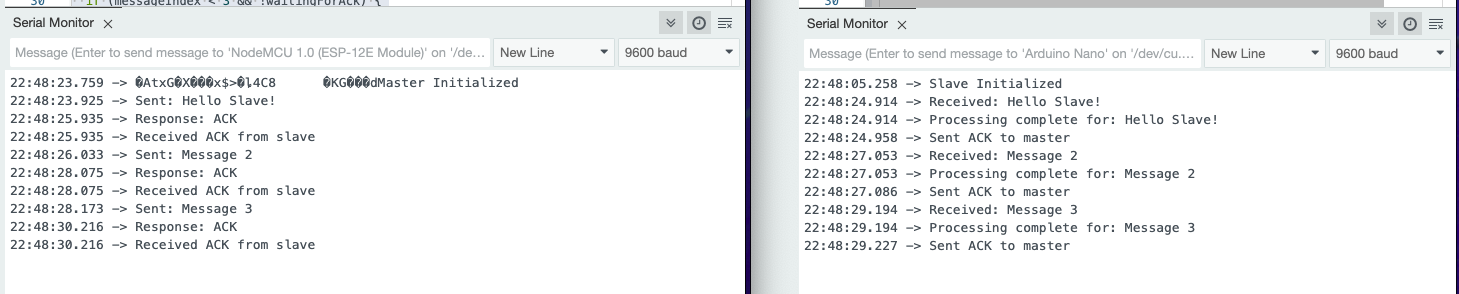
Responses I got from serial monitor for Master (LEFT) and Slave (RIGHT) when running the software with everything connected ..

Make sure you switch on the Slave first otherwise the master will complain it can't see the slave)

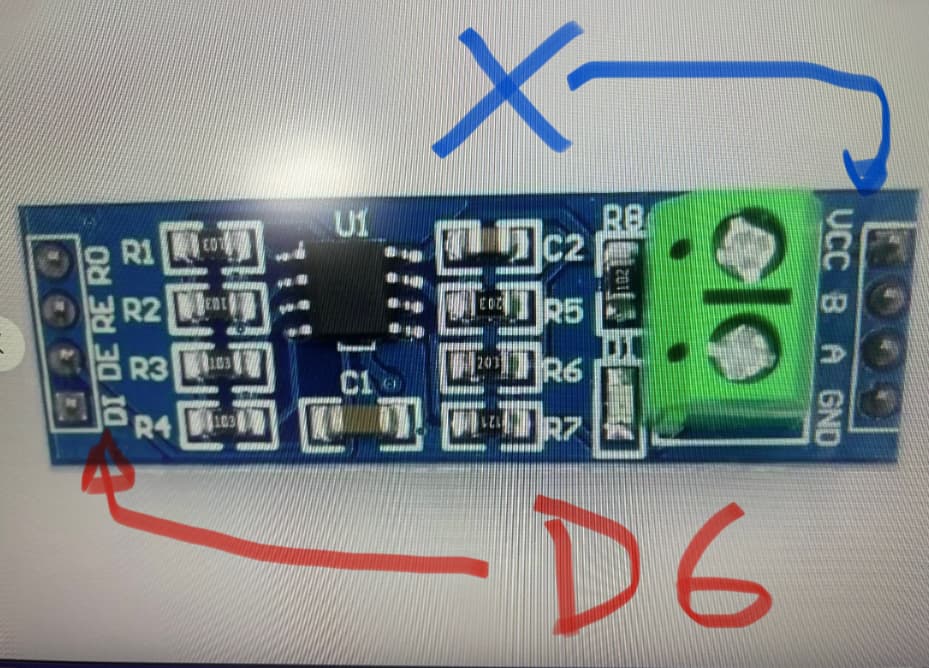
Incidentally, and I'm not sure why, If I remove the +ve cable from the RS845 Converter board (see Blue arrow), the device is unaffected. It seems to get it's +ve power from the DI pin which is connected to D6!, all I need to do is to connect the Gnd wire and I get 3.3v across it, which (as you say) is ample.

Never do that. You draw some unspecified current from your Gpio pin that is not designed for that.

1 Like

Understood - thank you!!

I have found that the MAX485 works OK with VCC at 3.3V which I use when prototyping with 3.3V logic devices on breadboards
however, as @kmin states the specification for MAX485 VCC is 5V
if powering VCC at 5V with a 3.3V logic device rather than a level shifter you could have a potential divider on the RS485 Tx to ESP Rx line

in practice when building PCBs I would use a RS485 module which has a +3V to +5V Input Supply Range such as the MAX13430E

1 Like

probably the simplest way to avoid collisions is for the master to control traffic on the bus, e.g. to poll the slave devices in turn for their status

1 Like

This topic was automatically closed 180 days after the last reply. New replies are no longer allowed.