I'm pretty new to arduino coding and projects. I have done one RGB project with an Adafruit for a headset but that's about it.
I am in the middle of a new project and I'm hitting a wall.
I found an old Nintendo Joycon the other day and decided to try a new project. The goal, to power a couple of LEDS from the internal battery and use the existing buttons to control them and turn them ON/OFF.
For now I'm on the testing phase using an Arduino Nano. Down the line I'll use an ATTiny85 directly powered from the internal battery.
Here is what I did.
Arduino powered by USB. GND and 5v pins connected to + rail on the breadboard.
LEDS (SK6812mini) VDD connected to + rail. GND connected to GND rail. Data PIN connected to PIN6 of arduino.
For the joycon: ground pad I found connected to GND rail. Button Z (not GND pad) connected to pIN2, ZR (not GND) connected to PIN3, +button connected to pin 4.
The code is supposed to have the LEDS only power ON with a combination of buttons (all 3 during 5s). It doesn't work.
THe leds do turn on when joycon GND is connected to GND rail. When that happens, the LEDS turn on/off every 3s or so. They do not flicker.
LEDS do not turn on when joycon GND is not connected to arduino GND rail.
Your setup is only missing one critical thing: a permanent shared ground
Make sure the Joy-Con’s GND pad is connected to the Arduino’s GND at all times. Without that, the button signals float and the Arduino can’t read them.
After you tie the grounds together, the button inputs will behave normally and your LED logic should start working.
If it still acts weird after that, add a 10k pull-down or pull-up on each button pin so the inputs don’t float.
The resistors aren’t the problem.
The Joy-Con buttons are not simple “switch-to-GND” buttons, so the Arduino never gets a real HIGH/LOW signal. The pads you soldered don’t actually connect to ground when pressed, so the Arduino pins float that’s why the LEDs follow your 5-second timer instead of the buttons.
Quick test:
Use your multimeter and check if your button pad goes to GND when pressed. It won’t.
So the Arduino can’t read these pads directly.
You’ll need either the correct matrix output pad (hard) or use your own buttons inside the shell (easy).
What would a matrix output entail? I don't mind hard. I prefer to take my time and do something clean rather than having extra buttons that would be difficult to use.
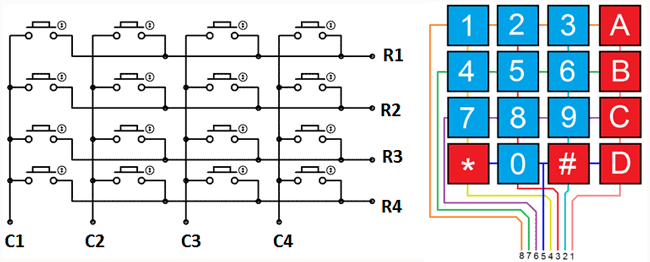
A matrix output means each button connects one row line to one column line it never goes to GND. To use it properly, you’d need to find the two lines that belong to that button and detect when they’re shorted during the scan.
Example:in the matrix, the “A” button might just connect Row 2 to Column 4 for a moment, not GND.
It’s doable, just more reverse-engineering than simple wiring. If you want, I can tell you how to find those two lines.
Put your multimeter on continuity.
Touch one probe to the button pad, and with the other probe check nearby traces.
The two points that only beep when the button is pressed are that button’s row and column.
Example: if you probe around and only Row-2 and Col-4 beep when you press the button, those are the two lines you need.
If I do manage to find the correct traces, would that mean that each button would need 2 wires that would then be connected each to one pin of the arduino?
Yes each button in a matrix is basically a pair.
So you’d take two wires, one from the row line and one from the column line, and bring both into the Arduino.
The Arduino doesn’t read “pressed = GND”; it reads “these two lines are shorted”.
That’s just how matrix buttons work
Ok in that case the ATTiny85 won't be enough for 3 buttons yes?
I may have found a compromise, soldering a wire to 2 legs of a button that are shorted when pressed. It seems easier to find than the traces.
Three matrix-style buttons would need 6 signals, so yes an ATtiny85 doesn’t really have enough pins unless you do some tricks.
And yes, tapping the two legs of the physical switch (the ones that actually short when pressed) is a perfectly valid shortcut.
It saves you from dealing with the matrix lines, and the Arduino will finally see a clean HIGH/LOW signal.
OK. It will take some resoldering and modification of the code but it might be a better option.
I will have to deal with the control functions with only 2 buttons instead of 3 but at least it should work.
Will keep you posted if you are interested.
Thank you for your assistance it really did help me understand what was going on.
Glad it helped and rewiring the switch legs is usually the cleaner option.
If you want it, I have a more advanced button-handling code (short-press, long-press, double-tap) that can be adapted to your setup pretty easily.
Just let me know and I’ll send it over.
And yes, I’m genuinely curious to see how your final setup turns out.
I will gladly accept whatever you can provide.
For now it's just testing on a pair of Joycon I found laying around. I took one apart because I saw that the battery was swelling and I figured that I might as well play with it since it was opened. Once the project is finalized i will contact you here and send you a picture if possible.
Here you go I’m sending you a clean and modular button-handling code that should work perfectly for your Joy-Con tests.
It’s stable, supports short-press, long-press and double-tap, and you can easily extend it if your project grows.
And yes, when you finish the prototype I’d love to see a picture — I’m really curious how it will turn out.
struct Button {
    uint8_t pin;

    bool raw;
    bool stable;
    bool pressed;

    unsigned long lastRawChange;
    unsigned long pressedAt;
    unsigned long lastTapAt;
    bool longSent;
};

// Settings
const unsigned long DEBOUNCE    = 25;   // ms
const unsigned long LONG_PRESS  = 600;  // ms
const unsigned long DOUBLE_TAP  = 250;  // ms

Button BTN1;
Button BTN2;


// Initialize a button (no C++11 stuff, fully Arduino-safe)
void initButton(Button &b, uint8_t pin) {
    b.pin = pin;
    b.raw = HIGH;
    b.stable = HIGH;
    b.pressed = false;
    b.lastRawChange = 0;
    b.pressedAt = 0;
    b.lastTapAt = 0;
    b.longSent = false;
}

// Debounce: returns stable HIGH/LOW
bool debounce(Button &b) {
    bool reading = digitalRead(b.pin);

    if (reading != b.raw) {
        b.raw = reading;
        b.lastRawChange = millis();
    }

    if (millis() - b.lastRawChange >= DEBOUNCE) {
        b.stable = b.raw;
    }

    return b.stable;
}


// Reads transitions. Returns true only when released.
bool readButton(Button &b) {
    bool state = debounce(b);

    // Press detected
    if (state == LOW && !b.pressed) {
        b.pressed = true;
        b.pressedAt = millis();
        b.longSent = false;
    }

    // Release detected
    if (state == HIGH && b.pressed) {
        b.pressed = false;
        return true;  // released event
    }

    return false;
}


// Event handling: short press, long press, double tap
void handleEvents(Button &b, const char* name, bool released) {
    unsigned long now = millis();

    // LONG PRESS
    if (b.pressed && !b.longSent &&
        (now - b.pressedAt) >= LONG_PRESS) {

        Serial.print(name);
        Serial.println(" - LONG press");
        b.longSent = true;
    }

    // SHORT or DOUBLE TAP
    if (released && !b.longSent) {
        if (now - b.lastTapAt < DOUBLE_TAP) {
            Serial.print(name);
            Serial.println(" - DOUBLE tap");
        } else {
            Serial.print(name);
            Serial.println(" - SHORT press");
        }
        b.lastTapAt = now;
    }
}


void setup() {
    Serial.begin(115200);

    initButton(BTN1, 2);   // first button on pin 2
    initButton(BTN2, 3);   // second button on pin 3

    pinMode(BTN1.pin, INPUT_PULLUP);
    pinMode(BTN2.pin, INPUT_PULLUP);
}


void loop() {
    bool r1 = readButton(BTN1);
    bool r2 = readButton(BTN2);

    handleEvents(BTN1, "Button 1", r1);
    handleEvents(BTN2, "Button 2", r2);
}
The code has a small Button object for each button.
It debounces automatically, so the Arduino won’t misread noisy Joy-Con switches.
readButton() detects press and release transitions.
handleEvents() decides if the user performed:
a short press
a long press
a double tap
It’s fully non-blocking, so it won’t slow down the rest of project.
If you want to take a look at this, I wrote this code so that if you use a power supply, your board doesn't burn out.
I'm facing another problem apparently. I resoldered the wires to a pad on each side of each buttton. When I press, they short. So far so good.
Problem is, one pad of one button A seems connected to button B.
That usually means the buttons share a common trace on the PCB many Joy-Con buttons aren’t fully isolated. One pad is the signal and the other pad is part of a shared matrix or a shared ground line. So measuring continuity between pads of different buttons is normal in that case.
What matters is that only the signal pad goes to your input pin, and the shared pad goes to GND. If both pads of two buttons are tied together, you probably picked the wrong pad try probing the PCB and locate the pad that actually changes when you press the button. Sometimes only one of the two pads is the real switch line and the other is part of a common bus.
If you’re unsure: set your multimeter to continuity, put one probe on GND of the board, and find which pad beeps. That one is the common pad ignore it and use the other pad for your button signal