L293d not running two bo motors

i am trying to run 2 bo motors with l293d motor driver shield. but the motors are not running even the code was working fine and arduino was good. (by the way to check motor driver shield working or not, i used ultrasonic sensors, those are working fine with the motor shield) but the motors are not working.

i attached the battery to the arduino and the arduino is connected to the laptop with the usb cable.

battery used: WATTNINE® 12V 1200mAh Rechargeable Lithium Battery with Warranty for G – QuartzComponents

L293D motor driver shield: Arduino L293D Motor Driver Shield – QuartzComponents

BO motors : https://www.amazon.in/gp/product/B0821LDS1S/ref=ppx_yo_dt_b_asin_title_o03_s00?ie=UTF8&psc=1

the code i used:

is there anything wrong?

#include <AFMotor.h>
AF_DCMotor M1(1);
AF_DCMotor M2(2);
 
void setup() {
  // Serial.begin()
  Serial.begin(9600);

  M1.setSpeed(150);
  M2.setSpeed(150);
}
 
void loop() {
  Serial.print("forward 1\n");
  M1.run(FORWARD);
  Serial.print("forward 2\n");

  M2.run(FORWARD);
  delay(2000);
  Serial.print("backward 1\n");

  M1.run(BACKWARD);
  Serial.print("backward 2\n");

  M2.run(BACKWARD);
  delay(2000);
  Serial.print("stop 1\n");

  M1.run(RELEASE);
  Serial.print("stop 2\n");

  M2.run(RELEASE);
  delay(500);
}

my circuit looks like this: (i used WATTNINE® 12V 1200mAh Rechargeable Lithium Battery with Warranty for G – QuartzComponents for the battery purpose and connected it to the arduino, i posted this image for getting idea of the connections and didnt used 9v battery as shown in this image )

A battery must be connected to the motor driver, as shown in the diagram you posted (but not a 9V PP3 battery).

in that post i mentioned the battery i used. i connected that one to the arduino board, and i didnt used any 9v battery, i just posted that image for the idea of connections.

Please re-read post #2.

you mean connect another battery to the motor driver, then can i use the 12v battery for motor driver and connect the arduino to the laptop via usb cable??

That is one possible approach.

The motor driver requires a motor power supply. The Arduino is not a power supply.

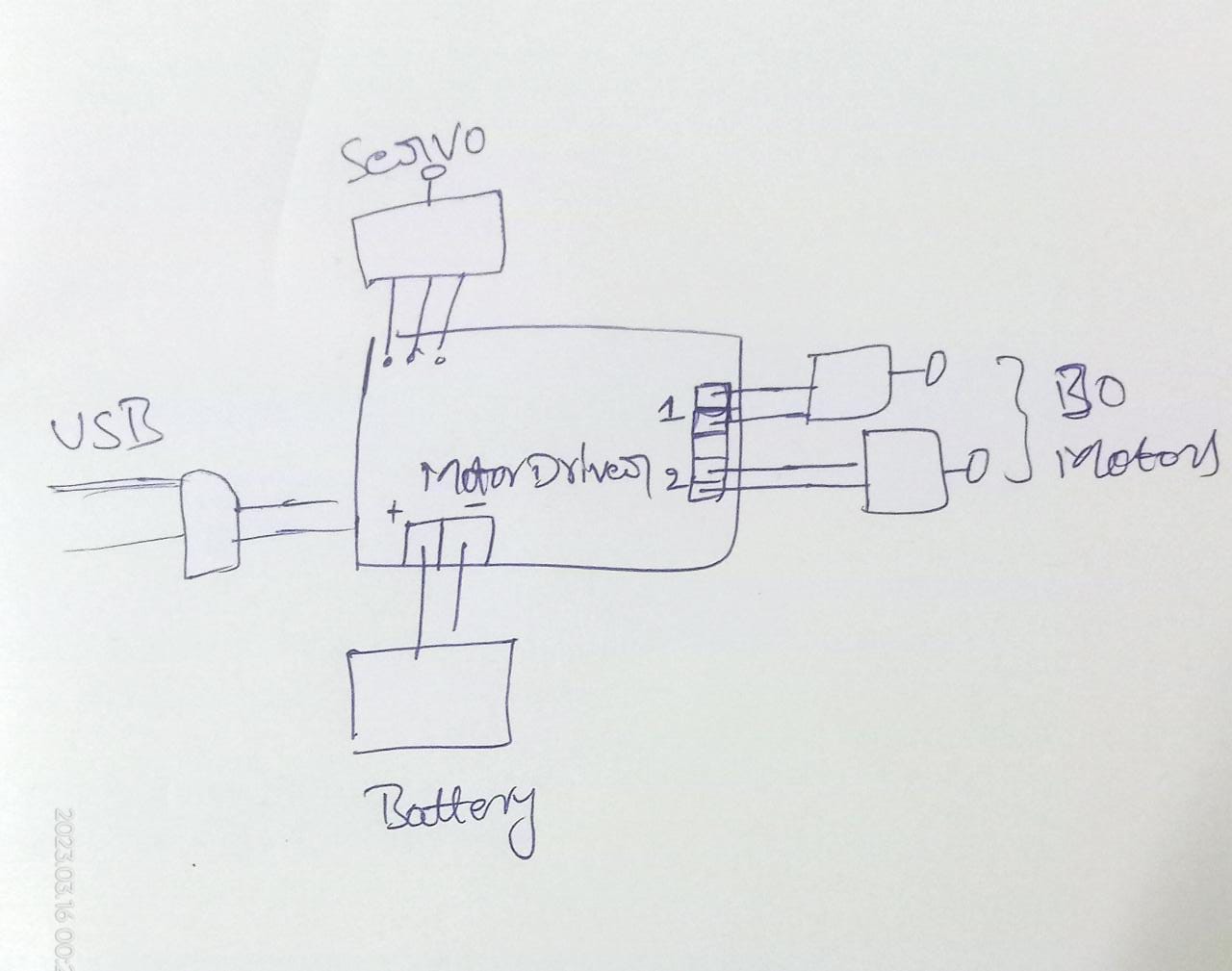
i removed the jumper fuse in the motor driver and connected motor driver to the 12v battery and arduino to my laptop.

Not worked, to check i used servo motor along with the 2 bo motors

code :

#include <Servo.h>
#include <AFMotor.h>
Servo servo1;
AF_DCMotor M1(1);
AF_DCMotor M2(2);


void setup() {
  M1.setSpeed(150);
  M2.setSpeed(150);
  servo1.attach(10);
}
void loop() {
  servo();
  gearmotor();
}

void gearmotor() {
  M1.run(FORWARD);
  M2.run(FORWARD);
  delay(2000);
  M1.run(BACKWARD);
  M2.run(BACKWARD);
  delay(2000);
  M1.run(RELEASE);
  M2.run(RELEASE);
  delay(500);
}
void servo() {
  for (int a = 0; a <= 180; a++ ) {
    servo1.write(a);
    delay(20);
  }
  for (int b = 179; b > 0; b--) {
    servo1.write(b);
    delay(20);
  }
}

here servo motor only running the bo motors are not running

Post a hand drawn wiring diagram of your setup. A photo of a pencil and paper drawing is fine. Be sure to clearly label all pins and connections.

Please get a valid data sheet for these motors. The advertisement varies between 3V recommended to 6V or 12V supply, and 150W @ 5V is incredible and never fits L293D drivers.

For a first hint measure the motor resistance.

is using l293d piggypacking solves it??
L293D Piggyback for High Current Motors|High Current DC Motor Driver - Arduino Projects and Robotics Tutorial

The L293D, although ancient and extremely inefficient, should be able to handle at least one of those little motors.

If the motor does not move, then most likely either your wiring is incorrect, the shield is defective, the motor power supply (battery) is defective (dead) or the code is wrong (e.g. wrong digital pins used).