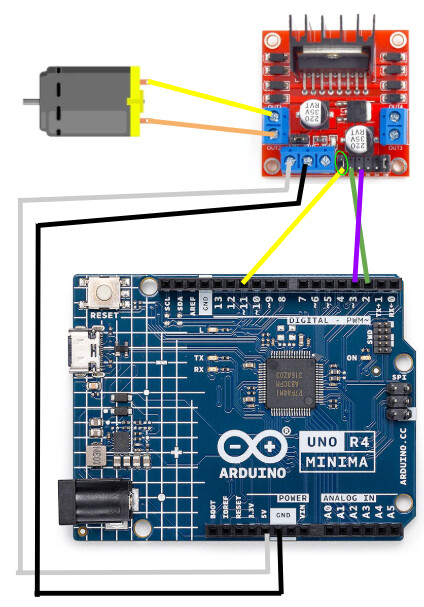
When I have the jumper wire connecting the ena pin to the other pin (see green circle diagram below), everything works smoothly. However, when I remove the jumper pin and attempt to control the speed of the motor via the ena pin, the motor will not spin at all. I have 2 of these drivers and neither work with the ena/enb pins, and I tried all the pwm ports on my arduino, but to no avail. Thank you!
Current code I am using to attempt to control the motor speed (taken from the arduino project hub article)
int motor1pin1 = 2;
int motor1pin2 = 3;
int motor1ena = 11;

void setup() {
  // put your setup code here, to run once:
  pinMode(motor1pin1, OUTPUT);
  pinMode(motor1pin2, OUTPUT);
  pinMode(motor1ena,  OUTPUT);
}

void loop() {
  // put your main code here, to run repeatedly:

  //Controlling speed (0  = off and 255 = max speed):
  analogWrite(motor1ena, 100); //ENA  pin

  digitalWrite(motor1pin1,  HIGH);
  digitalWrite(motor1pin2, LOW);
  delay(3000);

  digitalWrite(motor1pin1,  LOW);
  digitalWrite(motor1pin2, HIGH);
  delay(3000);
}
Recieved the voltage conveter, and the ena pin works, kinda...
At first the motor spins just fine, but in 5 seconds it goes to spinning normally to being too weak to spin, whilst both the motor and blue voltage converter make weird noises.
The first green one boosts the voltage from 1.5v to 5v and the second blue one (which is the one making a clicking noise) boosts the voltage from 5v to 12v, which then powers the L298n.
My arduino is powered by my laptop from a USB C cable.
Oh my gosh I am dumb thank you so much
So I'm probably overloading that first green voltage converter...
Tomorrow I'll fix the circuit and see what happens
Maybe, but if it haven't released the magic smoke yet it's probably ok.
Best setup would be a 12 V battery, or Lithium batteries to get 3.6 V x 4 and go downhills from that. You could drive the motor without any conversion, and one buck converter for 5 V, smaller losses.
Sorry for the delay, I had quite the busy week
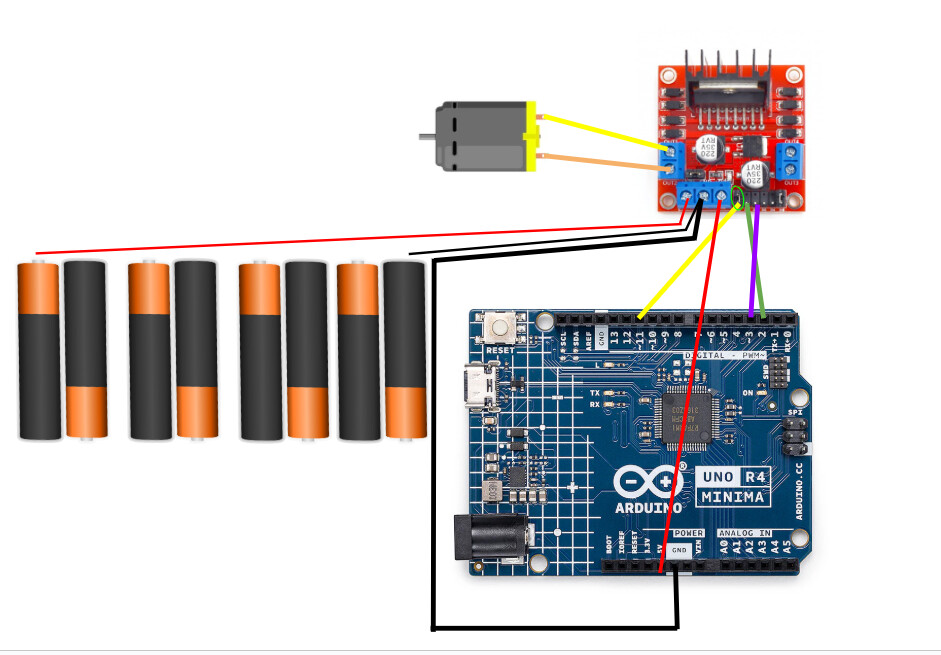
Anyways though, I soldered 2 4-AA battery packs together to make an 8 AA battery pack, wired that to the L298N, and ran the code.
It does run for a lot longer (15 seconds), and the PWM speed works, but then proceeds to dp the same thing of rapidly deteriorating to spinning weakly to not at all, even though the voltage of the batteries only dropped to 12.2V (although it does seem weird how 8 AA batteries were delivering more than 12V...)
I figured out that for some reason the L298N wouldn't work if I powered the arduino from it's 5v output, so I used a seperate power supply for said arudino (3 AA batteries with 5v step up)
I was going to try to use my spare L298N, however, when I plugged my 5v power supply to the Arduino 5v pin (mistake #1, should've used the VIN pin), the arduino didn't turn on. I then made a big mistake and connected my laptop to it via USB (mistake #2) and got the rice krispy electric death omen of snap, crackle, and pop....
So I gueas that's the end of that for now..., thank you for all your help though!
(I might get another one... I never like leaving a project unfinished)