LDR/Bulb problem

Hello guys. I have a weird one for you. I’m trying to light up a bulb (through a relay) by using an LDR. The problem that I have is that when the light approaches the target value it has small variation that turns ON/OFF the bulb. In order to stop that I tried to an array to store the latest values and then make an average out of that, but something is not working. When the light approaches the target value the bulb starts to rapidly turn ON/OFF. I was expecting, that my code, every 2 seconds (unsigned long IntervalReflectoare = 2000;), it will read the sensor, add the value to the array and calculate the average.

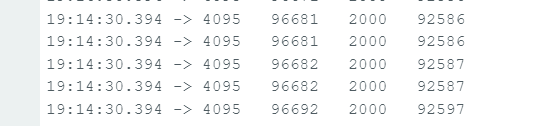
I’ve tried doing some debugging, and I’ve got some weird results. This are the lines that I have added to the code:

Serial.print(TimpReflectoare);
Serial.print("   ");
Serial.print(millis());
Serial.print("   ");
Serial.print(IntervalReflectoare);
Serial.print("   ");
Serial.println(millis() - TimpReflectoare);

And this is the result:
Here is the whole code.

#define REMOTEXY_MODE__WIFI_CLOUD
#include <WiFi.h>
#include <RemoteXY.h>

// RemoteXY connection settings 
#define REMOTEXY_WIFI_SSID "xxx"
#define REMOTEXY_WIFI_PASSWORD "xxx"
#define REMOTEXY_CLOUD_SERVER "cloud.remotexy.com"
#define REMOTEXY_CLOUD_PORT 6376
#define REMOTEXY_CLOUD_TOKEN "7f9e099ee89e878ad23e6e9f9fe32d8d"

//Reflectoare
int Fotorezistor = 34; // Fotorezistor
int Releu_Reflectoare = 5; // Releu reflectoare
unsigned long Fotorezistor_Variabila = 0;
unsigned long Fotorezistor_Variabila_Suma = 0;
unsigned long Fotorezistor_Variabila_Medie = 0;

int Fotorezistor_Limita = 3600;
unsigned long IntervalReflectoare = 2000;
unsigned long TimpReflectoare = 0;
const int Dimensiune_Array = 10;
int Array[Dimensiune_Array];

unsigned long counter = 0;

// RemoteXY GUI configuration  
#pragma pack(push, 1)  
uint8_t RemoteXY_CONF[] =   // 118 bytes
  { 255,1,0,23,0,111,0,19,0,0,0,0,31,1,108,200,1,1,8,0,
  130,0,0,55,32,24,31,129,8,3,40,7,64,8,82,101,102,108,101,99,
  116,111,97,114,101,0,70,3,13,13,13,16,16,135,0,10,18,13,34,13,
  50,0,31,31,79,78,0,0,79,70,70,0,67,57,2,25,8,102,94,13,
  11,67,57,12,25,8,102,94,13,11,129,82,3,28,8,64,8,73,110,115,
  116,97,110,116,0,129,82,13,24,8,64,8,77,101,100,105,101,0 };
  
// this structure defines all the variables and events of your control interface 
struct {

    // input variables
  uint8_t Reflectoare_Buton; // =1 if state is ON, else =0

    // output variables
  uint8_t Reflectoare_LED; // from 0 to 1
  char Fotorezistor_Variabila_Text[11]; // string UTF8 end zero
  char Fotorezistor_Variabila_Medie_Text[11]; // string UTF8 end zero

    // other variable
  uint8_t connect_flag;  // =1 if wire connected, else =0

} RemoteXY;   
#pragma pack(pop)
/////////////////////////////////////////////
//           END RemoteXY include          //
/////////////////////////////////////////////

void setup() {
  Serial.begin(115200);
  delay(100);
  RemoteXY_Init ();
  delay(1000);

  pinMode(Fotorezistor,INPUT);
  pinMode(Releu_Reflectoare,OUTPUT);
  
  digitalWrite(Releu_Reflectoare,!LOW);
}

void loop() {
// START loop
  RemoteXY_Handler ();


//START Reflectoare
if (RemoteXY.Reflectoare_Buton == 1) {
  digitalWrite(Releu_Reflectoare,!HIGH);
} else {

if( (millis() - TimpReflectoare) > IntervalReflectoare){
TimpReflectoare = millis();

  Fotorezistor_Variabila = analogRead(Fotorezistor);
  dtostrf(Fotorezistor_Variabila, 0, 0, RemoteXY.Fotorezistor_Variabila_Text);

  for (byte i = Dimensiune_Array; i > 0; i = i - 1) {
      Array[i] = Array[i-1];
    }
  Array[0] = Fotorezistor_Variabila;

Fotorezistor_Variabila_Suma = 0;

for (byte j = 0; j < Dimensiune_Array; j = j + 1) {
      Fotorezistor_Variabila_Suma = Fotorezistor_Variabila_Suma + Array[j];
    }

  Fotorezistor_Variabila_Medie = Fotorezistor_Variabila_Suma/Dimensiune_Array;
  dtostrf(Fotorezistor_Variabila_Medie, 0, 0, RemoteXY.Fotorezistor_Variabila_Medie_Text);

    if (Fotorezistor_Variabila_Medie > Fotorezistor_Limita) {

      digitalWrite(Releu_Reflectoare,!HIGH);
      RemoteXY.Reflectoare_LED = 1;

    } else {

      digitalWrite(Releu_Reflectoare,!LOW);
      RemoteXY.Reflectoare_LED = 0;
    }
  
Serial.print(TimpReflectoare);
Serial.print("   ");
Serial.print(millis());
Serial.print("   ");
Serial.print(IntervalReflectoare);
Serial.print("   ");
Serial.println(millis() - TimpReflectoare);

  }
}
//STOP Reflectoare

} // END LOOP

What I would like to achieve it that at night, when the light gets to the target value to turn the bulb on and stay on until the morning.

You need to set-up a threshold with hysteresis.
For example turn the light ON when thres > 200 but don't turn it OFF unless thresh < 180. That will stop the on/off chattering.
Of course you can also do some averaging to smooth the signal if needed.

Sorry, I dont find your code very comprehensible; (language issue)
and it seems very complicated for such a simple task.

It would be useful to document it at a higher level (eg pseudocode)
eg measure light level & average it to match a range 0 - 1023
apply some hysteresis so the light doesnt flicker
turn light on or off depending on result.

Exactly. And it could not be simpler. @georgepa remember how your home thermostat works.

The heat doesn't come on until it is too cold. Then it stays on until is is warm enough. These are different temperatures, usually a few degrees.

The magic is that when the temperature is between the two thresholds, the heat is either left running (if we are heating up) or not running (if we are cooling off).

    if (Fotorezistor_Variabila_Medie > Fotorezistor_Limita + piccolaQuantita) {

      digitalWrite(Releu_Reflectoare, !HIGH);
      RemoteXY.Reflectoare_LED = 1;

    }

    if (Fotorezistor_Variabila_Medie > Fotorezistor_Limita - piccolaQuantita) {
      digitalWrite(Releu_Reflectoare, !LOW);
      RemoteXY.Reflectoare_LED = 0;
    }

Two entirely separate if statements. You can use else if between the two bodies. I like to omit it as I have done here as it leaves clear the simple logic of hysteresis with negligible cost.

Set a constant piccolaQuantita to make it work how you want. Your one number now is 3600, you could start with 150 so it woukd switch on (or is that off?) at 3750 and the other way at 3450.

Experiment.

Now don't use !HIGH, see how it confused me? Is that turning the LED on or off?

With digitalWrite() it is convenient to define some symbols up top to make things clear, viz:

# define ON  HIGH
# define OFF LOW

and in you code say

      digitalWrite(Releu_Reflectoare, ON);

// or

      digitalWrite(Releu_Reflectoare, OFF);

And I am clear about what you doing.

It is also handy if you have need to do the opposite from what you see, like if you had a relay module that operated "upside down" to what you thought, or to what a replacement module needs: you only have to change the definitions of ON and OFF in one place.

HTH

a7

Thank you all for the input. It was very helpful. I think that now I might be able to get the result that I want.

But, I still have one question.

if( (millis() - TimpReflectoare) > IntervalReflectoare){
TimpReflectoare = millis();

At this "if", from my understanding, there should be a 2 seconds pause. But the program is ignoring it. Also, the "TimpReflectoare" variable is always 4095 (as a clarification, the program runs an e esp32). Where is the problem?

Happy to help.

Please use the IDE Autoform tool on your sketch, and post the entire current sketch inyour next response.

We don't know what you've changed, and it isn't clear when there should be any pause in the action; the code will help but may still need some words.

a7

Array[i] = Array[i-1];

i=10 is out of bounds for the array
That will cause some problems.

If you use hysterisis and the circuit I show, you won't need the array.

I don't know how to do that. :pensive_face:

Here is a more simplify version with more explications.

//Reflectoare
int Fotorezistor = 34; // Fotorezistor
int Releu_Reflectoare = 5; // Relay
unsigned long Fotorezistor_Variabila = 0;   // variable
unsigned long Fotorezistor_Variabila_Suma = 0;   //sum
unsigned long Fotorezistor_Variabila_Medie = 0;   //average

int Fotorezistor_Limita = 3600;
unsigned long IntervalReflectoare = 2000;
unsigned long TimpReflectoare = 0;
const int Dimensiune_Array = 10;
int Array[Dimensiune_Array];

unsigned long counter = 0;

void setup() {

  pinMode(Fotorezistor,INPUT);
  pinMode(Releu_Reflectoare,OUTPUT);
  
  digitalWrite(Releu_Reflectoare,!LOW);
}

void loop() {

if( (millis() - TimpReflectoare) > IntervalReflectoare){
TimpReflectoare = millis();

  Fotorezistor_Variabila = analogRead(Fotorezistor);

  for (byte i = Dimensiune_Array; i > 0; i = i - 1) {   // here the value read above is inserted in
      Array[i] = Array[i-1];                            //to the array and all the other values from 
    }                                                   //the array are moved one position to the right
  Array[0] = Fotorezistor_Variabila;

Fotorezistor_Variabila_Suma = 0;                        //here I reset the sum from the loop before

for (byte j = 0; j < Dimensiune_Array; j = j + 1) {
      Fotorezistor_Variabila_Suma = Fotorezistor_Variabila_Suma + Array[j]; //here I calulate the sum
    }                                                                       //of the values inside the array

  Fotorezistor_Variabila_Medie = Fotorezistor_Variabila_Suma/Dimensiune_Array;
              // here I devided the sum to the array size
    if (Fotorezistor_Variabila_Medie > Fotorezistor_Limita) {

      digitalWrite(Releu_Reflectoare,!HIGH);

    } else {

      digitalWrite(Releu_Reflectoare,!LOW);
    }
  }
}

See post #7 and #2

I don't know what you want paused for two seconds.

This

void loop() {
  if ( (millis() - TimpReflectoare) > IntervalReflectoare) {
    TimpReflectoare = millis();

    Serial.println("Hello");
  }
}

prints Hello every two seconds. But do you really want to look at the sensor only once every two seconds?

Seems like reading #4 again if you''ve already wouldn't hurt either.

The IDE Autoformat tools is an option in the Tools menu in the IDE.

a7

jim-p I understood what you told me. But I just want to understand what is rung with my code, so I know for the future. Also, the problem with the threshold is that the variation can sometimes be of 1000. And the LDR is a module like this one, and I think? it has the complementary components. I will try to take a picture and reverse engineer it.

alto777 The idea was to read the sensor every 2 seconds, so I get a more stable reading. I hoped the values read won't be so different.

What Arduino do you have?

Hi, @georgepa
Can you please post a copy of your circuit, a picture of a hand drawn circuit in jpg, png?
Hand drawn and photographed is perfectly acceptable.
Please include ALL hardware, power supplies, component names and pin labels.

Also can you post some images of your project?
So we can see your component layout.

Tom.... :smiley: :+1: :coffee: :australia:

Not necessary.

the problem with the threshold is that the variation can sometimes be of 1000

Do you mean for the same board or different boards or from one day to the next?

what is rung with my code

You made it to complicated with the array and averaging and as I pointed out you have a mistake in the array indexing.

I understood what you told me.

Then delete the array code and just use hysterisis. Adjust the values till it works the way you like.

I had modified yorr code 8 days ago but have since deleted it.

TomGeorge Is this ok?

That is quite different from your other schematic
Which is the actual way you have it connected?

This one was just to exemplify the type of LDR sensor.
As I mentioned in post #5 I'm using a ESP32, the last one is the whole wiring with all the components.

Well there is a BIG differenct between the two circuits. In the first one you are connected to the AO output of the LDR, in the second you are connected to the DO output.

You should be connected to the AO output and it should be connected to an ESP analog input
The LDR module should be connected to 3.3V NOT 5V.

ESP32 is known for bad analog readings.

They are not bad just not very accurate but more than good enough for reading an LDR