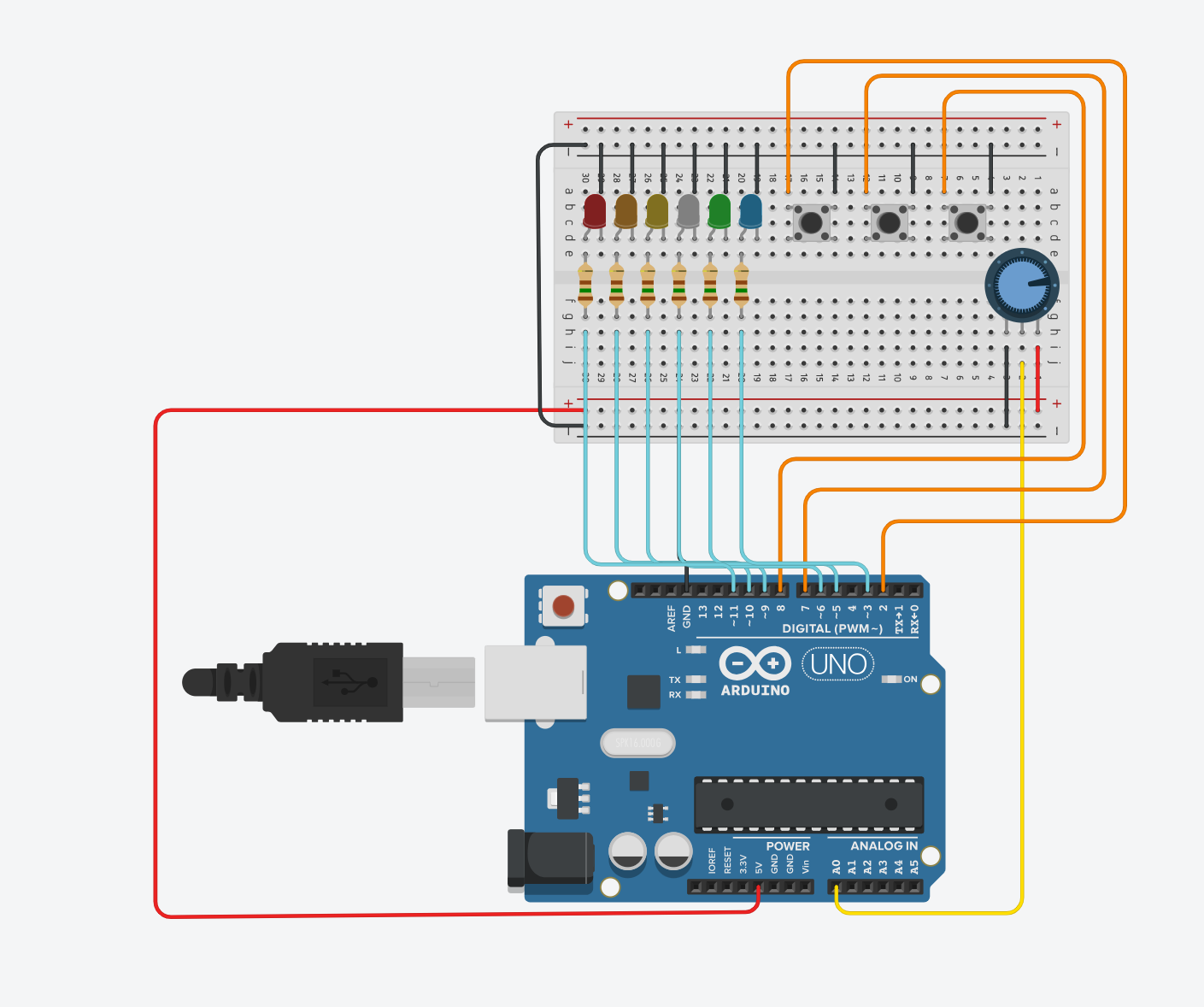
I’ve been trying to complete an Arduino project in Tinkercad where I need to do this Arduino activity, it requires building a circuit with the following components:
5 or 6 red LEDs
5 or 6 resistors (150Ω or similar)
1 potentiometer
3 push buttons
3 resistors (10kΩ)
1 protoboard
1 Arduino UNO
Main Tasks:
Potentiometer Control:
When the potentiometer is at the initial position (far left), all LEDs must be off.
At the final position (far right), all LEDs must be on.
At intermediate positions, only some LEDs should light up (e.g., halfway lights up LEDs 1, 2, and 3).
LED Blinking Sequence:
The LEDs must turn on and off in sequence every 500 ms. For example:
LED 1 turns on, then after 500 ms LED 2 turns on, then after 500 ms LED 3 turns on.
After all are on, they turn off after 500 ms, and the cycle repeats indefinitely.
Brightness Adjustment
Add 3 push buttons to control LED brightness:
Button 1 (KEY1): Minimum brightness.
Button 2 (KEY2): Half brightness.
Button 3 (KEY3): Maximum brightness (default if no button is pressed).
Use Arduino’s PWM functions (analogWrite and map) for brightness control.
I managed to get the potentiometer part working, but the brightness control isn’t responding .
int LED1 = 3;
int LED2 = 5;
int LED3 = 6;
int LED4 = 9;
int LED5 = 10;
int LED6 = 11;
int Botao1 = 2;
int Botao2 = 7;
int Botao3 = 8;
int pwm = 255;

void setup() {
  pinMode(A0, INPUT);
  pinMode(Botao1, INPUT_PULLUP);
  pinMode(Botao2, INPUT_PULLUP);
  pinMode(Botao3, INPUT_PULLUP);

  pinMode(LED1, OUTPUT);
  pinMode(LED2, OUTPUT);
  pinMode(LED3, OUTPUT);
  pinMode(LED4, OUTPUT);
  pinMode(LED5, OUTPUT);
  pinMode(LED6, OUTPUT);
}

void loop() {

  if (digitalRead(Botao1) == LOW) {
    pwm = 50;
  }
  if (digitalRead(Botao2) == LOW) {
    pwm = 150;
  }
  if (digitalRead(Botao3) == LOW) {
    pwm = 255;
  }

  pot = analogRead(A0);

  if (pot >= 900) {
    piscaLEDs(6);
  } else if (pot >= 760) {
    piscaLEDs(5);
  } else if (pot >= 590) {
    piscaLEDs(4);
  } else if (pot >= 420) {
    piscaLEDs(3);
  } else if (pot >= 240) {
    piscaLEDs(2);
  } else if (pot >= 70) {
    piscaLEDs(1);
  } else {
    apagaTodosLEDs();
  }
}

void piscaLEDs(int quantidade) {
  int leds[] = {LED1, LED2, LED3, LED4, LED5, LED6};

  for (int i = 0; i < quantidade; i++) {
    analogWrite(leds[i], pwm);
    delay(500);
  }

  for (int i = quantidade - 1; i >= 0; i--) {
    digitalWrite(leds[i], LOW);
  }

  delay(500);
}

void apagaTodosLEDs() {
  int leds[] = {LED1, LED2, LED3, LED4, LED5, LED6};
  for (int i = 0; i < 6; i++) {
    digitalWrite(leds[i], LOW);
  }
}
This is the circuit I put together in tinkercad, I'm not sure if all the connections are correct. I need help, I'm really new to this and I don't really know what I'm doing, so if someone could help me and explain what's going wrong, it would help me a lot.
where did you place the 10K resistors? Change your code to print which button is pressed. For debugging also place a delay(2000) in the loop so you do not flood the serial channel. When the buttons are working let us know. Also if you do not have a multimeter you need to get one, even a $5 one would work.
The wiring is wrong. The push button switches should be placed across the central barrier on the bread board.
Then they should be wired across one diagonal. That is with ground where it is, and the input pin to the Arduino diagonally across from this.
The black wire carrying the ground to the Arduino on pin 24 of the Arduino is obscured by the blue wires so it is hard to see where it goes. Move it away from the blue wires so that you don't hide it.
The smart thing to do would be to define this as a global variable, just before the setup function, so you would not have to build this array every time you ran the piscaLEDs function.
The process of the LEDs turning on and flashing, and the potentiometer, is working, I'm having trouble with the buttons, which when pressed don't change the brightness of the LEDs, and I can't check if these buttons are working even in the simulator