Leonardo is not recognised

Good day guys,I having a problem on my arduino Leonardo my PC keeps saying last USB device is not recognize and the port was not showing and the arduino ON and RX light are always lit and when I tried to restart it the L light is fading in and out for 5-8 seconds I tried using all of my micro USB cable and also bought new one with data transmission/data sync and the problem is the same tried many things on this forum to fix it but unfortunately it doesn't works last time I was using this is for my DIY steering wheel and i didn't used it for half a year then I tried it again and shows this problem and the last time I'm using this works perfectly fine

do anyone know about my problem or should I buy another arduino

Thanks and have a good day.

That means that the boot loader is functioning. Does your operating system recognise the Leonardo (as Arduino Leonardo boot loader) after the reset for the duration that the L-LED fades?

Upload the blink sketch; when the IDE reports the memory usage, tap the reset button.

It's possible that you first have to tap the reset button and in the IDE select the port that shows (arduino leonardo boot loader) before performing the upload.

My Leonardo doesn't show up on device manager even for a split second my PC just immediately report that it is not recognizable I tried double pressing it and it's still not showing does trying it on a different pc may help it or not

It's worth a try because the boot loader seems to be functioning.

Ok thanks might try it to a different pc

Use USBasp to write de firmware and download the sketch

You mention a DIY steering wheel. Did you happen to flash a sketch that turned it into a HID/Keyboard device?

if so, then yes, a Leonardo bootloader would need to be flashed to it using either a USBASP or another Arduino as an ISP programmer.

https://docs.arduino.cc/built-in-examples/arduino-isp/ArduinoISP/

Once the bootloader has been flashed, the board should operate normally again.

OP stated that the L-LED is fading in and out after a reset; that indicates that the boot loader is present.

Yes and I flash it to became a joystick and I already tried reflashing the bootloader with my extra clone uno with ch340 and use it as an ISP to flash it but I didn't have any luck in it I tried all the instruction on yt but I will try flashing it again tomorrow maybe I've done something wrong which causes it to fail to flash

So long as you selected the Leonardo board in the IDE board manager when flashing the bootloader, that should have been OK.

Did you try on another PC as suggested earlier?

I tried connecting it to 2 different pc and same problems occur and also tried burning it again and having problem saying avrdude: Expected signature for ATmega32u4 is 1E 95 87 Double check chip, or use -F to this check and can't find anything about this on web

And I also can't find my board on board since my board says Leonardo r3

When burning the boot loader, it should also tell you which signature avrdude did retrieve from the processor.

Here's the full output of the error

"C:\Users\PC\AppData\Local\Arduino15\packages\arduino\tools\avrdude\6.3.0-arduino17/bin/avrdude" "-CC:\Users\PC\AppData\Local\Arduino15\packages\arduino\tools\avrdude\6.3.0-arduino17/etc/avrdude.conf" -v -patmega32u4 -cstk500v1 -PCOM4 -b19200 -e -Ulock:w:0x3F:m -Uefuse:w:0xcb:m -Uhfuse:w:0xd8:m -Ulfuse:w:0xff:m

avrdude: Version 6.3-20190619
Copyright (c) 2000-2005 Brian Dean, http://www.bdmicro.com/
Copyright (c) 2007-2014 Joerg Wunsch

     System wide configuration file is "C:\Users\PC\AppData\Local\Arduino15\packages\arduino\tools\avrdude\6.3.0-arduino17/etc/avrdude.conf"

     Using Port                    : COM4
     Using Programmer              : stk500v1
     Overriding Baud Rate          : 19200
     AVR Part                      : ATmega32U4
     Chip Erase delay              : 9000 us
     PAGEL                         : PD7
     BS2                           : PA0
     RESET disposition             : dedicated
     RETRY pulse                   : SCK
     serial program mode           : yes
     parallel program mode         : yes
     Timeout                       : 200
     StabDelay                     : 100
     CmdexeDelay                   : 25
     SyncLoops                     : 32
     ByteDelay                     : 0
     PollIndex                     : 3
     PollValue                     : 0x53
     Memory Detail                 :

                              Block Poll               Page                       Polled
       Memory Type Mode Delay Size  Indx Paged  Size   Size #Pages MinW  MaxW   ReadBack
       ----------- ---- ----- ----- ---- ------ ------ ---- ------ ----- ----- ---------
       eeprom        65    20     4    0 no       1024    4      0  9000  9000 0x00 0x00
       flash         65     6   128    0 yes     32768  128    256  4500  4500 0x00 0x00
       lfuse          0     0     0    0 no          1    0      0  9000  9000 0x00 0x00
       hfuse          0     0     0    0 no          1    0      0  9000  9000 0x00 0x00
       efuse          0     0     0    0 no          1    0      0  9000  9000 0x00 0x00
       lock           0     0     0    0 no          1    0      0  9000  9000 0x00 0x00
       calibration    0     0     0    0 no          1    0      0     0     0 0x00 0x00
       signature      0     0     0    0 no          3    0      0     0     0 0x00 0x00

     Programmer Type : STK500
     Description     : Atmel STK500 Version 1.x firmware
     Hardware Version: 2
     Firmware Version: 1.18
     Topcard         : Unknown
     Vtarget         : 0.0 V
     Varef           : 0.0 V
     Oscillator      : Off
     SCK period      : 0.1 us

avrdude: AVR device initialized and ready to accept instructions

Reading | ################################################## | 100% 0.02s

avrdude: Device signature = 0xff00ff
avrdude: Expected signature for ATmega32U4 is 1E 95 87
Double check chip, or use -F to override this check.

avrdude done. Thank you.

Failed chip erase: uploading error: exit status 1

That might explain a lot.

As you might have already guessed, using -F will override the signature, but I suggest that you wait for further advice from sterretje before attempting that. There may be some other factor at play.

I suspect bad wiring. Double/triple check; make sure that there are no bad contacts.

Usually incorrect wiring is, to my knowledge, indicated by 0x000000 or 0xFFFFFF. But it might be that you have permanently damaged the 32U4.

Please confirm that the L-LED still fades in and out after a reset. If so, I would suspect the following why normal uploads fail via USB

  1. Bad USB connectors, both the board and PC connector.
  2. Bad USB cables.
  3. Problem in the operating system; I think that it's reasonable to exclude that as it's unlikely to happen on two PCs.

I have seen micro USB connectors with a cracked center tab (the flat piece inside in the middle of the PCB connector) and even one with tracks lifting on that tab and shorting, both of which caused an intermittent data connection. Connectors can also come loose on the PCB and tracks lift of the PCB at the back, although that usually becomes evident though intermittent power. Worth giving everything the once-over, even with a magnifying glass if need be.

I've successfuly burned the bootloader but the same problem occurs
Here's what the output when I burned it

"C:\Users\PC\AppData\Local\Arduino15\packages\arduino\tools\avrdude\6.3.0-arduino17/bin/avrdude" "-CC:\Users\BPC\AppData\Local\Arduino15\packages\arduino\tools\avrdude\6.3.0-arduino17/etc/avrdude.conf" -v -patmega32u4 -cstk500v1 -PCOM4 -b19200 -e -Ulock:w:0x3F:m -Uefuse:w:0xcb:m -Uhfuse:w:0xd8:m -Ulfuse:w:0xff:m

avrdude: Version 6.3-20190619
Copyright (c) 2000-2005 Brian Dean, http://www.bdmicro.com/
Copyright (c) 2007-2014 Joerg Wunsch

     System wide configuration file is "C:\Users\BAGUIO PC\AppData\Local\Arduino15\packages\arduino\tools\avrdude\6.3.0-arduino17/etc/avrdude.conf"

     Using Port                    : COM4
     Using Programmer              : stk500v1
     Overriding Baud Rate          : 19200
     AVR Part                      : ATmega32U4
     Chip Erase delay              : 9000 us
     PAGEL                         : PD7
     BS2                           : PA0
     RESET disposition             : dedicated
     RETRY pulse                   : SCK
     serial program mode           : yes
     parallel program mode         : yes
     Timeout                       : 200
     StabDelay                     : 100
     CmdexeDelay                   : 25
     SyncLoops                     : 32
     ByteDelay                     : 0
     PollIndex                     : 3
     PollValue                     : 0x53
     Memory Detail                 :

                              Block Poll               Page                       Polled
       Memory Type Mode Delay Size  Indx Paged  Size   Size #Pages MinW  MaxW   ReadBack
       ----------- ---- ----- ----- ---- ------ ------ ---- ------ ----- ----- ---------
       eeprom        65    20     4    0 no       1024    4      0  9000  9000 0x00 0x00
       flash         65     6   128    0 yes     32768  128    256  4500  4500 0x00 0x00
       lfuse          0     0     0    0 no          1    0      0  9000  9000 0x00 0x00
       hfuse          0     0     0    0 no          1    0      0  9000  9000 0x00 0x00
       efuse          0     0     0    0 no          1    0      0  9000  9000 0x00 0x00
       lock           0     0     0    0 no          1    0      0  9000  9000 0x00 0x00
       calibration    0     0     0    0 no          1    0      0     0     0 0x00 0x00
       signature      0     0     0    0 no          3    0      0     0     0 0x00 0x00

     Programmer Type : STK500
     Description     : Atmel STK500 Version 1.x firmware
     Hardware Version: 2
     Firmware Version: 1.18
     Topcard         : Unknown
     Vtarget         : 0.0 V
     Varef           : 0.0 V
     Oscillator      : Off
     SCK period      : 0.1 us

avrdude: AVR device initialized and ready to accept instructions

Reading | ################################################## | 100% 0.02s

avrdude: Device signature = 0x1e9587 (probably m32u4)
avrdude: erasing chip
avrdude: reading input file "0x3F"
avrdude: writing lock (1 bytes):

Writing | ################################################## | 100% 0.01s

avrdude: 1 bytes of lock written
avrdude: verifying lock memory against 0x3F:
avrdude: load data lock data from input file 0x3F:
avrdude: input file 0x3F contains 1 bytes
avrdude: reading on-chip lock data:

Reading | ################################################## | 100% 0.01s

avrdude: verifying ...
avrdude: 1 bytes of lock verified
avrdude: reading input file "0xcb"
avrdude: writing efuse (1 bytes):

Writing | ################################################## | 100% 0.01s

avrdude: 1 bytes of efuse written
avrdude: verifying efuse memory against 0xcb:
avrdude: load data efuse data from input file 0xcb:
avrdude: input file 0xcb contains 1 bytes
avrdude: reading on-chip efuse data:

Reading | ################################################## | 100% 0.01s

avrdude: verifying ...
avrdude: 1 bytes of efuse verified
avrdude: reading input file "0xd8"
avrdude: writing hfuse (1 bytes):

Writing | ################################################## | 100% 0.01s

avrdude: 1 bytes of hfuse written
avrdude: verifying hfuse memory against 0xd8:
avrdude: load data hfuse data from input file 0xd8:
avrdude: input file 0xd8 contains 1 bytes
avrdude: reading on-chip hfuse data:

Reading | ################################################## | 100% 0.01s

avrdude: verifying ...
avrdude: 1 bytes of hfuse verified
avrdude: reading input file "0xff"
avrdude: writing lfuse (1 bytes):

Writing | ################################################## | 100% 0.01s

avrdude: 1 bytes of lfuse written
avrdude: verifying lfuse memory against 0xff:
avrdude: load data lfuse data from input file 0xff:
avrdude: input file 0xff contains 1 bytes
avrdude: reading on-chip lfuse data:

Reading | ########################"C:\Users\PC\AppData\Local\Arduino15\packages\arduino\tools\avrdude\6.3.0-arduino17/bin/avrdude" "-CC:\Users\PC\AppData\Local\Arduino15\packages\arduino\tools\avrdude\6.3.0-arduino17/etc/avrdude.conf" -v -patmega32u4 -cstk500v1 -PCOM4 -b19200 "-Uflash:w:C:\Users\PC\AppData\Local\Arduino15\packages\arduino\hardware\avr\1.8.6/bootloaders/caterina/Caterina-Leonardo.hex:i" -Ulock:w:0x2F:m
########################## | 100% 0.01s

avrdude: verifying ...
avrdude: 1 bytes of lfuse verified

avrdude done. Thank you.

avrdude: Version 6.3-20190619
Copyright (c) 2000-2005 Brian Dean, http://www.bdmicro.com/
Copyright (c) 2007-2014 Joerg Wunsch

     System wide configuration file is "C:\Users\PC\AppData\Local\Arduino15\packages\arduino\tools\avrdude\6.3.0-arduino17/etc/avrdude.conf"

     Using Port                    : COM4
     Using Programmer              : stk500v1
     Overriding Baud Rate          : 19200
     AVR Part                      : ATmega32U4
     Chip Erase delay              : 9000 us
     PAGEL                         : PD7
     BS2                           : PA0
     RESET disposition             : dedicated
     RETRY pulse                   : SCK
     serial program mode           : yes
     parallel program mode         : yes
     Timeout                       : 200
     StabDelay                     : 100
     CmdexeDelay                   : 25
     SyncLoops                     : 32
     ByteDelay                     : 0
     PollIndex                     : 3
     PollValue                     : 0x53
     Memory Detail                 :

                              Block Poll               Page                       Polled
       Memory Type Mode Delay Size  Indx Paged  Size   Size #Pages MinW  MaxW   ReadBack
       ----------- ---- ----- ----- ---- ------ ------ ---- ------ ----- ----- ---------
       eeprom        65    20     4    0 no       1024    4      0  9000  9000 0x00 0x00
       flash         65     6   128    0 yes     32768  128    256  4500  4500 0x00 0x00
       lfuse          0     0     0    0 no          1    0      0  9000  9000 0x00 0x00
       hfuse          0     0     0    0 no          1    0      0  9000  9000 0x00 0x00
       efuse          0     0     0    0 no          1    0      0  9000  9000 0x00 0x00
       lock           0     0     0    0 no          1    0      0  9000  9000 0x00 0x00
       calibration    0     0     0    0 no          1    0      0     0     0 0x00 0x00
       signature      0     0     0    0 no          3    0      0     0     0 0x00 0x00

     Programmer Type : STK500
     Description     : Atmel STK500 Version 1.x firmware
     Hardware Version: 2
     Firmware Version: 1.18
     Topcard         : Unknown
     Vtarget         : 0.0 V
     Varef           : 0.0 V
     Oscillator      : Off
     SCK period      : 0.1 us

avrdude: AVR device initialized and ready to accept instructions

Reading | ################################################## | 100% 0.02s

avrdude: Device signature = 0x1e9587 (probably m32u4)
avrdude: NOTE: "flash" memory has been specified, an erase cycle will be performed
To disable this feature, specify the -D option.
avrdude: erasing chip
avrdude: reading input file "C:\Users\PC\AppData\Local\Arduino15\packages\arduino\hardware\avr\1.8.6/bootloaders/caterina/Caterina-Leonardo.hex"
avrdude: writing flash (32730 bytes):

Writing | ################################################## | 100% 35.80s

avrdude: 32730 bytes of flash written
avrdude: verifying flash memory against C:\Users\BAGUIO PC\AppData\Local\Arduino15\packages\arduino\hardware\avr\1.8.6/bootloaders/caterina/Caterina-Leonardo.hex:
avrdude: load data flash data from input file C:\Users\PC\AppData\Local\Arduino15\packages\arduino\hardware\avr\1.8.6/bootloaders/caterina/Caterina-Leonardo.hex:
avrdude: input file C:\Users\ PC\AppData\Local\Arduino15\packages\arduino\hardware\avr\1.8.6/bootloaders/caterina/Caterina-Leonardo.hex contains 32730 bytes
avrdude: reading on-chip flash data:

Reading | ################################################## | 100% 19.55s

avrdude: verifying ...
avrdude: 32730 bytes of flash verified
avrdude: reading input file "0x2F"
avrdude: writing lock (1 bytes):

Writing | ################################################## | 100% 0.02s

avrdude: 1 bytes of lock written
avrdude: verifying lock memory against 0x2F:
avrdude: load data lock data from input file 0x2F:
avrdude: input file 0x2F contains 1 bytes
avrdude: reading on-chip lock data:

Reading | ################################################## | 100% 0.01s

avrdude: verifying ...
avrdude: 1 bytes of lock verified

avrdude done. Thank you.

And also I tried uploading bare minimum into it using upload sketch using programmer and the problem still the same but all the lights are lits

Maybe I will just buy a new one
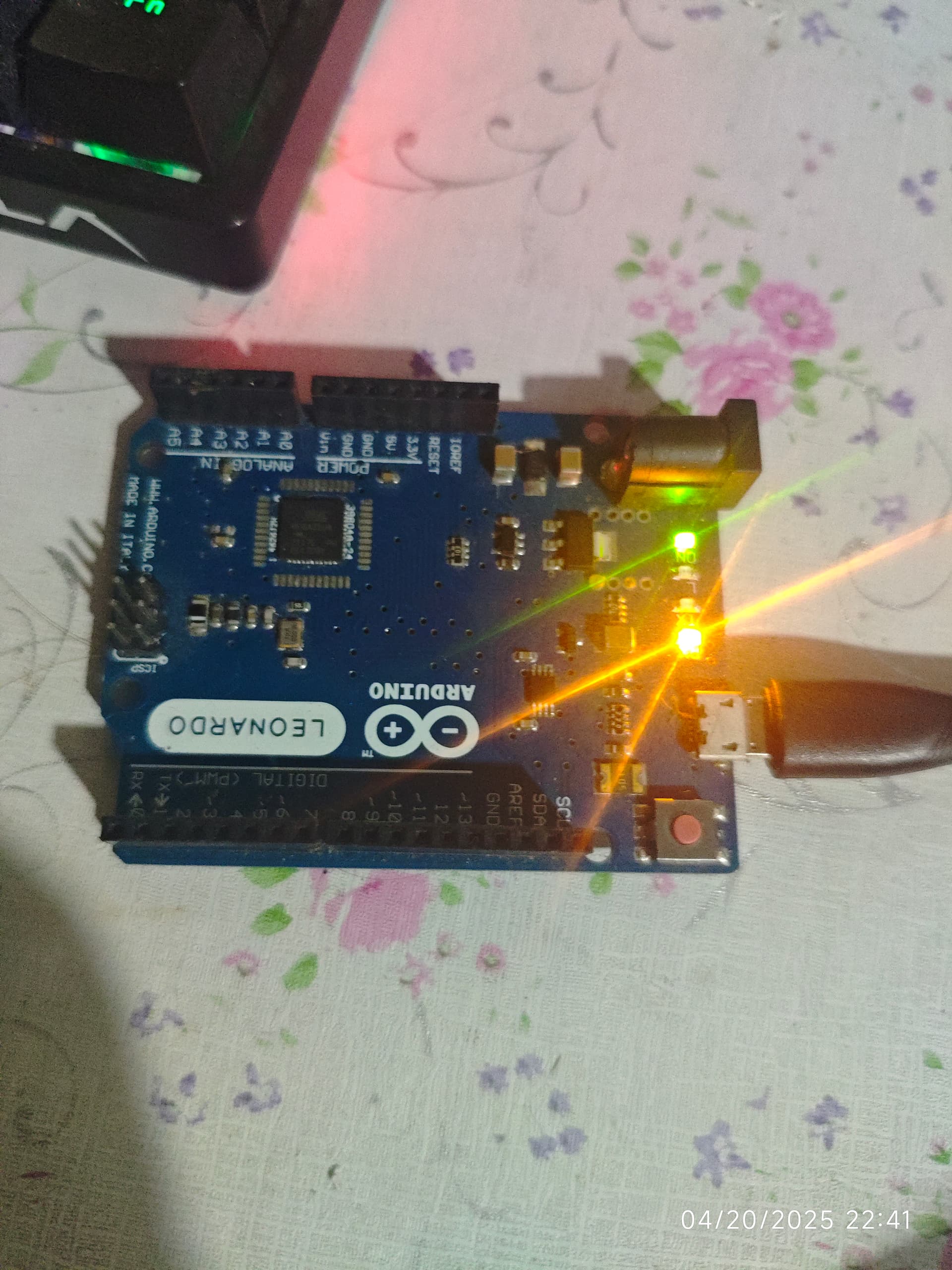
Just in case you did not know, that wipes the boot loader. But your board should be recognised in device manager.

I don't think that that should be the case. To my knowledge, Rx and Tx LEDs should be off.

When I upload the bare minimum sketch all light are lit and when I press the reset the bootloader is gone and the L led don't fade in/out it's just turnoff tx rx led and when I release it will just lit and will not be recognized by my pc
And I tried to flash the bootloader again and the problem still the same it's not detected my PC I saw similar problem but their arduino shows the bootloader in device manager when pressing the reset button and mine is different as I press the reset and it will immediately tell me it is not recognizable.
maybe my Leonardo is bricked
I'll just save money to buy another one

Thanks all for your help and time