mp1337:
What I meant by checking if message has been sent correctly was that I want to stop sending message after it is sent on the bus(no contention), so I was wondering if I will receive my sent message back(is it broadcasted) so I can stop sending it or if not, how will I know that I succesfully sent message?
Each message has a defined structure, and is of a known length before you send it. You just send the correct number of bytes. You don't need to monitor what's being sent to decide when to stop. It will only send the number of bytes you specify.
How do I detect contention on MCP2004 since it has no hardware detection?
Should I count time after every received message and if for example 10ms passes I mark line free and start transmitting?
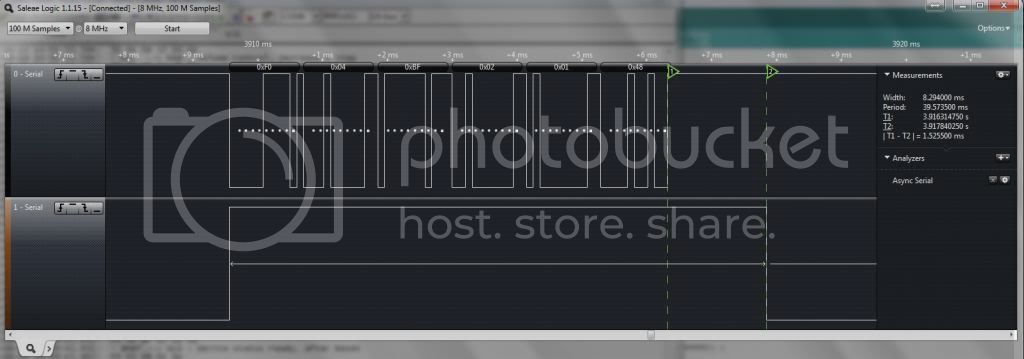
Although you don't have a pin on the MCP2003/2025, you can simulate this signal with the Arduino. If you loop the Rx pin into one of the interrupt pins (2 & 3 on an Uno), you can simulate this pin. Every time the Rx pin (and therefore the interrupt pin) goes low, you set a flag that signals that the line is busy. This flag will stay set until it sees the Rx pin stay high for 10us or more.
This is a logic analyser plot that shows this signal. The top trace is an IBUS message being received on the Rx pin, and the bottom trace is the signal that indicates the bus is busy. You can only send when this signal is low.
What is the size of smallest size of the received message? Does it come byte by byte or bigger chunks come in at one time?
The smallest message is 5 bytes, and it comes in one byte at a time. I think the longest message is around 36 bytes
How do I detect full message, right know I am thinking about storing everything that comes in a buffer and once I receive stop bit i go back and check if my message is correct by calculating the check sum. Is it a right way to do it?
The biggest problem with an IBUS message, is that it doesn't have anything nice and simple to indicate the start or end of the message. What you do have though, is the second byte of the message that indicates the length, and the last byte that's the checksum.
I did initially (with the help of Robin) try to detect the gap between messages, and although it worked to a point, I was never able to reliably read all messages this way. That's not to say it can't be done that way, more that I'm not bright enough to do it  .
.
My current method reads in the first two bytes, and given the second (length) byte, I read in the remaining bytes, calculate the checksum and compare it with the last byte in the message. If they match, it's a good message. If they don't, I discard the first byte, read in another (length) byte and try again. You obviously discard a number of bytes during the initial synchronisation, but once in sync, it stays in sync.
Ian.