Hello everyone, I'm trying to get two pairs of load cells to read different values at the same time on the ESP32. The library that im using is HX711_ADC.
here's the link: GitHub - olkal/HX711_ADC: Arduino library for the HX711 24-bit ADC for weight scales
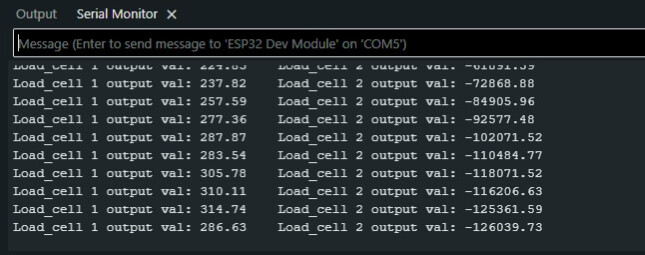
But, when i upload the example sketch from the library "Read_2x_load_cell.ino", the readings are very unstable, they keep changing all the time, even with no weight on the load cells, and sometimes I get very high or negative values.
Here's the code:
//-------------------------------------------------------------------------------------
// HX711_ADC.h
// Arduino master library for HX711 24-Bit Analog-to-Digital Converter for Weigh Scales
// Olav Kallhovd sept2017
// Tested with      : HX711 asian module on channel A and YZC-133 3kg load cell
// Tested with MCU  : Arduino Nano
//-------------------------------------------------------------------------------------
// This is an example sketch on how to use this library for two ore more HX711 modules
// Settling time (number of samples) and data filtering can be adjusted in the config.h file

#include <HX711_ADC.h>
#if defined(ESP8266)|| defined(ESP32) || defined(AVR)
#include <EEPROM.h>
#endif

//pins:
const int HX711_dout_1 = 4; //mcu > HX711 no 1 dout pin
const int HX711_sck_1 = 5; //mcu > HX711 no 1 sck pin
const int HX711_dout_2 = 6; //mcu > HX711 no 2 dout pin
const int HX711_sck_2 = 7; //mcu > HX711 no 2 sck pin

//HX711 constructor (dout pin, sck pin)
HX711_ADC LoadCell_1(HX711_dout_1, HX711_sck_1); //HX711 1
HX711_ADC LoadCell_2(HX711_dout_2, HX711_sck_2); //HX711 2

const int calVal_eepromAdress_1 = 0; // eeprom adress for calibration value load cell 1 (4 bytes)
const int calVal_eepromAdress_2 = 4; // eeprom adress for calibration value load cell 2 (4 bytes)
unsigned long t = 0;

void setup() {
  Serial.begin(57600); delay(10);
  Serial.println();
  Serial.println("Starting...");

  float calibrationValue_1; // calibration value load cell 1
  float calibrationValue_2; // calibration value load cell 2

  calibrationValue_1 = 696.0; // uncomment this if you want to set this value in the sketch
  calibrationValue_2 = 733.0; // uncomment this if you want to set this value in the sketch
#if defined(ESP8266) || defined(ESP32)
  //EEPROM.begin(512); // uncomment this if you use ESP8266 and want to fetch the value from eeprom
#endif
  //EEPROM.get(calVal_eepromAdress_1, calibrationValue_1); // uncomment this if you want to fetch the value from eeprom
  //EEPROM.get(calVal_eepromAdress_2, calibrationValue_2); // uncomment this if you want to fetch the value from eeprom

  LoadCell_1.begin();
  LoadCell_2.begin();
  //LoadCell_1.setReverseOutput();
  //LoadCell_2.setReverseOutput();
  unsigned long stabilizingtime = 2000; // tare preciscion can be improved by adding a few seconds of stabilizing time
  boolean _tare = true; //set this to false if you don't want tare to be performed in the next step
  byte loadcell_1_rdy = 0;
  byte loadcell_2_rdy = 0;
  while ((loadcell_1_rdy + loadcell_2_rdy) < 2) { //run startup, stabilization and tare, both modules simultaniously
    if (!loadcell_1_rdy) loadcell_1_rdy = LoadCell_1.startMultiple(stabilizingtime, _tare);
    if (!loadcell_2_rdy) loadcell_2_rdy = LoadCell_2.startMultiple(stabilizingtime, _tare);
  }
  if (LoadCell_1.getTareTimeoutFlag()) {
    Serial.println("Timeout, check MCU>HX711 no.1 wiring and pin designations");
  }
  if (LoadCell_2.getTareTimeoutFlag()) {
    Serial.println("Timeout, check MCU>HX711 no.2 wiring and pin designations");
  }
  LoadCell_1.setCalFactor(calibrationValue_1); // user set calibration value (float)
  LoadCell_2.setCalFactor(calibrationValue_2); // user set calibration value (float)
  Serial.println("Startup is complete");
}

void loop() {
  static boolean newDataReady = 0;
  const int serialPrintInterval = 0; //increase value to slow down serial print activity

  // check for new data/start next conversion:
  if (LoadCell_1.update()) newDataReady = true;
  LoadCell_2.update();

  //get smoothed value from data set
  if ((newDataReady)) {
    if (millis() > t + serialPrintInterval) {
      float a = LoadCell_1.getData();
      float b = LoadCell_2.getData();
      Serial.print("Load_cell 1 output val: ");
      Serial.print(a);
      Serial.print("    Load_cell 2 output val: ");
      Serial.println(b);
      newDataReady = 0;
      t = millis();
    }
  }

  // receive command from serial terminal, send 't' to initiate tare operation:
  if (Serial.available() > 0) {
    char inByte = Serial.read();
    if (inByte == 't') {
      LoadCell_1.tareNoDelay();
      LoadCell_2.tareNoDelay();
    }
  }

  //check if last tare operation is complete
  if (LoadCell_1.getTareStatus() == true) {
    Serial.println("Tare load cell 1 complete");
  }
  if (LoadCell_2.getTareStatus() == true) {
    Serial.println("Tare load cell 2 complete");
  }

}
The values in the serial monitor:
And the diagram:

Any help would be greatly appreciated.