Looking for Help on my Program for a gaming table

Hello to anyone that is taking the time in reading my dilemma!

I have been trying my best to learn some Arduino programing in the last couple weeks.

My project is all about LED lighting.

Quick explanation on what I am trying to do....

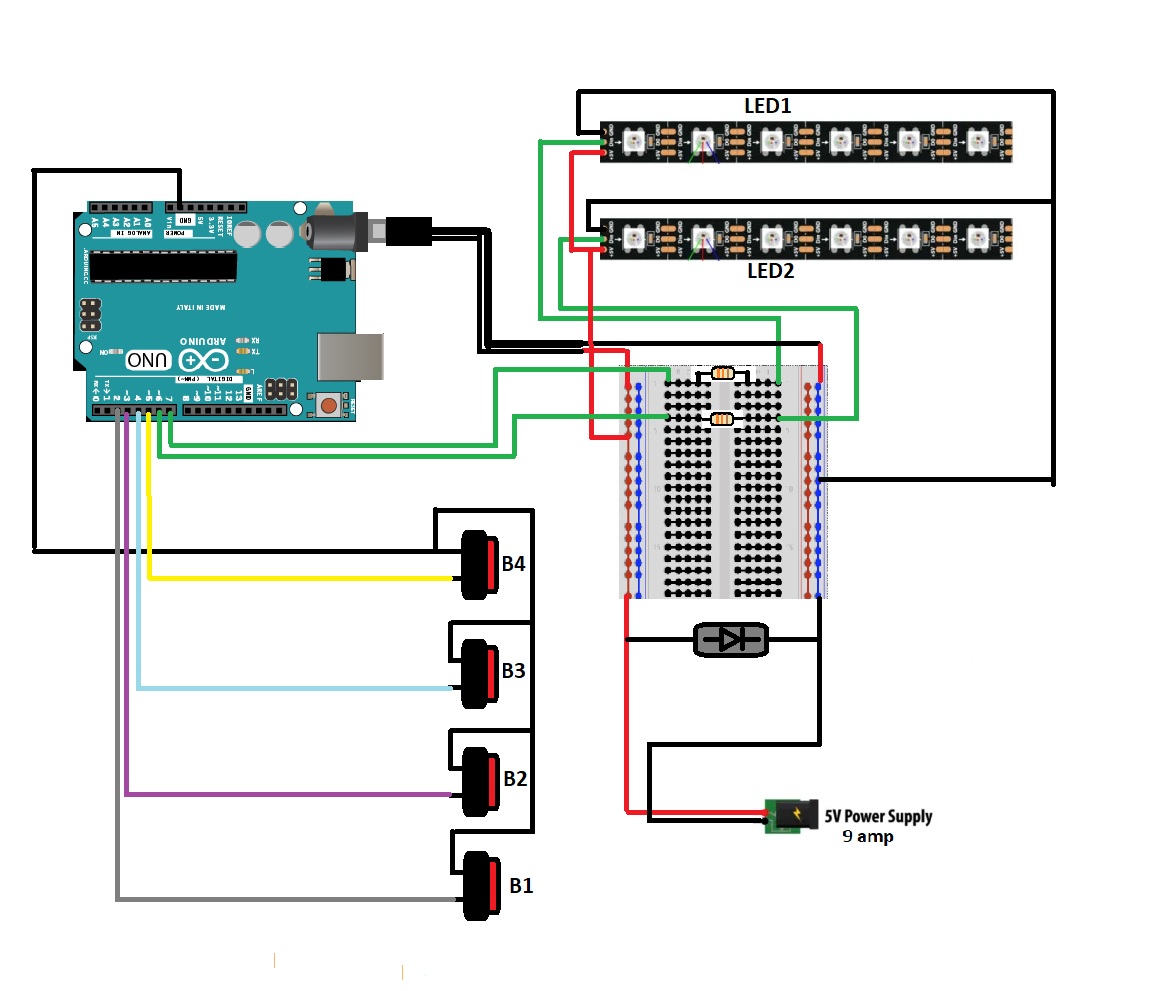
I am creating a gaming table. The table is running two sets of WS2812 lighting strips. Strip #1 is for the inside Plainfield of the gaming table. There will be two push buttons for this strip. An toggle button B1 and a momentary button B2. B1 must be on in order for B2 to be pushed and toggle different colors to the entire strip (eg press B1 lights turn red, press B1 again and LEDs turn blue, press again and they turn green) If B1 is togged off they lights turn OFF of the playing feild.

The second strip will run lights that illuminate a resin logo in the table, one in front of each seat of the table. There will be two buttons for this strip as well. One toggle button B3, and one momentary button B4. B3 toggles between two states, state one is serial communications that talked to an excel spread sheet. Every time a box is clicked in excel one of the logos lights up. When B3 is OFF then all the logos illuminate and B4 will change the color of all the logos every time is it pushed (similar to the B2 of the other strip)

THE PROBLEM
I have most of my project working. The issue I seem to have is if B1 is ON and B2 is push the colors change, but if B2 is held down the color of the LEDs changed rapidly.
I would prefer for it to only advance once whether it was a quick push or held for a second or two.

I will attach my code below.

Please be easy on me this is my first crack at a program, and first time programing anything.

// Program is for running an Arduino board for a gaming table. The table has 2 WS2812b lighting strips and 5 push buttons
// LEDstrip1 runs the inside playing feild around the inner perimeter
//          LEDstrip1 can be turned ON/OFF by a latching push button (ButtonPF)
//          LEDstrip1 when ON can change the color with a momentary push button (ButtonPFsequence) Colours will toggle through 7 hues
// LEDstrip2 runs the perimeter lights that make the logo glows on the edge of the tables frame
//          LEDstrip2 can be turned ON/OFF by a latching push button (ButtonLogos)
//          LEDstrip2 lights can be turned ALL ON or run by a computer excel program
//                  Excel program can send 0-9 values (Via USB connection from Arduino to computer), each value will illumate a differnt logo
//          LEDstrip2 when set to ALL ON can be toggled through colours just like the playing field LEDS
//                  By pressing a button (buttonLOGOsequence) you can toggle the colour of all logos through 7 different hues
// NOTE there are more push button on the gaming table but these are not controlled by the Arduino program
//         these buttons are to run the TV and are directly wired into the TV itself

const int len = 60;  // line is for the communications between Excel and Arduino
char my_str[len];    // line is for the communications between Excel and Arduino
char pos = 0;        // line is for the communications between Excel and Arduino

int incomingByte = 0;  //  for incoming serial data

#include <Adafruit_NeoPixel.h>  // for including LED library
#ifdef __AVR__
#include <avr/power.h>  // Required for 16 MHz Adafruit Trinket
#endif


#define Button1 2  // Pin for the latching on/off button
#define Button2 3  // Pin for the momentary push button
#define Button3 4  // Pin for the latching on/off button
#define Button4 5  // Pin for the momentary push button

int button1State = 0;  // variable to store the state of the latching on/off
int button2State = 0;  // variable to store the state of the momentary push
int button3State = 0;  // variable to store the state of the latching on/off
int button4State = 0;  // variable to store the state of the momentary push

int lastbutton2State;

int colorIndex1 = 0;  // variable to keep track of the current color pattern for LEDstrip1
int colorIndex2 = 0;  // variable to keep track of the current color pattern for LEDstrip2

unsigned long previousMillis = 0;  // Initialize variable to store the last time the button was pressed
const long interval = 2000;        // 2 seconds, how long the button must be held before the color is incremented

// This group is for the 1st WS2812b LED lighting strip, lights that light up the outer perimeter of the playing field
#define PIN1 6          // Which pin on the Arduino is connected to the NeoPixels?
#define NUMPIXELS1 104  // How many NeoPixels are attached to the Arduino?
Adafruit_NeoPixel pixels1(NUMPIXELS1, PIN1, NEO_RGB + NEO_KHZ800);
#define DELAYPIX1 100  // Time (in milliseconds) to pause between pixels


// This group is for the 12nd WS2812b LED lighting strip
#define PIN2 7          // Which pin on the Arduino is connected to the NeoPixels?
#define NUMPIXELS2 104  // How many NeoPixels are attached to the Arduino?
Adafruit_NeoPixel pixels2(NUMPIXELS2, PIN2, NEO_RGB + NEO_KHZ800);
#define DELAYPIX2 100  // Time (in milliseconds) to pause between pixels


void setup() {

  Serial.begin(9600);  // configure serial coms baud rate

  pinMode(Button1, INPUT_PULLUP);  // set the latching on/off button as an input
  pinMode(Button2, INPUT_PULLUP);  // set the momentary push button as an input
  pinMode(Button3, INPUT_PULLUP);  // set the latching on/off button as an input
  pinMode(Button4, INPUT_PULLUP);  // set the momentary push button as an input

  pixels1.begin();  // INITIALIZE NeoPixel strip object (REQUIRED)
  pixels2.begin();  // INITIALIZE NeoPixel strip object (REQUIRED)
}

void loop() {
  button1State = digitalRead(Button1);
  button2State = digitalRead(Button2);
  button3State = digitalRead(Button3);
  button4State = digitalRead(Button4);
  lastbutton2State = digitalRead(button2State);

  if ((button2State == LOW) && (button2State != lastbutton2State)) {  // if the momentary push button is pressed

    colorIndex1++;          // increment the colorIndex variable
    if (colorIndex1 > 8) {  // if the colorIndex variable exceeds 3, set it back to 0
      colorIndex1 = 0;
    }
  }
  switch (colorIndex1) {
    case 0:                                                // if colorIndex is 0, set the first 10 LEDs to blue
      for (int i = 78; i < 104; i++) {                     // For choosing what LEDs will turn on
        pixels1.setPixelColor(i, pixels1.Color(0, 0, 0));  // pixels.Color() takes RGB values, from 0,0,0 up to 255,255,255
        pixels1.show();
      }

      break;
    case 1:                                                  // if colorIndex is 1, set the next 10 LEDs to red
      for (int i = 78; i < 104; i++) {                       // For choosing what LEDs will turn on
        pixels1.setPixelColor(i, pixels1.Color(0, 255, 0));  // pixels.Color() takes RGB values, from 0,0,0 up to 255,255,255
        pixels1.show();
      }

      break;
    case 2:                                                  // if colorIndex is 2, set the next 10 LEDs to green
      for (int i = 78; i < 104; i++) {                       // For choosing what LEDs will turn on
        pixels1.setPixelColor(i, pixels1.Color(0, 0, 255));  // pixels.Color() takes RGB values, from 0,0,0 up to 255,255,255
        pixels1.show();
      }
      break;
    case 3:                                                    // if colorIndex is 3, turn off all the LEDs
      for (int i = 78; i < 104; i++) {                         // For choosing what LEDs will turn on
        pixels1.setPixelColor(i, pixels1.Color(255, 255, 0));  // pixels.Color() takes RGB values, from 0,0,0 up to 255,255,255
        pixels1.show();
      }
      break;
    case 4:                                                    // if colorIndex is 3, turn off all the LEDs
      for (int i = 78; i < 104; i++) {                         // For choosing what LEDs will turn on
        pixels1.setPixelColor(i, pixels1.Color(0, 255, 255));  // pixels.Color() takes RGB values, from 0,0,0 up to 255,255,255
        pixels1.show();
      }
      break;
    case 5:                                                    // if colorIndex is 3, turn off all the LEDs
      for (int i = 78; i < 115; i++) {                         // For choosing what LEDs will turn on
        pixels1.setPixelColor(i, pixels1.Color(255, 0, 255));  // pixels.Color() takes RGB values, from 0,0,0 up to 255,255,255
        pixels1.show();
      }
      break;
    case 6:                                                      // if colorIndex is 3, turn off all the LEDs
      for (int i = 78; i < 104; i++) {                           // For choosing what LEDs will turn on
        pixels1.setPixelColor(i, pixels1.Color(200, 200, 200));  // pixels.Color() takes RGB values, from 0,0,0 up to 255,255,255
        pixels1.show();
      }
      break;
    case 7:                                                     // if colorIndex is 3, turn off all the LEDs
      for (int i = 78; i < 104; i++) {                          // For choosing what LEDs will turn on
        pixels1.setPixelColor(i, pixels1.Color(10, 100, 200));  // pixels.Color() takes RGB values, from 0,0,0 up to 255,255,255
        pixels1.show();
      }
      break;
    case 8:                                                     // if colorIndex is 3, turn off all the LEDs
      for (int i = 78; i < 104; i++) {                          // For choosing what LEDs will turn on
        pixels1.setPixelColor(i, pixels1.Color(200, 100, 10));  // pixels.Color() takes RGB values, from 0,0,0 up to 255,255,255
        pixels1.show();
      }
      break;
  }


  if ((button1State == HIGH) && (button2State == HIGH)) {  // if the latching on/off button is pressed
    for (int i = 0; i < 104; i++) {
      pixels1.setPixelColor(i, pixels1.Color(0, 0, 0));  // pixels.Color() takes RGB values, from 0,0,0 up to 255,255,255
    }
    pixels1.show();  // update the LEDs to turn off all the LEDs
  }


  if (Serial.available() > 0) {    //  send data only when you receive data:
    incomingByte = Serial.read();  // read the incoming byte
    my_str[pos] = incomingByte;
    pos++;
    if (incomingByte == 10) {  // 10 is line feed character
      pos = 0;

      if (my_str[0] == '0') {
        Serial.print("0,LOW,");
        for (int i = 78; i < 104; i++) {                     // For choosing what LEDs will turn on
          pixels2.setPixelColor(i, pixels2.Color(0, 0, 0));  // pixels.Color() takes RGB values, from 0,0,0 up to 255,255,255
          pixels2.show();                                    // Send the updated pixel colors to the hardware.
        }
      }
      if (my_str[0] == '1') {
        Serial.print("1,HIGH,");
        for (int i = 78; i < 104; i++) {
          pixels2.setPixelColor(i, pixels2.Color(200, 0, 0));
          pixels2.show();
          delay(DELAYPIX2);
        }
      }
      if (my_str[0] == '2') {
        Serial.print("2,HIGH,");
        for (int i = 78; i < 104; i++) {
          pixels2.setPixelColor(i, pixels2.Color(0, 200, 0));
          pixels2.show();
          delay(DELAYPIX2);
        }
      }
      if (my_str[0] == '3') {
        Serial.print("3,HIGH,");
        for (int i = 78; i < 104; i++) {
          pixels2.setPixelColor(i, pixels2.Color(0, 0, 200));
          pixels2.show();
          delay(DELAYPIX2);
        }
      }
      if (my_str[0] == '4') {
        Serial.print("4,HIGH,");
        for (int i = 78; i < 104; i++) {
          pixels2.setPixelColor(i, pixels2.Color(200, 200, 0));
          pixels2.show();
          delay(DELAYPIX2);
        }
      }
      if (my_str[0] == '5') {
        Serial.print("5,HIGH,");
        for (int i = 78; i < 104; i++) {
          pixels2.setPixelColor(i, pixels2.Color(0, 200, 200));
          pixels2.show();
          delay(DELAYPIX2);
        }
      }
      if (my_str[0] == '6') {
        Serial.print("6,HIGH,");
        for (int i = 78; i < 104; i++) {
          pixels2.setPixelColor(i, pixels2.Color(200, 0, 200));
          pixels2.show();
          delay(DELAYPIX2);
        }
      }
      if (my_str[0] == '7') {
        Serial.print("7,HIGH,");
        for (int i = 78; i < 104; i++) {
          pixels2.setPixelColor(i, pixels2.Color(200, 200, 200));
          pixels2.show();
          delay(DELAYPIX2);
        }
      }
      if (my_str[0] == '8') {
        Serial.print("8,HIGH,");
        for (int i = 78; i < 104; i++) {
          pixels2.setPixelColor(i, pixels2.Color(100, 200, 100));
          pixels2.show();
          delay(DELAYPIX2);
        }
      }
      if (my_str[0] == '9') {
        Serial.print("9,HIGH,");
        for (int i = 778; i < 104; i++) {
          pixels2.setPixelColor(i, pixels2.Color(200, 75, 200));
          pixels2.show();
          delay(DELAYPIX2);
        }
      }
      Serial.print(my_str);  //clear the string for the next time
      for (int i = 0; i <= len - 1; i++) {
        my_str[i] = 0;
      }
    }
  }
}
1 Like

Tons of text and chopped up code......
Please read and follow the link below and adjust Your post.

The link: How to get the best out of this forum - Using Arduino / Project Guidance - Arduino Forum

1 Like

Post an annotated schematic as you have it wired showing all power supplies, grounds etc.

Try and read your own post and you will see why code tags are important. It sounds to me like you are reading a button over and over looking for its state and acting on it rather than looking for a change in state but that is just a guess as I can’t be bothered to try and read the code in the current format

1 Like

This


if ((button2State == LOW) && (button2State != lastbutton2State)) { // if the momentary push button is pressed

  colorIndex1++; // increment the colorIndex variable
  if (colorIndex1 > 8) { // if the colorIndex variable exceeds 3, set it back to 0
  colorIndex1 = 0;
}

is incomplete and/or atypical. This is the pattern I see

if (button2State != lastbutton2State)) {   // if the push button is different 
  if (button2State == LOW) {               // and got pressed

    colorIndex1++;         // increment the colorIndex variable
    if (colorIndex1 > 8) { // if the colorIndex variable exceeds 3, or 8, or whatever, set it back to 0
      colorIndex1 = 0;
    }
  }

  lastButton2State = button2State;  // remember state
}

The above is not tested. My confidence is high but it's a beautiful sunny time here, the beach is close at hand, optimism wins for now.

This also assumes that your loop is blocking quite a bit; if it isn't, the switch reading should be controlled so it only gets execute 20 - 50 times a second. A standard millis() timing mechanism can be employed to denounce the push buttons.

HTH

a7

Ok so this is your first te Here so I will be easy, may you please edit the post and use the including code function in the post editor to properly highlight and format your code so we can read it, I understand you are just starting out and need help so please fix the post @claylikethedirt

Thanks for everyone whom chimed in.

my apologies for my post before. I have altered it and hopefully its in a better state for anyone to look at.

I have tried different statements around the line 79 but can't seem to figure it out. No matter what I use there if I hold down the Select button it will cycle the colors at a fast speed.

alto777 I will try to work through you post see if I can piece something together.

gilshultz I will try to make a drawing so there is some reference

everyone else who has posted thanks for taking the time to have a look

again I am Very new to programing so my coding might seem sloppy but I seem to learn something every time I sit down to tinker with this.

I tried your code for the state of the push button a is different from last state and if button 2 goes low.

it still cycles rapidly when held down.

Reading your code makes it sound like it should work, it looks correct as the state doesn't change after the first scan when it's held down. It should stop it from changing on the next scan.

Do you have that last line in your code now? Not only is it nonsense, it is wrong. Lose it.

Nonsense: you are reading a pin number using a variable that actually has a a different meaning.

Wrong: this is now no place to update lastbutton2State.

Looking through the tiny window.

HTH

a7

Thanks for the suggestions,
but unless I am doing something wrong, when take out the "lastbuton2State = digitalRead (button2State) it wont even run the push button.

I thought that this line gave the program a reference point to what the last state was.

Sry, yes. Or at least maybe.

My suggestion assumed (with no reason to) that you had adopted the pattern in post #5.

In that case, updating the history variable happens there and would be wrong to do again where you have it.

a7

here is coding where most things seem to work, its the closest that I have made it to date.

I do have some small bugs I am trying to work out.

// Program is for running an Arduino board for a gaming table. The table has 2 WS2812b lighting strips and 5 push buttons
// LEDstrip1 runs the inside playing feild around the inner perimeter
//          LEDstrip1 can be turned ON/OFF by a latching push button (ButtonPF)
//          LEDstrip1 when ON can change the color with a momentary push button (ButtonPFsequence) Colours will toggle through 7 hues
// LEDstrip2 runs the perimeter lights that make the logo glows on the edge of the tables frame
//          LEDstrip2 can be turned ON/OFF by a latching push button (ButtonLogos)
//          LEDstrip2 lights can be turned ALL ON or run by a computer excel program
//                  Excel program can send 0-9 values (Via USB connection from Arduino to computer), each value will illumate a differnt logo
//          LEDstrip2 when set to ALL ON can be toggled through colours just like the playing field LEDS
//                  By pressing a button (buttonLOGOsequence) you can toggle the colour of all logos through 7 different hues
// NOTE there are more push button on the gaming table but these are not controlled by the Arduino program
//         these buttons are to run the TV and are directly wired into the TV itself

const int len = 60;  // line is for the communications between Excel and Arduino
char my_str[len];    // line is for the communications between Excel and Arduino
char pos = 0;        // line is for the communications between Excel and Arduino

int incomingByte = 0;  //  for incoming serial data

#include <Adafruit_NeoPixel.h>  // for including LED library
#ifdef __AVR__
#include <avr/power.h>  // Required for 16 MHz Adafruit Trinket
#endif


#define Button1 2  // Pin for the latching on/off button
#define Button2 3  // Pin for the momentary push button
#define Button3 4  // Pin for the latching on/off button
#define Button4 5  // Pin for the momentary push button

int button1State = 0;  // variable to store the state of the latching on/off
int button2State = 0;  // variable to store the state of the momentary push
int button3State = 0;  // variable to store the state of the latching on/off
int button4State = 0;  // variable to store the state of the momentary push

int button1PrevState = 0;
int button2PrevState = 0;
int button3PrevState = 0;
int button4PrevState = 0;

int ledState1 = 0;
int ledState2 = 0;

int colorIndex1 = 0;  // variable to keep track of the current color pattern for LEDstrip1
int colorIndex2 = 0;  // variable to keep track of the current color pattern for LEDstrip2


// This group is for the 1st WS2812b LED lighting strip, lights that light up the outer perimeter of the playing field
#define PIN1 6          // Which pin on the Arduino is connected to the NeoPixels?
#define NUMPIXELS1 104  // How many NeoPixels are attached to the Arduino?
Adafruit_NeoPixel pixels1(NUMPIXELS1, PIN1, NEO_RGB + NEO_KHZ800);
#define DELAYPIX1 100  // Time (in milliseconds) to pause between pixels


// This group is for the 12nd WS2812b LED lighting strip
#define PIN2 7          // Which pin on the Arduino is connected to the NeoPixels?
#define NUMPIXELS2 104  // How many NeoPixels are attached to the Arduino?
Adafruit_NeoPixel pixels2(NUMPIXELS2, PIN2, NEO_RGB + NEO_KHZ800);
#define DELAYPIX2 100  // Time (in milliseconds) to pause between pixels


void setup() {

  Serial.begin(9600);  // configure serial coms baud rate

  pinMode(Button1, INPUT_PULLUP);  // set the latching on/off button as an input
  pinMode(Button2, INPUT_PULLUP);  // set the momentary push button as an input
  pinMode(Button3, INPUT_PULLUP);  // set the latching on/off button as an input
  pinMode(Button4, INPUT_PULLUP);  // set the momentary push button as an input


  pixels1.begin();  // INITIALIZE NeoPixel strip object (REQUIRED)
  pixels2.begin();  // INITIALIZE NeoPixel strip object (REQUIRED)
}

void loop() {
  button1State = digitalRead(Button1);
  button2State = digitalRead(Button2);
  button3State = digitalRead(Button3);
  button4State = digitalRead(Button4);
  //---------------------------------------------------------------------------------------------------------------

  if (button2State != button2PrevState) {
    if ((button2State == LOW) && (button1State == LOW)) {
      ledState1++;
      if (ledState1 > 8) {
        ledState1 = 0;
      }
    }
  }

  button2PrevState = button2State;

  switch (ledState1) {
    case 0:
      // all LEDs off
      for (int i = 0; i < NUMPIXELS1; i++) {
        pixels1.setPixelColor(i, 0, 0, 0);
      }
      break;
    case 1:
      // all LEDs green
      for (int i = 78; i < 104; i++) {                       // For choosing what LEDs will turn on
        pixels1.setPixelColor(i, pixels1.Color(100, 0, 0));  // pixels.Color() takes RGB values, from 0,0,0 up to 255,255,255
        pixels1.show();
      }
      break;
    case 2:
      // all LEDs red
      for (int i = 78; i < 104; i++) {                       // For choosing what LEDs will turn on
        pixels1.setPixelColor(i, pixels1.Color(0, 100, 0));  // pixels.Color() takes RGB values, from 0,0,0 up to 255,255,255
        pixels1.show();
      }
      break;
    case 3:
      // all LEDs blue
      for (int i = 78; i < 104; i++) {                       // For choosing what LEDs will turn on
        pixels1.setPixelColor(i, pixels1.Color(0, 0, 100));  // pixels.Color() takes RGB values, from 0,0,0 up to 255,255,255
        pixels1.show();
      }
      break;
    case 4:
      // all LEDs teal
      for (int i = 78; i < 104; i++) {                         // For choosing what LEDs will turn on
        pixels1.setPixelColor(i, pixels1.Color(100, 0, 100));  // pixels.Color() takes RGB values, from 0,0,0 up to 255,255,255
        pixels1.show();
      }
      break;
    case 5:
      // all LEDs purple
      for (int i = 78; i < 104; i++) {                         // For choosing what LEDs will turn on
        pixels1.setPixelColor(i, pixels1.Color(0, 100, 100));  // pixels.Color() takes RGB values, from 0,0,0 up to 255,255,255
        pixels1.show();
      }
      break;
    case 6:
      // all LEDs yellow
      for (int i = 78; i < 104; i++) {                         // For choosing what LEDs will turn on
        pixels1.setPixelColor(i, pixels1.Color(100, 100, 0));  // pixels.Color() takes RGB values, from 0,0,0 up to 255,255,255
        pixels1.show();
      }
      break;
    case 7:
      // all LEDs orange
      for (int i = 78; i < 104; i++) {                           // For choosing what LEDs will turn on
        pixels1.setPixelColor(i, pixels1.Color(100, 100, 100));  // pixels.Color() takes RGB values, from 0,0,0 up to 255,255,255
        pixels1.show();
      }
      break;
    case 8:
      // all LEDs green
      for (int i = 78; i < 104; i++) {                     // For choosing what LEDs will turn on
        pixels1.setPixelColor(i, pixels1.Color(0, 0, 0));  // pixels.Color() takes RGB values, from 0,0,0 up to 255,255,255
        pixels1.show();
      }
      break;
  }

  pixels1.show();


  //----------------------------------------------------------------------------------------------------------------------------


  if ((Serial.available() > 0) && (button1State == HIGH)) {  //  send data only when you receive data:
    incomingByte = Serial.read();                            // read the incoming byte
    my_str[pos] = incomingByte;
    pos++;
    if (incomingByte == 10) {  // 10 is line feed character
      pos = 0;

      if (my_str[0] == '0') {
        Serial.print("0,LOW,");
        for (int i = 78; i < 104; i++) {                     // For choosing what LEDs will turn on
          pixels2.setPixelColor(i, pixels2.Color(0, 0, 0));  // pixels.Color() takes RGB values, from 0,0,0 up to 255,255,255
          pixels2.show();                                    // Send the updated pixel colors to the hardware.
        }
      }
      if (my_str[0] == '1') {
        Serial.print("1,HIGH,");
        for (int i = 78; i < 104; i++) {
          pixels2.setPixelColor(i, pixels2.Color(200, 0, 0));
          pixels2.show();
          delay(DELAYPIX2);
        }
      }
      if (my_str[0] == '2') {
        Serial.print("2,HIGH,");
        for (int i = 78; i < 104; i++) {
          pixels2.setPixelColor(i, pixels2.Color(0, 200, 0));
          pixels2.show();
          delay(DELAYPIX2);
        }
      }
      if (my_str[0] == '3') {
        Serial.print("3,HIGH,");
        for (int i = 78; i < 104; i++) {
          pixels2.setPixelColor(i, pixels2.Color(0, 0, 200));
          pixels2.show();
          delay(DELAYPIX2);
        }
      }
      if (my_str[0] == '4') {
        Serial.print("4,HIGH,");
        for (int i = 78; i < 104; i++) {
          pixels2.setPixelColor(i, pixels2.Color(200, 200, 0));
          pixels2.show();
          delay(DELAYPIX2);
        }
      }
      if (my_str[0] == '5') {
        Serial.print("5,HIGH,");
        for (int i = 78; i < 104; i++) {
          pixels2.setPixelColor(i, pixels2.Color(0, 200, 200));
          pixels2.show();
          delay(DELAYPIX2);
        }
      }
      if (my_str[0] == '6') {
        Serial.print("6,HIGH,");
        for (int i = 78; i < 104; i++) {
          pixels2.setPixelColor(i, pixels2.Color(200, 0, 200));
          pixels2.show();
          delay(DELAYPIX2);
        }
      }
      if (my_str[0] == '7') {
        Serial.print("7,HIGH,");
        for (int i = 78; i < 104; i++) {
          pixels2.setPixelColor(i, pixels2.Color(200, 200, 200));
          pixels2.show();
          delay(DELAYPIX2);
        }
      }
      if (my_str[0] == '8') {
        Serial.print("8,HIGH,");
        for (int i = 78; i < 104; i++) {
          pixels2.setPixelColor(i, pixels2.Color(100, 200, 100));
          pixels2.show();
          delay(DELAYPIX2);
        }
      }
      if (my_str[0] == '9') {
        Serial.print("9,HIGH,");
        for (int i = 778; i < 104; i++) {
          pixels2.setPixelColor(i, pixels2.Color(200, 75, 200));
          pixels2.show();
          delay(DELAYPIX2);
        }
      }
      Serial.print(my_str);  //clear the string for the next time
      for (int i = 0; i <= len - 1; i++) {
        my_str[i] = 0;
      }
    }
  }


  //----------------------------------------------------------------------------
  if (button4State != button4PrevState) {
    if ((button4State == LOW) && (button3State == LOW)) {
      ledState2++;
      if (ledState2 > 8) {
        ledState2 = 0;
      }
    }


    button4PrevState = button4State;

    switch (ledState2) {
      case 0:
        // all LEDs off
        for (int i = 0; i < NUMPIXELS2; i++) {
          pixels2.setPixelColor(i, 0, 0, 0);
        }
        break;
      case 1:
        // all LEDs green
        for (int i = 78; i < 104; i++) {                       // For choosing what LEDs will turn on
          pixels2.setPixelColor(i, pixels2.Color(100, 0, 0));  // pixels.Color() takes RGB values, from 0,0,0 up to 255,255,255
          pixels2.show();
        }
        break;
      case 2:
        // all LEDs red
        for (int i = 78; i < 104; i++) {                       // For choosing what LEDs will turn on
          pixels2.setPixelColor(i, pixels2.Color(0, 100, 0));  // pixels.Color() takes RGB values, from 0,0,0 up to 255,255,255
          pixels2.show();
        }
        break;
      case 3:
        // all LEDs blue
        for (int i = 78; i < 104; i++) {                       // For choosing what LEDs will turn on
          pixels2.setPixelColor(i, pixels2.Color(0, 0, 100));  // pixels.Color() takes RGB values, from 0,0,0 up to 255,255,255
          pixels2.show();
        }
        break;
      case 4:
        // all LEDs teal
        for (int i = 78; i < 104; i++) {                         // For choosing what LEDs will turn on
          pixels2.setPixelColor(i, pixels2.Color(100, 0, 100));  // pixels.Color() takes RGB values, from 0,0,0 up to 255,255,255
          pixels2.show();
        }
        break;
      case 5:
        // all LEDs purple
        for (int i = 78; i < 104; i++) {                        // For choosing what LEDs will turn on
          pixels2.setPixelColor(i, pixels2.Color(0, 51, 100));  // pixels.Color() takes RGB values, from 0,0,0 up to 255,255,255
          pixels2.show();
        }
        break;
      case 6:
        // all LEDs yellow
        for (int i = 78; i < 104; i++) {                         // For choosing what LEDs will turn on
          pixels2.setPixelColor(i, pixels2.Color(100, 100, 0));  // pixels.Color() takes RGB values, from 0,0,0 up to 255,255,255
          pixels2.show();
        }
        break;
      case 7:
        // all LEDs orange
        for (int i = 78; i < 104; i++) {                           // For choosing what LEDs will turn on
          pixels2.setPixelColor(i, pixels2.Color(100, 100, 100));  // pixels.Color() takes RGB values, from 0,0,0 up to 255,255,255
          pixels2.show();
        }
        break;
      case 8:
        // all LEDs green
        for (int i = 78; i < 104; i++) {                     // For choosing what LEDs will turn on
          pixels2.setPixelColor(i, pixels2.Color(0, 0, 0));  // pixels.Color() takes RGB values, from 0,0,0 up to 255,255,255
          pixels2.show();
        }
        break;
    }
  }
}

This topic was automatically closed 180 days after the last reply. New replies are no longer allowed.