Hi
I'm using SX127XL Lora module on sender and receiver.
Sends a package each 15 sec
I get this graph on home assistant dashboard:
Time period 1,5 h

Time period 48 h

Any tip why this happens?
Thanks up front!
You may be overloading the receiver. Reduce the transmit power and separate TX and RX by a sensible distance.
Keep in mind that antennas are required and that radio transmission is inherently unreliable.
Thanks for answer
Sender and receiver is on my work bench, and not in production.
When in production I will have around 50-100 m, so maybe problem will be solved.
And yes, I have antennas 
I could not intially wotk out what you were showing us, an explanation would have helped.
The graph appears to be showing RSSI variations in dBm ?
If so the variations look normalish in the first graph.
The second graph appears to be showing ocaisional packets at -120dBm, if so, that is normal too.
If you want to be sure you dont recieve foriegn packets, that are not from your application, its important to put identities in the packet so you can tell the packets are not from your application.
H
You are rigth.
What is measured is RSSI from receiver, the dBm I'm not 100% sure is correct, but it is my HomeAssistant dash.
The second graph appears to be showing ocaisional packets at -120dBm, if so, that is normal too.
Graph 1 is only a subset of 2, a shorter timeline
I have CRC check
Serial output receiver:
13:34:49.214 ->     Pakkeprossesering
13:34:49.214 ->     HEX pakke: ǀ⸮Af  (only strange characters)
13:34:49.214 ->     Received data:
13:34:49.214 ->         Raw Bytes: C7 80 CA 41 66 3 0 0 0 80 D3 41 0 80 C9 41 66 66 CE 41 66 66 4C 42 7 0 0 0 1 0 0 0 A5 B 80 40 54 0 0 0 0 0 0 0
13:34:49.214 ->     vekt:            25.31
13:34:49.214 ->     pakkeNr:         870
13:34:49.214 ->     BStempKube:      26.44
13:34:49.214 ->     BStempUte:       25.19
13:34:49.214 ->     DHTtempKube:     25.80
13:34:49.214 ->     DHTfuktKube:     51.10
13:34:49.214 ->     alarmValue:      7
13:34:49.214 ->     volt:            4.00
13:34:49.534 ->     sender-versjon:  84
13:34:49.534 ->     sleepTimeMin:    15
13:34:49.534 ->
13:34:49.534 ->     CRC:     DEE6
13:34:49.534 ->     RSSI:    -73 dBm
13:34:49.534 ->     SNR:     9
13:34:49.534 ->     Lengde:  44
13:34:49.534 ->     Pakker:  2
13:34:49.534 ->     Feil:    0
13:34:49.534 ->     IRQreg:  50
13:34:49.534 -> -------------------------------------------
Yes, but did the -120dBm packets contain data from your application ?
Well, good question, I expect that packages that are not according to CRC is not processed.
My code control code, good or bad:
void processpacket()
{
  RXPacketL  = LoRa.readRXPacketL();                //read in the received packet length
  PacketRSSI = LoRa.readPacketRSSI();               //read the received packets RSSI value
  PacketSNR  = LoRa.readPacketSNR();                //read the received packets SNR value
  spln("    Pakkeprossesering");

  if (RXPacketL > 0)
  {
    packet_is_OK();                                //if RXpacketL > 0 there is a valid packet
  }
  else
  {
    packet_is_Error();                             //if RXpacketL is 0, there is a packet error
  }
}
And main part of function packet_is_OK()
void packet_is_OK() {
  RXpacketCount++;                                   // org
  LoRa.readPacket(RXBUFFER, RXPacketL);              // org read the received packet into the RXBUFFER
  if (sWrite == 1) {                                 // skriver bare ut om swrite er 1, true
    sp("    HEX pakke: ");
    LoRa.printASCIIPacket(RXBUFFER, RXPacketL);      // org print the packet as ASCII characters Gibberish
    spln();
  }
  uint16_t IRQStatus, localCRC;
  IRQStatus = LoRa.readIrqStatus();
  //printElapsedTime();

  // Extract payload without modifying its byte order
  Payload payload;
  memcpy(&payload, RXBUFFER, sizeof(Payload));

  if (sWrite == 1) {  // sjekker om debug info skal skrives ut
    Serial.println(F("    Mottatte data: "));
    Serial.print(F("    "));
    printReceivedPayload(payload);  // Add this line to print raw bytes
    Serial.println();
    localCRC = LoRa.CRCCCITT(reinterpret_cast<uint8_t*>(&payload), sizeof(Payload), 0xFFFF);
    Serial.print(F("    CRC:     "));  Serial.println(localCRC, HEX);
    Serial.print(F("    RSSI:    "));  Serial.print(PacketRSSI); Serial.println(F(" dBm"));
    Serial.print(F("    SNR:     "));  Serial.println(PacketSNR);
    Serial.print(F("    Lengde:  "));  Serial.println(RXPacketL);
    Serial.print(F("    Pakker:  "));  Serial.println(RXpacketCount);
    Serial.print(F("    Feil:    "));  Serial.println(RXerrors);
    Serial.print(F("    IRQreg:  "));  Serial.println(IRQStatus, HEX);
    Serial.println("-------------------------------------------");
  }
To which CRC are you refering, the one internal to the LoRa device and appended to a packet or a CRC that you have added to the actual packet.
Hey, you ask a bit more than I'm 100% sure of
This nice guy shared CRC, and I have implemented it as best I could:
Programs for Arduino - Copyright of the author Stuart Robinson - 02/03/20
My sender code:
  startmS =  millis();                                                    // her sjekkes og sendes pakken
  if (LoRa.transmit(reinterpret_cast<uint8_t*>(&myPayload), sizeof(Payload), 10000, TXpower, WAIT_TX)) {
    endmS = millis();
    TXPacketCount++;
    packet_is_OK(myPayload);  // overfører myPayload til function
  } else {
    packet_is_Error();
  }
and in sender
void setupLoRaSettings(SX127XLT <) {
lt.setMode(MODE_STDBY_RC);
lt.setPacketType(PACKET_TYPE_LORA);
lt.setRfFrequency(Frequency, Offset);
lt.calibrateImage(0);
lt.setModulationParams(SpreadingFactor, Bandwidth, CodeRate, LDRO_AUTO);
lt.setBufferBaseAddress(0x00, 0x00);
lt.setPacketParams(8, LORA_PACKET_VARIABLE_LENGTH, 255, LORA_CRC_ON, LORA_IQ_NORMAL);
lt.setSyncWord(LORA_MAC_PRIVATE_SYNCWORD);
lt.setHighSensitivity();
lt.setDioIrqParams(IRQ_RADIO_ALL, IRQ_TX_DONE, 0, 0);
if (sWrite == 1) { // noen print setninger som ikke er basert på Serial.P
Serial.println(F("--------------------------------------"));
Serial.println(F("ModemSettings: ")); lt.printModemSettings(); Serial.println();
Serial.println(F("OperatingSettings: ")); lt.printOperatingSettings(); Serial.println();
// spln("Register: "); spln(); lt.printRegisters(0x00, 0x4F); // dette er ganske uinteressant
spln("LoRa sender klar! ");
}
}
Ah IC.
So you are reporting the RSSI before the packet is checked for validity.
In which case do appreciate that LoRa devices can generate 'phantom' packets as was discovered in 2018;
https://stuartsprojects.github.io/2018/05/29/a-LoRa-mystery-phantom-packets.html
https://stuartsprojects.github.io/2018/05/31/a-LoRa-mystery-phantom-packets-but-deeper.html
https://stuartsprojects.github.io/2018/06/02/phantom-packets-is-this-the-reason.html
The giveaway for a phantom is that the RSSI and SNR are close to the reception limit and the packet length varies quite a bit and can often be fairly long.
Hi,
thanks for helping me. The ghost packages I have read about, dear Mr Stuart, but I did not fully got it. I got some of his code.
Well, I don't think so:
I reseive PacketRSSI
then if Error noting more happens to my packet going to Home Assistant
void processpacket()
{
  RXPacketL  = LoRa.readRXPacketL();                //read in the received packet length
  PacketRSSI = LoRa.readPacketRSSI();               //read the received packets RSSI value
  PacketSNR  = LoRa.readPacketSNR();                //read the received packets SNR value
  spln("    Pakkeprossesering");

  if (RXPacketL > 0)
  {
    packet_is_OK();                                //if RXpacketL > 0 there is a valid packet
  }
  else
  {
    packet_is_Error();                             //if RXpacketL is 0, there is a packet error
  }
}
If packet is good then I process it and send to Home assistant.
Question
Gohst packet: can that be treated as good packet in my system, I was hoping that implementing Stuarts CRC would help a bit?
If yes, I send it to HA, and get some shitty data.
But what I see in HA is pretty stable, my scale gives only 9 gram deviation last days. So at least no phantom packages represented on that crucial sensor data.
Only "bad" data is the RSSI numbers, going up and down -60 to -120 dBm
My scale (some white spots due to reloading code while testing/working on code
FYI: I dont think there is many LoRa packets in air where I live. Maybe my smartHome from eaton xComfort may have some in the air...
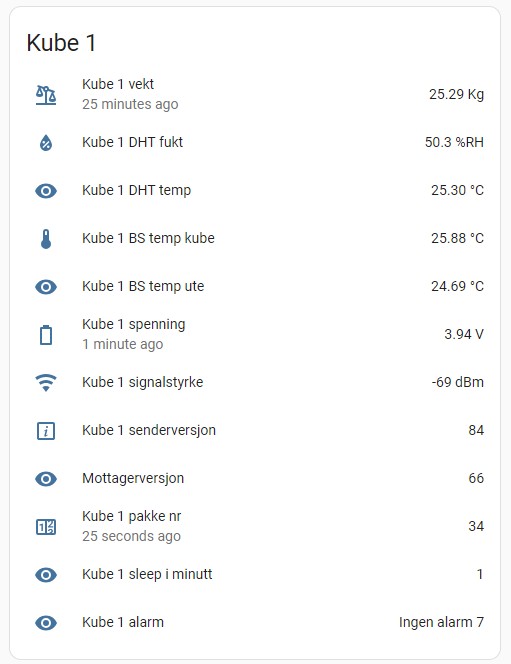
My HA dash pr today:
Whether its phantom packets or packets from other sources, and remeber LoRa is long range, it makes a lot of sense to be sure the packets you are decoding are really from your own transmitters.
The library you are using has a set of functitions that will do all the checking for you automatically, see the 'Reliable' packet transmit and receive options. If you use those functions the chances of accidently decoding a rogue packet are close to zero, since each packet automatically includes and checks a seperate payload CRC and network ID.
Hi
I downloaded only this from Stuart:

so I may have used them, in my code, must check.