LTR-303 for photosensitive epilepsy

Dear Arduino Forum,

I am trying to utilize the LTR-303 sensor to help me create a device to trigger a pin interrupt when 5-30Hz frequency is detected. I have edited the advanced code to receive an output of visible light intensity in Lux but I am having trouble figuring out how to convert this value to frequency. Below is the link to the sensor.

5610 Adafruit Industries LLC | Development Boards, Kits, Programmers | DigiKey)

Here is the code I have been working with, I would appreciate any help with finding out how to utilize the code and sensor I have to get these values for me.

#include "Adafruit_LTR329_LTR303.h"

Adafruit_LTR303 ltr = Adafruit_LTR303();

const unsigned long samplingInterval = 1000; // Sampling interval in milliseconds (1 second)
const uint16_t minLux = 1; // Minimum lux threshold (adjust as needed)
const uint16_t maxLux = 64000; // Maximum lux threshold (adjust as needed)
const unsigned long minFrequency = 5; // Minimum frequency in Hz
const unsigned long maxFrequency = 30; // Maximum frequency in Hz

unsigned long luxSamples = 0;
unsigned long lastSampleTime = 0;

void setup() {
Serial.begin(115200);
Serial.println("Adafruit LTR-303 advanced test");

if (!ltr.begin()) {
Serial.println("Couldn't find LTR sensor!");
while (1) delay(10);
}
Serial.println("Found LTR sensor!");

// Set sensor configurations
ltr.setGain(LTR3XX_GAIN_96); // High sensitivity (adjust as needed)
ltr.setIntegrationTime(LTR3XX_INTEGTIME_100); // Integration time 100 ms (adjust as needed)
ltr.setMeasurementRate(LTR3XX_MEASRATE_1000); // Measurement rate 1000 ms (adjust as needed)

// Enable interrupts and set lux thresholds
ltr.enableInterrupt(true);
ltr.setLowThreshold(minLux);
ltr.setHighThreshold(maxLux);
ltr.setIntPersistance(1); // Require 1 count in a row before an IRQ
}

void loop() {
unsigned long currentTime = millis();

if (currentTime - lastSampleTime >= samplingInterval) {
lastSampleTime = currentTime;

bool valid;
uint16_t visible_plus_ir, infrared;

if (ltr.newDataAvailable()) {
  valid = ltr.readBothChannels(visible_plus_ir, infrared);
  if (valid) {
    // Calculate lux value (assuming visible_plus_ir - infrared gives lux)
    uint16_t lux = visible_plus_ir - infrared;
    Serial.print("Lux: ");
    Serial.println(lux);

    // Increment lux samples counter
    luxSamples++;
  }
}

}

// Calculate frequency and check if it falls within the desired range
unsigned long elapsedTime = currentTime - lastSampleTime;
if (elapsedTime > 0) {
float frequency = (float)luxSamples / (elapsedTime / 1000.0); // Convert to Hz
Serial.print("Frequency (Hz): ");
Serial.println(frequency);

// Check if frequency is within the specified range
if (frequency >= minFrequency && frequency <= maxFrequency) {
  // Trigger interrupt or perform other actions
  Serial.println("Frequency in desired range. Triggering interrupt...");
  // You can add code here to trigger an interrupt or take other actions
}

// Reset lux samples counter
luxSamples = 0;

}

delay(100); // Delay for stability
}

Breadboard setup:
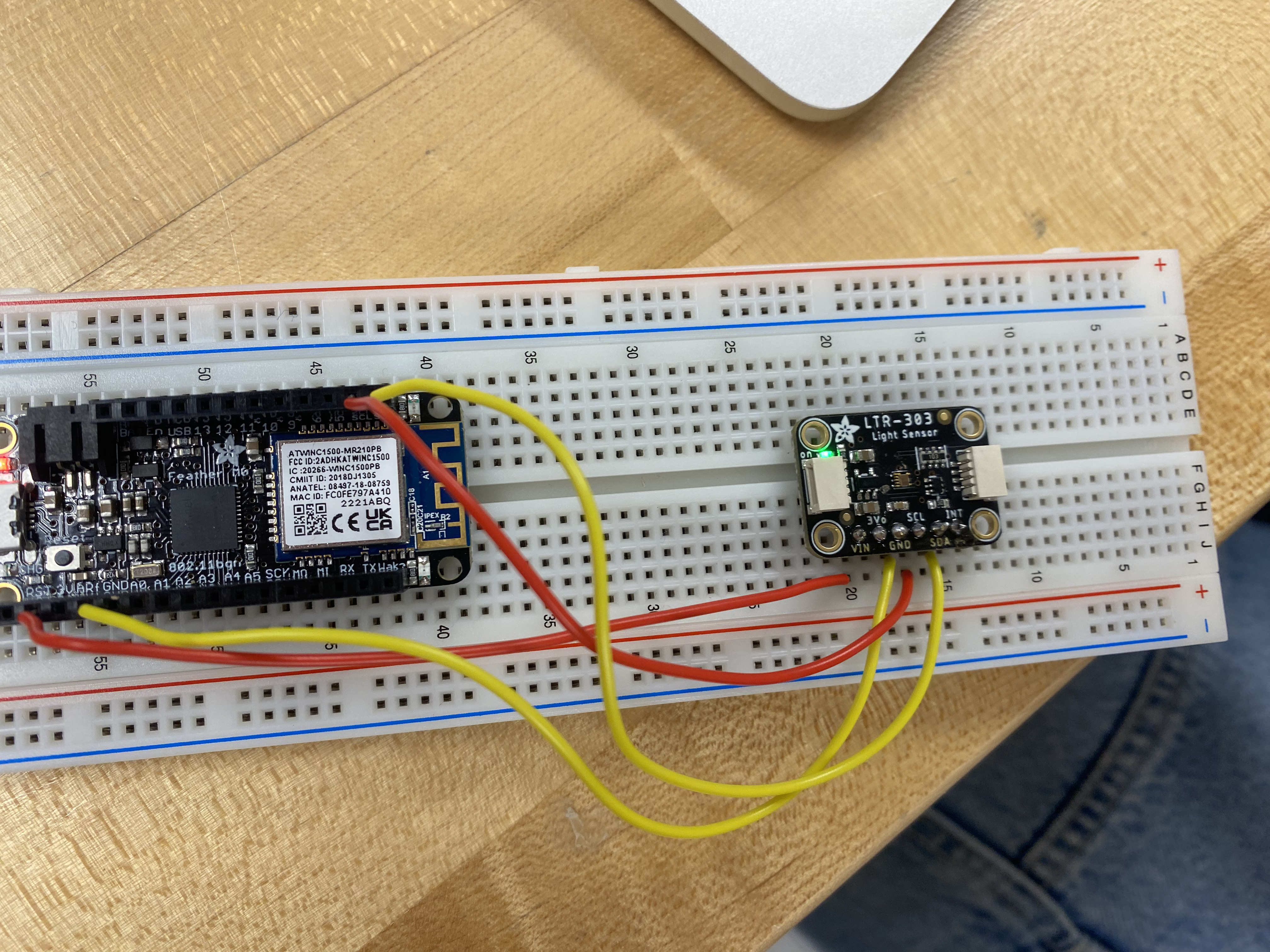
What has led you to think the device is able to create an interrupt based on frequency of something? Yes, I downloaded the data sheet PDF.

Please use code tags when posting code (you can edit your post).

Your code will need to measure the frequency and make decisions, and you will probably find that the LTR-303 is unsuitable for measurements of rapidly varying light levels, as it is an integrating sensor with a minimum sample period of 50 ms (not counting the time required to transfer the data to the Arduino).

A photodiode or phototransistor would be a better choice.

You should abandon the LTR-303 and use a plain photo transistor as an input. The LTR-303 is not capable of sensing the frequencies you desire.

Dear Arduino Forum,

I am trying to utilize the LTR-303 sensor to help me create a device to send an alert when 5-30Hz frequency is detected. I have edited the advanced code to receive an output of visible light intensity in Lux and convert this to find the amount of flashes per second, which is our frequency value. Below is the link to the sensor.

5610 Adafruit Industries LLC | Development Boards, Kits, Programmers | DigiKey 1)

Here is the code I have been working with, I would appreciate any help with finding out how to utilize the code and sensor I have to get these values for me. The current code is not alerting when we use a strobe light within the desired range:

Thank you in advance!

t#include "Adafruit_LTR329_LTR303.h"

Adafruit_LTR303 ltr = Adafruit_LTR303();

void setup() {
  Serial.begin(115200);
  Serial.println("Adafruit LTR-303 advanced test");

  if (!ltr.begin()) {
    Serial.println("Couldn't find LTR sensor!");
    while (1) delay(10);
  }
  Serial.println("Found LTR sensor!");

  ltr.setGain(LTR3XX_GAIN_96);
  ltr.setIntegrationTime(LTR3XX_INTEGTIME_100);
  ltr.setMeasurementRate(LTR3XX_MEASRATE_200);

  ltr.enableInterrupt(true);
  ltr.setInterruptPolarity(false);
  ltr.setLowThreshold(2000);
  ltr.setHighThreshold(30000);
  ltr.setIntPersistance(4);
}

void loop() {
  bool valid;
  uint16_t visible_plus_ir, infrared, visible_light;
  static uint16_t prev_visible_light = 0;
  static bool prev_valid = false;
  static unsigned long prevMillis = 0;
  unsigned long currentMillis = millis();

  if (ltr.newDataAvailable()) {
    valid = ltr.readBothChannels(visible_plus_ir, infrared);
    if (valid) {
      visible_light = visible_plus_ir - infrared;

      // Check if the current reading differs significantly from the previous reading
      if (prev_valid && abs(visible_light - prev_visible_light) > 100) {
        unsigned long period = currentMillis - prevMillis;
        Serial.print("Period: ");
        Serial.print(period);
        Serial.println(" ms");

        // Check if the period is within the specified range for the alert
        if (period > 30 && period < 200) {
          Serial.println("Alert: Period is between 0.03 and 0.2 seconds!");
          // Add code here for any alert actions (e.g., turning on a LED, triggering a buzzer, etc.)
        }

        prevMillis = currentMillis;
      }

      prev_visible_light = visible_light;
      prev_valid = true;

      Serial.print(visible_light);
      Serial.println(",");
    } else {
      prev_valid = false;
    }
  }

  delay(100);
}

In your previous post on this same topic, several forum members pointed out that the LTR-303 is not suitable for the project as it cannot do what you want.

@photoepileptic, please do not cross-post. Threads merged.

This topic was automatically closed 180 days after the last reply. New replies are no longer allowed.