Magnetic sensors

Hello,
I would really apappreciate your help! I will write a bit about my project and then add the code, if you could go through my code and tell me if its the cause of my proble, it will help me alot.

The project Im working on is using magnetic sensors. what it does is that if a door is open for 20 seconds, the rduino will do 2 things, one, is sending this information to a raspberry pi, and it will also give voltage to a certain pin, and that pin will be connected to another arduino that controls a solenoid.

My problem is with the main arduino that gets the information from the magnetic sensors, when I seperate the magnet from the sensors, sometimes it doesnt sense the state change.

I am not sure why, I have tried alot of different things to fix it and none worked. currently, I am looking to try new sensors, but this problem didnt happend a month ago, and the only thing that changed at the code is that I added the parts regarding to a switch that stops the voltage to the pin if both doors are closed and also the part the concerns sending the voltage.

this is the magnetic sensors class:


#ifndef MAGNETIC_SENSOR_H
#define MAGNETIC_SENSOR_H

#include <Arduino.h>

class magnetic_sensor
{
private:
  byte pin;
  byte state;
  byte lastState;
  byte reading;
  bool toggled;
  unsigned long lastDebounceTime;
  unsigned long debounceDelay;
public:
  magnetic_sensor() {}   //do not use
  
  magnetic_sensor(byte x)
  {
    pin = x;
  }

  void init()
  {
    pinMode(pin, INPUT_PULLUP);
    lastDebounceTime = 0;
    debounceDelay = 20;
    lastState = LOW;
  }

  void isChanged()
  {
    reading = digitalRead(pin);
    if (reading != lastState) {
      lastDebounceTime = millis();
    }
  }

  void debounce()
  {
    if ((millis() - lastDebounceTime) > debounceDelay) {
      if (reading != state) {
        state = reading;
        toggled = HIGH;
      }
      else {
        toggled = LOW;
      }
    }
    lastState = reading;
  }

  bool isOpen()
  {
    updateState();
    if (state == HIGH) {
      return LOW;
    }
    else {
      return HIGH;
    }
  }

  bool isClosed()
  {
    return !isOpen();
  }

    void updateState()
  {
    isChanged();
    debounce();
  }

  bool isToggledOn()
  {
    if (toggled == HIGH && state == HIGH) {
      return HIGH;
    }
    else {
      return LOW;
    }
  }

  bool isToggledOff()
  {
    if (toggled == HIGH && state == LOW) {
      return HIGH;
    }
    else {
      return LOW;
    }
  }

  
  /*void tester(byte num)
  {
    Serial.print("micro");
    Serial.print(num);
    Serial.print(" - ");
    Serial.print("pin:  ");
    Serial.print(pin);
    Serial.print("  state: ");
    Serial.print(state);
    Serial.print("  lastState: ");
    Serial.print(lastState);
    Serial.print("  reading: ");
    Serial.print(reading);
    Serial.print("  lastDebounceTime: ");
    Serial.print(lastDebounceTime);
    Serial.print(".\n");
  }*/
};

#endif MAGNETIC_SENSOR_H

and this is the main code:


#include "magnetic_sensor.h"
#include "button.h"

magnetic_sensor magnetic_sensor_1(12);
magnetic_sensor magnetic_sensor_2(8);
Button button(2);
const int outputPin = 4;

unsigned long lastSensorTime = 0;
const unsigned long sensorTimeout = 20000;
bool sensorMessageSent = false;

 void doorClosedRoutine() {
  Serial.println("shutter off");
  digitalWrite(outputPin, LOW); 
 }
 
void setup() {
  Serial.begin(9600);
  button.init();
  magnetic_sensor_1.init();
  magnetic_sensor_2.init();
  pinMode(outputPin, OUTPUT);
}
 
void loop() {
  magnetic_sensor_1.updateState();
  magnetic_sensor_2.updateState();
  button.updateState();

  if (magnetic_sensor_1.isToggledOn()) {
    Serial.println("Door 1 opened");
    if (lastSensorTime ==0) {
      lastSensorTime = millis();
      sensorMessageSent = false; //reset the flag
    }
  }
  if (magnetic_sensor_2.isToggledOn()) {
    Serial.println("Door 2 opened");
    if (lastSensorTime ==0) {
      lastSensorTime = millis();
      sensorMessageSent = false; //reset the flag
    }
  }
  if (lastSensorTime != 0 && millis() - lastSensorTime >= sensorTimeout){
    digitalWrite(outputPin, HIGH);
    if (!sensorMessageSent) {
      Serial.println("Sensor open for 20 seconds");
      sensorMessageSent = true; }
  }
  if (magnetic_sensor_1.isOpen() && magnetic_sensor_2.isOpen()) {
    lastSensorTime = 0;
    if (button.isToggledOn()) {
      doorClosedRoutine(); }
  }
 
}

thank you for your help and sorry for the long read!
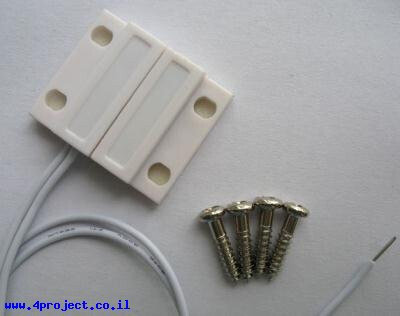
what kind of sensor do you have ?

some sensors are of poor quality and the receiving plate will stay magnetised for some time after you removed the magnet, thus fooling the sensor into thinking it's still connected...

hey, thank you for the response, this is the sensor that I have:
image

this could be of poor quality :slight_smile:

try with just a printing a digitalRead() in the loop and use the Serial Plotter to see if the state reacts always immediately

it might also be an issue with your library. I don't know what's the magnetic_sensor library, never used it. if your sensors work like a button with INPUT_PULLUP, you might want to try different libraries like OneButton or Toggle

try this code and open the serial plotter at 115200 bauds

const byte sensor1Pin = 12;
const byte sensor2Pin = 8;

void setup() {
  Serial.begin(115200);
  pinMode(sensor1Pin, INPUT_PULLUP);
  pinMode(sensor2Pin, INPUT_PULLUP);
  Serial.println("s1\ts2");
}

void loop() {
  Serial.print(digitalRead(sensor1Pin) == HIGH ? 0 : 100);
  Serial.write('\t');
  Serial.println(digitalRead(sensor2Pin) == HIGH ? 0 : 100);
}

and play with your sensors. if the curves follow what you do then you know you have an issue with your code. if they don't and you see a lag or missed events, then you know you have a bad magnet.

hey,
I tried what you suggested, and also tried doing it with the part of my code that only prints "door 1 opened" "door 2 opened" and it works fine, so the problem is in the code. if its not too much to ask for, would you mind give it a look and tell me what seems to be causing it to not detect the change in state sometimes? or maybe direct me to a way to find what causes the problem?

so basically your door sensor is like a button. You don't need two libraries for buttons, one would be enough. I would suggest you get rid of magnetic_sensor.h :slight_smile: (I did not dive into it but you probably got something wrong in there)

I would suggest to use Toggle

can you try with this code if all works as you expect

#include <Toggle.h> // https://github.com/Dlloydev/Toggle

const byte buttonPin = 2;
const byte magSensor1Pin = 12;
const byte magSensor2Pin = 8;
const byte outputPin = 4;

Toggle magSensor1;
Toggle magSensor2;
Toggle button;

void setup() {
  button.begin(buttonPin);
  magSensor1.begin(magSensor1Pin);
  magSensor2.begin(magSensor2Pin);
  pinMode(outputPin, OUTPUT);
  Serial.begin(115200);
}

void loop() {
  magSensor1.poll();
  magSensor2.poll();
  button.poll();

  if (magSensor1.onPress())   Serial.println("Door 1 opened");
  if (magSensor1.onRelease()) Serial.println("Door 1 closed");
  if (magSensor2.onPress())   Serial.println("Door 2 opened");
  if (magSensor2.onRelease()) Serial.println("Door 2 closed");
  if (button.onPress())       Serial.println("Button Pressed");
  if (button.onRelease())     Serial.println("Button Released");
}

if that works for you then you can use the above functions to detect state changes and you can also use the function isPressed() and isReleased() to know the current debounced state of the sensor/button and there are also the pressedFor(ms) and releasedFor(ms) functions which can come handy (they return true if the switch has been in the pressed or released state for at least the given number of milliseconds).

before i do that, i discovered something that i want to see if it changes your answer. when i delete the last if loop at the code:

  if (magnetic_sensor_1.isOpen() && magnetic_sensor_2.isOpen()) {
    lastSensorTime = 0;
    if (button.isToggledOn()) {
      doorClosedRoutine(); }
  }

the sensors work fine. does this changes anything?

yes - it points to the possible error you have in your library. your code for state change detection likely works under the assumption that the state remains valid only until you call updateState() again

your call to updateState() in isOpen() means that you trigger state changes that you will miss at the next loop when you ask

  magnetic_sensor_1.updateState();
  magnetic_sensor_2.updateState();

that could explain why you miss events.

I would still get rid of a redundant library, everything is a button. I use the Toggle library because I find it pretty effective.

thank you so much for your help! i could have never figure this out without you. you were correct about the problem with my library and it fixed it! i will also look into using the toggle library and in general, using those libraries in the future and looking at sensors like this like a button. thank you again!

glad it helped - have fun !