Hi All,
I'm building a Mega powered controller for my car's dash that controls:
Gauge lights. 3xPWM outputs via 2 IRL1004 FET's and 1 via a BC327.
Indication and warning LED's. 7xPWM outputs each via 2n2222.
2 Servos to control the heater. externally powered opto isolated with 4n25's.
My issue is I can't get all these working together as they should. I have 3 sketches and they all work separately. When I combine them the output to D44 which is 2 of the gauge lights that are controlled via the BC327 that switches the supply voltage stop working. I tried using ServoTimer2.h and then D44 works but 2 indication LED's on pins D9 & D10 stoop working. I have spent hours with the code and with serial monitoring and either the switch inputs D22-D25 stop reading.
I'm at the point where I'm about to use a Nano to control the heater servos separately. Am I just asking to much of the Mega?
The Mega should have enough timers for the project.
Which libraries do you use ? Can you give a list of them with links to their Github repository ?
I expect you will have reliability problems. Here is some reading that may help:
Arduinos were designed for and are are intended for experimentation and learning, often with breadboards and loose wires that eventually break if vibrated.
Most important, the boards are not protected against harsh, dirty or electrically noisy environments found in industrial, automotive and other commercial applications. It is unreliable as it is not suitable for industrial, automotive and other commercial operation.
There is many good app notes such as AN2689 by ST on automotive electronics. reading it will help you a lot.
https://www.st.com/resource/en/application_note/cd00181783-protection-of-automotive-electronics-from-electrical-hazards-guidelines-for-design-and-component-selection-stmicroelectronics.pdf
Also take a look at these: Distilled Automotive Electronics Design | Analog Devices and
Transient Voltage Suppression in Automotive Applications
AEC-100 https://media.monolithicpower.com/mps_cms_document/w/e/Webinar_-_Fundamentals_of_AEC-
Are you using the Servo library? That will use timer 5 for the first 12 servos on a Mega.
You do not need to use PWM pins for the servos, move those to non-PWM pins, and move the gauge lights from D44 to one of the PWM pins that were being used for the servos.
< edit >
You are defeating the purpose of using optocouplers when you use a common ground on both sides.
I've tried using the standard #include <Servo.h> and #include <ServoTimer2.h> (GitHub - nabontra/ServoTimer2: ServoTimer2 is a simple library for Arduino 1.x that does not use Timer1 in case of a conflict.)
Thanks for the info. I may have to redesign it then but first I'm going get it running like this.
I've used servo.h and servotimer2.h.
I'm pretty new to this an bumbling my way through. I thought that because servos us PWM I'd have to use a PWM pin with them.
I thought D44 is a PWM because of this
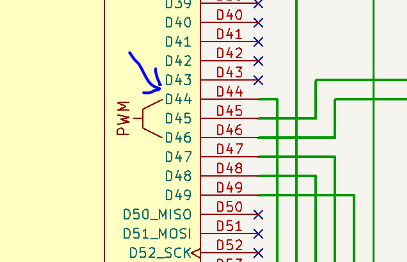
I'm confused about the ground too. Since there ultimately is only 1 ground in the car how else do I ground it?
The Servo library (as well as ServoTimer2) do not use the hardware PWM to drive the servos.
Instead, the pulses for the servos are generated in software by using interrupts generated by one or more of the timers. The timer being used for the servos cannot simultaneously be used for generating the hardware PWM signals.
The servos can be connected to any digital output pin, and one timer can drive up to 12 servos.
Is the combination of analogWrite() with the Servo library a problem for the timers ? Is that the problem ? Is the Servo library the only library that is used ?
Can you give a list of the used pins for the Servo motors and the analogWrite() ?
The code for the timers of the Servo library are in a list: https://github.com/arduino-libraries/Servo/blob/master/src/avr/ServoTimers.h#L39.
You could make changes to the code to use other timers.
This Wokwi simulation has 32 servo motors, I can try to add another 32 of you want: https://wokwi.com/projects/305336312628511297
Thanks David,
Everything I have read tell me to use servo.h to drive them.
I just did some googling and I think you have just given me the breakthrough I need!
I'll be able to do some testing tomorrow night and I'll come back with my results
Simulations are great until they don't match the real world. I think David has the answer that I shouldn't be using servo libraries at all.
The Wokwi simulation for the Uno and Mega is very good. It is clock accurate.
If you have less than 12 servo motors, then only one timer is used. The first in the list is Timer5 as david_2018 already mentioned.
I'm thinking about making a copy of the Servo library, give the files other names, add them as local files to the project, and use an other timer.
The problem is that the OP is using nearly all the PWM outputs. Changing the timer will not help, because that just changes which PWM outputs no longer work in the code.
The PWM pins driven by timer 5 are D44, D45, and D46, with only D44 being used for PWM output.
Currently the servos are connected to two of the PWM pins, D12 and D13. Those can be move to non-PWM pins, and the output connect to D44 moved to either D12 or D13.
Let me try to grasp that.
The table for pins and timers: https://github.com/arduino/ArduinoCore-avr/blob/master/variants/mega/pins_arduino.h#L312
AnalogWrite() used on the pins: 2, 3, 4...11, 44.
I count 8 2N2222, but only 7 have PWM. I guess one of them is not PWM.
When I map those pins to timers via the table, then I get: Timer0, 1, 2, 3, 4, 5. That is indeed all of them 
@david_2018 You are two steps ahead of me, but I think I got this right:
The options are:
- What david_2018 says is the best option. Move the PWM from pin 44 to pin 12 or 13. It releases Timer5. The Servo library can be used without a change in the source of the library.
- There are other ways, by using pin 12, 13, 45 and 46 for PWM and release an other timer. More hardware changes are needed, and the library has to be changed.
- Add external hardware. For example the Adafruit shield: https://www.adafruit.com/product/1411.
- There are libraries for PWM on any pin that use single timer for a software interrupt. It is often good enough for leds and light bulbs. For example: https://github.com/bhagman/SoftPWM. I have used this in the past and it worked remarkably well.
- It is even possible to generate a PWM signal in the loop() without any timer. A delay in the loop() will cause a stutter. That does not matter for a led, but it might put extra stress on a light bulb.
Thank you so much David, it all works!
This was the education I needed 
I still need to do some tweaking with the movement speed and dead zones but your advice got everything working together!