Modifying simple LM35 Serial.print sketch to lcd.print

Beginner, using an Uno with a 1602 LCD Keypad shield. The original sketch does Serial print fine, I thought I could just add lcd.begin and lcd.print.
I'm also having trouble how to properly post a sketch I used </> but don't know where to use ' and why.

I have this sketch that I have started to modify to print to LCD screen. I get this error message,

C:\Users\Lamon\Documents\Arduino\LM35_Test\LM35_Test.ino:8:8: error: expected initializer before '.' token
int lcd.begin;
^
C:\Users\Lamon\Documents\Arduino\LM35_Test\LM35_Test.ino: In function 'void loop()':
C:\Users\Lamon\Documents\Arduino\LM35_Test\LM35_Test.ino:35:3: error: 'lcd' was not declared in this scope
lcd.begin(16, 2);
^~~

exit status 1

Compilation error: expected initializer before '.' token
/* LM35 analog temperature sensor with Arduino example code. More info: https://www.makerguides.com */

I don't know what I need to add to correct this.

// Define to which pin of the Arduino the output of the LM35 is connected:
#define sensorPin A5
int fahrenheit;
int celsius;
int lcd.begin;

void setup() {
// Begin serial communication at a baud rate of 9600:
Serial.begin(9600);
lcd.begin;
}

void loop() {
// Get a reading from the temperature sensor:
int reading = analogRead(sensorPin);
//fahrenheit = ((celsius * 9) / 5 + 32);

// Convert the reading into voltage:
float voltage = reading * (5000 / 1024.0);

// Convert the voltage into the temperature in degree Celsius:
float tempC = voltage / 10;
float temperature = ((tempC * 9) / 5 + 32); // Convert to fahrenheit

// Print the temperature in the Serial Monitor:
//Serial.print(temperature);
//Serial.print(" \xC2\xB0"); // shows degree symbol
//Serial.println("F");

lcd.begin(16, 2);

// Print a message to the LCD.

lcd.print("hello, world!");

delay(1000); // wait a second between readings
}
Hi,
It depends on the I2C library you are using.
In your case, you used it like this: "lcd.begin;, the correct thing would be like this
lcd.begin(16,2);
But there are libraries that use it like this: lcd.init();

The line lcd.begin; before the setup() function needs to be removed.
The line lcd.begin(16,2); in the loop() function needs to be removed.
Missing to include library #include <LiquidCrystal_I2C.h>
Missing to create the lcd instance. LiquidCrystal_I2C lcd(0x27, 16, 2);

Pretty sure I have the adafruit LCD library. But...
The line lcd.begin; before the setup() function needs to be removed.
Done
The line lcd.begin(16,2); in the loop() function needs to be removed.
Done
Missing to include library #include <LiquidCrystal_I2C.h>
Done, Installed into sketch
Missing to create the lcd instance. LiquidCrystal_I2C lcd(0x27, 16, 2);
Done
Thanks for helping, Douger

I'm still not doing it correctly.

Error message, C:\Users\Lamon\Documents\Arduino\LM35_Test\LM35_Test.ino: In function 'void loop()':
C:\Users\Lamon\Documents\Arduino\LM35_Test\LM35_Test.ino:45:7: error: request for member 'print' in 'lcd', which is of non-class type 'int'
lcd.print("Temperature ");
^~~~~
C:\Users\Lamon\Documents\Arduino\LM35_Test\LM35_Test.ino:46:7: error: request for member 'print' in 'lcd', which is of non-class type 'int'
lcd.print (temperature);
^~~~~

exit status 1

Compilation error: request for member 'print' in 'lcd', which is of non-class type 'int'

#include <LiquidCrystal_I2C.h>

/* LM35 analog temperature sensor with Arduino example code. More info: https://www.makerguides.com */

// Define to which pin of the Arduino the output of the LM35 is connected:
#define sensorPin A5
int fahrenheit;
int celsius;
int lcd;

void setup() {
// Begin serial communication at a baud rate of 9600:
Serial.begin(9600);
LiquidCrystal_I2C lcd(0x27, 16, 2);
}

void loop() {
// Get a reading from the temperature sensor:
int reading = analogRead(sensorPin);
//fahrenheit = ((celsius * 9) / 5 + 32);

// Convert the reading into voltage:
float voltage = reading * (5000 / 1024.0);

// Convert the voltage into the temperature in degree Celsius:
float tempC = voltage / 10;
float temperature = ((tempC * 9) / 5 + 32); // Convert to fahrenheit

// Print the temperature in the Serial Monitor:
//Serial.print(temperature);
//Serial.print(" \xC2\xB0"); // shows degree symbol
//Serial.println("F");

// Print a message to the LCD.

lcd.print("Temperature ");
lcd.print (temperature);

delay(1000); // wait a second between readings
}Preformatted text

Remove this line.

Test this code and compare it with yours.

 #include<LiquidCrystal_I2C.h>

/* LM35 analog temperature sensor with Arduino example code. More info: https://www.makerguides.com */

// Define to which pin of the Arduino the output of the LM35 is connected:
#define sensorPin A5
int fahrenheit;
int celsius;
//int lcd;
LiquidCrystal_I2C lcd(0x27, 16, 2);

void setup() {
// Begin serial communication at a baud rate of 9600:
Serial.begin(9600);
lcd.begin(16,2);
}

void loop() {
// Get a reading from the temperature sensor:
int reading = analogRead(sensorPin);
//fahrenheit = ((celsius * 9) / 5 + 32);

// Convert the reading into voltage:
float voltage = reading * (5000 / 1024.0);

// Convert the voltage into the temperature in degree Celsius:
float tempC = voltage / 10;
float temperature = ((tempC * 9) / 5 + 32); // Convert to fahrenheit

// Print the temperature in the Serial Monitor:
//Serial.print(temperature);
//Serial.print(" \xC2\xB0"); // shows degree symbol
//Serial.println("F");

// Print a message to the LCD.
lcd.setCursor(0,0);
lcd.print("Temperature ");
lcd.print (temperature);

delay(1000); // wait a second between readings
}

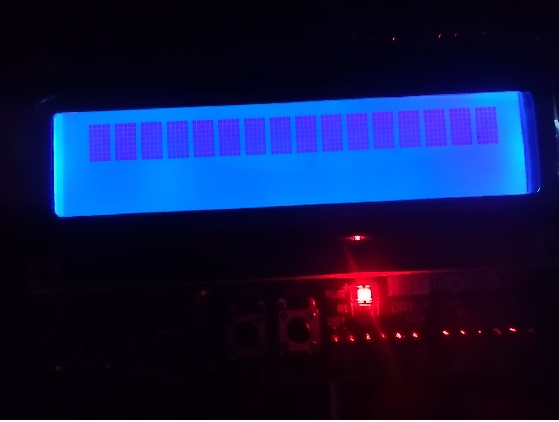
This compiles, (correct term?) without error, but the LCD has 16 characters with all dots lit.
No Temperature 77.5*F on display.
Douger

Show a LCD image.

LCD Display

Run the I2Cscanner.ino to verify your I2C address.
And if no 0x27, correct this line " LiquidCrystal_I2C lcd(0x27, 16, 2);" with your i2C address.

I thought I could figure this out. Load I2Cscanner.ino into library, then add to sketch. No go.
Then I found a program to run scan with I2Cscanner.ino, it has error.
If it helps, I have run hello world and modified it to run buttons with other lcd display characters.
That was with LiquidCrystal library not with LiquidCrystal_I2C.h>
Douger

I can't get past, "Compilation error: 'lcd' was not declared in this scope"
What does that mean I need to add and where?
Thanks, Douger

C:\Users\Lamon\Documents\Arduino\LM35_Test\LM35_Test.ino: In function 'void setup()':
C:\Users\Lamon\Documents\Arduino\LM35_Test\LM35_Test.ino:30:3: error: 'lcd' was not declared in this scope
lcd.begin (0x27, 16, 2);
^~~
C:\Users\Lamon\Documents\Arduino\LM35_Test\LM35_Test.ino: In function 'void loop()':
C:\Users\Lamon\Documents\Arduino\LM35_Test\LM35_Test.ino:55:3: error: 'lcd' was not declared in this scope
lcd.print("Temperature ");
^~~
Multiple libraries were found for "LiquidCrystal.h"
Used: C:\Users\Lamon\Documents\Arduino\libraries\LiquidCrystal
Not used: C:\Users\Lamon\AppData\Local\Arduino15\libraries\LiquidCrystal
exit status 1

Compilation error: 'lcd' was not declared in this scope

I'm taking a break, running an errand, I'll check back in 2 hours.
Thanks, Douger