hi!
based on what I was able to understand from Arduino Playground - 4051 I did the following sletch assuming that the same would apply for a 4067
int r0 = 0;      //value of select pin at the 4051 (s0)
int r1 = 0;      //value of select pin at the 4051 (s1)
int r2 = 0;      //value of select pin at the 4051 (s2)
int r3 = 0;      //value of select pin at the 4051 (s3)

int count = 0;   //which y pin we are selecting


void setup(){
  pinMode(4, OUTPUT);    // s0
  pinMode(5, OUTPUT);    // s1
  pinMode(6, OUTPUT);    // s2
  pinMode(7, OUTPUT);    // s3
}


void loop() {

    for (count=0; count<=16; count++) {

    r0 = bitRead(count,0);
    r1 = bitRead(count,1);
    r2 = bitRead(count,2);
    r3 = bitRead(count,3);

    digitalWrite(4, r0);
    digitalWrite(5, r1);
    digitalWrite(6, r2);
    digitalWrite(7, r3);
    }
}
I am working on a midi controller, and I normally have my potentiometers conected to analog inputs as you can see in the following piece of code:
unsigned char status;
#define midichannel 0;

int val01 = 0;
int lastVal01 = 0;


void setup() {
  Serial.begin(31250);
}


void loop() {

  val01 = analogRead(A0)/8;
  if (val01 != lastVal01){
  lastVal01 = val01;
  MIDI_TX(176,0,val01);
  }

//*******************************************************************************************************************
// Transmit MIDI Message
//*******************************************************************************************************************
void MIDI_TX(unsigned char MESSAGE, unsigned char PITCH, unsigned char VELOCITY)
{
  status = MESSAGE + midichannel;
  Serial.write(status);
  Serial.write(PITCH);
  Serial.write(VELOCITY);
}
so in the code I "analog read" for example A0.
What do I have to read in order to receive the information from the potentiometer when it is connected to the 4067?
jm, I am also realizing that in the first code (extracted from Arduino Playground - 4051 ) I am never indicating with analog input is being used by the IC...
I dont quite get this
DrAzzy
February 12, 2016, 6:26pm
3
Read the analog pin you connected to the output pin (Z) of the analog mux chip.
If the chip has an Enable pin, that needs to be in the right state (LOW for the 4067) to enable output.
if the Enable pin is not connected, there is no output?
DrAzzy
February 12, 2016, 6:43pm
5
camilozk:
If the enable pin is high, there is no output. If it is low, there is output.
If it is not connected to anything, I'm not sure how it behaves. Datasheet doesn't seem to mention anything - could be internally pulled up, or internally pulled down, or floating (in which case it will transition between logic levels unpredictably in response to ambient electromagnetic fields).
zoomkat
February 13, 2016, 5:11am
6
Don't let the chip control pins float or you will get mixed results. A high value resistor on the control pins will keep them from floating.
so, with great support from a friend we did the following sketch that receives analog data from 4 potentiometers through the 4067.
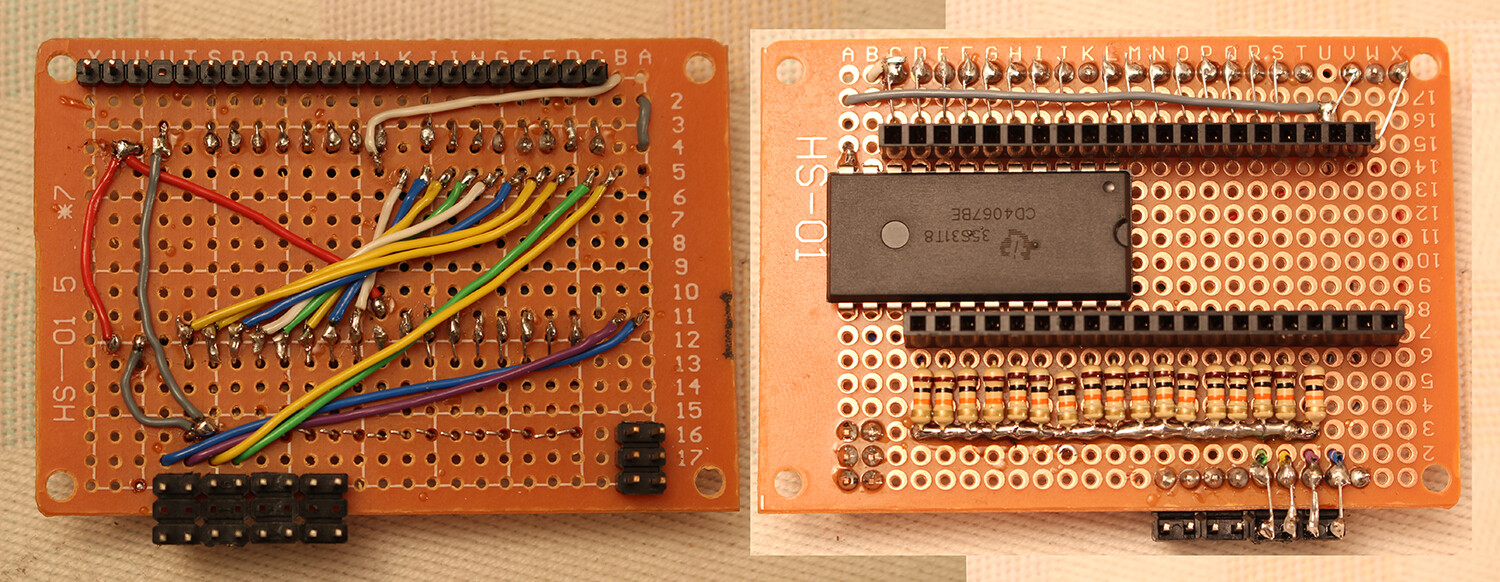
Also, I built my own mux shield for this project.
here a picture of the shield and the code. I really hope this is usefull for somebody and I will try to do an instructable about this becasue there I found very little resources that help me figuring this out, when you do not have real knowledge in the field.
unsigned char status;
#define midichannel 0;

int val01 = 0;
int lastVal01 = 0;
int val02 = 0;
int lastVal02 = 0;
int val03 = 0;
int lastVal03 = 0;
int val04 = 0;
int lastVal04 = 0;


void setup() {
  Serial.begin(31250);
  pinMode(4, OUTPUT);    // s0
  pinMode(5, OUTPUT);    // s1
  pinMode(6, OUTPUT);    // s2
  pinMode(7, OUTPUT);    // s3
}


void loop() {

  val01 = analogReadMux(0)/8;
  if (val01 != lastVal01){
  lastVal01 = val01;
  MIDI_TX(176,0,val01);
  }

  val02 = analogReadMux(1)/8;
  if (val02 != lastVal02){
  lastVal02 = val02;
  MIDI_TX(177,0,val02);
  }

  val03 = analogReadMux(2)/8;
  if (val03 != lastVal03){
  lastVal03 = val03;
  MIDI_TX(178,0,val03);
  }

  val04 = analogReadMux(3)/8;
  if (val04 != lastVal04){
  lastVal04 = val04;
  MIDI_TX(179,0,val04);
  }
}

//*******************************************************************************************************************
// Transmit MIDI Message
//*******************************************************************************************************************
void MIDI_TX(unsigned char MESSAGE, unsigned char PITCH, unsigned char VELOCITY)
{
  status = MESSAGE + midichannel;
  Serial.write(status);
  Serial.write(PITCH);
  Serial.write(VELOCITY);
}


int analogReadMux(int channel){
  int r0 = 0;      //(s0)
  int r1 = 0;      //(s1)
  int r2 = 0;      //(s2)
  int r3 = 0;      //(s3)

  r0 = bitRead(channel,0);
  r1 = bitRead(channel,1);
  r2 = bitRead(channel,2);
  r3 = bitRead(channel,3);

  digitalWrite(4, r0);
  digitalWrite(5, r1);
  digitalWrite(6, r2);
  digitalWrite(7, r3);

  return analogRead(A15);
}