My 1.3" OLED i2c iic is not working

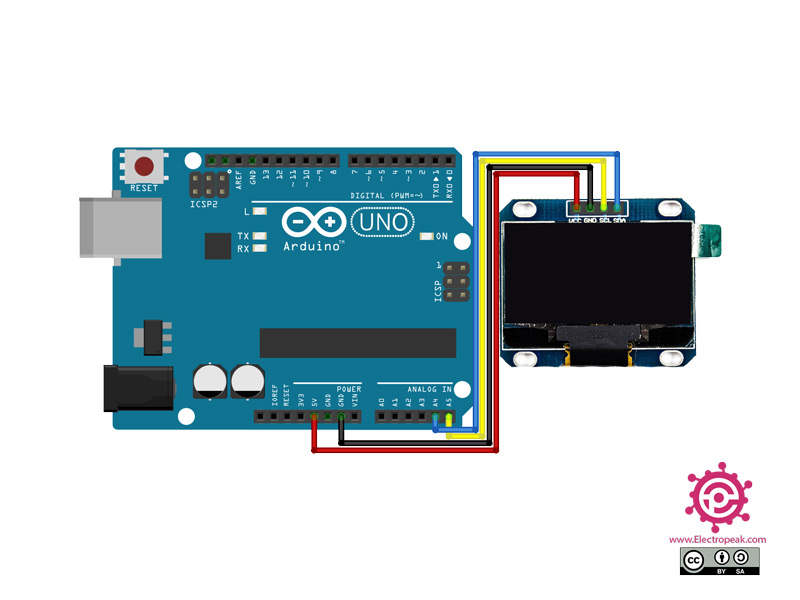
its a oled i plugd sda at A4 and sca at A5.So I copied some code becouse it's my first time wotking with this this is the code

#include <SPI.h>
#include <Wire.h>
#include <Adafruit_GFX.h>
#include <Adafruit_SSD1306.h>

#define SCREEN_WIDTH 128 // OLED display width, in pixels
#define SCREEN_HEIGHT 64 // OLED display height, in pixels

// Declaration for SSD1306 display connected using I2C
#define OLED_RESET     -1 // Reset pin # (or -1 if sharing Arduino reset pin)
#define SCREEN_ADDRESS 0x3C
Adafruit_SSD1306 display(SCREEN_WIDTH, SCREEN_HEIGHT, &Wire, OLED_RESET);

// Declaration for SSD1306 display connected using software SPI:
//#define OLED_MOSI   9
//#define OLED_CLK   10
//#define OLED_DC    11
//#define OLED_CS    12
//#define OLED_RESET 13
//Adafruit_SSD1306 display(SCREEN_WIDTH, SCREEN_HEIGHT, OLED_MOSI, OLED_CLK, OLED_DC, OLED_RESET, OLED_CS);

void setup()
{
  Serial.begin(9600);
  
  // initialize the OLED object
  if(!display.begin(SSD1306_SWITCHCAPVCC, SCREEN_ADDRESS)) {
    Serial.println(F("SSD1306 allocation failed"));
    for(;;); // Don't proceed, loop forever
  }

  // Uncomment this if you are using SPI
  //if(!display.begin(SSD1306_SWITCHCAPVCC)) {
  //  Serial.println(F("SSD1306 allocation failed"));
  //  for(;;); // Don't proceed, loop forever
  //}

  // Clear the buffer.
  display.clearDisplay();

  // Display Text
  display.setTextSize(1);
  display.setTextColor(WHITE);
  display.setCursor(0,28);
  display.println("Hello world!");
  display.display();
  delay(2000);
  display.clearDisplay();

  // Display Inverted Text
  display.setTextColor(BLACK, WHITE); // 'inverted' text
  display.setCursor(0,28);
  display.println("Hello world!");
  display.display();
  delay(2000);
  display.clearDisplay();

  // Changing Font Size
  display.setTextColor(WHITE);
  display.setCursor(0,24);
  display.setTextSize(2);
  display.println("Hello!");
  display.display();
  delay(2000);
  display.clearDisplay();

  // Display Numbers
  display.setTextSize(1);
  display.setCursor(0,28);
  display.println(123456789);
  display.display();
  delay(2000);
  display.clearDisplay();

  // Specifying Base For Numbers
  display.setCursor(0,28);
  display.print("0x"); display.print(0xFF, HEX); 
  display.print("(HEX) = ");
  display.print(0xFF, DEC);
  display.println("(DEC)"); 
  display.display();
  delay(2000);
  display.clearDisplay();

  // Display ASCII Characters
  display.setCursor(0,24);
  display.setTextSize(2);
  display.write(3);
  display.display();
  delay(2000);
  display.clearDisplay();

  // Scroll full screen
  display.setCursor(0,0);
  display.setTextSize(1);
  display.println("Full");
  display.println("screen");
  display.println("scrolling!");
  display.display();
  display.startscrollright(0x00, 0x07);
  delay(2000);
  display.stopscroll();
  delay(1000);
  display.startscrollleft(0x00, 0x07);
  delay(2000);
  display.stopscroll();
  delay(1000);    
  display.startscrolldiagright(0x00, 0x07);
  delay(2000);
  display.startscrolldiagleft(0x00, 0x07);
  delay(2000);
  display.stopscroll();
  display.clearDisplay();

  // Scroll part of the screen
  display.setCursor(0,0);
  display.setTextSize(1);
  display.println("Scroll");
  display.println("some part");
  display.println("of the screen.");
  display.display();
  display.startscrollright(0x00, 0x00);
}

void loop() {
}

and I instaled Adafruit GFX Library, Adafruit SSD1306 library, Adafruit BusIO library. Then i run the code se nothing tried cople diferent codes and it still dosent work. If you have any way of helping me pls help. To it's 1.30"iic 2.0v if that helps

Need more information. Post a picture and datasheet.

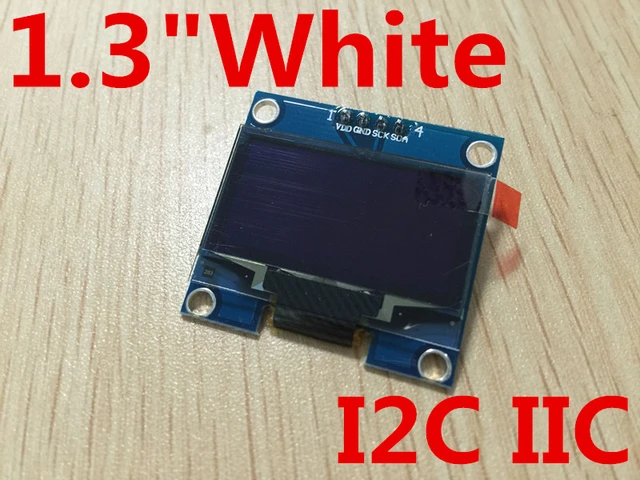
picture:
HTB1PfHnxcyYBuNkSnfoq6AWgVXaV.jpg_640x640Q90.jpg_

datasheet:


pls help

  • Is your display a 1.3” SH1106 or a .96” SSD1306 ?

1.3" sh1106

Using a display with a SH1106 controller with code written for an SSD1306 usually results in something like this:

If that's what you're seeing, the solution is to use the Adafruit_SH110X library and try one of the examples there.

no it dosent turn on at all

You can also try an address of 0x3D instead of 0x3C, the displays can be set to either.

  • Show us good images of your ‘actual’ wiring. ?

what do you meen by 'actual' writin?

  • Images of your wiring.
#include <SPI.h>
#include <Wire.h>
#include <Adafruit_GFX.h>
#include <Adafruit_SSD1306.h>

#define SCREEN_WIDTH 128 // OLED display width, in pixels
#define SCREEN_HEIGHT 64 // OLED display height, in pixels

// Declaration for SSD1306 display connected using I2C
#define OLED_RESET     -1 // Reset pin # (or -1 if sharing Arduino reset pin)
#define SCREEN_ADDRESS 0x3C
Adafruit_SSD1306 display(SCREEN_WIDTH, SCREEN_HEIGHT, &Wire, OLED_RESET);

// Declaration for SSD1306 display connected using software SPI:
//#define OLED_MOSI   9
//#define OLED_CLK   10
//#define OLED_DC    11
//#define OLED_CS    12
//#define OLED_RESET 13
//Adafruit_SSD1306 display(SCREEN_WIDTH, SCREEN_HEIGHT, OLED_MOSI, OLED_CLK, OLED_DC, OLED_RESET, OLED_CS);

void setup()
{
  Serial.begin(9600);
  
  // initialize the OLED object
  if(!display.begin(SSD1306_SWITCHCAPVCC, SCREEN_ADDRESS)) {
    Serial.println(F("SSD1306 allocation failed"));
    for(;;); // Don't proceed, loop forever
  }

  // Uncomment this if you are using SPI
  //if(!display.begin(SSD1306_SWITCHCAPVCC)) {
  //  Serial.println(F("SSD1306 allocation failed"));
  //  for(;;); // Don't proceed, loop forever
  //}

  // Clear the buffer.
  display.clearDisplay();

  // Display Text
  display.setTextSize(1);
  display.setTextColor(WHITE);
  display.setCursor(0,28);
  display.println("Hello world!");
  display.display();
  delay(2000);
  display.clearDisplay();

  // Display Inverted Text
  display.setTextColor(BLACK, WHITE); // 'inverted' text
  display.setCursor(0,28);
  display.println("Hello world!");
  display.display();
  delay(2000);
  display.clearDisplay();

  // Changing Font Size
  display.setTextColor(WHITE);
  display.setCursor(0,24);
  display.setTextSize(2);
  display.println("Hello!");
  display.display();
  delay(2000);
  display.clearDisplay();

  // Display Numbers
  display.setTextSize(1);
  display.setCursor(0,28);
  display.println(123456789);
  display.display();
  delay(2000);
  display.clearDisplay();

  // Specifying Base For Numbers
  display.setCursor(0,28);
  display.print("0x"); display.print(0xFF, HEX); 
  display.print("(HEX) = ");
  display.print(0xFF, DEC);
  display.println("(DEC)"); 
  display.display();
  delay(2000);
  display.clearDisplay();

  // Display ASCII Characters
  display.setCursor(0,24);
  display.setTextSize(2);
  display.write(3);
  display.display();
  delay(2000);
  display.clearDisplay();

  // Scroll full screen
  display.setCursor(0,0);
  display.setTextSize(1);
  display.println("Full");
  display.println("screen");
  display.println("scrolling!");
  display.display();
  display.startscrollright(0x00, 0x07);
  delay(2000);
  display.stopscroll();
  delay(1000);
  display.startscrollleft(0x00, 0x07);
  delay(2000);
  display.stopscroll();
  delay(1000);    
  display.startscrolldiagright(0x00, 0x07);
  delay(2000);
  display.startscrolldiagleft(0x00, 0x07);
  delay(2000);
  display.stopscroll();
  display.clearDisplay();

  // Scroll part of the screen
  display.setCursor(0,0);
  display.setTextSize(1);
  display.println("Scroll");
  display.println("some part");
  display.println("of the screen.");
  display.display();
  display.startscrollright(0x00, 0x00);
}

void loop() {
}

We will try one last time.

  • Show us good pictures of your wiring.


Try this:

Click Here for code
//********************************************^************************************************
//  OLED_Counter.ino
//
//  LarryD
//  Version   YY/MM/DD     Comments
//  =======   ========     ===============================================
//  1.00      22/04/21     Running code
//
//

//https://lastminuteengineers.com/oled-display-arduino-tutorial/

#include <Wire.h>
//#include <Adafruit_GFX.h>
//#include <Adafruit_SSD1306.h>
#include <Adafruit_SH110X.h>

/* Uncomment the initialize the I2C address , uncomment only one, If you get a totally blank screen try the other*/
#define i2c_Address 0x3c //initialize with the I2C addr 0x3C Typically eBay OLED's
//#define i2c_Address 0x3d //initialize with the I2C addr 0x3D Typically Adafruit OLED's


//********************************************^************************************************

const byte heartbeatLED     = 13;

#define SCREEN_WIDTH        128   //OLED display width,  in pixels
#define SCREEN_HEIGHT       64   //OLED display height, in pixels


//SSD1306 display
//size 1 is 5X7   pixels therefore, 6X8   to acount for spacing,  21 characters per line
//size 2 is 10X14 pixels therefore, 11X15 to account for spacing, 10 characters per line
//size 4 is 20X28 pixels therefore, 21X29 to account for spacing,  5 characters per line

//Declaration for an SSD1306 display connected to I2C (SDA, SCL pins)
//Adafruit_SSD1306 display(SCREEN_WIDTH, SCREEN_HEIGHT, &Wire, -1);

#define OLED_RESET -1   //   QT-PY / XIAO
Adafruit_SH1106G display = Adafruit_SH1106G(SCREEN_WIDTH, SCREEN_HEIGHT, &Wire, OLED_RESET);


unsigned long counter       = 0;

//timing stuff
unsigned long heartbeatTime;
unsigned long displayTime;


//                                       s e t u p ( )
//********************************************^************************************************
//
void setup()
{
  Serial.begin(115200);

  pinMode(heartbeatLED, OUTPUT);

  delay(250); // wait for the OLED to power up
  display.begin(i2c_Address, true); // Address 0x3C default

  display.display();
  delay(2000);

//  if (!display.begin(SSD1306_SWITCHCAPVCC, 0x3C))
//  {
//    Serial.println(F("SSD1306 allocation failed"));
//    for (;;);
//  }

  display.clearDisplay();

  //display.setTextColor(textColor, backgroundColor);
  //display.setTextColor(WHITE, BLACK);

  display.setTextSize(1);
  display.setTextColor(SH110X_WHITE);
  display.setCursor(0, 0);

} //END of   setup()


//                                        l o o p ( )
//********************************************^************************************************
//
void loop()
{
  //*********************************                         heartbeat TIMER
  //is it time to toggle the heartbeatLED (every 500ms)?
  if (millis() - heartbeatTime >= 500ul)
  {
    //restart this TIMER
    heartbeatTime = millis();

    //toggle the heartbeat LED
    digitalWrite(heartbeatLED, digitalRead(heartbeatLED) == HIGH ? LOW : HIGH);
  }

  //*********************************                         displayTime TIMER
  //is time to update the display ?
  if (millis() - displayTime >= 250ul)
  {
    //restart this TIMER
    displayTime = millis();

    //clear SSD1306 display
    display.clearDisplay();

    //************************************
    display.setTextSize(1);
    display.setCursor(0, 0);

    //Size 1 line is  000000000111111111122
    //21 characters   123456789012345678901
    //Example         ..OLED Counter Demo..
    display.print("  OLED Counter Demo  ");

    //************************************
    //display.setCursor(0,9);
    //Size 1 line is  000000000111111111122
    //21 characters   123456789012345678901
    //display.print ("ABCDEFGHIJKLMNOPQRSTU");

    //************************************
    display.setTextSize(2);
    //2 = current text size, 16 is the pixel row we want to postion to
    display.setCursor(centering(counter, 2), 16);

    //Size 2 line     0000000001
    //10 characters   1234567890
    //Example           100000
    display.print(counter++);

    //************************************
    //degree symbol
    //using CP437 ASCII
    //display.cp437(true);
    //display.write(248);

    //************************************
    //  display.setTextSize(2);
    //  display.setCursor(0,16);
    //  display.setCursor(0,32);
    //  //temperature
    //  //Size 2 line is  0000000001
    //  //10 characters   1234567890
    //  //Example         ABCDEFGHIJ
    //  display.print("ABCDEFGHIJ");

    //************************************
    display.display();
  }

  //************************************
  //other non blocking code goes here
  //************************************


} //END of   loop()


//                                 c o u n t D i g i t s ( )
//********************************************^************************************************
//return the number of digits in a number
byte countDigits(int num)
{
  byte count = 0;

  while (num)
  {
    num = num / 10;
    count++;
  }

  return count;

} //END of   countDigits()


//                                    g e t D i g i t ( )
//********************************************^************************************************
//return the selected digit
byte getDigit(unsigned int number, int digit)
{
  for (int i = 0; i < digit - 1; i++)
  {
    number = number / 10;
  }

  return number % 10;

} //END of   getDigit()


//                                   c e n t e r i n g ( )
//********************************************^************************************************
//return the position to print the MSD
byte centering(unsigned long number, byte textSize)
{
  byte count = 0;
  byte charaterCellWidth = 0;

  //a basic character is 5X7, we must scale for this text size
  charaterCellWidth = (5 * textSize) + 1;

  //number of digits in our number
  while (number)
  {
    number = number / 10;
    count++;
  }

  //center location where the MSD character will be displayed
  return (SCREEN_WIDTH / 2 - (charaterCellWidth * count / 2));

} //END of   centering()

//

gives me this eror

Arduino: 1.8.16 (Windows 7), Board: "Arduino Uno"

temture:16:10: fatal error: Adafruit_SH110X.h: No such file or directory

 #include <Adafruit_SH110X.h>

          ^~~~~~~~~~~~~~~~~~~

compilation terminated.

exit status 1

Adafruit_SH110X.h: No such file or directory


This report would have more information with
"Show verbose output during compilation"
option enabled in File -> Preferences.
  • Read thru this To get the library:

it is still black. and i instald the library and yoused youre code

Looks like you messed up the code in a copy/paste. Line 16, character 10. "temture" was probably "temperature"

Follow, exactly, the advice given and slow down.

ok the code works now. But my i2c is still black

  • We cannot help if you do not respond to questions and requests.

  • You may have damaged the display when you wired the circuit.