Hi Guys,
i received my brandnew 1.44" 128x128 RGB TFTs today, equipped with an 7735S chipset. Im using an Arduino Nano, and the standard Adafruit GFX and ST7735 library, and have followed these instructions:
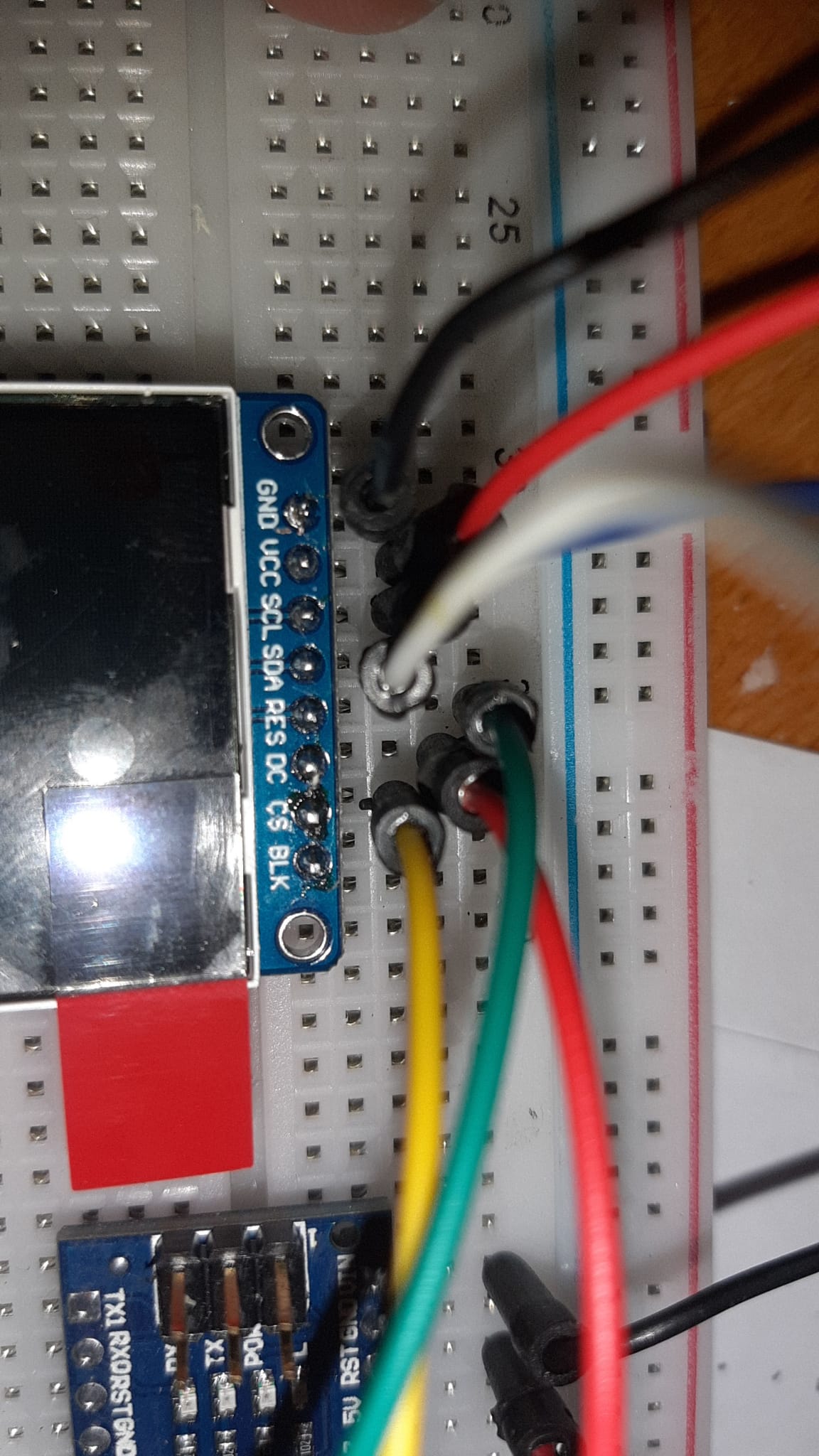
According Instructions i connected:
GND to GND
VCC first to 3.3, then 5V
SCL to PIN D13
SDA to PIN D11
RES to PIN D9
DC first not at all, now to 3.3V
CS to PIN D10
(See Attachments)
I checked that the Pins are set accordingly in the standard ADAFRUIT examples, booted up, downloaded and.....BAM nothing, white screen. None of the example work, so i am obviously having a connection or library problem.....
I have checked the connections multiple times, coming to the conclusion i did OK....
I have also tried the greentab and blacktab options with the commenting out, but got the same ressults.....
Here the standard adafruit example code
/**************************************************************************
  This is a library for several Adafruit displays based on ST77* drivers.

  Works with the Adafruit 1.8" TFT Breakout w/SD card
    ----> http://www.adafruit.com/products/358
  The 1.8" TFT shield
    ----> https://www.adafruit.com/product/802
  The 1.44" TFT breakout
    ----> https://www.adafruit.com/product/2088
  The 1.14" TFT breakout
  ----> https://www.adafruit.com/product/4383
  The 1.3" TFT breakout
  ----> https://www.adafruit.com/product/4313
  The 1.54" TFT breakout
    ----> https://www.adafruit.com/product/3787
  The 2.0" TFT breakout
    ----> https://www.adafruit.com/product/4311
  as well as Adafruit raw 1.8" TFT display
    ----> http://www.adafruit.com/products/618

  Check out the links above for our tutorials and wiring diagrams.
  These displays use SPI to communicate, 4 or 5 pins are required to
  interface (RST is optional).

  Adafruit invests time and resources providing this open source code,
  please support Adafruit and open-source hardware by purchasing
  products from Adafruit!

  Written by Limor Fried/Ladyada for Adafruit Industries.
  MIT license, all text above must be included in any redistribution
 **************************************************************************/

#include <Adafruit_GFX.h>    // Core graphics library
#include <Adafruit_ST7735.h> // Hardware-specific library for ST7735
#include <Adafruit_ST7789.h> // Hardware-specific library for ST7789
#include <SPI.h>

//#if defined(ARDUINO_FEATHER_ESP32) // Feather Huzzah32
//  #define TFT_CS         14
//  #define TFT_RST        15
//  #define TFT_DC         32

//#elif defined(ESP8266)
//  #define TFT_CS         4
//  #define TFT_RST        16
//  #define TFT_DC         5

//#else
  // For the breakout board, you can use any 2 or 3 pins.
  // These pins will also work for the 1.8" TFT shield.
  #define TFT_CS        10
  #define TFT_RST        9 // Or set to -1 and connect to Arduino RESET pin
  #define TFT_DC         8
//#endif

// OPTION 1 (recommended) is to use the HARDWARE SPI pins, which are unique
// to each board and not reassignable. For Arduino Uno: MOSI = pin 11 and
// SCLK = pin 13. This is the fastest mode of operation and is required if
// using the breakout board's microSD card.

// For 1.44" and 1.8" TFT with ST7735 use:
Adafruit_ST7735 tft = Adafruit_ST7735(TFT_CS, TFT_DC, TFT_RST);

// For 1.14", 1.3", 1.54", and 2.0" TFT with ST7789:
//Adafruit_ST7789 tft = Adafruit_ST7789(TFT_CS, TFT_DC, TFT_RST);


// OPTION 2 lets you interface the display using ANY TWO or THREE PINS,
// tradeoff being that performance is not as fast as hardware SPI above.
//#define TFT_MOSI 11  // Data out
//#define TFT_SCLK 13  // Clock out

// For ST7735-based displays, we will use this call
//Adafruit_ST7735 tft = Adafruit_ST7735(TFT_CS, TFT_DC, TFT_MOSI, TFT_SCLK, TFT_RST);

// OR for the ST7789-based displays, we will use this call
//Adafruit_ST7789 tft = Adafruit_ST7789(TFT_CS, TFT_DC, TFT_MOSI, TFT_SCLK, TFT_RST);


float p = 3.1415926;

void setup(void) {
  Serial.begin(9600);
  Serial.print(F("Hello! ST77xx TFT Test"));

  // Use this initializer if using a 1.8" TFT screen:
 // tft.initR(INITR_BLACKTAB);      // Init ST7735S chip, black tab

  // OR use this initializer (uncomment) if using a 1.44" TFT:
  tft.initR(INITR_144GREENTAB); // Init ST7735R chip, green tab

  // OR use this initializer (uncomment) if using a 0.96" 160x80 TFT:
  //tft.initR(INITR_MINI160x80);  // Init ST7735S mini display

  // OR use this initializer (uncomment) if using a 1.3" or 1.54" 240x240 TFT:
  //tft.init(240, 240);           // Init ST7789 240x240

  // OR use this initializer (uncomment) if using a 2.0" 320x240 TFT:
  //tft.init(240, 320);           // Init ST7789 320x240

  // OR use this initializer (uncomment) if using a 1.14" 240x135 TFT:
  //tft.init(135, 240);           // Init ST7789 240x135

  Serial.println(F("Initialized"));

 Displays aside for a week, back to the xmas lights....


