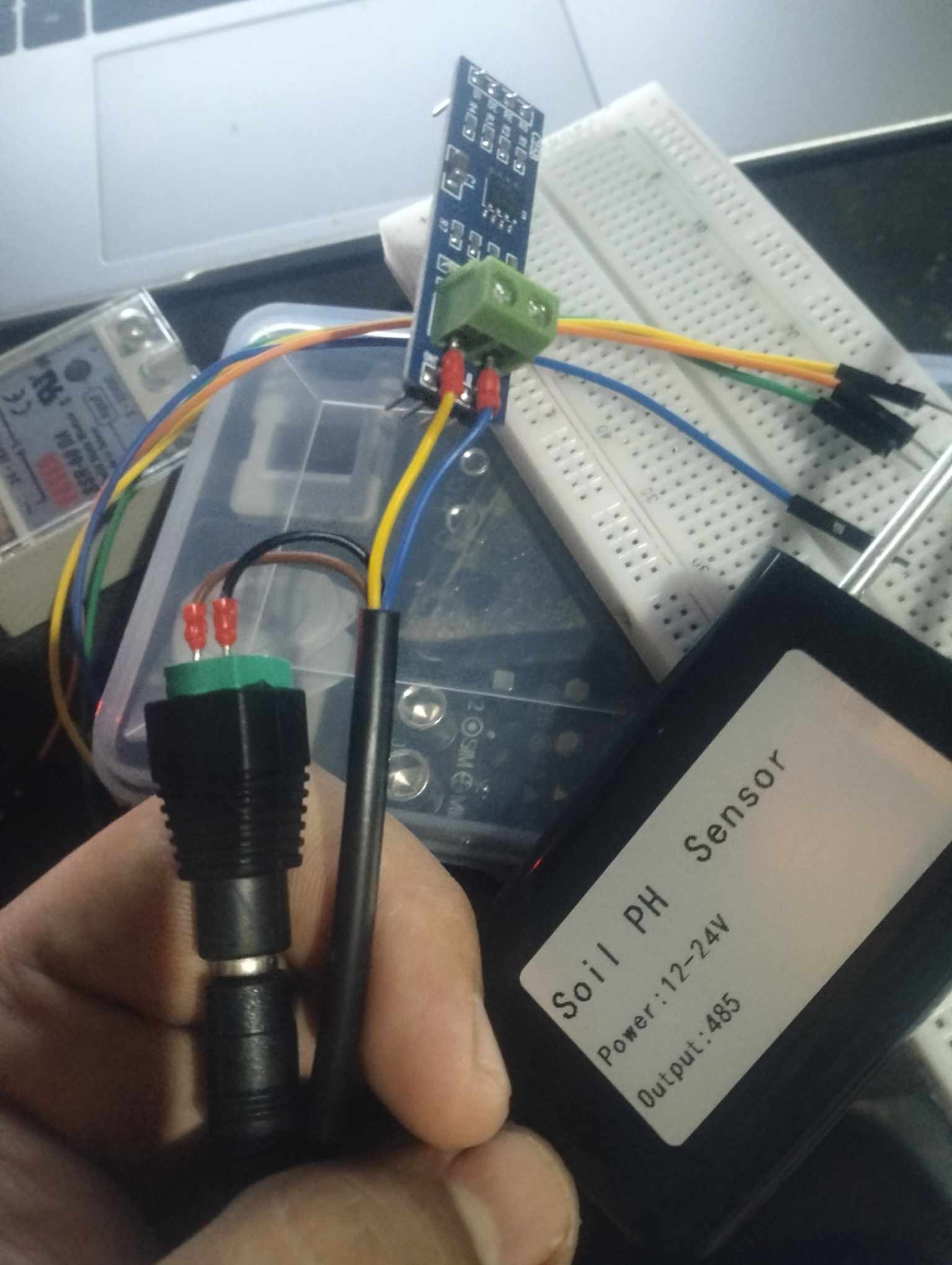
I have a soil pH sensor with rs485 output that is connected to MAX485 and ESP32. I'm having a bit of a problem as the serial monitor doesn't show the correct value (Just random characters that is not supposed to be showing)
#include <ModbusMaster.h>

#define RE 5   // GPIO 5
#define DE 6   // GPIO 6

const byte ph[] = {0x01, 0x03, 0x00, 0x0D, 0x00, 0x01, 0x15, 0xC9};
byte values[2];  // Assuming the response is 2 bytes
ModbusMaster node;

void setup() {
  Serial.begin(4800);  // Adjust the baud rate to 4800
  pinMode(RE, OUTPUT);
  pinMode(DE, OUTPUT);
  digitalWrite(RE, LOW);   // Set RE low for receiving data
  digitalWrite(DE, LOW);   // Set DE low for receiving data
  node.begin(1, Serial);    // Node ID 1, use hardware serial for communication

  // Wait for the serial connection to be established
  while (!Serial) {
    delay(10);
  }

  Serial.println("Serial communication established.");
}

void loop() {
  // Send inquiry frame to the soil pH sensor
  sendInquiryFrame();

  // Wait for a response from the soil pH sensor
  delay(500);  // Adjust the delay as needed

  // Read and process the response
  if (readResponse()) {
    // Calculate pH value from the received data
    uint16_t pHRaw = (values[0] << 8) | values[1];
    float pHValue = pHRaw / 100.0;  // Assuming the pH value is represented as a two-decimal fixed-point number

    Serial.print("Soil pH: ");
    Serial.println(pHValue, 2);  // Print pH value with 2 decimal places
  } else {
    Serial.println("Failed to read from the soil pH sensor.");
  }

  delay(3000);
}

void sendInquiryFrame() {
  // Enable DE to send data
  digitalWrite(DE, HIGH);

  // Send inquiry frame to the soil pH sensor
  if (Serial.write(ph, sizeof(ph)) != sizeof(ph)) {
    Serial.println("Failed to send inquiry frame.");
  }

  delay(2);  // Allow time for transmission to complete
  digitalWrite(DE, LOW);  // Disable DE to receive data
}

bool readResponse() {
  digitalWrite(DE, LOW);
  digitalWrite(RE, HIGH);
  delay(10);

  // Read the response from the soil pH sensor
  for (byte i = 0; i < 2; i++) {
    if (Serial.available()) {
      values[i] = Serial.read();
      Serial.print(values[i], HEX);
    } else {
      Serial.println("Timeout waiting for response byte.");
      return false;
    }
  }
  Serial.println();

  digitalWrite(RE, LOW);

  // Check if the expected number of bytes are received
  return (Serial.available() == 0);
}
The following are the pinouts for the max485 for more reference: DI - GPIO19 DE - GPIO6 RE - GPIO5 RO - GPIO21
i tried using the other inquiry frame from the datasheet and also connecting and disconnecting the pins but it still persists. Any form of criticisms is much appreciated
Did inquiry frame send successfully? Or you see this message:
Did you code print the response bytes or it experienced the timeout?
By the way, your "timeout" code is incorrect, it didn't wait for any timeout and exits just if serial do not receive a byte immeditially.
the brown and black wire which is positive and negative respectively are connected to a 12v power supply and the Yellow and Blue which is the A and B is connected into the A and B port of the Max485 (The wires are coated in metal jacket if that helps)
Indeed!
You can't use the same Serial for RS485 and for output messages to the Monitor.
As a result, neither one nor the other will work for you.
The Serial is busy for outputting messages to the computer, to work with RS485 you need to select a different serial port - for example a Serial2 on pins 16 and 17
As already mentioned, you need 2 separate serial ports - 1 to handle your Serial.print output and another to communicate with your RS485 sensor.
The datasheet indicates that the default baud rate is 9600 baud (see section 3.1).
You need to be careful in your handling of the RE & DE signals. Generally RE & DE operate as a pair - either both LOW (receive) or both HIGH (transmit). If you only drive DE HIGH (and keep RE LOW) when transmitting, then your receiver will hear its own transmission which you will need to ignore. This doesn't happen if you also drive RE HIGH when transmitting.
You are on the right track here. However, using a delay like this can lead to the transmission being cut short or the transceiver still being in transmit mode when the remote device tries to respond. Have a look at Serial.flush() rather than using delay().
The response from the sensor consists of a Modbus reply message. See the response frame in section 3.4 where you will see a 7 byte response and the location of the pH value in that response.
#include <ModbusMaster.h>
#include <WiFi.h>

#define RE 5   // GPIO 5
#define DE 23   // GPIO 23

ModbusMaster node;

#define RXD2 22
#define TXD2 13

void setup() {
  Serial.begin(115200);
  Serial2.begin(115200, SERIAL_8N1, RXD2, TXD2);   // Set baud rate to 115200
  pinMode(RE, OUTPUT);
  pinMode(DE, OUTPUT);
  digitalWrite(RE, LOW);   // Set RE low for receiving data
  digitalWrite(DE, LOW);   // Set DE low for receiving data
  node.begin(1, Serial2);    // Node ID 1, use hardware serial for communication

  // Wait for the serial connection to be established
  while (!Serial) {
    delay(10);
  }

  Serial.println("Serial communication established.");
}

void loop() {
  // Send inquiry frame to the soil pH sensor
  if (sendInquiryFrame()) {
    // Wait for a response from the soil pH sensor
    delay(10);  // Adjust delay as needed
    if (node.available()) {
      node.receive();
      uint16_t pHValue = node.getResponseBuffer(0x00);  // Assuming response starts at register 0x00
      Serial.print("Soil pH: ");
      Serial.println(pHValue / 100.0, 2);  // Convert to float and print with 2 decimal places
    } else {
      Serial.println("Failed to read from the soil pH sensor.");
    }
  } else {
    Serial.println("Failed to send inquiry frame.");
  }

  delay(3000);
}

bool sendInquiryFrame() {
  // Enable DE to send data
  digitalWrite(DE, HIGH);

  // Send inquiry frame to the soil pH sensor
  if (node.writeMultipleRegisters(0x00, 1) != node.ku8MBSuccess) {
    Serial.println("Failed to send inquiry frame.");
    return false;
  }

  delay(2);  // Allow time for transmission to complete
  digitalWrite(DE, LOW);  // Disable DE to receive data
  return true;
}