Need help to connect with Arduino UNO, 20X4 LCD and 4X3 Keypad

I'm connecting an Arduino UNO, with a 20X4 LCD, and a 4X3 keypad, want to get the input number from the keypad and display on the LCD.

Please see the code in below:

///////////////////----------LCD Connection------------////////////////
/*
The circuit:
LCD VDD pin to +5V
LCD V0 pin to GND
LCD RS pin to digital pin 12
LCD R/W pin to digital pin 11
LCD Enable pin to digital pin 10
LCD D4 pin to digital pin 5
LCD D5 pin to digital pin 4
LCD D6 pin to digital pin 3
LCD D7 pin to digital pin 2
LCD +LED pin to digital pin 13
LCD -LED pin to GND
*/
////////////////////////////////////////////////////////////////////////////////////////////////////////////////
///////////////////----------Keypad Connection------------////////////////
/*
The circuit:
Keypad pin 1 – digital pin 12
Keypad pin 2 – digital pin 11
Keypad pin  3– digital pin 10
Keypad pin  4– digital pin 9
Keypad pin  5– digital pin 8
Keypad pin  6– digital pin 7
Keypad pin  7– digital pin 6
*/
////////////////////////////////////////////////////////////////////////////////////////////////////////////////

#include <Keypad.h>
#include <LiquidCrystal.h>


///////////////////----------Read and Store Date------////////////////////
char rsdata;
/////////////////////////////////////////////////////////////////////////////////////////

///////////////////----------Keypad Setting-------------////////////////////
const byte ROWS=4; //4 rows
const byte COLS=3; //3 columns
char key[ROWS][COLS]={
  
  {'1','2','3'},
  {'4','5','6'},
  {'7','8','9'},
  {'*','0','#'},
};

byte rowPins[ROWS]={11,6,7,9};
byte colPins[COLS]={10,12,8};

Keypad customKeypad=Keypad(makeKeymap(key) ,rowPins, colPins, ROWS, COLS);

//////////////////------------LCD Setting--------------------//////////////
int backLight = 13;    // pin 13 will control the backlight

// setup LiquidCrystal lcd variable
//                 LCD pin:  rs, r/w, enable, d4, d5, d6, d7 
//              Arduino pin:12, 11,        10,   5,   4,   3,  2
LiquidCrystal lcd(12, 11, 10, 5, 4, 3, 2);

////////////////////////////////////////////////////////////////////////////


void setup() {

Serial.begin(9600);

pinMode(backLight, OUTPUT);
digitalWrite(backLight, HIGH); // turn backlight on. Replace 'HIGH' with 'LOW' to turn it off.
 lcd.begin(20, 4);     // setting of LCD (4 x 20)

 // Try to print somethings on LCD (IT IS WORK FOR THIS PART)//
  lcd.print("Printing text");
  delay(2500);
  lcd.clear();
  lcd.print("Enter a Number");
delay(1500);
}
 

///////////////------void loop------////////////////////////////

void loop(){
lcd.clear();
lcd.setCursor(0, 1);
lcd.print("HI"); // ( I can print this "HI" on LCD)
char customKey = customKeypad.getKey();  
  if (customKey!= NO_KEY){
    Serial.println(customKey);
    lcd.clear();
    lcd.setCursor(0,2);
    lcd.print("GOT KEY");
    delay(2000);
  }

}

Result:
I can print "Printing text" and "Enter a Number"
and the LCD is cleared

Then “HI” is print on the LCD

Now, I press a number “8” from keypad:

On Serial Monitor: 8 is showed
On LCD: The text” HI” is gone, but “8” did not show on the LCD
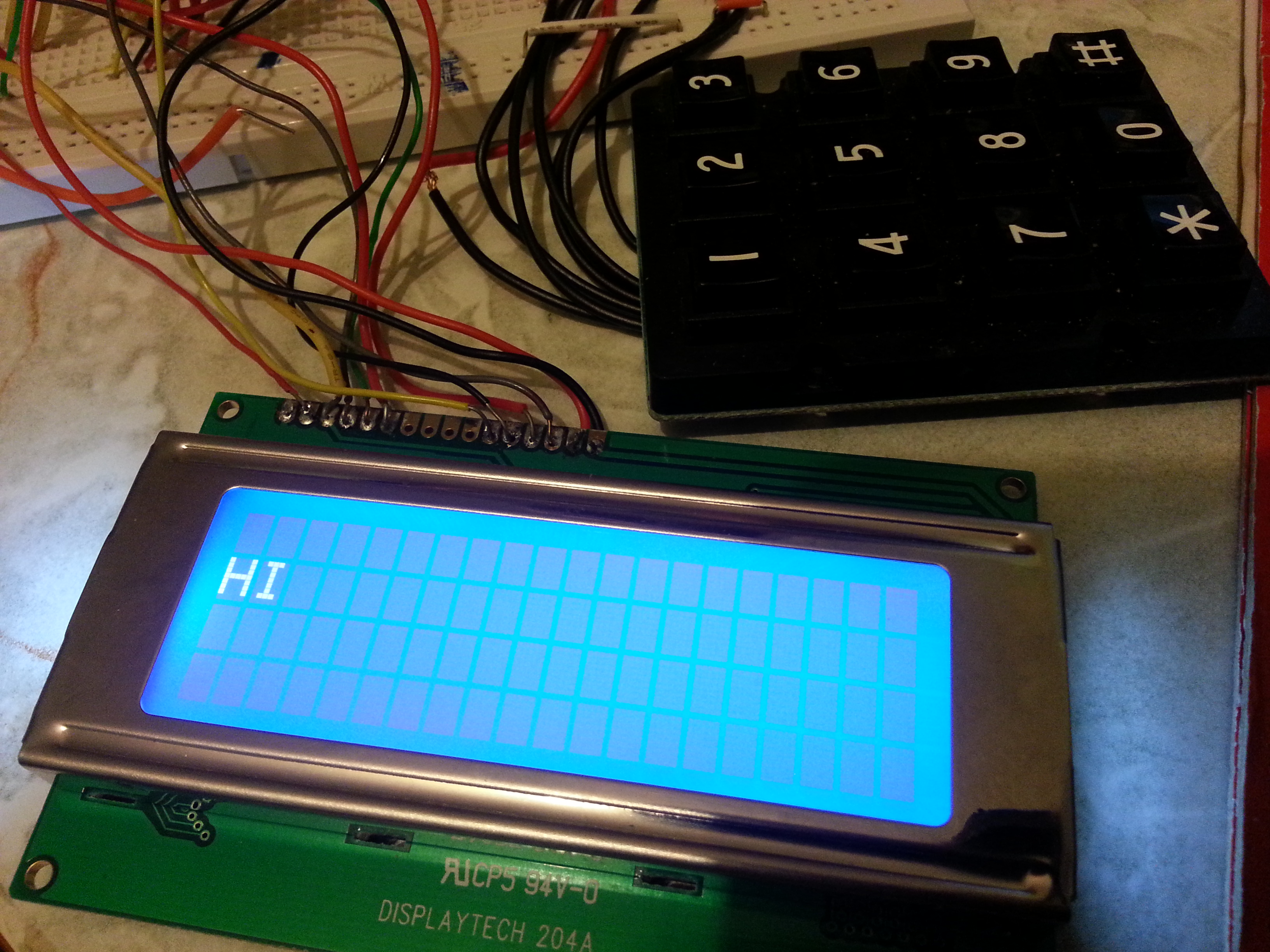
Can anyone tell me why the number input from the keypad does not show on LCD?
also it seems that lcd.print() work with problem when I used in a "if" function? I'm not sure about that, please help.

On the arduino, loop() is called continuously.

This section:

void loop(){
lcd.clear();
lcd.setCursor(0, 1);
lcd.print("HI"); // ( I can print this "HI" on LCD)
char customKey = customKeypad.getKey(); 
  if (customKey!= NO_KEY){
    Serial.println(customKey);
    lcd.clear();
    lcd.setCursor(0,2);
    lcd.print("GOT KEY");
    delay(2000);
  }

}

never sends the customKey to the LCD. If you see the "GOT KEY", you just need to add the line to also send the number to the LCD.

Ideally, you would also loop waiting for a key, then process the key, rather than continuously exiting the loop() function, and clearing the LCD and re-printing "Hi".

Thanks for your advise!

This section:

Code:
void loop(){
lcd.clear();
lcd.setCursor(0, 1);
lcd.print("HI"); // ( I can print this "HI" on LCD)
char customKey = customKeypad.getKey(); 
  if (customKey!= NO_KEY){
    Serial.println(customKey);
    lcd.clear();
    lcd.setCursor(0,2);
    lcd.print("GOT KEY");
    lcd.print(customKey);
    delay(2000);
  }

}

I got two questions:

  1. Why the LCD does not print "GOT KEY" after I press the keypad?
    2)Is it just adding a lcd.print so i can get the input from keypad?

Thanks alot

Well, I'm a little confused.

  1. You said previously that if you press the '8' key, you see the '8' sent to the serial port. If that is true, then we know that it is correctly reading the keypad, and getting inside the 'if' statement (since that's where the serial print happens for the key).

We also know that:

lcd.clear();
lcd.setCursor(0, 1);
lcd.print("HI");

works.

So, I would replace:

    lcd.clear();
    lcd.setCursor(0,2);
    lcd.print("GOT KEY");
    lcd.print(customKey);

with

    lcd.clear();
    lcd.print("GOT KEY");
    lcd.print(customKey);
    Serial.println("Displaying Key");

This will let you know if you are getting to this part of the code, and eliminate the untested lines 3 and 4 of the LCD screen.

  1. Yes, lcd.print(customKey); should print the key to the LCD.

Modified, its shows on serial monitor, but failed to show on screen.
Please see my attached photo.

  1. LCD Shows "HI" Before press any key
  2. LCD shows nothings but cursor one line 1 and line 3
  3. "8" and" Displaying Key" shows on serial monitor.

I must admit, I'm at a bit of a loss.

You could try changing it to this to see if it helps narrow down the problem (UNTESTED):

Basically, I put in a serial print and a delay after the first LCD.print() in our if, to see what the LCD screen looks like after that, but before the second print. I also added the while loop to make us wait for a keypress, which stops us continually clearing the LCD and printing "Hi" while we don't have a key.

void loop() {
lcd.clear();
lcd.setCursor(0, 1);
lcd.print("HI"); // ( I can print this "HI" on LCD)

char customKey;
do {
   customKey = customKeypad.getKey(); 
   if (customKey!= NO_KEY){
    Serial.println(customKey);
    lcd.clear();
    lcd.print("GOT KEY");
    Serial.println("Got Key");
    delay(2000);
    lcd.print(customKey);
    Serial.println("Displaying Key");
    delay(5000);
  }
} while (customKey == NO_KEY);

}

tried for both lcd.print and lcd.write(), it shows the same result on LCD. =(

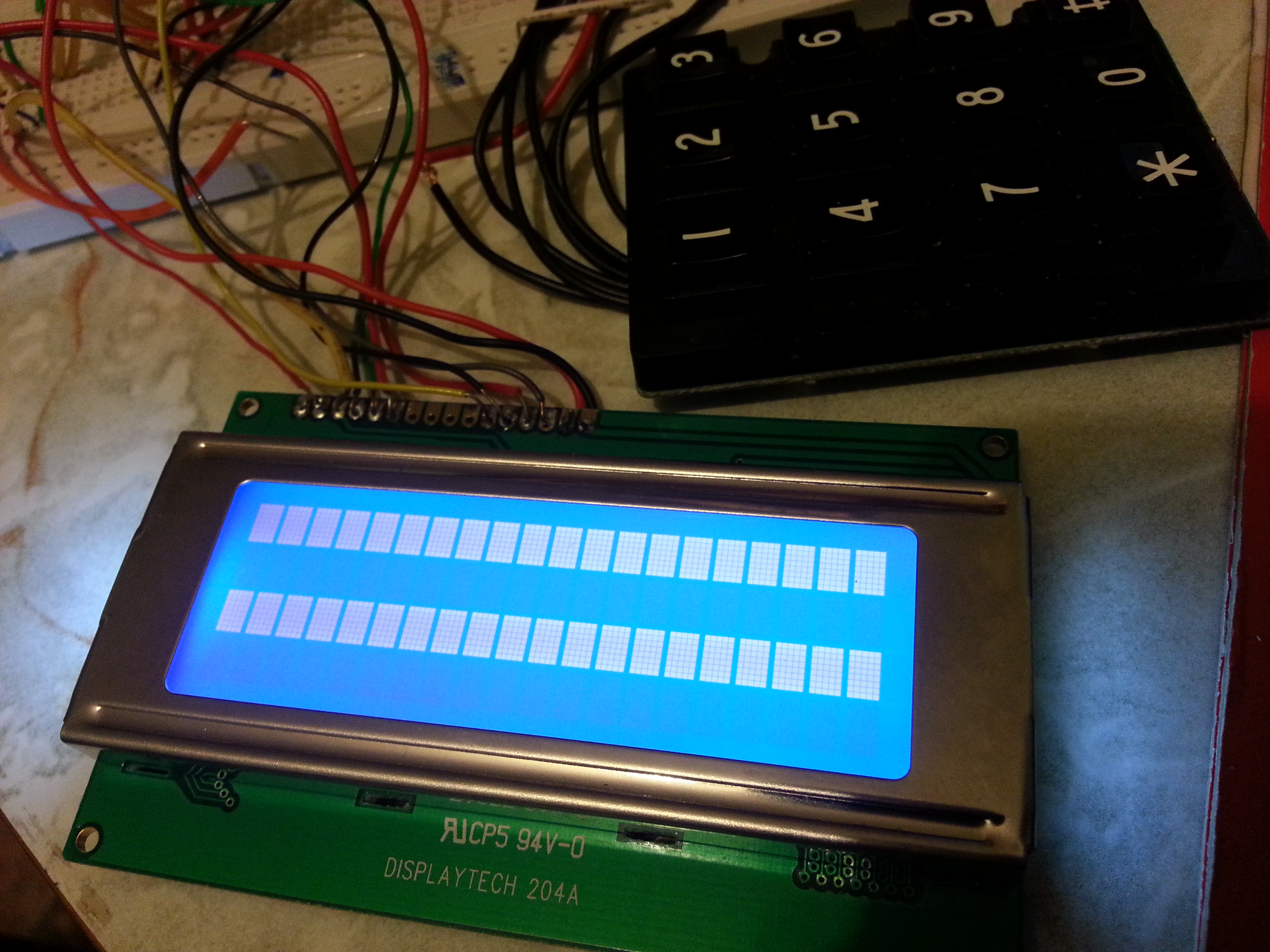
this is what shows on LCD

i can only print text if I put the lcd.print/lcd.write out of the "if" function.
Again, is that "if" cannot work together with "lcd.print/write" ?

Yes, but I'm trying to work out what line of code causes the LCD to show rows of blocks, since we write to the LCD more than once inside the "if" statement.

For now, just comment out the:
// lcd.print(customKey);
line.

I assume that until you press a key, the LCD is happily displaying "HI". When you press a key, these lines of blocks appear immediately. Is that correct?

kingkong135:
i can only print text if I put the lcd.print/lcd.write out of the "if" function.
Again, is that "if" cannot work together with "lcd.print/write" ?

I don't know what you mean by this.

No. There is no association between "if" and "lcd.print". You can use lcd.print inside or outside an "if". There is no connection. The "if" simply allows you to choose whether to do something or not.

totally correct

i just got another code from internet

/* @file EventSerialKeypad.pde
|| @version 1.0
|| @author Alexander Brevig
|| @contact alexanderbrevig@gmail.com
||
|| @description
|| | Demonstrates using the KeypadEvent.
|| #
*/
#include <Keypad.h>

const byte ROWS = 4; //four rows
const byte COLS = 3; //three columns
char keys[ROWS][COLS] = {
	{'1','2','3'},
	{'4','5','6'},
	{'7','8','9'},
	{'*','0','#'}
	};
byte rowPins[ROWS] = {11, 6, 7, 9}; //connect to the row pinouts of the keypad
byte colPins[COLS] = {10, 12, 8}; //connect to the column pinouts of the keypad

Keypad keypad = Keypad( makeKeymap(keys), rowPins, colPins, ROWS, COLS );
byte ledPin = 13; 

boolean blink = false;

void setup(){
  Serial.begin(9600);
  pinMode(ledPin, OUTPUT);      // sets the digital pin as output
  digitalWrite(ledPin, HIGH);   // sets the LED on
  keypad.addEventListener(keypadEvent); //add an event listener for this keypad
}

void loop(){
  char key = keypad.getKey();

  if (key) {
    Serial.println(key);
  }
  if (blink){
    digitalWrite(ledPin,!digitalRead(ledPin));
    delay(100);
  }
}

//take care of some special events
void keypadEvent(KeypadEvent key){
  switch (keypad.getState()){
    case PRESSED:
      switch (key){
        case '#': digitalWrite(ledPin,!digitalRead(ledPin)); break;
        case '*': 
          digitalWrite(ledPin,!digitalRead(ledPin));
        break;
      }
    break;
    case RELEASED:
      switch (key){
        case '*': 
          digitalWrite(ledPin,!digitalRead(ledPin));
          blink = false;
        break;
      }
    break;
    case HOLD:
      switch (key){
        case '*': blink = true; break;
      }
    break;
  }
}

And this work, when i press "", it blink once
when i hold "
", the LCD keeps on/off
when i press "#" it turns on to off / off to on
can i assume that the LCD got "*" and "#" at this moment?

Oh wait a minute.

I just read your sketch initialization. You have the keypad and lcd hooked up to some of the same pins. You can't do that.

oh!! i cant do this?? then how can i connect those pin??

Yeah, well you have a bit of a problem.

The LCD needs 7 digital pins + 1 for the led. Your keypad also needs 7 digital pins. That's a total of 14/15. The UNO only has 13 digital pins. So, you need to either get a Mega (more digital pins), get an IO shield for the UNO to expand the number of pins available, or do it yourself with a chip.

Hopefully someone else can chip in here now that we know what the problem is. Suggestions anyone?

Have a read of this thread.

http://forum.arduino.cc/index.php/topic,173357.0.html

For your circumstances, it may be enough to use the analog pins as digital pins. That gives you 13 digital + 6 analog, 19 total. You need 15. So, move your connections, change your pin selections in your code, and hopefully everything will then work.

Actually, it is standard practice to use the data pins - four in this case - in common between the LCD and the keypad, you just have to choose them correctly and the code must be written to match.

The four data pins for the LCD need to be the same as the four used as strobes to the keypad. To avoid problems when someone presses multiple keys on the same "sense" line (input to the Arduino), you put resistors of say, 1k ohm in series with each strobe to the keypad (and presumably the "sense" lines are using the internal pull-ups).

This should work with the standard libraries (albeit if they are properly written) given that you are calling the keypad and LCD functions separately, that they both expect the same four lines to be set up in advance as outputs, and that each time called, each routine necessarily starts by putting its desired data out on those four outputs - as it really must do in order to on the one hand, load data to the LCD and alternately, strobe each of the keyboard rows (or columns depending on how it is set up) in turn. The only problem with this may be that successive calls of the keyboard input routine may assume that the strobe lines were set up by the previous call (or initialisation). It may then be necessary to use an enhanced version of the keyboard library. :smiley:

If all this is too difficult, the "analog" pins certainly are perfectly functional as digital I/O.